
The battle for the default messaging app on Samsung devices has been a recurring point of contention for Android users. For years, Samsung has bundled its proprietary Samsung Messages app, a feature-rich application with its own set of strengths. However, with the increasing prominence and advanced capabilities of Google Messages, many users find themselves at a crossroads, questioning which app truly offers the superior messaging experience. This article delves deep into the features, functionalities, and user experience of both Google Messages and Samsung Messages, aiming to provide a comprehensive comparison to help you determine which platform reigns supreme for your daily communication needs. We will explore their core offerings, advanced features, integration capabilities, and overall user interface, ultimately guiding you to make an informed decision based purely on technological merit.
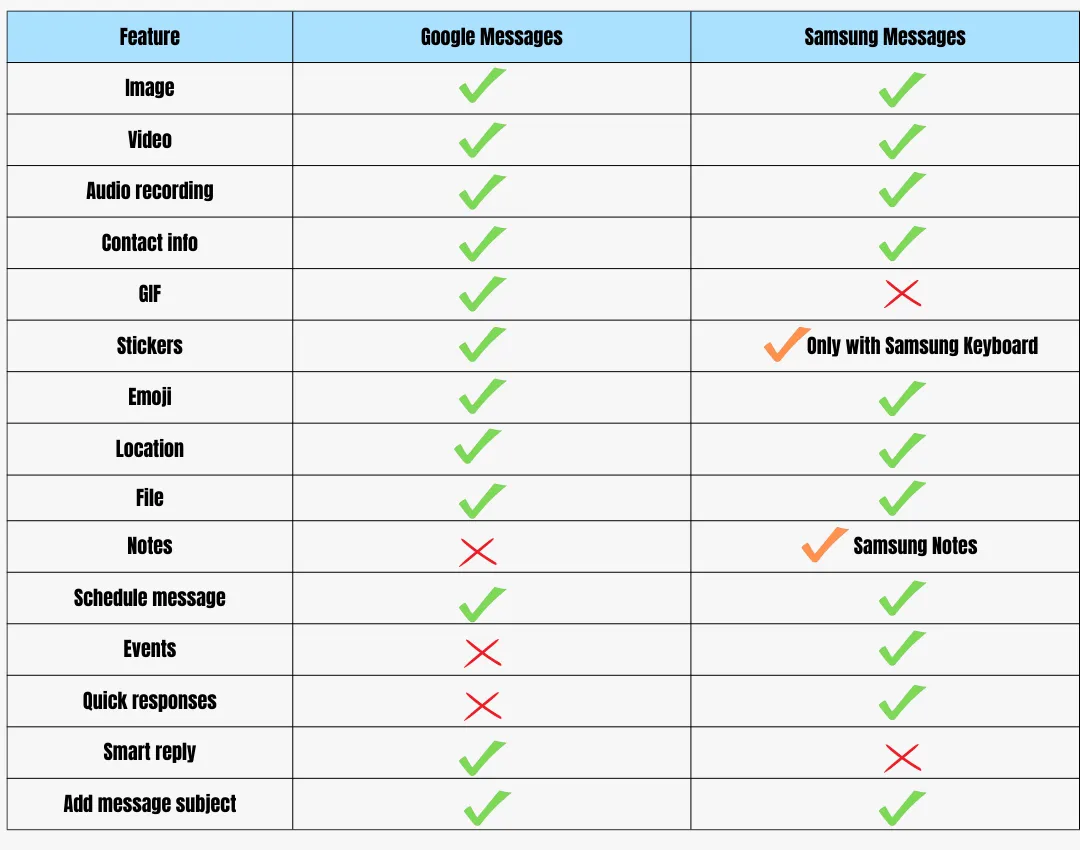
Core Messaging Functionality and User Interface
At their most fundamental level, both Google Messages and Samsung Messages excel at the primary task: sending and receiving text messages (SMS) and multimedia messages (MMS). However, the nuances in their design and implementation can significantly impact the user experience.
SMS/MMS Capabilities
Both applications reliably handle standard SMS and MMS functionality. You can send text, photos, videos, and audio clips without issue on either platform. However, the underlying infrastructure and network optimization can sometimes lead to subtle differences in message delivery speed and reliability, though these are often negligible for the average user.
User Interface and Design Philosophy
Google Messages generally adheres to Google’s Material Design principles, offering a clean, minimalist, and intuitive interface. The emphasis is on clarity and ease of use. Its design is consistent with other Google applications, making it feel familiar to those deeply embedded in the Google ecosystem. Conversations are clearly delineated, with options for archiving, pinning, and deleting messages readily accessible. The app prioritizes quick access to core functions and often introduces new features through gradual rollouts, ensuring a stable and predictable user experience.
Samsung Messages, on the other hand, incorporates Samsung’s One UI design language. This often results in a slightly more visually dense interface with more readily available customization options. Samsung Messages tends to integrate more closely with Samsung’s own ecosystem and hardware features. While it might offer a broader range of immediate visual options, some users find its interface to be less streamlined compared to Google Messages. However, for users who prefer a more feature-rich and visually distinct experience directly from their device manufacturer, Samsung Messages often hits the mark. The placement of certain controls and the overall aesthetic are tailored to Samsung’s hardware philosophy.
Search and Organization
Effective message management is crucial, especially for users who handle a high volume of communication. Both apps offer search functionalities, but their sophistication can vary.
Google Messages boasts a robust search engine that allows users to quickly find specific messages by keywords, senders, or even dates. Its integration with Google’s AI capabilities can sometimes lead to more intelligent search results, understanding context more effectively. The app also offers features like categorization and conversation threading, helping users keep their inboxes organized.
Samsung Messages also provides search capabilities, which are generally effective for finding specific messages. However, the AI-powered contextual understanding might not be as advanced as Google’s. Samsung’s approach to organization often relies on manual actions like starring or pinning important conversations, and it may not offer the same level of automated categorization as Google Messages.
Advanced Features and Integration
Beyond the basic functionalities, the true differentiation between Google Messages and Samsung Messages lies in their advanced features and how well they integrate with other services and technologies.
Rich Communication Services (RCS)
This is arguably the most significant differentiator. Google Messages has been a strong proponent and primary driver of Rich Communication Services (RCS) adoption. RCS is the modern messaging protocol designed to replace SMS and MMS, offering features akin to instant messaging apps like WhatsApp or iMessage. When both users have RCS enabled and are using compatible apps, they can enjoy:
- Read Receipts: See when your messages have been read.
- Typing Indicators: Know when someone is typing a response.
- High-Quality Media Sharing: Send photos and videos in much higher resolution.
- Larger File Attachments: Share larger files than typically allowed by MMS.
- End-to-End Encryption: For one-on-one conversations, Google Messages offers robust end-to-end encryption, ensuring privacy.
- Group Chat Enhancements: More reliable and feature-rich group conversations.
Samsung Messages also supports RCS, but its implementation and rollout have historically been more dependent on carrier support and integration with Google’s Jibe platform. While Samsung has made strides, Google Messages often provides a more seamless and consistent RCS experience, particularly for global users, due to its direct development and advocacy for the standard. The user experience with RCS features can sometimes feel more polished and reliable on Google Messages.
AI and Smart Features
Google’s dominance in artificial intelligence naturally extends to its messaging app. Google Messages leverages AI for several smart features:
- Smart Reply: Suggests quick responses based on the context of a received message. This can significantly speed up replying to common messages.
- Smart Compose: Suggests words and phrases as you type, helping you compose messages faster and more efficiently.
- Spam Protection: Google’s advanced AI algorithms are highly effective at identifying and filtering out spam messages, offering a much cleaner inbox.
- Categorization: Automatically categorizes messages into tabs like “Personal,” “Transactions,” and “Promotions,” making it easier to manage your inbox.
Samsung Messages has been incorporating some AI-powered features, but they are generally less prominent and comprehensive than those in Google Messages. While it might offer some basic spam detection, it doesn’t typically match the sophistication of Google’s AI-driven spam filtering. The absence of features like Smart Reply and Smart Compose means users rely on manual typing and response generation, which can be less efficient.
Cross-Platform and Web Access
The ability to access your messages from multiple devices is increasingly important.
Google Messages offers a well-integrated web interface, accessible via messages.google.com/web. This allows you to send and receive messages directly from your computer, mirroring your phone’s conversations. The web client is generally fast, reliable, and offers a near-identical experience to the mobile app, making it incredibly convenient for desktop users.
Samsung Messages also offers a web interface, often through Samsung’s Link to Windows integration. While functional, it can sometimes feel less robust or seamless than Google Messages’ web client. The integration might be more tightly coupled with Samsung’s own ecosystem and Windows integration tools, which might not appeal to all users. The performance and feature parity can also differ.
Integration with Other Services
Google Messages is deeply integrated with the broader Google ecosystem. This means seamless interaction with Google Assistant, Google Pay, and other Google services. For instance, you can easily share links to Google Maps locations or initiate Google Pay transactions directly from within a conversation.
Samsung Messages is designed to work in concert with Samsung’s own suite of applications and services. This might include deeper integration with Samsung Health, Samsung Pay, and other Samsung-specific features. For users who are heavily invested in the Samsung ecosystem, this can provide a more cohesive and interconnected experience.
Customization and User Preferences
Ultimately, the “better” app often boils down to individual preferences regarding customization and the specific features that users prioritize.
Personalization Options
Both applications offer some degree of personalization, but their approaches differ.
Google Messages provides a clean canvas for personalization. Users can change themes (including a dark mode), adjust font sizes, and set custom notification sounds for specific contacts. The focus is on enhancing the core experience without overwhelming the user with options.
Samsung Messages typically offers a more extensive range of customization options built into the app itself. This can include different color schemes, font choices beyond system-wide settings, and more granular control over notification settings for individual conversations. For users who enjoy tailoring every aspect of their device’s appearance and functionality, Samsung Messages might offer a more satisfying level of control.
Third-Party Integrations and Extensions
While both are primarily messaging apps, the potential for third-party integration can be a deciding factor.
Google Messages has been expanding its platform to allow for richer integrations. While it doesn’t have the same extensibility as some third-party chat apps, the underlying RCS platform has the potential for future third-party applications and services to interact with it. Google’s focus on open standards like RCS bodes well for broader integration down the line.
Samsung Messages, being a proprietary app, has a more closed ecosystem. Its integrations are primarily focused on Samsung’s own services and partnerships. This might limit the ability for third-party developers to create specialized add-ons or extensions that enhance its functionality.
Privacy and Security Considerations
Privacy and security are paramount in any communication tool.
Google Messages offers robust end-to-end encryption for one-on-one RCS conversations. This ensures that only you and the recipient can read your messages. Google also has strong spam filtering capabilities powered by AI, which adds another layer of security against malicious content. However, it’s important to remember that SMS/MMS messages are not inherently encrypted, and conversations that don’t utilize RCS will be unencrypted.
Samsung Messages, like any default SMS app, handles unencrypted SMS/MMS by default. While it may offer some basic security features and spam detection, it generally lacks the same level of advanced, built-in encryption for all message types that Google Messages provides with its RCS implementation. For users prioritizing the highest level of message confidentiality, Google Messages with enabled RCS often holds an advantage.

Conclusion: Which App is Right for You?
The debate between Google Messages and Samsung Messages isn’t about a clear winner, but rather about choosing the tool that best aligns with your individual needs, technical preferences, and ecosystem allegiance.
Google Messages shines when you prioritize a modern, feature-rich messaging experience powered by advanced AI. Its strengths lie in its seamless RCS implementation, superior spam filtering, intuitive user interface, and excellent web client. If you’re looking for the most forward-thinking messaging platform with features that actively enhance your communication efficiency and security (particularly with end-to-end encrypted RCS), Google Messages is likely your superior choice. It’s also the de facto standard for RCS, offering a more universally consistent experience across different Android devices, not just Samsung.
Samsung Messages offers a compelling alternative for users who prefer a deeply integrated experience within the Samsung ecosystem. Its strength lies in its comprehensive feature set tailored to Samsung hardware and its aesthetic adherence to One UI. If you value extensive personalization options directly within the app and are comfortable with Samsung’s proprietary ecosystem, then Samsung Messages might be the more appealing option. It provides a familiar and feature-rich environment that many Samsung users have come to rely on.
Ultimately, the best approach is often to try both. Most Samsung devices allow you to set a default messaging app. You can easily switch between Google Messages and Samsung Messages from your phone’s settings to experience their unique interfaces and functionalities firsthand. Consider which app’s features – be it the AI smarts of Google, the ecosystem integration of Samsung, or the robust RCS support – best serve your daily communication habits and priorities. The choice is yours, and thankfully, it’s a flexible one on the Android platform.
aViewFromTheCave is a participant in the Amazon Services LLC Associates Program, an affiliate advertising program designed to provide a means for sites to earn advertising fees by advertising and linking to Amazon.com. Amazon, the Amazon logo, AmazonSupply, and the AmazonSupply logo are trademarks of Amazon.com, Inc. or its affiliates. As an Amazon Associate we earn affiliate commissions from qualifying purchases.