
In the vast and interconnected digital landscape, understanding the fundamental building blocks of the internet is crucial for both seasoned developers and everyday users. Among these foundational elements, the Uniform Resource Locator, or URL, stands out as perhaps the most ubiquitous yet often misunderstood. Far more than just a string of characters in your browser’s address bar, a URL is the digital compass that guides you to every piece of information, every application, and every service available on the World Wide Web. It is the standardized method for specifying the location of any resource on the internet, from a simple webpage to an image, a video, a downloadable document, or even an endpoint for an API. Without URLs, the seamless navigation and boundless information exchange we take for granted would simply not exist. This article will delve deep into the technical intricacies of URLs, dissecting their components, exploring their critical functions, and offering insights into their broader implications in the realm of technology. By the end, you’ll not only know “what’s a URL” but also appreciate its elegant design and indispensable role in the modern digital ecosystem.

Decoding the Digital Address
At its core, a URL serves as the internet’s equivalent of a street address, guiding web browsers and other applications to specific resources located across the globe. It’s a precisely structured text string that not only identifies a resource but also specifies the protocol required to access it. This standardization is what allows billions of devices to communicate and retrieve information from one another reliably and efficiently.
The Concept of a Uniform Resource Locator
A Uniform Resource Locator (URL) is a specific type of Uniform Resource Identifier (URI) that, in addition to identifying a resource, provides a means of locating the resource by describing its primary access mechanism (e.g., its network location). Think of a URI as a broader category for naming things on the internet, and a URL as a specific kind of URI that tells you how and where to find that named thing. The “Uniform” aspect ensures consistency across the internet, allowing disparate systems to interpret and use these addresses universally. Whether you’re trying to reach a news website, a social media platform, or a cloud-based storage service, the URL provides the exact coordinates for your digital journey. It’s a contract between your device and the server hosting the resource, detailing the method of communication and the specific item being requested.
Bridging Users and Information
The primary function of a URL is to bridge the gap between users and the vast ocean of information and services available online. When you type https://www.google.com into your browser, that URL tells your computer to use the HTTPS protocol to connect to the server named www.google.com and retrieve its default webpage. Similarly, a URL like ftp://files.example.com/archive.zip instructs your system to use the File Transfer Protocol (FTP) to download a specific file from a different server. This immediate and unambiguous direction is fundamental to how we interact with the web daily, enabling everything from simple web browsing to complex data transfers and real-time application interactions. Without this standardized addressing system, navigating the internet would be a chaotic and largely impossible endeavor, reducing it to a collection of isolated servers rather than a cohesive global network.
The Evolution of Web Addressing
The concept of addressing resources on a network predates the public internet, but the modern URL emerged with the World Wide Web in the early 1990s, spearheaded by Sir Tim Berners-Lee. Early forms were simpler, often just specifying a file path on a server. As the web grew in complexity and functionality, so did the URL specification. The need to specify different access methods (protocols), hostnames, specific paths within a server, and eventually, parameters for dynamic content, led to the rich and structured URL format we use today. This evolution reflects the increasing sophistication of web applications and the growing demands for more precise and flexible resource identification and retrieval methods. From static HTML pages to interactive web apps and API endpoints, the URL has adapted to remain the backbone of resource location.
Anatomy of a URL
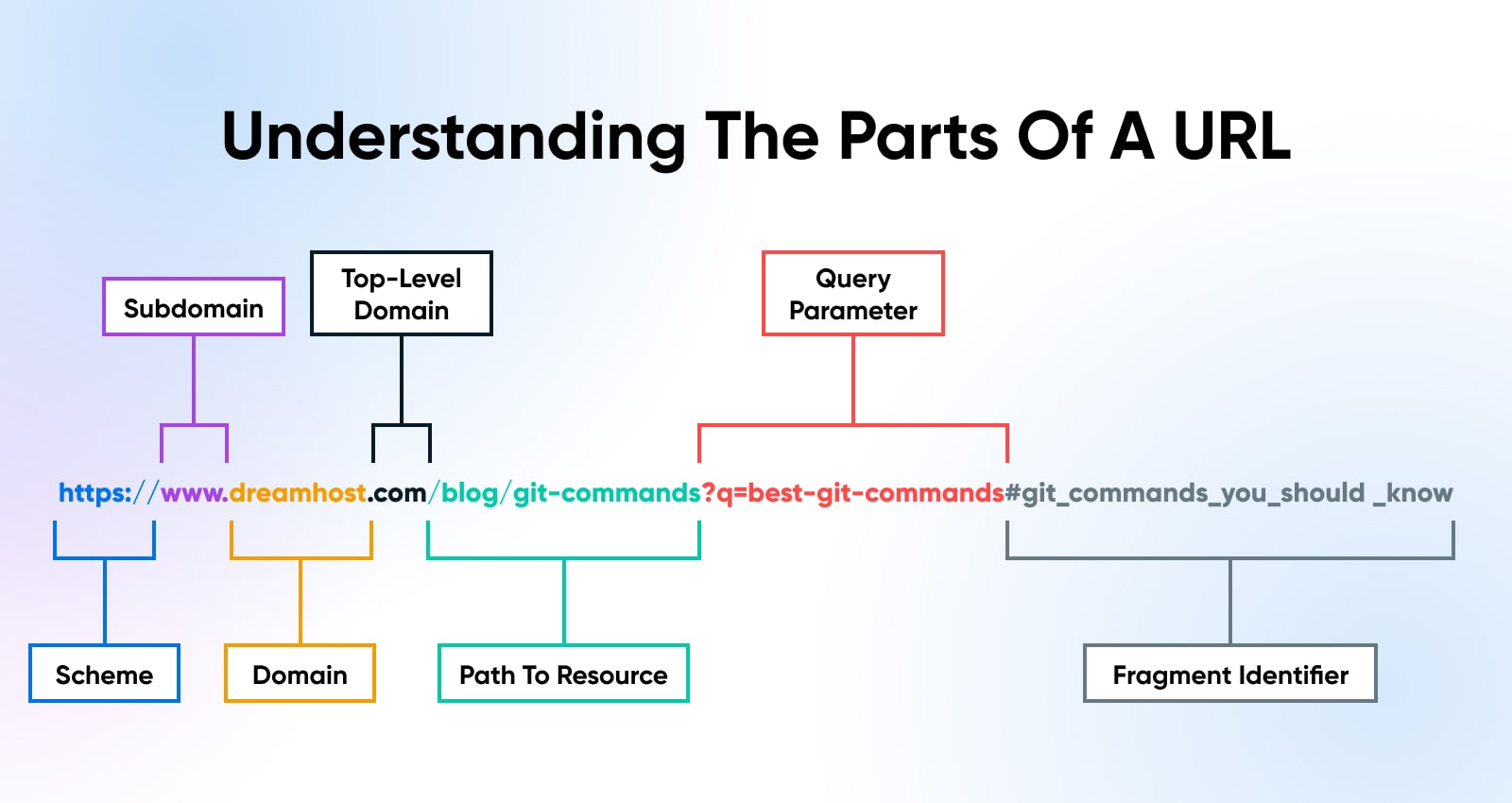
Understanding the structure of a URL is key to appreciating its power and functionality. A URL is not just a random sequence of characters; it’s a carefully crafted string, each part serving a specific purpose in directing your browser or application to the desired resource. While variations exist, most URLs adhere to a common syntax, allowing for precise resource identification.
The Scheme (Protocol)
The very first part of a URL is the scheme, also known as the protocol. It indicates the method of communication and the set of rules that should be used to access the resource.
-
http://(Hypertext Transfer Protocol): The original protocol for transmitting web pages. Data exchanged via HTTP is generally unencrypted. -
https://(Hypertext Transfer Protocol Secure): The secure version of HTTP. It uses SSL/TLS encryption to protect data in transit, making it crucial for sensitive information like login credentials or payment details. This is now the standard for secure web communication. -
ftp://(File Transfer Protocol): Used for transferring files between a client and a server. -
mailto:: Not for web resources, but for initiating an email message to a specified address. -
file://: Used to access files on a local computer. -
ws:///wss://(WebSocket / WebSocket Secure): Protocols for full-duplex communication channels over a single TCP connection, often used for real-time web applications.
The scheme tells the browser how to talk to the server. For instance, https instructs the browser to establish a secure, encrypted connection before any data is exchanged, providing a critical layer of digital security.
The Subdomain
Following the scheme, and typically separated by ://, comes the subdomain. This is an optional part of the domain name that allows websites to organize and separate content within their primary domain.
-
www(World Wide Web): The most common subdomain, historically used to indicate a web server. Today, many sites omit it or automatically redirect to the non-wwwversion. -
blog: Often used for a website’s blogging platform (e.g.,blog.example.com). -
shop: Frequently designates an e-commerce section (e.g.,shop.example.com). -
dev/test: Commonly used by developers to host development or testing versions of a website.
Subdomains provide a logical way to segment a website’s content and functionality, making it easier to manage large or complex online presences.
The Domain Name
The domain name is the core identifier of a website or a network of resources, akin to the unique name of a house or business. It’s the human-readable address that maps to an IP address (e.g., google.com maps to 142.250.190.46).
-
example.com -
mycompany.org
Domain names are registered with domain registrars and are unique globally. They form the basis of brand identity and online presence.
Top-Level Domains (TLDs)
The last segment of a domain name is the Top-Level Domain (TLD), located after the final dot. TLDs are managed by the Internet Assigned Numbers Authority (IANA) and fall into several categories:
-
Generic TLDs (gTLDs):
-
.com(commercial): The most popular and widely recognized. -
.org(organization): Primarily for non-profit organizations. -
.net(network): Originally for networking organizations. -
.edu(education): For educational institutions. -
.gov(government): For governmental entities. -
New gTLDs: A vast expansion including
.app,.tech,.blog,.online, etc., offering more specific categorization.
-
-
Country Code TLDs (ccTLDs):
-
.uk(United Kingdom) -
.de(Germany) -
.jp(Japan) -
These are often used to indicate the geographical origin or target audience of a website.
-
The TLD provides an immediate hint about the nature or origin of the website, playing a role in trust and recognition.
The Port (Optional)
The port number specifies the particular “door” on the server that the request should go through. It’s usually omitted because browsers default to standard ports for common protocols:
-
:80: Default for HTTP. -
:443: Default for HTTPS. -
:21: Default for FTP.
You only need to specify a port if the server is listening on a non-standard port (e.g., http://example.com:8080/). This is often seen in development environments or for specialized services.
The Path
The path specifies the exact location of the resource on the server, resembling a file system directory structure.
-
/products/category/item.html -
/images/logo.png -
/blog/2023/my-first-post
The path tells the server which specific file, folder, or virtual resource within its domain the user is trying to access. It’s hierarchical, using forward slashes (/) to denote different levels, much like directories on a computer.
The Query String
The query string is an optional component used to pass data to the server, typically for dynamic content retrieval or user input. It starts with a question mark (?) and consists of key-value pairs separated by ampersands (&).
-
?search=keyword&page=2 -
?id=12345 -
?category=electronics&sort=price_asc
Query strings are commonly used by search engines, e-commerce sites, and web applications to filter results, sort data, or pass session information without changing the fundamental URL path. This allows for highly personalized and dynamic web experiences.
The Fragment (Anchor)

The fragment identifier, starting with a hash symbol (#), points to a specific section within a web page.
-
#section-overview -
#comments
When a browser encounters a fragment, it loads the entire page but then immediately scrolls to the element with the corresponding ID. The fragment is processed entirely by the client (browser) and is typically not sent to the server, meaning the server doesn’t know which specific section of a page you’re targeting. This is extremely useful for navigating long documents or single-page applications.
The Role of URLs in Web Navigation and Functionality
URLs are far more than mere addresses; they are the connective tissue that binds the World Wide Web together, enabling seamless navigation, dynamic content delivery, and the very architecture of networked applications. Their design allows for both direct access to static resources and complex interactions with server-side logic, making them central to virtually every online experience.
Seamless Access to Web Resources
The most apparent role of URLs is to provide direct and unambiguous access to web resources. When a user types a URL into a browser or clicks a hyperlink, the browser translates that URL into a request, which it then sends to the appropriate server. The server, in turn, uses the path and query string information to locate and deliver the requested resource – be it an HTML page, an image, a PDF, or a JSON data stream. This process, facilitated by protocols like HTTP/S, happens in milliseconds, creating the illusion of instantaneous access to information regardless of its physical location on the globe. This seamless access is the bedrock of information retrieval and sharing on the internet.
Hyperlinking and Interconnectivity
URLs are the fundamental building blocks of hyperlinking, which is the very essence of the “web” in World Wide Web. Every clickable link you encounter online is a URL embedded within an anchor tag (<a> in HTML). These hyperlinks create a vast, interconnected network of documents and resources, allowing users to effortlessly jump from one piece of information to another. Without URLs, the ability to link between pages, articles, images, and other resources would be impossible, dissolving the rich tapestry of interconnected content that defines the modern internet into isolated silos. Hyperlinks transform static documents into dynamic, explorable information spaces.
Dynamic Content and User Interaction
While URLs can point to static files, their query string component is crucial for enabling dynamic content and user interaction. When you search on Google, filter results on an e-commerce site, or log into a web application, the data you input is often encoded into the URL’s query string. The server then uses this information to generate a unique response tailored to your request. For example, a search URL https://www.example.com/search?q=laptops&brand=dell tells the server to search for “laptops” specifically from the “dell” brand. This dynamic capability allows for personalized user experiences, real-time data filtering, and complex application logic to be executed based on URL parameters, moving beyond simple static page delivery.
APIs and Programmatic Access
Beyond human-driven web browsing, URLs are critically important for Application Programming Interfaces (APIs) and programmatic access to data. APIs, which allow different software applications to communicate with each other, rely heavily on URLs to define endpoints. An endpoint is a specific URL where an API can be accessed to retrieve or send data. For instance, an API might have an endpoint https://api.example.com/users/123 to retrieve information about user ID 123, or https://api.example.com/products?category=books to fetch a list of books. In this context, URLs serve as structured commands, allowing applications to request specific data or trigger specific actions on a server. This forms the backbone of modern interconnected services, microservices architectures, and mobile application data retrieval.
Beyond Basic Browsing: Advanced URL Concepts
While the basic structure and function of URLs are fundamental, their application extends into more advanced areas of web development, data management, and user experience. Understanding these concepts provides deeper insight into how the internet truly operates and how developers optimize its use.
URL Shorteners and Their Purpose
URL shorteners like Bitly or TinyURL convert long, complex URLs into concise, often alphanumeric strings. For example, https://example.com/blog/article-about-the-history-of-the-internet-and-its-impact might become https://bit.ly/3xY0zWz.
-
Benefits: Shorter URLs are easier to share, especially on platforms with character limits (e.g., Twitter). They also improve readability and can hide complex query strings. Many shorteners offer analytics, tracking clicks and geographic origin, which is valuable for marketing and content distribution (though the focus here is on the technical implementation).
-
Technical Mechanism: When a user clicks a shortened URL, the shortening service performs a server-side redirect (typically a 301 or 302 HTTP status code) to the original long URL. This process is transparent to the user, who ultimately arrives at the intended destination.
SEO-Friendly URLs
From a technical SEO (Search Engine Optimization) perspective, the structure of a URL can impact how easily search engines crawl, index, and understand a web page’s content.
-
Readability: URLs that are human-readable and descriptive (e.g.,
/products/laptops/gaming-laptop-model-x) are generally preferred over cryptic ones (e.g.,/item.php?id=123&cat=4). They provide context to both users and search engines. -
Keywords: Including relevant keywords in the URL path can reinforce the page’s topic and contribute to search engine rankings. For example,
example.com/web-development-tutorialclearly signals the content. -
Hyphens vs. Underscores: Hyphens (
-) are generally preferred by search engines to separate words in URLs, as they are interpreted as spaces. Underscores (_) are often treated as word concatenators. -
Static vs. Dynamic: While search engines are better at crawling dynamic URLs (with query strings) than in the past, static-looking URLs often appear cleaner and more trustworthy to users. Good URL design aims for clean, logical paths.
Internationalized Resource Identifiers (IRIs)
Traditionally, URLs were limited to a restricted set of characters (ASCII), making it challenging to represent resource names in non-Latin scripts (e.g., Arabic, Chinese, Cyrillic). Internationalized Resource Identifiers (IRIs) address this limitation.
-
Encoding: IRIs allow a broader range of Unicode characters, enabling domain names and paths to be expressed in native languages. When an IRI is used in a context that requires a URL, it is “percent-encoded” into its ASCII equivalent. For example,
http://例.tk/例子might becomehttp://xn--fsq.tk/xn--fsq. -
Global Reach: This advancement is crucial for making the web truly global, allowing users worldwide to interact with content in their native languages without encountering unreadable or broken URLs.
RESTful APIs and URL Design
Representational State Transfer (REST) is an architectural style for designing networked applications, particularly APIs. RESTful URLs are a key component of this design philosophy.
-
Resource-Oriented: RESTful URLs are designed to be resource-oriented, meaning the URL identifies a resource, and the HTTP method (GET, POST, PUT, DELETE) specifies the action to be performed on that resource.
-
GET /users(Retrieve all users) -
GET /users/123(Retrieve user with ID 123) -
POST /users(Create a new user) -
PUT /users/123(Update user with ID 123) -
DELETE /users/123(Delete user with ID 123)
-
-
Predictability and Clarity: RESTful URLs promote predictability and clarity, making APIs easier for developers to understand and integrate. They avoid verbs in the URL path and instead rely on nouns representing resources, leading to a more intuitive and standardized approach to API interactions.
URL Best Practices and Security Considerations
Navigating the internet safely and efficiently involves more than just knowing what a URL is; it requires an understanding of best practices for both users and developers, especially concerning security. A well-constructed URL enhances user experience and search engine visibility, while vigilance regarding URLs can protect against various cyber threats.
The Importance of HTTPS
The https:// scheme is no longer just a recommendation; it’s a fundamental security requirement for any website.
-
Data Encryption: HTTPS encrypts all communication between a user’s browser and the web server, protecting sensitive data (passwords, credit card numbers, personal information) from eavesdropping and tampering by malicious actors.
-
User Trust and Integrity: The padlock icon in the browser’s address bar signifies a secure connection, building trust with users. It also ensures the integrity of the data, guaranteeing that the information received hasn’t been altered in transit.
-
SEO Benefits: Major search engines, notably Google, prioritize HTTPS-enabled websites in their rankings, effectively making it a requirement for good SEO.
-
Browser Warnings: Modern browsers actively warn users or block access to HTTP-only sites, especially when sensitive data input is detected, pushing the internet towards ubiquitous encryption.
Recognizing Malicious URLs
Cybercriminals frequently exploit URLs through phishing and malware distribution. Users must develop a critical eye when encountering unfamiliar URLs:
-
Look for Mismatches: Hover over links (without clicking) to reveal the actual URL and check if it matches the displayed text. A link claiming to go to
paypal.combut showingpaypa1.com(with a ‘1’ instead of an ‘l’) is a classic phishing attempt. -
Deceptive Domains: Be wary of subtle misspellings (typosquatting) or unusual subdomains.
login.microsoft.com.malicious.linkis very different fromlogin.microsoft.com. The true domain ismalicious.link. -
HTTPS is Not a Panacea: While HTTPS indicates encryption, it doesn’t guarantee the legitimacy of the site’s content or owner. Even phishing sites can obtain SSL certificates. Always verify the domain name itself.
-
URL Length and Complexity: While not always indicative of malice, excessively long, overly complex URLs with numerous random characters in the path or query string can sometimes be a red flag for suspicious activity or redirects.
URL Encoding
URLs have a specific set of allowed characters (alphanumeric and a few symbols). Characters outside this set (like spaces, &, ?, #, non-ASCII characters) must be URL-encoded to ensure they are transmitted correctly.
-
Mechanism: URL encoding replaces problematic characters with a percent sign (
%) followed by their hexadecimal ASCII value (e.g., a space becomes%20, a hash#becomes%23). -
Importance: Proper encoding prevents misinterpretation by browsers and servers, ensuring that the intended resource is located and that data in query strings is passed accurately. Incorrect encoding can lead to broken links or security vulnerabilities like injection attacks.
Canonicalization
For search engine optimization, canonicalization is the process of selecting the “best” URL when there are multiple URLs for the same or very similar content.
-
Problem: Duplicate content can occur due to
http://vs.https://,wwwvs.non-www, trailing slashes, or query parameters that don’t change content (e.g.,?sessionid=abc). Without canonicalization, search engines might divide link equity among multiple versions or struggle to identify the authoritative page. -
Solution: Developers use a
<link rel="canonical" href="[preferred-URL]" />tag in the HTML header or server-side redirects (301) to explicitly tell search engines which version of a URL is the preferred one. This consolidates ranking signals and prevents issues with duplicate content.
Responsive URLs
In an era of diverse devices and screen sizes, responsive URLs refer to the practice of maintaining consistent URLs across different platforms while the content itself adapts to the viewing environment.
-
Single URL, Adaptive Content: The ideal approach for responsive web design is to use a single URL for a piece of content, and let CSS and JavaScript adapt the layout and media queries to suit desktops, tablets, or mobile phones.
-
Avoiding M. (Mobile) URLs: While some sites use separate
m.example.comsubdomains for mobile versions, this can complicate SEO, create duplicate content issues, and necessitate complex redirects. A single, responsive URL is generally preferred for simplicity and effectiveness.
In conclusion, URLs are the unsung heroes of the internet, silently powering every interaction and connection. From their intricate anatomy that precisely targets resources to their crucial role in security and sophisticated application design, understanding “what’s a URL” is fundamental to comprehending the digital world around us. For both casual users seeking to navigate safely and developers building the next generation of web experiences, a deep appreciation of the URL’s multifaceted nature remains indispensable.
aViewFromTheCave is a participant in the Amazon Services LLC Associates Program, an affiliate advertising program designed to provide a means for sites to earn advertising fees by advertising and linking to Amazon.com. Amazon, the Amazon logo, AmazonSupply, and the AmazonSupply logo are trademarks of Amazon.com, Inc. or its affiliates. As an Amazon Associate we earn affiliate commissions from qualifying purchases.