
In an increasingly digital world, streaming has evolved from a niche hobby into a cornerstone of communication, entertainment, and even commerce. Whether you’re a budding gamer broadcasting your latest triumphs, a professional delivering a crucial webinar, an influencer sharing daily vlogs, or simply connecting with family via video calls, the quality of your stream directly impacts your message and your audience’s experience. While many focus on download speeds for consuming content, the unsung hero of a flawless broadcast is upload speed. It’s the critical metric determining how smoothly and clearly your content travels from your device to the vast expanse of the internet. But amidst the myriad of resolutions, platforms, and technical jargon, a common question echoes: what upload speed do I really need to stream effectively?
The answer, like much in the digital realm, isn’t a single magic number. It’s a dynamic interplay of your desired quality, the nature of your content, your hardware, and even your strategic goals. A pixelated, buffering stream can frustrate viewers, undermine a professional brand, and ultimately hinder your ability to connect or monetize. Conversely, a crisp, uninterrupted broadcast can captivate audiences, reinforce your expertise, and build a loyal following. This comprehensive guide will demystify the complexities of upload speed, providing clear recommendations for various streaming scenarios, exploring the technological underpinnings, and shedding light on how this often-overlooked metric can profoundly impact your brand and financial aspirations.
The Fundamental Role of Upload Speed in Streaming
Before diving into specific numbers, it’s crucial to understand why upload speed is so important for streaming. The internet operates on a two-way street of data transfer: downloading and uploading.
When you stream content from the internet (watching YouTube, Netflix, browsing websites), your device is primarily downloading data. This is why internet service providers (ISPs) often heavily advertise download speeds, as it’s what most consumers primarily experience in their daily online activities.
However, when you stream content to the internet (broadcasting a live video game, participating in a video conference, uploading a large file), your device is primarily uploading data. For live streaming, this means sending your video feed, audio, and any accompanying data (like chat messages or overlays) from your computer or camera to a streaming server, which then distributes it to your audience. If your upload speed is insufficient, this data highway becomes a clogged single-lane road. Your video frames struggle to reach the server in real-time, leading to common streaming woes such as buffering, dropped frames, lag, and a significant reduction in video quality. In essence, while download speed dictates how quickly you receive information, upload speed dictates how quickly and effectively you send it – making it the paramount factor for anyone looking to broadcast.
Decoding Recommended Upload Speeds for Different Streaming Activities
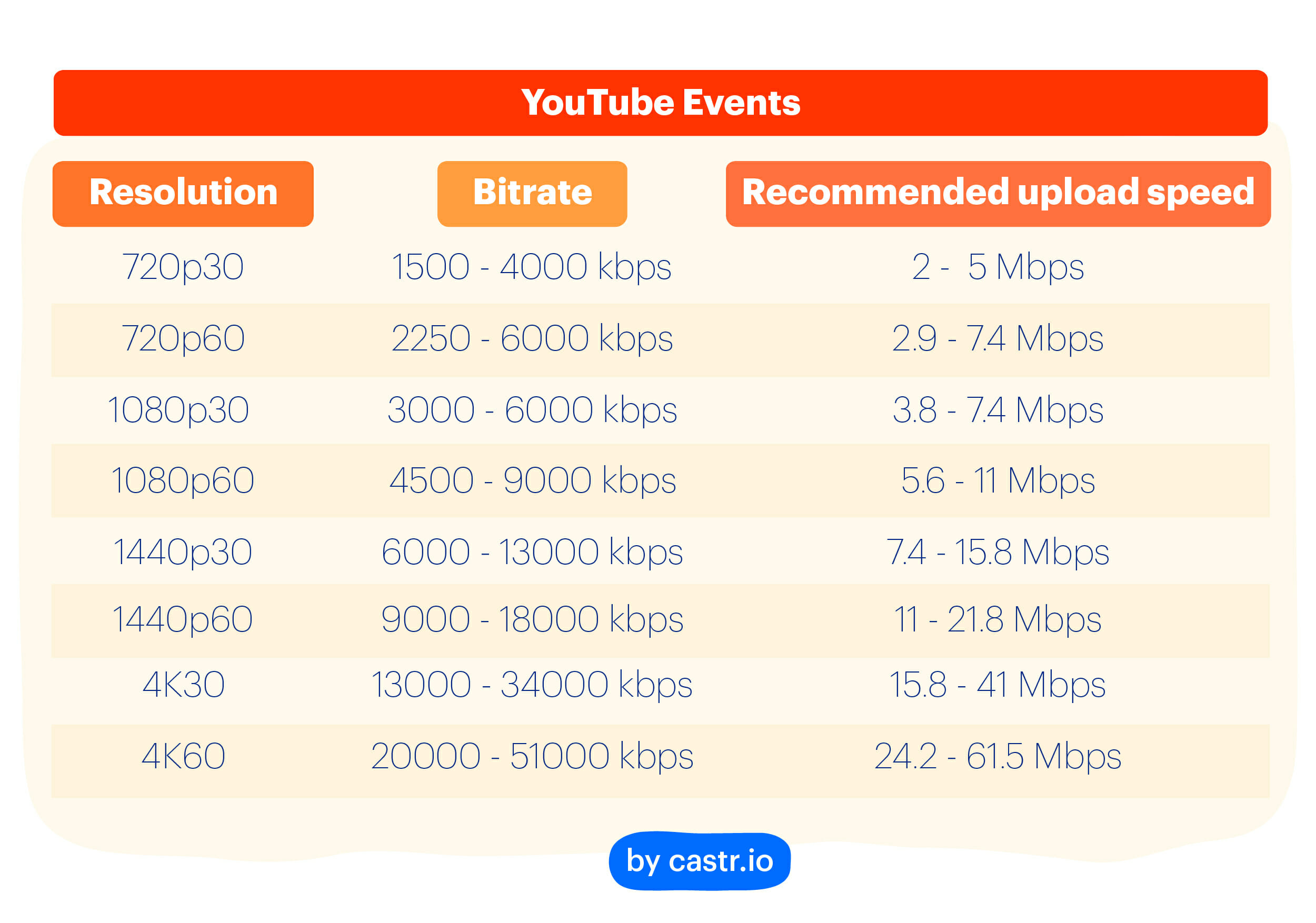
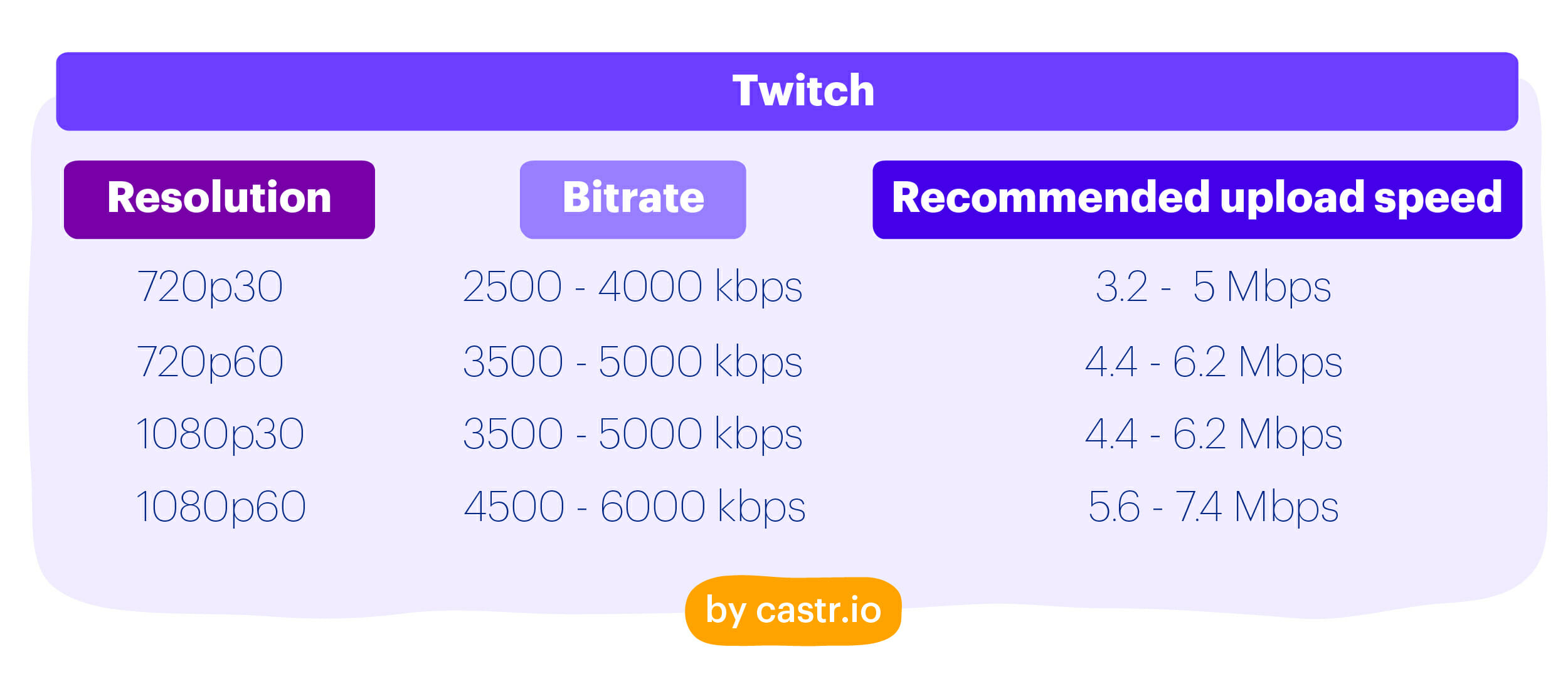
The “ideal” upload speed is highly dependent on what you’re trying to achieve. Higher resolutions, faster frame rates, and more complex streams demand greater bandwidth. Here’s a breakdown of common streaming scenarios and their typical upload speed requirements:
Standard Definition (SD) Streaming (480p)
Streaming in Standard Definition (typically 480p) is the most forgiving option, requiring the least amount of bandwidth. This resolution is often used for basic video calls where connection stability is prioritized over pristine visual quality, or for very casual streams where internet infrastructure is limited.
- Typical Upload Speed Needed: 0.5 Mbps to 2 Mbps
- Use Cases: Basic video conferencing (e.g., Zoom/Google Meet at lowest settings), very low-bandwidth casual gaming streams, voice-only broadcasts with a small video window.
- Considerations: While functional, 480p won’t offer a crisp or detailed image, which might detract from a professional or highly engaging stream.
High Definition (HD) Streaming (720p & 1080p)
This is where the majority of streamers operate, striking a balance between quality and accessibility. HD streaming offers a significantly better viewing experience than SD and is the standard for most content creation platforms like Twitch, YouTube Live, and professional video conferencing.
- 720p (HD):
- Typical Upload Speed Needed: 2.5 Mbps to 5 Mbps
- Use Cases: Entry-level gaming streams, casual vlogging, good quality video calls. It offers a clear picture without being overly demanding.
- 1080p (Full HD):
- Typical Upload Speed Needed: 5 Mbps to 10 Mbps
- Use Cases: Professional gaming streams, high-quality vlogs, business webinars, educational content, and general professional broadcasting. This is often considered the sweet spot for visual quality that doesn’t overwhelm most viewers’ download speeds.
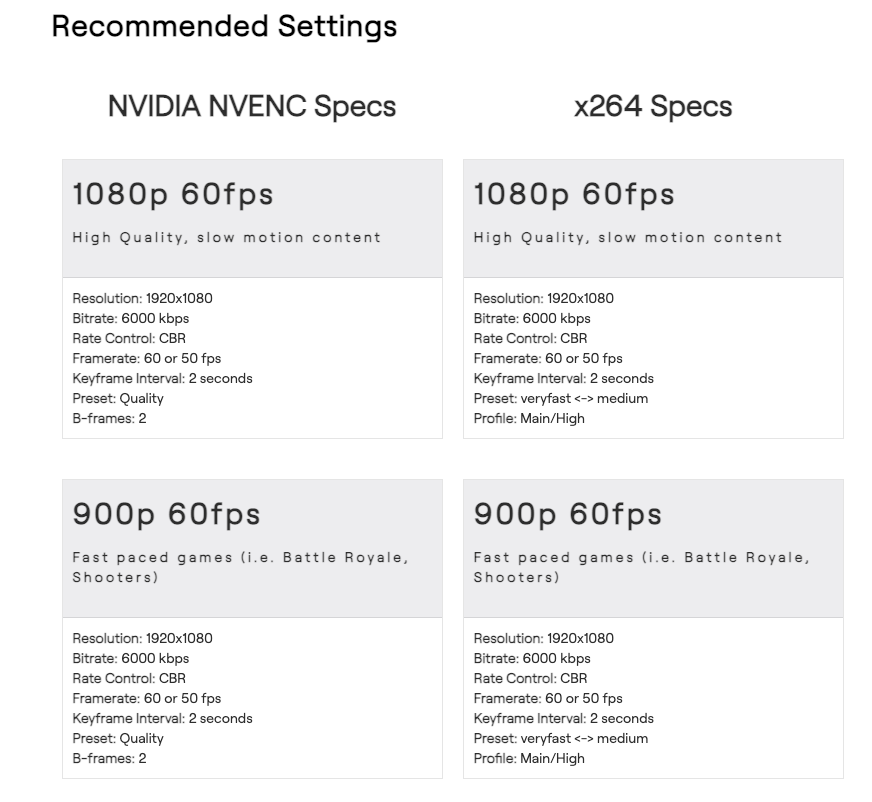
- Important Note on Bitrate: Within 1080p, you can vary the bitrate (the amount of data per second transmitted). A higher bitrate (e.g., 6000 kbps for 1080p at 60fps) means more data, resulting in a sharper image with less compression artifacting, but it also demands a higher consistent upload speed. For 1080p, you should aim for the upper end of the recommended upload speed range to support a healthy bitrate.
Ultra High Definition (UHD/4K) Streaming
Streaming in 4K is the pinnacle of visual quality, offering incredible detail and clarity. This is reserved for top-tier content creators, high-production broadcasts, and scenarios where every visual nuance matters. It is incredibly demanding on upload speed.
- Typical Upload Speed Needed: 15 Mbps to 25 Mbps (or even higher)
- Use Cases: High-end professional video production, cinematic gaming broadcasts, documentary streaming, virtual events where visual fidelity is paramount.
- Considerations: Not only does 4K streaming require immense upload bandwidth, but it also necessitates powerful encoding hardware (CPU/GPU) and often a robust internet connection for viewers to download. It’s often overkill for most applications unless your audience specifically benefits from or demands such high resolution.
Other Considerations: Multiple Streams, Background Tasks, and Simultaneous Users
The numbers above are typically for a single dedicated stream. However, real-world usage is rarely that simple.
- Multiple Streams/Uploads: If you’re simultaneously uploading a video file to YouTube while live streaming, or if multiple people in your household are using the internet for upload-heavy tasks (e.g., cloud backups, large file transfers), your available upload speed will be divided.
- Background Applications: Even seemingly innocuous background apps can consume a small amount of upload bandwidth for updates or data syncs.
- Overhead: It’s always wise to have a buffer. If a platform recommends 5 Mbps, aim for at least 7-8 Mbps to account for network fluctuations and ensure stability. A general rule of thumb is to have 25-50% more upload speed than your peak streaming requirement.
Beyond Raw Speed: Other Factors Influencing Your Streaming Quality (Tech Focus)
While upload speed is paramount, it’s part of a larger ecosystem. Neglecting other technical aspects can undermine even the fastest internet connection. Understanding these elements is crucial for a robust streaming setup.
Internet Service Provider (ISP) and Connection Type
Not all “Mbps” are created equal. The type of internet connection significantly impacts consistency and latency.
- Fiber Optic: Generally offers the most symmetrical (similar upload and download speeds) and most reliable connection, with very low latency. Ideal for streaming.
- Cable: Common and often provides good download speeds, but upload speeds are typically much lower (asymmetrical). Reliability can vary based on local network congestion.
- DSL: Older technology, generally slower and less reliable, especially for upload-intensive tasks.
- Satellite/Fixed Wireless: Often suffers from high latency and can be unreliable for live streaming due to the distance data travels.
- ISP Throttling/Traffic Shaping: Some ISPs might prioritize certain types of traffic or throttle bandwidth during peak hours, which can impact your stream even if your plan theoretically offers high speeds. Always check your ISP’s policies.
Router Quality and Network Configuration
Your router is the gateway between your devices and your ISP. An old or cheap router can bottleneck even a premium internet connection.
- Modern Router: Invest in a modern router (Wi-Fi 5 or Wi-Fi 6) capable of handling high bandwidth and multiple devices.
- Wired vs. Wireless: Always prioritize an Ethernet cable connection between your streaming computer and your router. Wi-Fi introduces variability, potential interference, and higher latency, which can lead to dropped frames and unstable streams.
- Quality of Service (QoS): Many modern routers offer QoS settings, allowing you to prioritize traffic from your streaming device over other devices or applications on your network. This ensures your stream gets the bandwidth it needs, even if someone else is browsing or downloading.
Streaming Software and Hardware
The tools you use to capture and encode your stream also play a significant role.
- Encoding Efficiency: Software like OBS Studio or Streamlabs OBS uses an encoder (x264 for CPU-based, NVENC/AMF for GPU-based) to compress your video data before sending it. Efficient encoders can achieve better quality at lower bitrates, thereby reducing the upload speed requirement for a given quality level. Powerful CPUs or dedicated GPUs (with modern encoders) can handle higher quality encoding without taxing your upload speed excessively.
- Capture Cards: For console gamers or multi-PC setups, a high-quality capture card is essential for capturing raw video efficiently and passing it to your streaming PC for encoding, reducing strain on the source machine.
- Webcam/Camera Quality: While not directly affecting upload speed, a good quality camera ensures the video you send is clear to begin with, maximizing the impact of your available bandwidth.
Latency and Jitter
Beyond raw speed, the consistency of that speed is vital.
- Latency (Ping): The time it takes for a data packet to travel from your device to a server and back. Low latency is crucial for interactive streams (gaming, Q&A) to minimize delay between you and your audience. Even with high upload speeds, high latency can make a stream feel unresponsive.
- Jitter: The variation in latency over time. High jitter means your data packets arrive out of order or with inconsistent delays, leading to choppy video and audio, even if your average upload speed is adequate. A stable, low-jitter connection is paramount for smooth live streaming.
The Strategic Edge: How Upload Speed Impacts Your Brand and Potential Earnings (Brand & Money Focus)
In the increasingly competitive world of online content and digital presence, your technical setup is not merely a utility; it’s a strategic asset. Your upload speed, often overlooked, directly influences your brand perception and, consequently, your potential for growth and monetization.
Building a Professional Brand Image
For content creators, educators, entrepreneurs, or even corporate entities, your stream is an extension of your brand. A consistently smooth, high-quality broadcast signals professionalism, reliability, and attention to detail.
- First Impressions Matter: A new viewer stumbling upon a laggy, pixelated stream is likely to click away, forming a negative impression that’s hard to shake. Conversely, a crisp, fluid stream immediately conveys competence and a commitment to quality.
- Audience Trust: When your stream is reliable, your audience learns to trust that you deliver a consistent experience. This trust is foundational for building a loyal community around your brand, whether it’s for entertainment, education, or business.
- Perceived Value: High production value, partly enabled by sufficient upload speed, elevates the perceived value of your content or service. It suggests that you invest in your craft, which viewers often translate into higher intrinsic value for your offerings.
Audience Engagement and Retention
The modern digital audience has high expectations. A subpar streaming experience directly impacts engagement and retention, which are critical metrics for any online endeavor.
- Minimizing Frustration: Buffering, stuttering, and dropped frames are incredibly frustrating for viewers. They disrupt the flow, break immersion, and ultimately drive people away. A smooth stream ensures your audience can focus on your content, not technical glitches.
- Maintaining Flow: For live interactions, especially gaming or Q&A sessions, consistent video and audio are vital for maintaining a natural conversation flow. A laggy feed can make interaction awkward and disjointed, hindering the natural rapport between creator and audience.
- Encouraging Participation: Audiences are more likely to stay, engage in chat, and participate in polls or discussions when the technical foundation is solid. A strong, stable connection ensures everyone is on the same page, in real-time.
Opportunities for Monetization and Growth
Ultimately, for many, streaming isn’t just a hobby; it’s a potential income stream or a vital component of a business strategy. The quality enabled by good upload speed directly correlates with monetization potential.
- Viewer Conversion: Platforms like Twitch and YouTube offer subscriptions, donations, and ad revenue. Viewers are more likely to subscribe or donate to channels that consistently deliver a high-quality, reliable experience.
- Sponsorships and Brand Deals: Brands looking to partner with streamers or content creators often evaluate professionalism and audience engagement. A channel known for technical issues is less attractive to sponsors who want their message delivered flawlessly. High-quality streams can command better rates and attract more reputable brand partnerships.
- Business Applications: For online educators, consultants, or businesses conducting virtual events, a robust upload speed is non-negotiable. It ensures professional delivery of online courses, seamless client consultations, and glitch-free webinars, directly impacting sales, client satisfaction, and reputation.
- Scalability: As your brand grows, so does the demand for higher quality content and more sophisticated production. Having ample upload speed future-proofs your setup, allowing you to scale up without immediate technical limitations, thereby enabling continuous growth and revenue generation.
Practical Steps to Measure, Optimize, and Future-Proof Your Upload Speed
Understanding the theory is one thing; putting it into practice is another. Here are actionable steps to ensure your upload speed meets your streaming ambitions.
Testing Your Current Upload Speed
The first step is to know your starting point.
- Use Online Speed Tests: Websites like Speedtest.net, Fast.com, or your ISP’s own speed test tool can give you an immediate snapshot of your current download and upload speeds.
- Connect Directly: For the most accurate result, connect your streaming computer directly to your router via an Ethernet cable before running the test.
- Run Multiple Tests: Conduct several tests at different times of the day to get an average, as network congestion can vary.
- Interpret Results: Compare your measured upload speed against the recommendations outlined earlier. Remember to leave a buffer!
Optimizing Your Existing Setup
Before upgrading your internet plan, ensure you’re getting the most out of what you already have.
- Use a Wired Connection: This is perhaps the single most impactful tip. Connect your streaming PC directly to your router with an Ethernet cable. This eliminates Wi-Fi interference, improves stability, and often reduces latency.
- Close Background Applications: Ensure no other programs are consuming bandwidth in the background (e.g., cloud sync services, large downloads, other streaming services).
- Limit Other Network Usage: If possible, ask others in your household to pause bandwidth-intensive activities during your stream.
- Update Router Firmware: Ensure your router’s firmware is up to date, as updates often include performance improvements and bug fixes.
- Optimize Router Placement: If using Wi-Fi, ensure your router is centrally located, unobstructed, and away from potential interference sources.
- Enable QoS (Quality of Service): If your router supports it, enable QoS and prioritize your streaming device’s traffic.
Upgrading Your Internet Plan
If optimization isn’t enough, it might be time for an upgrade.
- Contact Your ISP: Discuss your streaming needs with your internet service provider. Inquire about plans with higher upload speeds, specifically looking for symmetrical or near-symmetrical plans (like fiber optic) if available in your area.
- Understand Packages: Don’t just look at the advertised download speed. Scrutinize the upload speed component of different packages.
- Cost-Benefit Analysis: Weigh the cost of an upgraded plan against the benefits to your stream’s quality, brand image, and potential for monetization.
Investing in Better Equipment
Sometimes, your existing hardware is the bottleneck.
- High-Quality Router/Modem: Consider upgrading to a modern, powerful router and modem combination that can efficiently handle your internet speed and network traffic.
- Dedicated Streaming Hardware: For serious streamers, investing in a powerful CPU or a GPU with a dedicated encoder (like NVIDIA’s NVENC) can significantly improve stream quality at a given bitrate, thereby optimizing your upload speed usage.
- Ethernet Cables: Ensure you’re using Cat5e or Cat6 Ethernet cables for optimal wired performance.
In conclusion, your upload speed is far more than just a technical specification; it’s a cornerstone of your digital presence. It dictates the clarity of your message, the professionalism of your brand, and the engagement of your audience. By understanding its role, assessing your needs, and taking proactive steps to optimize your setup, you can unlock a world of seamless streaming, elevate your content, and truly connect with your audience in the high-fidelity manner they expect and deserve. Don’t let a bottlenecked upload speed hold back your next big idea; empower your streams with the bandwidth they need to shine.
aViewFromTheCave is a participant in the Amazon Services LLC Associates Program, an affiliate advertising program designed to provide a means for sites to earn advertising fees by advertising and linking to Amazon.com. Amazon, the Amazon logo, AmazonSupply, and the AmazonSupply logo are trademarks of Amazon.com, Inc. or its affiliates. As an Amazon Associate we earn affiliate commissions from qualifying purchases.