
In the modern digital ecosystem, Discord has evolved from a niche communication tool for gamers into a central hub for professional networking, community management, and private collaboration. For many users, losing access to an account due to a forgotten password is not merely an inconvenience; it represents a temporary severing of vital social and professional connections. Because Discord prioritizes security and data privacy, the recovery process is structured to verify identity rigorously while providing a streamlined path for legitimate owners to regain control.
If you find yourself staring at the login screen unable to recall your credentials, the path forward involves a combination of standard recovery protocols and, in some cases, advanced troubleshooting. Understanding the underlying mechanisms of Discord’s security architecture can help you navigate this process efficiently and prevent future lockouts.
Initiating the Standard Password Recovery Protocol
The most direct method for regaining access to your Discord account is the automated password reset system. This process relies on the email address or phone number associated with your account to verify your identity. Discord does not store passwords in plain text—using industry-standard hashing algorithms instead—which means even Discord staff cannot “look up” your password for you. You must create a new one.
Resetting via Desktop or Web Browser
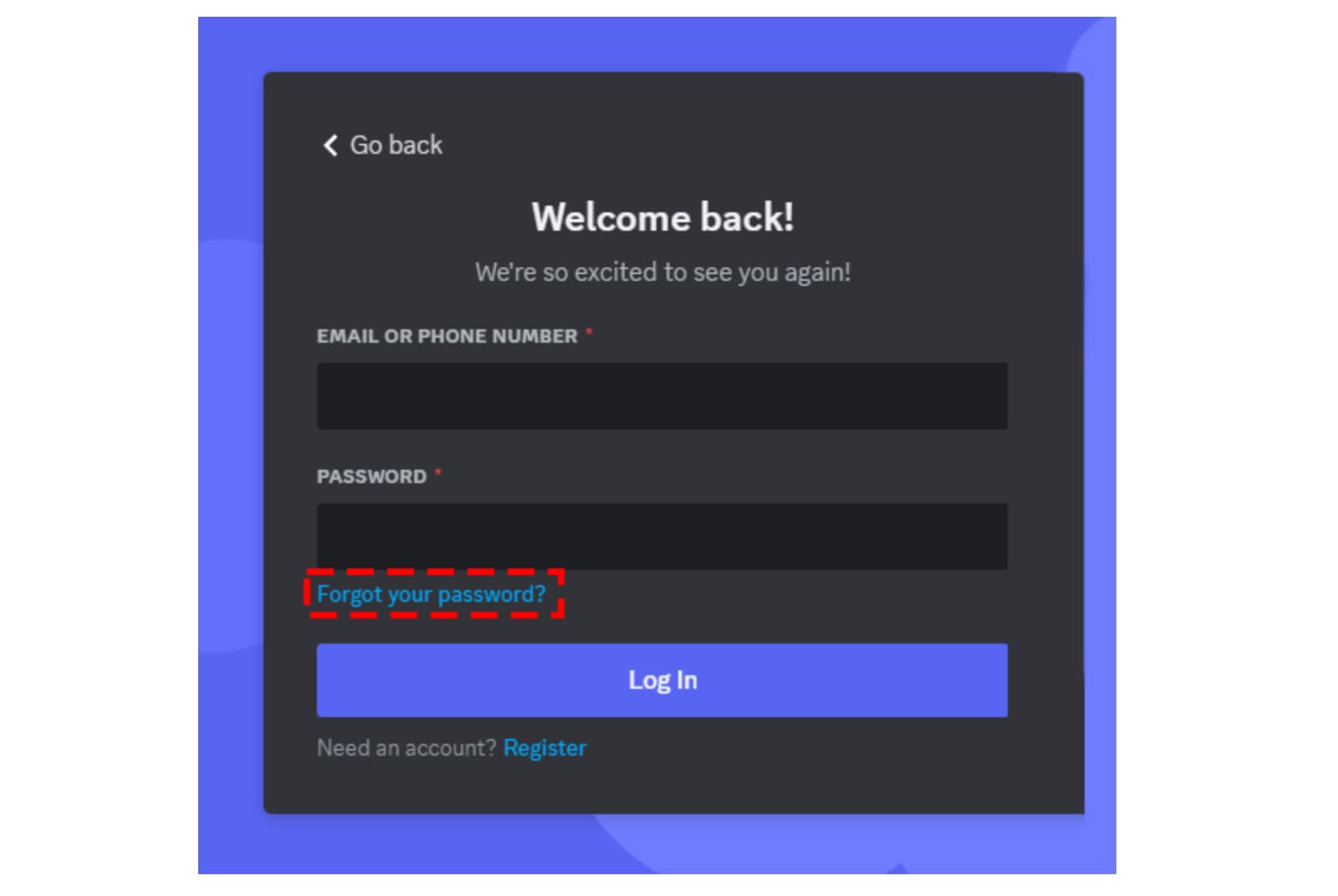
On a desktop client or web browser, the recovery process begins at the login portal. Once you enter your email address or the phone number linked to the account, click the “Forgot your password?” link located just below the password field.
Almost immediately, Discord’s automated system triggers an API call to send a reset link to your registered email address. It is crucial to check your inbox, as well as your spam or “Promotions” folders, as these automated emails can occasionally be misrouted by aggressive mail filters. The email will contain a “Reset Password” button that redirects you to a secure Discord page. Here, you will be prompted to enter a new password. To ensure maximum security, this password should be unique to Discord and utilize a combination of uppercase letters, numbers, and special characters.
Resetting via the Mobile Application
The mobile experience on iOS and Android mirrors the desktop process but is optimized for handheld interfaces. After opening the app and navigating to the login screen, enter your identifier (email or phone) and tap the “Forgot your password?” prompt.
If you have linked a phone number to your account and enabled it as a primary login method, you may receive a 6-digit verification code via SMS. Entering this code allows you to bypass the email requirement, which is particularly useful if you are traveling or lack immediate access to your email client. Once verified, the app will guide you through the creation of a new, secure password.
Navigating Advanced Access Barriers
While the standard reset process works for the majority of users, certain technical hurdles can complicate recovery. These often involve security layers like Two-Factor Authentication (2FA) or the loss of access to the primary communication channel associated with the account.
Overcoming Two-Factor Authentication (2FA) Challenges
Discord offers robust 2FA options, including app-based authenticators (like Google Authenticator or Authy) and SMS verification. While these significantly enhance security, they can become an obstacle if you have lost the device generating the codes.
If you are prompted for a 2FA code during the password reset process and cannot provide it, you have two primary fallback options:
- Backup Codes: When you first enabled 2FA, Discord prompted you to download a text file containing eight-digit backup codes. Each code can be used once to bypass the 2FA requirement. These are your “master keys” to the account.
- SMS Recovery: If you enabled SMS authentication as a backup, you can request a code be sent to your registered phone number.
If you have lost your 2FA device, do not have your backup codes, and did not enable SMS recovery, Discord’s security policy becomes intentionally rigid. Because of their commitment to end-to-end security, Discord support cannot manually remove 2FA from an account. In such instances, the account may become permanently inaccessible, necessitating the creation of a new profile. This underscores the critical importance of storing backup codes in a secure, offline location.

Handling a Lost or Inaccessible Email Address
A common technical dilemma occurs when a user forgets their Discord password and simultaneously loses access to the email account used to register it. From a digital security standpoint, the email address is the primary anchor of your identity.
Discord’s support team is generally unable to change the email address on an account for a user who cannot log in. This is a preventative measure against “social engineering” attacks, where hackers attempt to gain control of accounts by convincing support staff to change registration details. If you find yourself in this situation, your first priority should be recovering the email account through your mail provider (e.g., Gmail, Outlook, or Yahoo). Once the email account is recovered, the Discord recovery process can proceed normally.
Strengthening Your Digital Security Infrastructure
Recovering a lost password is an ideal time to audit your overall digital security posture. The tech landscape is increasingly fraught with sophisticated phishing and credential-stuffing attacks. Implementing proactive measures can ensure that a forgotten password is a minor hurdle rather than a catastrophic loss of data.
The Role of Password Managers
In an era where the average user manages dozens of digital identities, relying on human memory is a security vulnerability. Tech professionals and security experts overwhelmingly recommend the use of dedicated password managers such as Bitwarden, 1Password, or LastPass.
These tools serve as encrypted vaults that generate and store complex, unique passwords for every service you use. By using a password manager, you only need to remember one “Master Password.” Most modern managers also feature cross-platform synchronization, meaning your Discord credentials will be available on your desktop, smartphone, and tablet simultaneously, effectively eliminating the risk of being locked out due to forgetfulness.
Implementing Multi-Layered Security Measures
Beyond a strong password, adding layers of security can protect your account even if your credentials are compromised. Discord supports several advanced security features:
- Hardware Security Keys: For the highest level of protection, Discord supports WebAuthn-compatible hardware keys like YubiKeys. These physical devices require a touch to authenticate logins, making remote hacking virtually impossible.
- Email Notifications: Always ensure that “New Login Location” alerts are active. Discord will notify you whenever a login attempt is made from a new IP address, requiring email confirmation to proceed.
- Authorized Apps Audit: Periodically review the “Authorized Apps” section in your Discord settings. Revoke access for any third-party integrations or bots that you no longer use, as these can sometimes be leveraged as backdoors into your account data.
Identifying and Avoiding Social Engineering Attacks
Many users “forget” their passwords because their accounts have been compromised through social engineering, leading to unauthorized password changes. Understanding these technical threats is essential for maintaining account longevity.
A common tactic involves “Phishing” links distributed via Direct Messages (DMs), often disguised as “Free Discord Nitro” offers or invitations to test a new game. These links lead to fraudulent login pages designed to harvest your credentials in real-time. Once the attacker has your password and 2FA code, they immediately change the account details, locking you out.
Always verify the URL of the login page (it should always be discord.com) and remember that Discord staff will never ask for your password or 2FA codes. If you receive a suspicious link from a friend, contact them through a different medium to verify if their account has been compromised.

Best Practices for Long-Term Account Maintenance
Maintaining access to your Discord account requires a proactive approach to your digital footprint. As Discord continues to integrate more deeply into the professional world—with features like App Directory and Student Hubs—the value of your account only increases.
- Keep Recovery Codes Physical: Print your 2FA backup codes and store them in a physical safe or a locked drawer. Digital files can be lost or deleted during hardware failures.
- Verify Your Phone Number: Ensure a valid mobile number is linked to your account. This provides a secondary recovery path that is independent of your email provider.
- Update Your Credentials Regularly: While frequent password changes are less critical if you use unique, complex passwords, updating your security settings once a year is a healthy digital habit.
- Monitor Account Activity: Check your “Devices” list in the Discord settings to see every location where you are currently logged in. If you see an unrecognized device, you can remotely log it out and immediately change your password.
By treating your Discord credentials as a vital piece of your digital identity, you can navigate the complexities of software security with confidence. Whether you are a casual user or a community lead, the combination of strong password hygiene, robust two-factor authentication, and a clear understanding of recovery protocols will ensure that your digital presence remains secure and accessible.
aViewFromTheCave is a participant in the Amazon Services LLC Associates Program, an affiliate advertising program designed to provide a means for sites to earn advertising fees by advertising and linking to Amazon.com. Amazon, the Amazon logo, AmazonSupply, and the AmazonSupply logo are trademarks of Amazon.com, Inc. or its affiliates. As an Amazon Associate we earn affiliate commissions from qualifying purchases.