
In our increasingly interconnected world, the term “server” is ubiquitous, often heard in discussions about websites, applications, and cloud services. Yet, for many, its precise function remains a nebulous concept – a powerful, unseen machine somewhere “out there” that makes things happen online. At its core, a server is precisely what its name implies: a computer program or a device that provides a service to another computer program and its user, known as the “client.” This simple definition belies the intricate, multifaceted roles these unsung heroes play in the modern digital ecosystem, acting as the fundamental infrastructure that underpins virtually every online interaction and digital process we engage with daily.
From streaming your favorite show to sending an email, from online banking to gaming with friends across continents, a server is tirelessly working behind the scenes. It’s not just a single type of machine; servers come in various forms, specialized for different tasks, but all share the common objective of serving data, resources, or functionality to requesting clients. Without them, the internet as we know it would cease to exist, and our digital lives would grind to a halt. This article will demystify the server, exploring its fundamental role, diverse functions, critical importance, and the evolving landscape of server technology that continues to shape our digital future.
The Fundamental Role of a Server
At its heart, a server is a dedicated computer or system designed to process requests and deliver data to other computers over a local network or the internet. It operates on a client-server model, a distributed application architecture where tasks are partitioned between service providers (servers) and service requesters (clients).
Defining the “Server” Concept
A server is more than just a powerful computer; it is a system optimized for reliability, performance, and continuous operation. Unlike a typical desktop PC designed for interactive human use, a server often runs unattended in data centers, configured to handle concurrent requests from multiple clients without interruption. It typically features more robust hardware components, including multiple processors, large amounts of RAM, vast storage capacities, and redundant power supplies, all encased in chassis designed for efficient cooling and rack-mounting.
The “server” can refer to two distinct but related entities:
- Hardware Server: A physical computer optimized to run server software and connect to a network. These machines are engineered for heavy workloads and high availability.
- Software Server: A program running on a hardware server that listens for requests on a specific port and responds accordingly. For example, a web server (like Apache or Nginx) is a software server that handles HTTP requests.
This duality is crucial: the powerful hardware provides the engine, while specialized software dictates the specific services it can offer.
Client-Server Architecture Explained
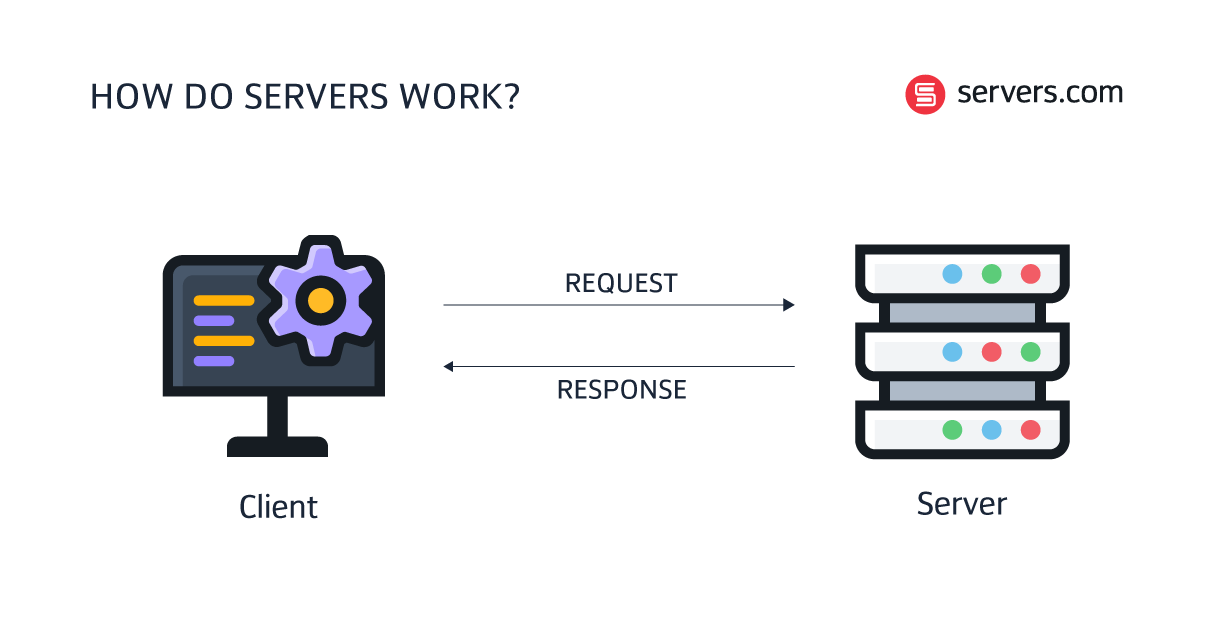
The client-server model is foundational to how most modern networks operate. A client is any device or application that requests information or services from a server. This could be your web browser, an email client on your smartphone, a gaming console, or even another server.
Here’s a simplified breakdown of the interaction:
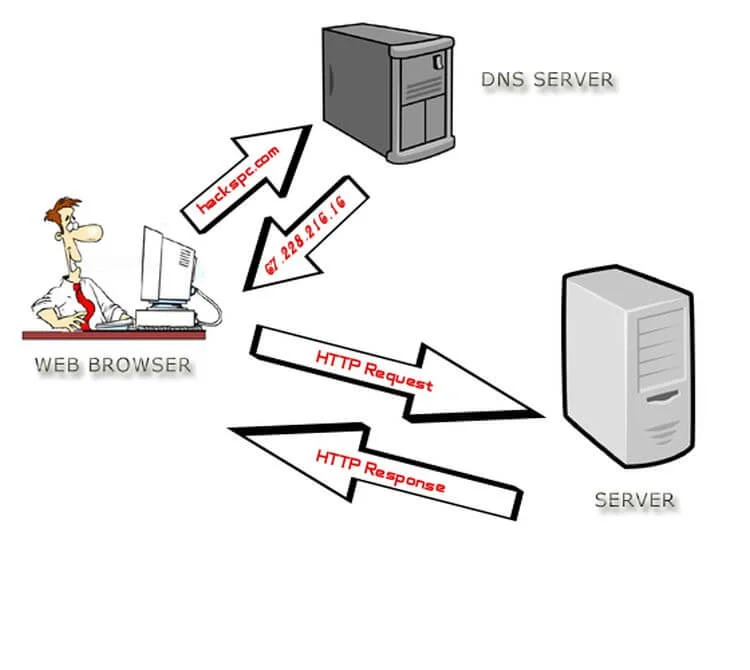
- Client Request: A client sends a request for a resource or service to a server. For instance, when you type a website address into your browser, your browser (the client) sends a request to the web server hosting that site.
- Server Processing: The server receives the request, processes it, and retrieves the necessary data or performs the requested action.
- Server Response: The server then sends a response back to the client. In our website example, the web server sends the website’s HTML, CSS, JavaScript, and images back to your browser.
- Client Display/Action: The client receives the response and displays the information or performs the requested action. Your browser renders the webpage for you to view.
This continuous cycle of requests and responses forms the backbone of digital communication, enabling seamless interaction between countless devices and services worldwide.
Beyond the Hardware: Server Software and Operating Systems
While robust hardware provides the foundation, it’s the server software and operating system that truly define what a server “does.” Server operating systems, such as Linux distributions (e.g., Ubuntu Server, Red Hat Enterprise Linux) or Windows Server, are optimized for stability, security, and multitasking. They provide the platform upon which various server applications run.
These server applications are specialized programs designed to perform specific tasks. Examples include:
- Web Servers: Apache HTTP Server, Nginx, Microsoft IIS
- Database Servers: MySQL, PostgreSQL, Microsoft SQL Server, Oracle Database
- Mail Servers: Postfix, Microsoft Exchange Server
- File Servers: Samba, Windows File Server
- Application Servers: Apache Tomcat, JBoss, Node.js
Each software application is configured to listen for particular types of requests and respond using specific protocols (e.g., HTTP for web pages, SMTP for email, FTP for file transfers). The synergy between specialized hardware, optimized operating systems, and dedicated server software enables a server to efficiently fulfill its diverse roles.
Diverse Functions Across the Digital Landscape
The sheer variety of tasks a server can perform is astonishing, demonstrating its adaptability and critical importance. Each type of server is tailored to a specific set of operations, ensuring specialized and efficient service delivery.
Web Servers: Hosting Your Online Experience
Perhaps the most common type, a web server stores website files (HTML documents, images, videos, CSS stylesheets, JavaScript files) and delivers them to web browsers upon request. When you type a URL, your browser asks a web server for the content of that page. The web server processes this HTTP request and sends back the requested files, allowing your browser to render the webpage. Popular web servers include Apache and Nginx.
Database Servers: The Architects of Information Storage
Database servers are specialized computers that store and manage vast amounts of data, providing access to this data for other computers or applications. They run database management systems (DBMS) like MySQL, PostgreSQL, Microsoft SQL Server, or Oracle. These servers are crucial for almost any application that needs to store persistent information, from e-commerce sites tracking product inventories and customer orders to social media platforms managing user profiles and posts. They ensure data integrity, security, and efficient retrieval.
File Servers: Centralized Data Management
A file server is a central storage location on a network where multiple users can store and access files. Instead of each user having files on their individual computer, a file server provides a shared repository, facilitating collaboration, backup, and consistent access to documents, spreadsheets, presentations, and other data types within an organization. This centralization simplifies management and enhances data security.
Application Servers: Powering Business Logic
Application servers host, manage, and execute applications. They act as an intermediary between web servers (which handle client-side interactions) and database servers (which store data). An application server provides the business logic and functionality for an application, processing complex operations, making calculations, and interacting with databases to generate dynamic content. For example, in an online banking system, the application server would handle transactions, account inquiries, and security validations.
Mail Servers: Facilitating Digital Communication
Mail servers are dedicated to sending, receiving, and storing email messages. When you send an email, your email client communicates with your outgoing mail server (using SMTP), which then relays the message to the recipient’s incoming mail server (using POP3 or IMAP). These servers manage mailboxes, filter spam, and ensure reliable delivery of electronic correspondence, forming the backbone of global communication.
DNS Servers: Translating the Internet’s Address Book
Domain Name System (DNS) servers are the internet’s phone books. They translate human-readable domain names (like google.com) into machine-readable IP addresses (like 172.217.160.142). Without DNS servers, you would have to remember complex numerical IP addresses to access websites, making the internet practically unusable. DNS servers are critical for navigating the web efficiently.
Game Servers: Enabling Multiplayer Experiences

Game servers host multiplayer video games, providing a central authority for game state, player actions, and rule enforcement. They synchronize player movements, handle physics calculations, and manage game logic to ensure a fair and consistent experience for all participants. From massive online role-playing games (MMORPGs) to competitive first-person shooters, dedicated game servers are essential for online gaming.
The Critical Importance of Server Infrastructure
The capabilities and reliability of server infrastructure are paramount to the success and even the mere functioning of modern businesses and digital services. Any compromise in this area can lead to significant financial losses, reputational damage, and user dissatisfaction.
Reliability and Uptime: Keeping Services Available
For any digital service, whether it’s an e-commerce website, a critical business application, or a communication platform, consistent availability is non-negotiable. Servers are designed to operate 24/7 with minimal downtime. Redundancy (duplicate components like power supplies, network interfaces, and even entire servers) and failover mechanisms (where a backup system automatically takes over if the primary fails) are built into server infrastructure to ensure high availability. Unplanned downtime can result in lost revenue, decreased productivity, and a damaged brand image.
Scalability: Growing with Demand
As businesses grow or services become more popular, the demand on their servers can increase exponentially. Server infrastructure must be scalable, meaning it can handle increasing workloads without performance degradation. This can be achieved through:
- Vertical Scaling (Scaling Up): Adding more resources (CPU, RAM, storage) to an existing server.
- Horizontal Scaling (Scaling Out): Adding more servers to distribute the workload.
Cloud computing has revolutionized scalability, allowing businesses to dynamically adjust their server resources based on real-time demand, paying only for what they use.
Security: Protecting Digital Assets
Servers are prime targets for cyberattacks because they often store sensitive data and control critical services. Robust security measures are therefore paramount. This includes:
- Firewalls and Intrusion Detection/Prevention Systems: To guard against unauthorized access and malicious traffic.
- Encryption: To protect data both in transit and at rest.
- Regular Security Patches and Updates: To fix vulnerabilities in operating systems and server software.
- Access Controls: To ensure only authorized personnel can manage the server and its data.
- Regular Backups: To enable data recovery in case of data loss or corruption.
A single security breach can have devastating consequences, making server security a top priority.
Performance: Delivering Speed and Efficiency
In the digital age, speed is critical. Users expect websites to load instantly and applications to respond without delay. Server performance directly impacts user experience and business efficiency. High-performance servers, equipped with fast processors, ample memory, and high-speed storage (like SSDs), can process requests quickly, reducing latency and improving responsiveness. Optimized server configurations, efficient code, and content delivery networks (CDNs) also play a crucial role in delivering a swift and seamless experience to end-users globally.
The Evolution and Future of Server Technology
The concept of a server has remained constant, but its implementation has undergone a dramatic transformation, driven by innovations in virtualization, cloud computing, and distributed architectures.
From Physical Racks to Virtual Machines
Historically, servers were physical machines, each dedicated to a specific task. This often led to underutilized hardware and high operational costs. The advent of virtualization revolutionized server management. Virtualization technology allows a single physical server (the host) to run multiple isolated virtual servers (virtual machines or VMs), each with its own operating system and applications. This maximizes hardware utilization, reduces energy consumption, and simplifies server provisioning and management. VMs can be easily migrated between physical hosts, offering flexibility and improving disaster recovery capabilities.
Cloud Computing: Servers as a Service
Building on virtualization, cloud computing further abstracts the underlying hardware, allowing users to consume server resources as a service over the internet. Providers like Amazon Web Services (AWS), Microsoft Azure, and Google Cloud Platform manage vast data centers filled with servers, offering compute power, storage, and networking on demand. This model (often termed Infrastructure as a Service – IaaS) eliminates the need for organizations to purchase and maintain their own physical servers, reducing capital expenditure and operational burdens. Cloud servers offer unparalleled scalability, reliability, and global reach, enabling businesses to deploy and scale applications rapidly.
Edge Computing: Bringing Servers Closer to the Source
While cloud computing centralizes resources, edge computing pushes computation and data storage closer to the data source – “the edge” of the network. Instead of sending all data to a distant cloud server for processing, edge servers process data locally. This reduces latency, conserves bandwidth, and enhances real-time applications, particularly critical for IoT devices, autonomous vehicles, and industrial automation where immediate decision-making is crucial. Edge servers complement cloud servers, handling time-sensitive processing locally while leveraging the cloud for long-term storage and heavier analytics.
Serverless Architectures: Abstracting the Server Away
The latest evolution in server management is serverless computing (also known as Function-as-a-Service, FaaS). While the name is a misnomer (servers are still very much involved), serverless abstracts away all server management from the developer. Developers write and deploy individual functions, and the cloud provider automatically provisions and scales the necessary server resources to execute these functions only when triggered. This “pay-per-execution” model means users only pay for the compute time consumed by their code, further reducing operational overhead and optimizing costs for event-driven applications.
Choosing the Right Server Solution
The decision of which server solution to adopt depends on a myriad of factors, including cost, performance requirements, security needs, and management capabilities.
On-Premise vs. Cloud Servers
- On-Premise Servers: These are physical servers located within an organization’s own data center. They offer complete control over hardware, software, and security. They may be ideal for organizations with strict compliance requirements, existing IT infrastructure, or very predictable, high-volume workloads that make cloud costs prohibitive in the long run. However, they require significant capital investment, ongoing maintenance, and dedicated IT staff.
- Cloud Servers: These are virtual servers hosted by a third-party cloud provider. They offer flexibility, scalability, and reduced upfront costs, with management often handled by the provider. They are suitable for businesses of all sizes, especially those needing rapid deployment, global reach, or variable workloads. However, they may involve recurring operational costs and less direct control over the underlying infrastructure.
Bare Metal vs. Virtual Servers
Within both on-premise and cloud environments, you might choose between bare metal and virtual servers:
- Bare Metal Servers: These are dedicated physical servers without a virtualization layer. They offer maximum performance and direct access to hardware resources, making them ideal for high-performance computing, large databases, or specialized applications that benefit from direct hardware interaction.
- Virtual Servers (VMs): These run on a hypervisor on a physical server, sharing hardware resources with other VMs. They offer flexibility, ease of provisioning, and cost efficiency due to resource sharing. Most cloud services deliver virtual servers.
Key Considerations: Performance, Cost, and Management
When selecting a server solution, businesses must weigh several critical factors:
- Performance: What are the CPU, RAM, storage, and network bandwidth requirements of your applications? How critical is low latency?
- Cost: Beyond upfront hardware purchases, consider recurring costs like power, cooling, maintenance, software licenses, and cloud subscription fees. What is the total cost of ownership (TCO)?
- Management: Do you have the in-house expertise and resources to manage physical servers, or would a managed cloud solution be more suitable? Consider the time and effort involved in patching, backups, security, and troubleshooting.
- Security & Compliance: What are your data security requirements and industry-specific compliance regulations?
- Scalability: How quickly do you anticipate your needs will grow, and how easily can your chosen solution accommodate that growth?
By carefully evaluating these aspects, organizations can choose the server infrastructure that best aligns with their operational needs, budgetary constraints, and strategic goals.
Conclusion
The server is far more than just a box in a data center; it is the tireless workhorse of the digital age, a sophisticated blend of hardware and software that forms the bedrock of our connected world. From hosting simple webpages to powering complex AI applications, servers enable nearly every digital interaction we have. Understanding “what a server does” reveals the intricate machinery behind the seamless online experiences we often take for granted. As technology continues to evolve, from cloud computing to edge processing and serverless architectures, the fundamental role of the server – to provide services and resources to clients – remains constant, albeit in increasingly abstract and efficient forms. For anyone navigating the modern technological landscape, a grasp of server functionality is not just insightful, but essential.
aViewFromTheCave is a participant in the Amazon Services LLC Associates Program, an affiliate advertising program designed to provide a means for sites to earn advertising fees by advertising and linking to Amazon.com. Amazon, the Amazon logo, AmazonSupply, and the AmazonSupply logo are trademarks of Amazon.com, Inc. or its affiliates. As an Amazon Associate we earn affiliate commissions from qualifying purchases.