
In the high-stakes world of PC gaming, the Central Processing Unit (CPU) is often described as the “brain” of the operation. While the Graphics Processing Unit (GPU) handles the heavy lifting of rendering textures and lighting, the processor is responsible for the game’s logic, physics, AI behavior, and frame-time consistency. Choosing the “best” processor isn’t just about picking the most expensive chip on the shelf; it is about finding the optimal balance between clock speeds, core architecture, and platform longevity.
As we move further into an era of highly optimized engines and ray-tracing-heavy titles, the demands on the CPU have shifted. Today’s gamers must choose between Intel’s hybrid architecture and AMD’s specialized 3D V-Cache technology. This guide explores the technical nuances of modern processors to help you identify which silicon powerhouse belongs in your gaming rig.
1. The Core Fundamentals of Gaming Performance
To understand what makes a processor “best” for gaming, one must look beyond the marketing jargon of core counts. Gaming is a unique workload that prioritizes specific architectural traits over raw multi-threaded power.
Single-Core Performance and Clock Speeds
Historically, gaming has been a frequency-dependent task. Most game engines are designed to push a primary “game thread” as fast as possible. This is why single-core performance remains the most critical metric for high-refresh-rate gaming. A processor with a higher boost clock (measured in GHz) can process instructions faster, resulting in higher peak frame rates. However, modern architecture has become so efficient that a 5.0 GHz chip from this year will vastly outperform a 5.0 GHz chip from five years ago due to improvements in Instructions Per Cycle (IPC).
The Role of L3 Cache in Modern Gaming
One of the most significant breakthroughs in recent years is the emphasis on L3 cache. When a processor needs to access data, it first looks in its local cache before reaching out to the slower System RAM. In gaming, where assets are constantly being swapped, a larger cache reduces latency. This is the secret behind AMD’s “X3D” series, which stacks extra cache vertically on the chip. By keeping more data “on-chip,” these processors eliminate micro-stutters and provide a much smoother gaming experience, even if their raw clock speeds are lower than competitors.
Core Counts: How Many Do You Actually Need?
The “more cores are better” myth has largely been debunked for pure gaming. While a 16-core or 24-core processor is a beast for video editing or 3D rendering, most modern games are optimized for 6 to 8 high-performance cores. Moving from a 6-core to an 8-core CPU can offer a noticeable bump in stability, but moving from 8 to 16 cores rarely yields a significant increase in frames per second (FPS). The key is “quality over quantity”—fewer, faster cores are almost always better for gaming than many slower ones.
2. Navigating the Intel vs. AMD Landscape
The rivalry between Intel and AMD has reached a fever pitch, providing gamers with more choices than ever before. Both companies take radically different approaches to how they handle gaming workloads.
Intel’s Performance Hybrid Architecture
Starting with their 12th Generation and continuing through the 14th Gen and beyond, Intel adopted a hybrid approach. They combine “P-cores” (Performance cores) with “E-cores” (Efficient cores). In a gaming scenario, the P-cores handle the heavy lifting of the game itself, while the E-cores manage background tasks like Windows updates, Discord, or web browsers. This prevents background “noise” from interrupting your gaming performance. Intel chips, such as the Core i7-14700K, are renowned for their high clock speeds and exceptional versatility in both gaming and productivity.
AMD’s Ryzen and the 3D V-Cache Revolution
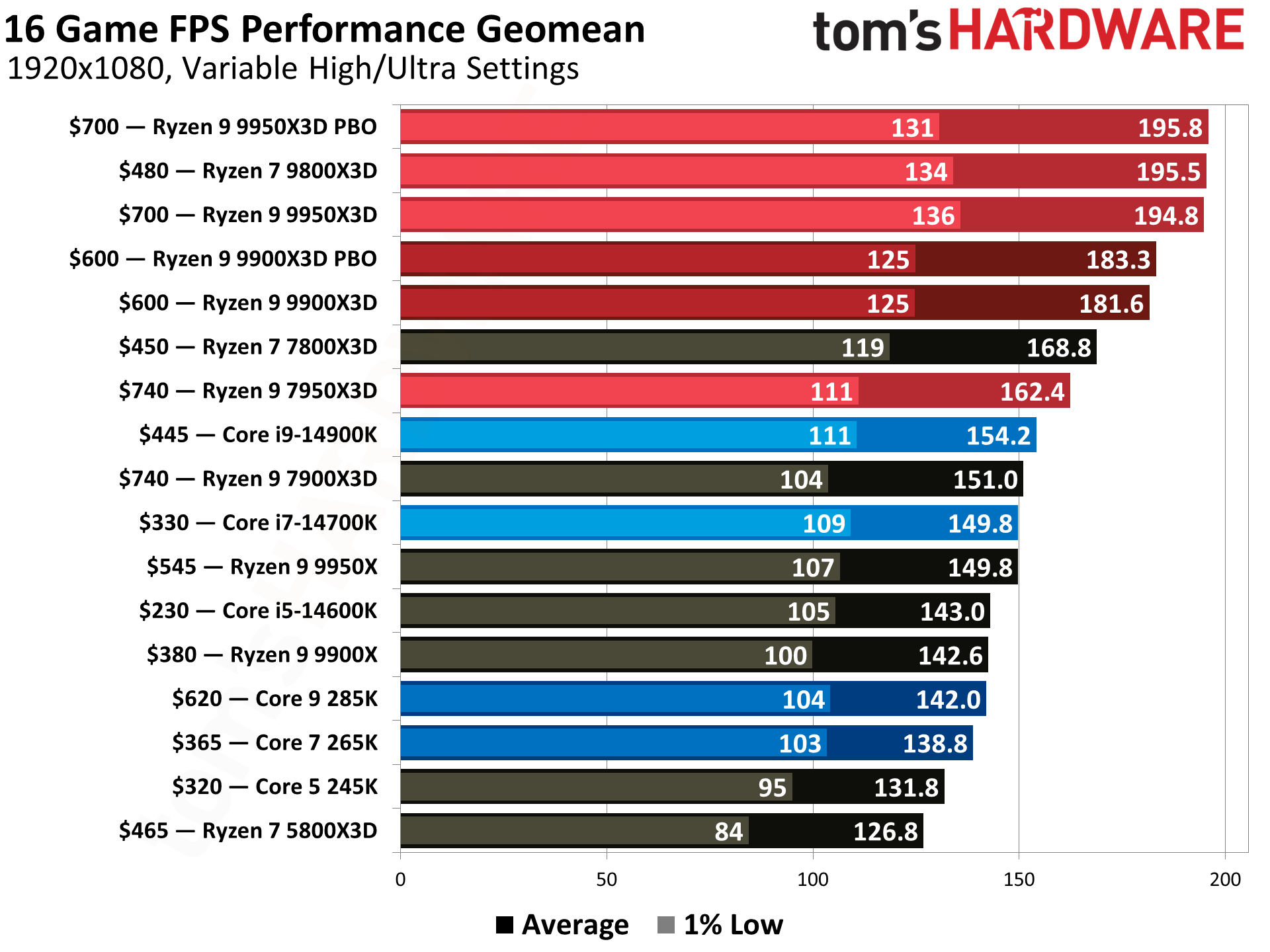
AMD has taken a different route by focusing on architectural efficiency and specialized gaming silicon. Their Ryzen 7000 and 9000 series processors use the AM5 platform, which promises longevity for several years. The standout performers are the “X3D” models, such as the Ryzen 7 7800X3D. By utilizing 3D V-Cache, AMD has created chips that are specifically tuned for gaming, often beating Intel’s most expensive flagships in gaming benchmarks while consuming significantly less power and generating less heat.
Platform Longevity: LGA 1700 vs. AM5
When choosing a processor, you are also choosing a motherboard socket. Intel’s LGA 1700 platform has reached its end of life, meaning any future CPU upgrades will require a new motherboard. Conversely, AMD’s AM5 socket is expected to be supported for several years, allowing gamers to drop in a new CPU in 2026 or 2027 without a total system overhaul. For the forward-thinking gamer, the “best” processor is often the one that offers the most painless upgrade path.
3. Categorizing the Top Contenders by User Tier
Not every gamer has the same needs. Whether you are aiming for 1080p high-refresh esports or 4K cinematic immersion, your CPU requirements will vary.
The Gold Standard: The High-End Enthusiast
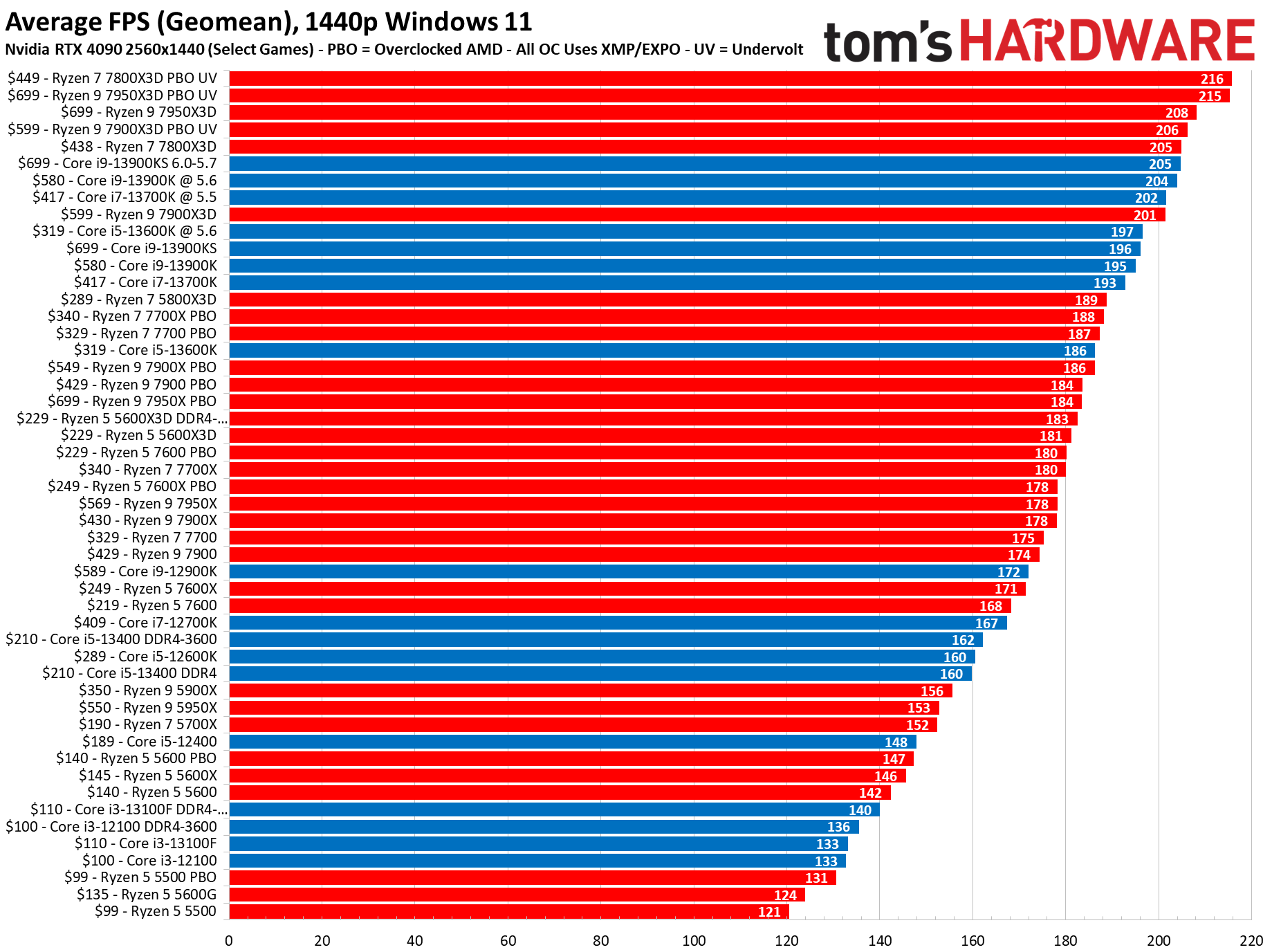
For those who want the absolute best gaming performance without compromise, the AMD Ryzen 7 7800X3D is currently widely considered the king of gaming CPUs. Its massive L3 cache allows it to maintain incredibly high minimum frame rates, ensuring that “1% lows” stay high even in chaotic scenes. On the Intel side, the Core i9-14900K remains the go-to for enthusiasts who want the highest possible clock speeds and the best multi-tasking performance for streaming and content creation alongside their gaming.
The Balanced Performer: Mid-Range Value
The mid-range is where most gamers find their perfect match. The Intel Core i5-13600K or i5-14600K are legendary for their “sweet spot” positioning. They offer enough P-cores to handle any modern AAA title and enough E-cores to keep the system responsive. Alternatively, the AMD Ryzen 5 7600X offers a brilliant entry into the AM5 platform, providing excellent gaming speeds at a fraction of the cost of flagship models.
The Budget Hero: Entry-Level Gaming
For those building a budget rig, the Intel Core i3-13100 or the AMD Ryzen 5 5600 (on the older AM4 platform) still hold their own. While they may struggle with extreme multitasking, they are more than capable of driving 60+ FPS in most modern titles when paired with a decent mid-range GPU. These processors prove that you don’t need a thousand-dollar budget to enjoy a premium gaming experience.
4. Balancing the System: Avoiding the Bottleneck
A common mistake is buying a top-tier processor and pairing it with entry-level components, or vice versa. To get the “best” out of your processor, the rest of the ecosystem must be in sync.
The CPU-GPU Synergy
If you are gaming at 1080p, your CPU is under a lot of pressure because the GPU can render frames faster than the CPU can prepare them. This is where a fast processor is most important. At 4K, the bottleneck shifts to the GPU; even a mid-range CPU can often keep up because the GPU is the one struggling to render the high-resolution pixels. Therefore, “the best” CPU for a 4K gamer might actually be a mid-range chip, allowing them to spend more of their budget on a high-end graphics card.
Memory Matters: DDR4 vs. DDR5
The processor’s ability to communicate with the rest of the system depends on your RAM. Intel’s recent chips support both DDR4 and DDR5, while AMD’s newest platform is DDR5 exclusive. DDR5 offers significantly higher bandwidth, which can improve frame stability in CPU-intensive games like Microsoft Flight Simulator or Cyberpunk 2077. When choosing a processor, ensuring it is paired with low-latency memory is crucial for unlocking its full potential.
Thermal Management and Power Consumption
A high-performance processor is only as good as its cooling solution. Modern chips from both Intel and AMD are designed to push themselves until they hit a thermal limit. This means that a “best” processor can perform like a “mediocre” one if it is being throttled by a poor cooler. High-end Intel chips, in particular, are known for their high power draw and heat output, often requiring 360mm liquid coolers to maintain their advertised boost speeds.
5. Future-Proofing and Evolving Technologies
The definition of the “best” gaming processor is constantly shifting as software evolves to take advantage of new hardware features.
The Integration of AI and Machine Learning
We are beginning to see the inclusion of NPU (Neural Processing Units) within consumer CPUs. While currently used for background noise cancellation or video effects, future game engines may offload AI pathfinding or procedural generation to these dedicated AI blocks. Staying ahead of the curve means looking for processors that embrace these new architectural standards.
The Shift Toward PCIe 5.0
Modern processors are now supporting PCIe 5.0, which doubles the bandwidth for SSDs and future GPUs. While today’s graphics cards don’t yet saturate a PCIe 4.0 slot, “future-proofing” your build involves selecting a processor and motherboard combo that can handle the next generation of ultra-fast storage and high-bandwidth peripherals.
Conclusion: Finding Your Perfect Match
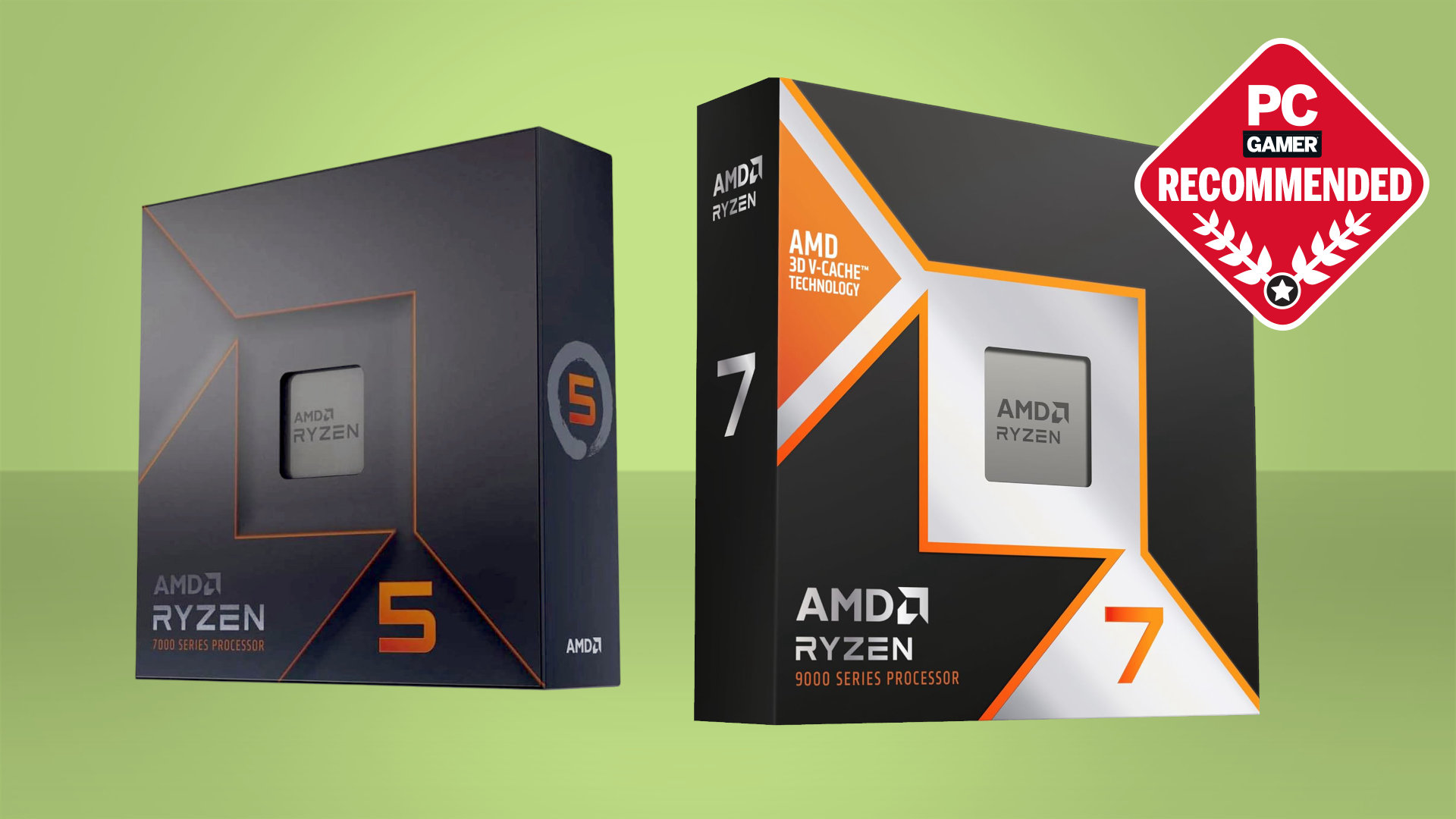
Ultimately, the “best” processor for gaming is the one that aligns with your specific goals, budget, and resolution. If you want the rawest gaming performance available today, the AMD Ryzen 7 7800X3D stands at the top of the mountain due to its revolutionary cache technology. If you need a versatile powerhouse that can handle professional video editing by day and high-end gaming by night, the Intel Core i7-14700K is a formidable choice.
As games become more complex, the processor’s role will only grow in importance. By focusing on single-core speed, cache efficiency, and platform longevity, you can ensure that your gaming rig remains fast, fluid, and ready for whatever the next generation of gaming has in store.
aViewFromTheCave is a participant in the Amazon Services LLC Associates Program, an affiliate advertising program designed to provide a means for sites to earn advertising fees by advertising and linking to Amazon.com. Amazon, the Amazon logo, AmazonSupply, and the AmazonSupply logo are trademarks of Amazon.com, Inc. or its affiliates. As an Amazon Associate we earn affiliate commissions from qualifying purchases.