
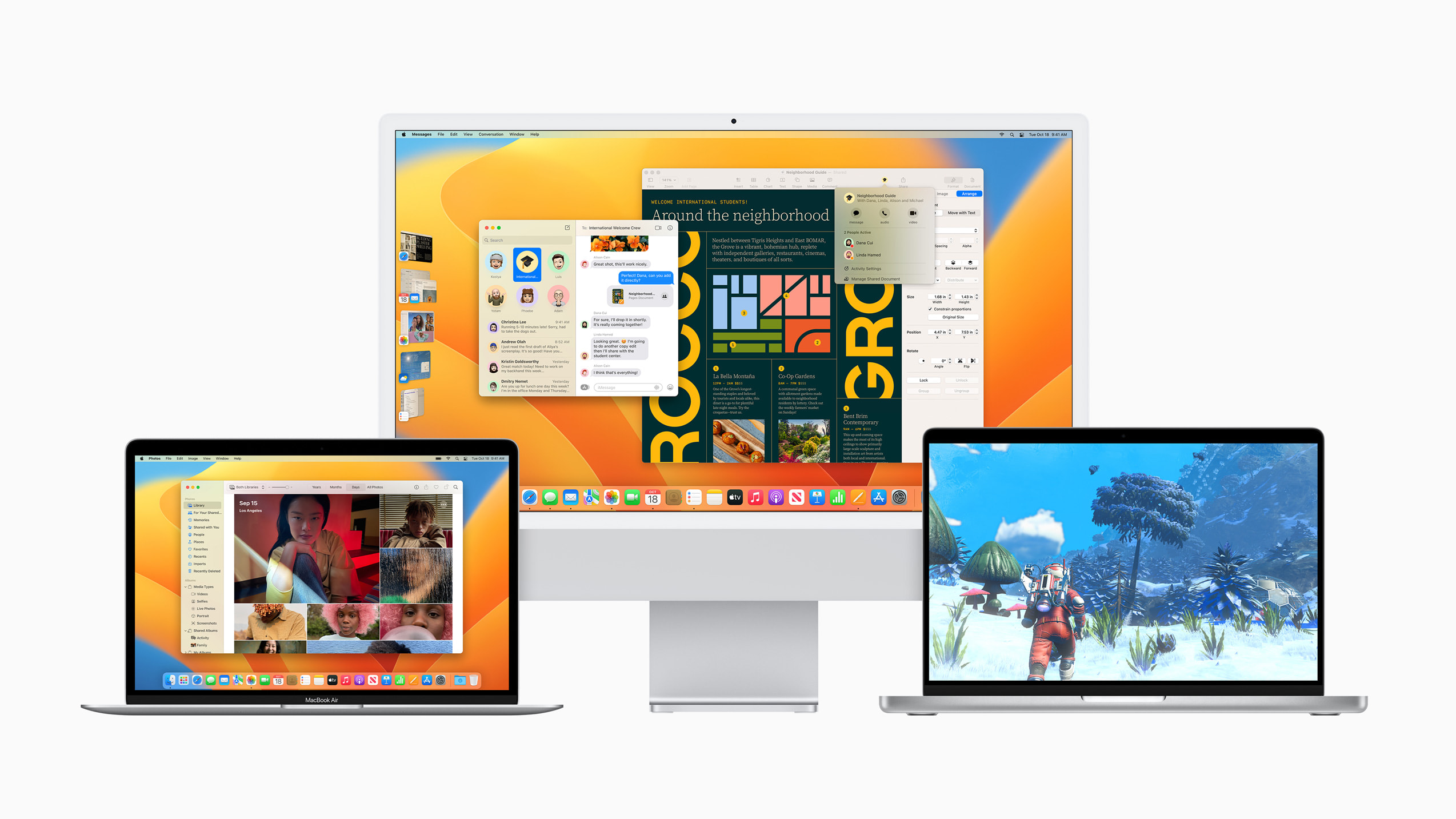
macOS Ventura, officially known as macOS 13, represents the latest evolution in Apple’s desktop operating system, building upon a rich history of innovation and user-centric design. For many, the question “what OS is macOS Ventura?” transcends a simple identification; it delves into the fundamental nature of what this operating system is, what it offers, and how it positions itself within the broader technological landscape. This article aims to provide a comprehensive understanding of macOS Ventura, exploring its core identity, key features, and its significance as a technological platform.
The Foundation: macOS Ventura as a Modern Operating System
At its heart, macOS Ventura is a sophisticated and highly integrated operating system designed to power Apple’s Mac computers. It is the direct successor to macOS Monterey and carries forward the lineage of operating systems that have defined personal computing for decades. Understanding its foundational aspects is crucial to appreciating its capabilities and its place in the tech ecosystem.
What Defines a Desktop Operating System?
An operating system (OS) is the fundamental software that manages computer hardware and software resources and provides common services for computer programs. For a desktop OS like macOS Ventura, this means overseeing everything from the graphical user interface (GUI) that users interact with, to the intricate processes that allow applications to run, files to be stored, and networks to be accessed. It acts as the bridge between the user and the powerful hardware, abstracting away complex technical details to provide a seamless and intuitive experience.
The Apple Ecosystem Integration
A defining characteristic of macOS Ventura, and indeed all macOS versions, is its deep integration with the wider Apple ecosystem. This is not merely a feature but a core tenet of its design philosophy. Ventura seamlessly communicates and synchronizes with other Apple devices like iPhones, iPads, and Apple Watches, enabling features like Handoff, Universal Clipboard, and AirDrop. This interconnectedness allows users to transition tasks effortlessly between devices, share information instantaneously, and extend the functionality of one device to another. For example, using an iPhone as a webcam for a Mac, a feature introduced with Ventura, exemplifies this powerful ecosystem synergy.
Core Technologies and Architecture
Under the hood, macOS Ventura is built upon a Unix-like core, specifically Darwin. This robust and stable foundation provides the underlying architecture for multitasking, memory management, and system security. This Unix heritage is a significant factor in macOS’s reliability and performance, contributing to its reputation for stability and its suitability for a wide range of professional and creative workflows. Ventura also leverages Apple’s proprietary Metal graphics API for high-performance graphics and computational tasks, and continues to benefit from advancements in Apple’s silicon, such as the M-series chips, which are optimized to work in tandem with the OS for enhanced power efficiency and speed.
Key Features and Innovations in macOS Ventura
Beyond its foundational elements, macOS Ventura distinguishes itself through a suite of new features and enhancements that refine the user experience, boost productivity, and introduce novel ways of interacting with the Mac. These innovations are not just incremental updates; they represent a thoughtful evolution of Apple’s software strategy.
Stage Manager: A New Approach to Multitasking
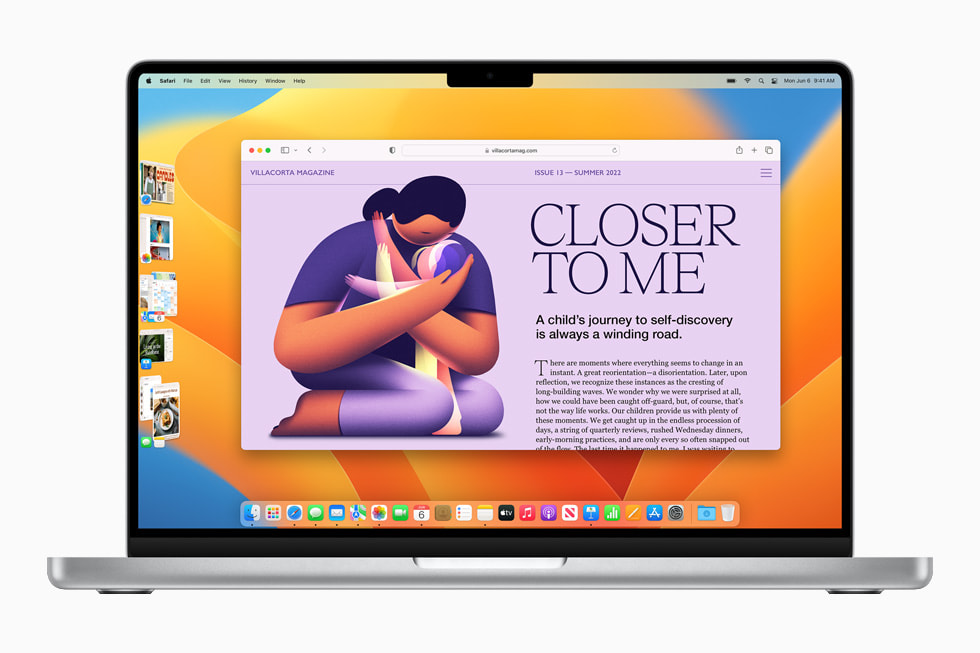
One of the most significant new features introduced with macOS Ventura is Stage Manager. This innovative multitasking tool aims to streamline the way users manage open applications and windows. Instead of the traditional overlapping windows that can clutter the screen, Stage Manager presents the current application in a large central window, with other open applications neatly arranged as thumbnails on the left side of the screen. Clicking on a thumbnail brings that application to the forefront, allowing users to quickly switch between tasks without getting lost in a sea of windows. This feature is particularly beneficial for users who work with multiple applications simultaneously, offering a more focused and organized digital workspace.
Enhanced Productivity Tools: Spotlight, Mail, and Safari
macOS Ventura brings significant improvements to several core applications and system-wide utilities. Spotlight, the powerful search function, has been enhanced with richer results, including images and even quick actions like starting a timer or running a shortcut. The Mail app receives updates designed to improve email management, such as the ability to schedule emails and undo send, addressing common user frustrations. Safari, Apple’s web browser, continues to evolve with features like Shared Tab Groups, facilitating collaboration on web browsing sessions, and Passkeys, a next-generation credential that promises more secure and convenient website logins. These enhancements, while seemingly minor individually, collectively contribute to a more efficient and user-friendly computing experience.

Collaboration and Communication: Messages and FaceTime
The way we communicate and collaborate digitally has been a major focus for Apple, and macOS Ventura reflects this. The Messages app gains new capabilities, allowing users to edit or unsend messages, mark conversations as unread, and even initiate SharePlay sessions directly from a conversation. FaceTime also sees improvements, with features like Continuity Camera, which allows users to seamlessly use their iPhone as a webcam for their Mac, offering enhanced video quality and new framing options. These advancements aim to make communication more fluid, flexible, and integrated across Apple’s devices.
The Underlying Philosophy: User Experience and Security
At the core of macOS Ventura, as with all Apple software, lies a deep commitment to user experience and robust security. These principles are not afterthoughts but are woven into the very fabric of the operating system, shaping its design, functionality, and how it interacts with users and their data.
Prioritizing Intuitive Design and Ease of Use
Apple has long been lauded for its intuitive and user-friendly interfaces, and macOS Ventura continues this tradition. The operating system is designed to be accessible to users of all technical skill levels, with a clean and uncluttered visual aesthetic, consistent navigation patterns, and readily available help resources. This focus on ease of use reduces the learning curve for new users and ensures that experienced users can navigate the system efficiently. Features like drag-and-drop functionality, customizable desktop arrangements, and consistent application design contribute to a familiar and predictable experience across the board.
Robust Security Measures and Privacy Protection
In an era where digital security and privacy are paramount concerns, macOS Ventura incorporates a comprehensive suite of security features. Apple’s approach is often described as “security by design,” meaning that security considerations are integrated from the earliest stages of development. This includes features like FileVault for disk encryption, Gatekeeper to ensure applications are from trusted sources, and System Integrity Protection (SIP) to prevent unauthorized modifications to critical system files. Furthermore, Ventura strengthens privacy controls, offering users more granular control over app permissions, data tracking, and online privacy through features like Safari’s Intelligent Tracking Prevention. The emphasis on on-device processing for many sensitive tasks, like Siri requests and facial recognition in Photos, further underscores Apple’s commitment to protecting user data.
macOS Ventura’s Place in the Technological Landscape
Understanding “what OS is macOS Ventura?” also requires situating it within the broader context of the technology industry, particularly in relation to its competitors and its role in driving innovation. Its unique blend of hardware and software integration, coupled with its distinct design philosophy, carves out a specific and influential niche.
Competition and Differentiation
The primary competitors to macOS Ventura are Microsoft’s Windows operating system and various Linux distributions. While Windows dominates the overall PC market, macOS occupies a significant and loyal segment, particularly among creative professionals, developers, and those invested in the Apple ecosystem. macOS Ventura differentiates itself through its seamless integration with Apple’s hardware, its emphasis on a refined user experience, its robust security and privacy features, and its strong performance, especially on Apple’s custom silicon. The controlled environment of macOS, where Apple designs both the hardware and the software, allows for a level of optimization and integration that is difficult for other operating systems to replicate.
The Role of Apple Silicon
The ongoing transition to Apple Silicon (M-series chips) is a pivotal aspect of macOS Ventura’s technological identity. These custom-designed processors are engineered to deliver exceptional performance and power efficiency, and macOS Ventura is optimized to leverage their full capabilities. This tight integration between hardware and software allows for faster app performance, improved battery life, and enhanced capabilities for demanding tasks like video editing and machine learning. The synergy between Apple Silicon and macOS Ventura represents a significant advancement in personal computing, offering a glimpse into the future of integrated computing platforms.
Future Trajectories and Evolution
macOS Ventura is not a static product but a stepping stone in Apple’s continuous evolution of its operating system. The innovations introduced in Ventura, such as Stage Manager and Continuity Camera, are likely to be refined and expanded upon in future releases. Apple’s consistent track record of integrating new technologies, such as machine learning and augmented reality, into its software suggests that future versions of macOS will continue to push the boundaries of what’s possible on a desktop computer. The ongoing development of Apple Silicon further promises a future where performance and efficiency are even more tightly coupled with the user experience.
In conclusion, macOS Ventura is a sophisticated, user-centric, and secure desktop operating system that represents the latest chapter in Apple’s storied history of personal computing. It is characterized by its deep integration within the Apple ecosystem, its innovative features designed to enhance productivity and collaboration, and its unwavering commitment to user experience and privacy, all underpinned by the powerful performance of Apple Silicon. Understanding what macOS Ventura is means appreciating its role not just as software, but as a key component of a seamlessly integrated technological experience.
aViewFromTheCave is a participant in the Amazon Services LLC Associates Program, an affiliate advertising program designed to provide a means for sites to earn advertising fees by advertising and linking to Amazon.com. Amazon, the Amazon logo, AmazonSupply, and the AmazonSupply logo are trademarks of Amazon.com, Inc. or its affiliates. As an Amazon Associate we earn affiliate commissions from qualifying purchases.