
Apple, a titan of the technology industry, is renowned for its meticulously crafted hardware and the seamless integration of its software. While many are familiar with the sleek designs of iPhones and MacBooks, a fundamental question often arises for those curious about the inner workings of these devices: What operating system powers Apple’s devices? The answer is not a single, monolithic entity, but rather a sophisticated ecosystem of interconnected operating systems, each tailored to a specific product line, yet sharing a common design philosophy and underlying architecture. Understanding these distinct operating systems is key to appreciating the Apple experience and the strategic decisions that drive its technological innovation.
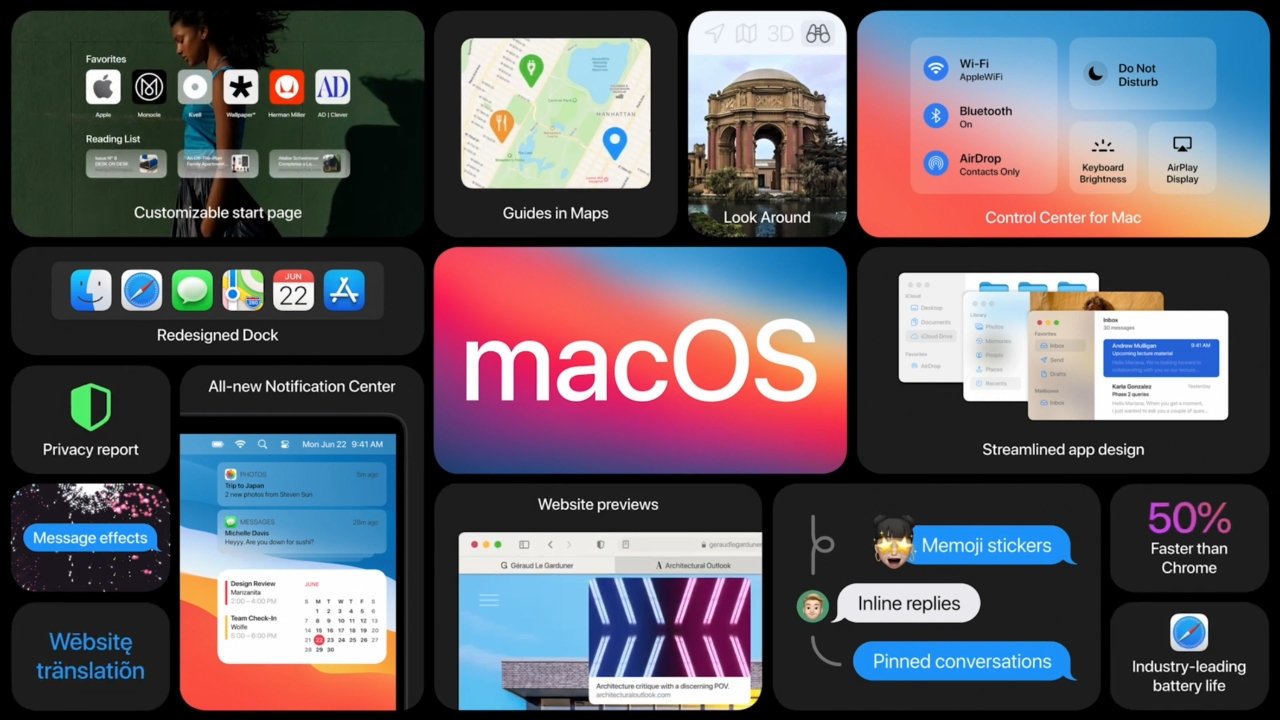
This exploration will delve into the core operating systems that define Apple’s product landscape. We will dissect macOS, the powerhouse behind Mac computers; iOS, the ubiquitous system running iPhones and iPod Touches; iPadOS, the specialized evolution of iOS for tablets; watchOS, the compact OS powering the Apple Watch; and tvOS, the streamlined system for the Apple TV. By examining their unique features, historical evolution, and the technological threads that bind them, we can gain a comprehensive understanding of what makes Apple’s software ecosystem so compelling and effective.
macOS: The Foundation of the Personal Computer Experience
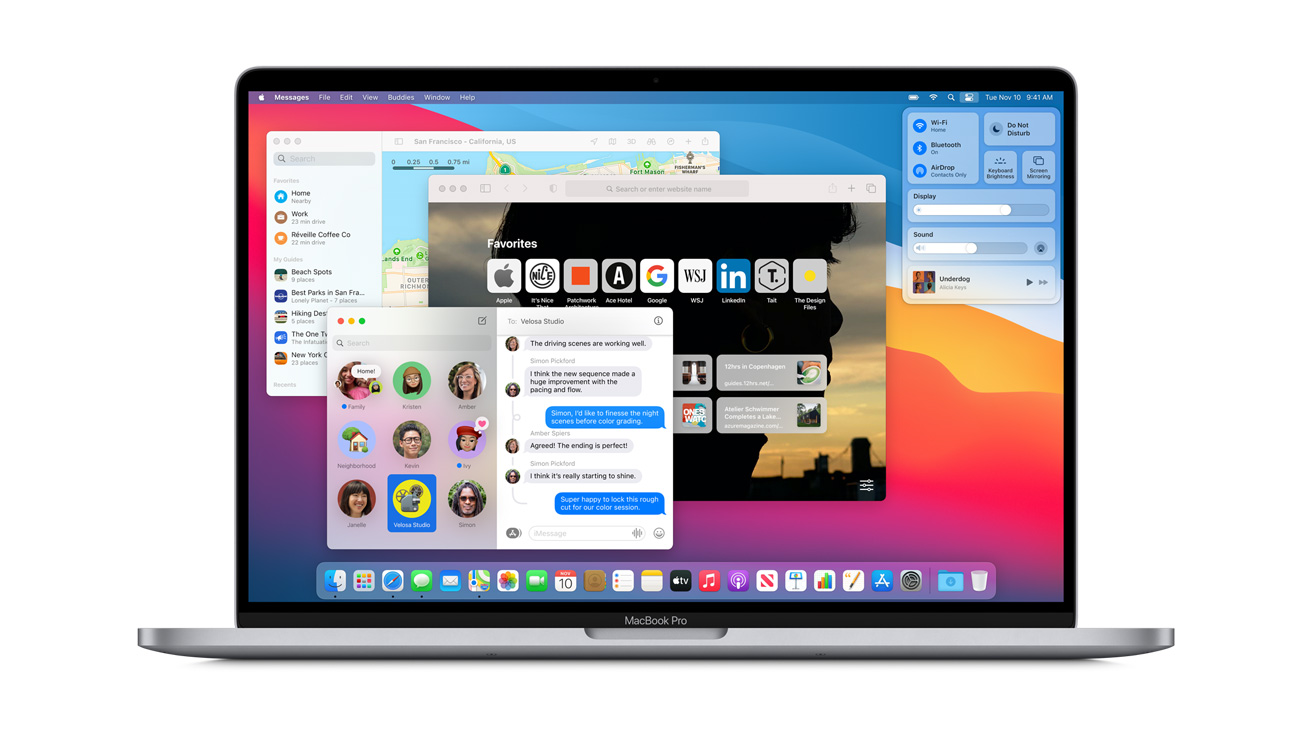
macOS, formerly known as OS X and before that, Mac OS, is the flagship operating system for Apple’s personal computers. It has a long and storied history, evolving from its early graphical user interfaces to the sophisticated, feature-rich system it is today. At its core, macOS is built upon a Unix-like foundation, which provides a robust and stable platform for a wide range of applications and tasks. This Unix heritage contributes to its security, multitasking capabilities, and efficient resource management.
A Legacy of Innovation: From System 1 to Sonoma
The journey of macOS is a testament to Apple’s commitment to user experience and technological advancement. Early versions of Mac OS, starting with System 1 in 1984, laid the groundwork for intuitive graphical interfaces, a radical departure from the command-line-driven operating systems of the era. The transition to OS X in 2001 marked a significant architectural shift, bringing a modern Unix-based core (Darwin) to the forefront. This move addressed many of the limitations of the classic Mac OS, enhancing stability, memory management, and overall performance.
Subsequent releases, each bearing the name of a famous California landmark, introduced a steady stream of innovations. Features like the Dock, Spotlight search, Time Machine, Mission Control, and iCloud integration have become synonymous with the Mac experience. More recent iterations, such as Monterey, Ventura, and the current Sonoma, have further refined the user interface, enhanced productivity features, and strengthened security protocols. macOS continues to evolve, adapting to new hardware capabilities and user demands, while maintaining its core principles of simplicity and power.
Key Features and the User Interface Philosophy
The hallmark of macOS is its user-centric design. The Aqua interface, introduced with OS X, is characterized by its smooth gradients, translucent elements, and consistent visual language. This aesthetic has been refined over the years, but the core principle of providing a clean, intuitive, and aesthetically pleasing environment remains.
Beyond the visual appeal, macOS boasts a rich set of features designed to enhance productivity and creativity. Built-in applications like Safari, Mail, Calendar, Photos, and iMovie offer robust functionality for everyday tasks and creative endeavors. The App Store provides a curated marketplace for software, ensuring a level of quality and security. Furthermore, macOS excels in its integration with other Apple devices, enabling seamless file sharing, continuity features like Handoff and Universal Clipboard, and extended display capabilities with Sidecar. Its powerful command-line interface also appeals to developers and power users, offering access to the underlying Unix system for advanced customization and scripting.
iOS: Powering the Pocket-Sized Revolution
iOS is arguably the most influential operating system Apple has ever developed, transforming the mobile phone into a versatile computing device. Launched in 2007 alongside the original iPhone, iOS has undergone a remarkable evolution, consistently pushing the boundaries of what a smartphone can do. It is the bedrock upon which the iPhone and iPod Touch experience is built, characterized by its touch-centric interface, extensive app ecosystem, and tight integration with Apple’s services.
The Genesis of the Modern Smartphone OS
The original iPhone was a paradigm shift, and iOS was its engine. Its revolutionary multi-touch interface, pioneered by Steve Jobs, allowed users to interact with their devices in entirely new ways. Pinch-to-zoom, swipe gestures, and tap-to-select became intuitive actions that redefined mobile interaction. Early versions of iOS focused on core functionalities like calling, messaging, and web browsing, but the introduction of the App Store in 2008 opened the floodgates for third-party applications, transforming the iPhone into a platform for a virtually limitless range of possibilities.
The evolution of iOS has been marked by significant feature additions and architectural improvements. Multitasking, copy-and-paste, the notification center, Siri, Apple Pay, and augmented reality capabilities have all been introduced and refined over the years. Each annual release, often announced at Apple’s Worldwide Developer Conference (WWDC), brings new functionalities, performance enhancements, and security updates, ensuring that iOS remains at the cutting edge of mobile technology.
The App Ecosystem and User Interaction
The success of iOS is inextricably linked to its thriving App Store. With millions of applications available, users can find tools for almost any purpose, from gaming and productivity to education and entertainment. Apple’s rigorous app review process aims to maintain a high standard of quality and security, fostering user trust.
The user interface of iOS is designed for simplicity and ease of use, even with its increasing complexity. The home screen, with its grid of app icons, is instantly recognizable. Gestures are deeply ingrained in the interaction model, allowing for fluid navigation and control. Control Center provides quick access to essential settings, while the Notification Center keeps users informed of alerts and updates. As iOS has matured, features like widgets, app libraries, and customizable lock screens have added layers of personalization and efficiency without sacrificing its core user-friendliness.
iPadOS: Tailored for the Tablet Experience
While rooted in iOS, iPadOS represents a deliberate and significant divergence, engineered to harness the unique capabilities of the iPad. Launched as a distinct operating system in 2019, it acknowledges that the iPad is more than just a larger iPhone; it’s a versatile device capable of productivity, creativity, and immersive entertainment. iPadOS builds upon the familiar iOS interface while introducing a host of features specifically designed for the larger screen and more powerful hardware.
From iOS Fork to Independent Identity
The early iPads ran on iOS, and while functional, they were often seen as scaled-up iPhones. As the iPad’s capabilities grew and its user base expanded, Apple recognized the need for an operating system that could better leverage its potential. The introduction of iPadOS was a strategic move to provide a more distinct and powerful experience. This separation allowed Apple to introduce features that were not feasible or desirable on the iPhone, such as enhanced multitasking, desktop-class web browsing, and improved file management.
Key features that distinguish iPadOS include a more capable multitasking system with Split View and Slide Over, allowing users to run multiple apps side-by-side. The introduction of the Files app provided a robust file management system, akin to a desktop experience. Support for external keyboards and trackpads, along with Apple Pencil enhancements, further bridges the gap between tablet and laptop. The ability to run desktop-class web browsers and install more complex applications positions the iPad as a serious contender for productivity tasks.
Enhancing Productivity and Creativity
iPadOS is designed to empower users in a variety of workflows. The enhanced multitasking allows for more efficient content creation and consumption. For example, a user can have a document open in one app, a web browser in another for research, and a drawing app in a third for annotations, all visible simultaneously. The integration with Apple Pencil unlocks powerful creative possibilities, from sketching and note-taking to detailed digital art.
The Files app, with its support for external storage devices, cloud services, and advanced organization features, transforms the iPad into a portable workstation. The introduction of desktop-class web browsing means that complex web applications and websites function as they would on a desktop computer, opening up new avenues for online productivity. Furthermore, iPadOS continues to receive regular updates, introducing new features that further blur the lines between mobile and desktop computing, making it an increasingly compelling choice for a wide range of users.
watchOS and tvOS: Specialized for Their Platforms
Beyond the Mac, iPhone, and iPad, Apple’s operating systems extend to its other flagship devices: the Apple Watch and Apple TV. watchOS and tvOS, while sharing the DNA of iOS, are meticulously optimized for their unique hardware and intended use cases, demonstrating Apple’s commitment to a cohesive yet specialized software experience across its entire product line.
watchOS: The Power of a Tiny Screen
watchOS is the operating system that powers the Apple Watch. It is designed to be glanceable, actionable, and deeply integrated with the user’s health and fitness goals. The interface is optimized for the small screen, relying heavily on gestures, complications (small widgets on the watch face), and voice commands via Siri.
Key features of watchOS include robust health tracking, such as heart rate monitoring, ECG capabilities, fall detection, and activity tracking. Its integration with the iPhone allows for seamless notifications, app usage, and communication. The App Store on watchOS offers a curated selection of apps designed for quick interactions. watchOS also emphasizes productivity on the go, enabling users to respond to messages, make calls, use Apple Pay, and control smart home devices directly from their wrist. Its ongoing development focuses on expanding its health and fitness capabilities, improving battery efficiency, and enhancing its utility as a personal assistant.
tvOS: The Heart of the Living Room Entertainment Hub
tvOS is the operating system that drives the Apple TV. Its primary focus is on delivering a seamless entertainment experience in the living room. The interface is designed for navigation using the Siri Remote, with a focus on visual content and intuitive control.
Key features of tvOS include access to the App Store for Apple TV, which offers a growing library of streaming services, games, and other entertainment apps. The integration with Apple’s own services like Apple TV+, Apple Music, and Apple Arcade provides a rich content ecosystem. Picture-in-picture functionality, multi-user support for personalized recommendations, and the ability to use the iPhone as a remote control are all designed to enhance the living room experience. tvOS also prioritizes simplicity and ease of use, ensuring that the entire family can navigate and enjoy the content available.
The Common Threads: Design Philosophy and Interconnectivity
While macOS, iOS, iPadOS, watchOS, and tvOS are distinct operating systems, they are united by a common design philosophy and a deep commitment to interconnectivity. This synergy is a cornerstone of Apple’s success, creating an ecosystem that is both powerful and intuitive.
A Unified Design Language and User Experience
Across all of Apple’s operating systems, a consistent design language prevails. This includes a focus on clean aesthetics, intuitive navigation, and user-friendly interfaces. Whether you are using a Mac, iPhone, iPad, Apple Watch, or Apple TV, you will encounter familiar design cues, navigation patterns, and a similar level of polish. This consistency reduces the learning curve for new devices and enhances the overall user experience, fostering a sense of familiarity and ease of use.
The Power of the Apple Ecosystem
The true magic of Apple’s operating systems lies in their ability to work together seamlessly. Features like Handoff, Universal Clipboard, AirDrop, and iCloud allow users to start a task on one device and finish it on another, or share content effortlessly between them. For example, you can start writing an email on your iPhone and then complete it on your Mac, or transfer photos from your iPhone to your iPad with a simple drag and drop. This interconnectedness creates a fluid and efficient workflow that is a significant differentiator for Apple. The ongoing development of these operating systems, with an eye towards tighter integration and shared functionalities, ensures that the Apple ecosystem continues to evolve, offering users an unparalleled level of convenience and productivity.
aViewFromTheCave is a participant in the Amazon Services LLC Associates Program, an affiliate advertising program designed to provide a means for sites to earn advertising fees by advertising and linking to Amazon.com. Amazon, the Amazon logo, AmazonSupply, and the AmazonSupply logo are trademarks of Amazon.com, Inc. or its affiliates. As an Amazon Associate we earn affiliate commissions from qualifying purchases.