
The Visa gift card has become a ubiquitous tool in the modern financial landscape, serving as a bridge between cash and digital credit. While its primary purpose is convenience, many users find themselves at a crossroads when a digital checkout screen asks for the “Name on Card.” Unlike a traditional credit or debit card issued by a bank, a prepaid Visa gift card often lacks a physical name embossed on its surface. Navigating the nuances of payment gateways, address verification systems, and account registration is essential for anyone looking to use these financial tools effectively.

Understanding exactly what name to provide is not just a matter of technicality; it is a critical step in ensuring transaction security and financial fluidity. Whether you are using a card for a one-time purchase or integrating it into a broader budgeting strategy, knowing how to handle the “name” field determines whether your payment is accepted or declined by a merchant’s processing system.
The Anatomy of a Prepaid Visa: Why the Name Field Varies
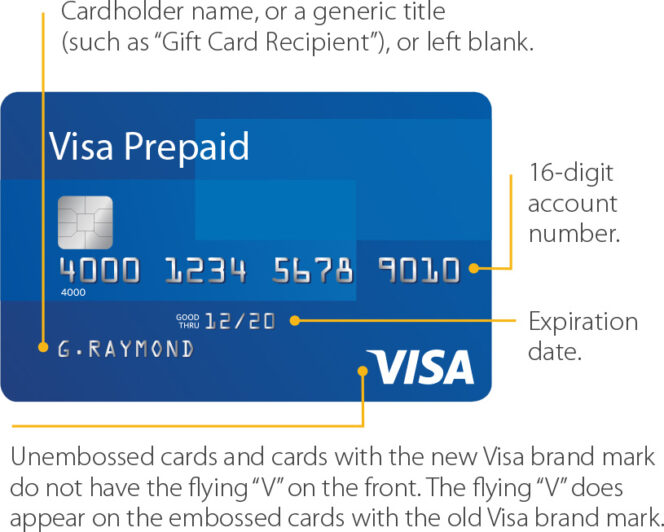
When you receive or purchase a Visa gift card, the physical card typically bears a generic placeholder such as “Valued Customer,” “Gift Card Recipient,” or sometimes no name at all. This is because these cards are often “non-reloadable” and are sold as “instant-issue” products in retail environments. They are not tied to a specific individual’s identity at the point of sale in the same way a standard checking account or line of credit would be.
However, the digital economy operates on a different set of rules than the physical one. In a brick-and-mortar store, a cashier rarely checks the name on a gift card; they simply swipe or dip the card, and as long as the balance is sufficient, the transaction clears. Online, the process involves an invisible layer of security known as the Address Verification System (AVS).
The AVS is a mechanism used by credit card processors to detect suspicious credit card transactions by matching the billing address provided by the customer with the address on file with the card issuer. Because gift cards are often purchased anonymously, they lack an initial billing address and a registered name. To bridge this gap, you must understand the two primary ways these cards are handled: as unregistered “guest” cards or as registered personal financial tools.
Unregistered vs. Registered Cards
If you have not registered your card on the issuer’s website, the “name” field can be a source of frustration. Some merchants allow you to use “Valued Customer” or simply your own name, and the transaction will pass if their security settings are lenient. However, major retailers like Amazon, Walmart, or various subscription services often require a precise match between the name entered and the name on file. If the card is unregistered, there is no name on file, which often leads to a “declined” status even if the funds are present.
The Critical Step: Registering Your Identity for Digital Success
To gain full utility from a Visa gift card in the online marketplace, registration is the most significant action you can take. Most Visa gift cards—whether they are issued by Vanilla, GiftCardMall, or a specific bank—provide a website on the back of the card where you can “Register Card” or “Check Balance.”
How Registration Affects the Name Field
When you register the card, you are essentially creating a temporary financial profile for that specific piece of plastic. You will be asked to provide your legal name and a valid billing address (usually including a zip code). Once this information is saved into the issuer’s database, your name becomes the official “Name on Card.”
From a personal finance perspective, this step is vital for several reasons:
- AVS Compatibility: Once registered, the name you put on the checkout screen must exactly match the name you used during registration.
- Fraud Protection: If the card is lost or stolen, having your name attached to the registration allows the issuer to verify your identity and potentially recover the remaining balance.
- Subscription Services: Many “Software as a Service” (SaaS) tools or streaming platforms perform a “pre-authorization hold.” These systems almost always require a registered name and address to verify that the card belongs to a real person.
What Name to Use if You Don’t Register
If you choose not to register the card (perhaps for privacy reasons or because you intend to use the full balance immediately), you should first try using your own legal name. Most modern payment processors are designed to look for a name, any name, to fill the data packet. If your legal name is rejected, the next best alternative is “Valued Customer.” However, be aware that without a registered zip code, the likelihood of an online decline remains high.
Strategic Financial Management: Using Gift Cards as Tools
Beyond the immediate question of what name to type into a box, Visa gift cards serve as sophisticated tools for personal finance management. By understanding how to manipulate the identity fields and registration, you can use these cards for more than just simple gifts.
Privacy and Digital Security
In an era of frequent data breaches, many savvy consumers use Visa gift cards as a buffer. By using a gift card for a specific online purchase, you are not exposing your primary bank account or credit line to the merchant. When prompted for a name, using your own name on a registered gift card still provides a layer of separation. The merchant gets a valid name for their records, but they do not have access to your main financial ecosystem.
Budgeting and Spending Caps
For those practicing strict “envelope budgeting” in a digital world, Visa gift cards are an excellent way to cap spending. You might dedicate a $200 Visa gift card to “Entertainment” for the month. By registering this card in your name, you can use it across various platforms (movie tickets, digital rentals, dining apps). The “name” you use is yours, but the financial risk is limited strictly to the balance on that card.
Handling “Placeholder” Holds
A common trap in business finance and travel is the “authorization hold.” Hotels and gas stations often place a hold on funds that is higher than the actual purchase price. If you use a Visa gift card, ensure the name is registered; otherwise, if the hold fails due to a name mismatch, you may find yourself unable to complete a necessary transaction despite having the funds. Always use your registered legal name for these types of “active” transactions.
Troubleshooting Common Payment Failures
Even with the correct name, Visa gift cards can sometimes be finicky. Understanding the financial mechanics behind a decline can help you resolve the issue quickly.
Name and Address Mismatch
The most common reason for a decline is not the name itself, but the zip code associated with the name. If you have moved recently or used an old address during registration, the AVS will return a “no match” error. Ensure that the billing address you enter on the merchant’s site is identical to what is on the card issuer’s website.
The “Zero Balance” Test
Some merchants, particularly in the tech and app sectors, will run a $0.00 or $1.00 “test” transaction to see if the card is valid. If your name isn’t registered, these automated systems often flag the card as “high risk.” If you encounter a decline on a site like PayPal or a specialized app, go back to the issuer’s portal and verify that your name is correctly spelled and that the card is fully “active.”
Partial Authorizations
If you are trying to buy something that costs $55 but your card only has $50, the transaction may decline regardless of the name you use. In the financial world, this is a “hard decline.” Some sophisticated POS (Point of Sale) systems allow for “split-tender” transactions where you pay the first $50 with the gift card and the rest with another method, but this is rarely available online. To make this work, ensure you know your exact balance down to the cent, as even a one-cent discrepancy will cause the system to reject your “Name on Card” entry.

Maximizing the Value of the Prepaid Ecosystem
The Visa gift card is a versatile financial instrument that functions best when treated with the same rigor as a standard debit card. While the “name” might seem like a minor detail, it is the key that unlocks the card’s ability to move through the complex web of global payment processing.
To get the most out of these cards, users should:
- Register immediately: Do not wait until you are at a checkout screen to realize you need a registered name and address.
- Keep a record: Store a screenshot of the registration page. If a merchant disputes a charge or if you need to provide proof of identity, having the registered name and address on hand is invaluable.
- Use for fixed expenses: They are ideal for “trial” subscriptions. Using your name on a gift card allows you to sign up for a service without worrying about an accidental auto-renewal hitting your main savings account.
By mastering the simple act of registering a name and understanding the underlying AVS requirements, you transform a simple piece of plastic into a robust, secure, and highly functional financial tool. Whether you are protecting your identity or simply trying to complete an online purchase, the “name” you put on a Visa gift card is your gateway to a seamless digital transaction.
aViewFromTheCave is a participant in the Amazon Services LLC Associates Program, an affiliate advertising program designed to provide a means for sites to earn advertising fees by advertising and linking to Amazon.com. Amazon, the Amazon logo, AmazonSupply, and the AmazonSupply logo are trademarks of Amazon.com, Inc. or its affiliates. As an Amazon Associate we earn affiliate commissions from qualifying purchases.