
The quest for immersive audio experiences has become a significant factor in laptop purchasing decisions for many users. While high-resolution screens and powerful processors often steal the spotlight, the auditory capabilities of a device are increasingly being recognized as crucial for everything from entertainment and content creation to effective communication. One specific audio feature that many users seek is “bass boost.” This functionality, often found in audio software or integrated hardware solutions, is designed to enhance the low-frequency sounds, adding depth, richness, and impact to music, movies, and games. However, identifying laptops that explicitly advertise or reliably offer a dedicated “bass boost” option can be a nuanced challenge. This article delves into what constitutes a bass boost feature in laptops, why it matters, and how to navigate the market to find devices that deliver on this auditory promise.

Understanding Bass Boost in the Laptop Audio Landscape
Bass boost is not a universally standardized feature across all laptop manufacturers or audio chipsets. Instead, it typically manifests in a few key ways, each with its own implications for user experience and hardware integration. Understanding these distinctions is the first step in identifying laptops that will meet your low-frequency audio needs.
Software-Based Bass Enhancement: The Common Approach
The most prevalent method for achieving bass boost on laptops is through software. This can be integrated into the operating system’s audio settings, provided by the laptop manufacturer as part of their custom audio utility, or offered by third-party audio enhancement applications.
Manufacturer-Specific Audio Utilities
Many laptop manufacturers, particularly those known for their multimedia or gaming-oriented devices, equip their machines with proprietary audio software suites. Brands like ASUS (ROG Sonic Studio), HP (Bang & Olufsen Audio Control), Dell (Waves MaxxAudio Pro), and Lenovo (Dolby Audio) often include pre-installed applications that offer a range of audio customization options. Within these utilities, users can typically find sliders or preset modes designed to enhance bass frequencies. These features are often labeled as “Bass Boost,” “Subwoofer,” or might be integrated into broader “Enhancement” profiles that prioritize low-end impact. The effectiveness of these software solutions can vary significantly, depending on the quality of the audio drivers, the capabilities of the onboard audio codec, and the sophistication of the algorithms employed by the software.
Operating System Audio Settings
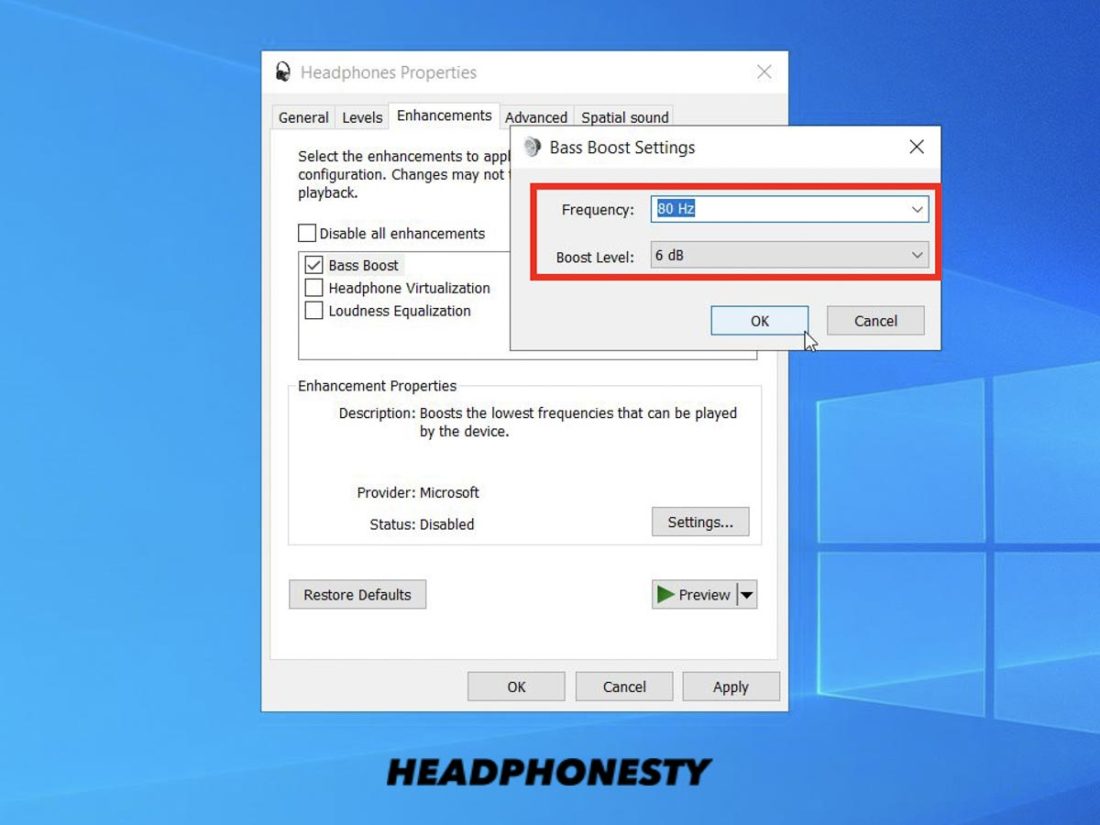
While less common for explicit “bass boost” toggles, both Windows and macOS offer some level of audio customization. Windows, for example, has an “Enhancements” tab within its sound properties where some audio drivers may present options for bass boost or a “Loudness Equalization” feature, which can indirectly amplify lower frequencies. macOS, on the other hand, relies more heavily on third-party applications or developer-level audio adjustments for such granular control. These OS-level settings are generally more generic and might not offer the same level of targeted bass enhancement as manufacturer-specific software.
Third-Party Audio Applications
For users who want maximum control or whose laptops lack robust built-in audio software, third-party applications offer a powerful alternative. Software like Equalizer APO (a free, open-source system-wide equalizer for Windows), Boom 3D, or FxSound are designed to provide advanced audio manipulation, including dedicated bass boost functionalities, sophisticated equalizers, and virtual surround sound. While these applications can significantly improve audio quality and bass response, they are an add-on rather than an inherent feature of the laptop hardware itself.
Hardware-Implications and Limitations
While software plays a dominant role in bass boost, the underlying hardware of a laptop does impose certain limitations and can influence the effectiveness of any audio enhancement.
Onboard Audio Codecs and Amplifiers
The audio codec (e.g., Realtek, Conexant) and the integrated audio amplifier are the foundational components responsible for processing and outputting sound. Higher-end codecs and more powerful amplifiers are better equipped to handle the increased demands of boosted bass frequencies without introducing distortion or clipping. A weak amplifier might struggle to deliver the desired impact, even with aggressive software boost, leading to muddy or anemic low-end.
Speaker Quality and Design
The physical speakers within a laptop are perhaps the most critical hardware element for bass reproduction. Small, tinny laptop speakers are inherently limited in their ability to produce deep, resonant bass. Even with the most advanced bass boost software, these speakers cannot magically create frequencies they are not physically capable of reproducing. Laptops with larger, more robust speaker enclosures and drivers, often found in premium multimedia or gaming models, are more likely to benefit from and respond effectively to bass boost features. Some laptops, particularly gaming laptops, might also include small built-in subwoofers, which significantly enhance low-frequency output and make bass boost features more impactful.
Form Factor and Acoustic Cavity
The internal design and acoustic cavity of a laptop also play a role. Larger laptops generally have more space for better speaker placement and larger resonant chambers, which can contribute to a fuller sound profile and better bass response. Ultra-thin laptops, while portable, often make compromises in speaker size and enclosure volume, which can limit their low-frequency capabilities.
Identifying Laptops with Bass Boost Features: A Practical Guide
Given that “bass boost” isn’t a standard spec like RAM or storage, finding laptops that offer it requires a proactive approach to research and understanding manufacturer marketing.
Navigating Manufacturer Specifications and Marketing
When searching for a new laptop, pay close attention to how manufacturers describe their audio capabilities.
Keywords to Look For
While you might not see “bass boost” explicitly listed in the main specification sheet, look for terms like:
- Dolby Audio/Dolby Atmos: Many laptops featuring Dolby technologies offer profiles that emphasize bass. Dolby Audio often includes a “Bass Enhancement” option in its control panel.
- DTS:X Ultra/DTS Sound Unbound: Similar to Dolby, DTS offers immersive audio experiences with options that can boost bass.
- Waves MaxxAudio Pro: Commonly found on Dell and other laptops, this suite frequently includes a Bass Boost or Bass Redirection feature.
- Bang & Olufsen: HP laptops with B&O branding often come with sophisticated audio control panels that allow for bass tuning.
- ROG Sonic Studio (ASUS ROG): Gaming laptops from ASUS typically feature this robust audio suite with detailed customization, including bass enhancement.
- Harman Kardon: Some laptops partner with Harman Kardon for audio tuning, which may include bass-focused presets.
- “Enhanced Bass,” “Deep Bass,” “Powerful Lows”: Manufacturers might use more descriptive marketing terms to highlight the audio experience.
Reading Reviews and Listening Tests
Specifications can only tell you so much. The best way to confirm if a laptop’s audio system is conducive to bass boost is to read detailed reviews from reputable tech publications and watch video reviews that often include audio demonstrations. Look for reviewers who specifically comment on the bass response and the effectiveness of the built-in audio software. If possible, an in-person demonstration at a retail store can provide a direct auditory experience.
Understanding the Role of Audio Software in Bass Boost
As highlighted earlier, software is where the “bass boost” functionality truly lives.

Essential Audio Software Suites
When you find a laptop that seems promising, investigate its pre-installed audio software. This is where you’ll find the actual controls. For example:
- Realtek Audio Console: If your laptop uses a Realtek audio codec, the Realtek Audio Console is often where you’ll find equalizer settings and potential bass enhancement options.
- Manufacturer-Specific Apps (as mentioned above): These are the primary places to look. Familiarize yourself with the interface and available settings.
- Windows Sonic for Headphones/Dolby Atmos for Headphones: These Windows features, while primarily for spatial audio, can also influence the perception of bass, especially when used with compatible headphones.
Customization vs. Presets
Some audio software offers simple “bass boost” toggles or slider bars, while others provide extensive equalizer controls. An equalizer (EQ) allows you to manually adjust the levels of different frequency bands. To boost bass using an EQ, you would typically increase the gain in the lower frequency ranges (e.g., 60Hz, 100Hz, 200Hz). This offers more granular control than a simple “boost” button, allowing users to tailor the bass response to their specific preferences and the content they are listening to.
Laptops That Typically Excel in Audio and Bass Response
While specific models change rapidly, certain lines and brands consistently prioritize audio quality and often incorporate robust audio enhancement features.
Gaming Laptops: A Strong Contender for Bass Enthusiasts
Gaming laptops are often designed with multimedia consumption and immersive experiences in mind, which translates to better audio hardware and software.
Enhanced Speaker Systems and Subwoofers
Many gaming laptops feature larger, more powerful speakers and sometimes even dedicated subwoofers. This hardware foundation allows them to reproduce a wider range of frequencies, including deeper bass, more effectively. Manufacturers understand that gamers want impactful explosions, deep engine roars, and resonant music, making audio a key selling point.
Advanced Audio Software for Gamers
Brands like ASUS (ROG), MSI (often with Nahimic audio software), Alienware (Dell), and Razer frequently equip their gaming laptops with sophisticated audio suites. These often include specific gaming profiles designed to enhance directional sound and bass impact, along with general-purpose bass boost options. The ability to customize audio profiles for different games is a common feature.
Premium Multimedia Laptops: Balancing Performance and Sound
Beyond gaming, some high-end consumer and professional multimedia laptops also invest heavily in audio.
Focus on Balanced Sound Reproduction
These laptops aim for a more balanced and refined audio experience, often partnering with renowned audio companies. While their primary goal might not be an overwhelming bass boost, they tend to have better-tuned speakers and pre-amplifiers that provide a solid foundation for any software-based enhancements.
Brands to Consider
- Apple MacBook Pro: While not explicitly advertising “bass boost,” MacBooks are known for their surprisingly good built-in speakers that offer a decent low-end response. The macOS audio system allows for EQ adjustments that can be used to boost bass.
- Dell XPS (high-end models): Often feature Waves MaxxAudio Pro, providing significant audio customization.
- HP Spectre and Envy series: Frequently come with Bang & Olufsen audio tuning, offering advanced control panels.
- Lenovo Yoga and ThinkPad X1 series: May incorporate Dolby Audio or other premium audio solutions.
Considerations for Audio Quality Beyond Bass Boost
While bass boost is a specific feature, it’s important to remember that overall audio quality is a combination of factors.
Speaker Placement and Design
The physical location and design of the speakers within a laptop can significantly impact bass. Downward-firing speakers can suffer from being muffled by a desk surface, while upward-firing speakers or those strategically placed on the deck can offer a more open sound.
Audio Drivers and Updates
Keeping your laptop’s audio drivers up-to-date is crucial. Manufacturers regularly release updates that can improve audio performance, fix bugs, and even introduce new features or enhance existing ones, including bass response.
Using External Audio Solutions
For the ultimate bass boost and audio fidelity, consider external solutions like good quality headphones, earbuds, or even a portable Bluetooth speaker. Many laptops will provide a strong output signal to these devices, allowing their own dedicated bass enhancement technologies or drivers to shine. If your laptop has a dedicated headphone amplifier chip, it can further improve the quality of the audio delivered to headphones.
Conclusion: Finding Your Perfect Bass-Infused Laptop Experience
The search for a laptop with a bass boost option is less about finding a single, definitive spec and more about understanding how audio enhancement is implemented across different devices. It typically involves looking for laptops that prioritize multimedia experiences, whether through gaming-focused features or premium consumer audio solutions.
The most common avenue for bass boost lies within manufacturer-specific audio utilities and operating system settings. While hardware limitations, particularly speaker quality and size, will always play a role in the ultimate bass impact, robust software can effectively amplify and shape the low frequencies.
When making your decision, focus on brands and product lines known for their audio prowess. Read reviews that specifically address bass response, and don’t hesitate to explore the audio control panels of prospective laptops. For those who crave a deep, resonant low-end, understanding the interplay between hardware capabilities and software enhancements will be your key to unlocking a more immersive and satisfying audio experience on your next laptop. Whether you’re a music aficionado, a movie buff, or a dedicated gamer, a well-implemented bass boost feature can significantly elevate your enjoyment.
aViewFromTheCave is a participant in the Amazon Services LLC Associates Program, an affiliate advertising program designed to provide a means for sites to earn advertising fees by advertising and linking to Amazon.com. Amazon, the Amazon logo, AmazonSupply, and the AmazonSupply logo are trademarks of Amazon.com, Inc. or its affiliates. As an Amazon Associate we earn affiliate commissions from qualifying purchases.