
The SAT is a pivotal exam, and for many students, the Math sections can be a significant hurdle. While fundamental mathematical understanding is paramount, the right technological tool – specifically, the right calculator – can be an indispensable asset, providing efficiency, accuracy, and the ability to tackle complex problems with greater ease. Choosing the “best” calculator isn’t just about picking a popular brand; it’s about understanding the technology, its features, and how it aligns with the specific demands and restrictions of the SAT. This guide delves deep into the tech considerations for selecting and mastering your SAT calculator, ensuring you’re optimally equipped for test day.

Understanding SAT Calculator Policies: The Tech Restrictions and Opportunities
Before even considering models and features, it’s crucial to grasp the technical rules set by the College Board. The SAT has strict guidelines on what technological devices are permitted, and violating these can lead to disqualification. These policies are designed to ensure fairness and prevent undue advantage from sophisticated, memory-rich devices.
Permitted vs. Prohibited Devices: A Technical Overview
The College Board generally allows most four-function, scientific, and graphing calculators. However, certain technological advancements and features are explicitly banned. These include:
- Calculators with QWERTY keyboards: Devices resembling laptops or smartphones are prohibited due to their communication and data storage capabilities.
- Calculators that can connect to the internet or have wireless communication capabilities: Bluetooth, Wi-Fi, cellular data, or any form of external communication technology is strictly forbidden.
- Calculators that require an electrical outlet: Battery-powered devices are the only acceptable form.
- Calculators with audio/video recording or playback capabilities: These infringe on test security protocols.
- Cell phones, smartphones, smartwatches, or any other computing device: These are absolute no-gos and should not even be accessible during the test.
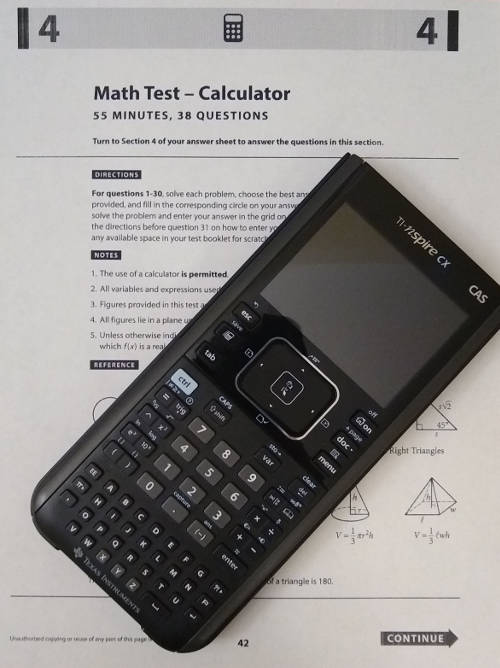
- Calculators with computer algebra system (CAS) functionality that can perform symbolic manipulation: While some advanced graphing calculators do have CAS, the SAT allows them only if the CAS function is disabled or if it’s not a prominent feature that grants an unfair advantage. It’s best to check specific model lists. For instance, TI-Nspire CX CAS is generally prohibited unless in “Press-to-Test” mode, while the TI-Nspire CX (non-CAS) is fine.
Understanding these technical boundaries is the first step in making an informed choice. It’s not just about what a calculator can do, but what it’s allowed to do within the test environment.
Key Features to Look For (and Avoid)
Once you know what’s forbidden, you can focus on the beneficial technological features. For the SAT Math sections, especially the calculator-permitted part, look for devices that offer:
- Clear display: A large, easy-to-read screen is essential, especially for graphing functions or complex calculations. High-resolution displays can reduce eye strain and misinterpretation.
- Efficient input: An intuitive button layout and a responsive keypad minimize errors and speed up calculations. Look for well-spaced buttons and logical function groupings.
- Fraction capabilities: The ability to input and output fractions directly is a huge time-saver and reduces errors when converting decimals.
- Graphing functionality: For graphing calculators, features like zooming, tracing, finding intercepts, and analyzing functions are invaluable for certain problems.
- Matrix and vector operations: While less common, some advanced problems might benefit from these capabilities.
- Statistical functions: Mean, median, standard deviation, and regression analysis can be very helpful for data interpretation problems.
- Solver function: The ability to numerically solve equations can be a massive advantage for certain algebraic problems.
Conversely, avoid overly complex interfaces that might confuse you under pressure, or features you won’t use that add unnecessary cost and complexity.
Battery Life and Reliability: An Essential Tech Consideration
This is often overlooked but critically important. Your chosen calculator is a piece of hardware, and like all hardware, it needs power. Ensure your device has:
- Long-lasting battery: Graphing calculators, with their larger screens and processing power, typically consume more battery than scientific ones. Check battery type (AAA, rechargeable) and typical lifespan.
- Reliable power source: Always start the SAT with fresh batteries or a fully charged rechargeable unit. Carry spare batteries if your calculator uses disposable ones.
- Robust construction: A calculator that can withstand typical student use without glitches is vital. Dropping your calculator on test day could be disastrous if it’s flimsy.
This isn’t just about having the right tech, but having functional tech when it matters most.
Exploring the Calculator Arsenal: Scientific vs. Graphing
The core decision for many students boils down to two main types of calculators: scientific and graphing. Both have their technological merits and drawbacks, depending on your mathematical comfort level and strategic approach to the SAT.
Scientific Calculators: The Foundational Powerhouses
Scientific calculators are compact, affordable, and proficient at a wide range of mathematical operations. Their tech is geared towards numerical computations rather than visual representations.
- Pros:
- Cost-effective: Significantly cheaper than graphing calculators.
- Compact and lightweight: Easy to handle.
- Permitted everywhere: No issues with SAT policy.
- Core functions: Handle exponents, logarithms, trigonometry, roots, and basic statistics efficiently.
- Cons:
- No graphing: Cannot visually represent functions, which can be a disadvantage for certain geometry and algebra problems.
- Limited display: Often a single-line or small multi-line display, making complex expressions harder to review.
- Slower for iterative tasks: Operations like finding roots of polynomials or solving systems of equations might require more manual steps.
For students who are confident in their algebraic manipulation and don’t rely on visual aids for functions, a high-quality scientific calculator like the Casio fx-115ES Plus or TI-36X Pro can be more than sufficient. Their efficient processing of numerical data makes them incredibly useful.
Graphing Calculators: Unlocking Advanced Visualizations
Graphing calculators represent a significant leap in computational technology, offering graphical representation alongside numerical capabilities. They are essentially specialized mini-computers designed for mathematical exploration.
- Pros:
- Visual problem-solving: Crucial for problems involving functions, inequalities, geometry, and data interpretation. You can literally see the solutions or relationships.
- Advanced features: Equation solvers, matrix operations, statistical regressions, and more complex programming features are common.
- Efficiency: Can often solve complex equations or systems of equations with fewer manual steps.
- Versatility: Useful beyond the SAT for higher-level math courses (Precalculus, Calculus, Statistics).
- Cons:
- Higher cost: Can be a significant investment.
- Steeper learning curve: Requires dedicated practice to master its extensive features.
- Potential for policy issues: Some advanced models or specific modes might be prohibited (as discussed earlier).
- Larger and heavier: Less portable than scientific calculators.
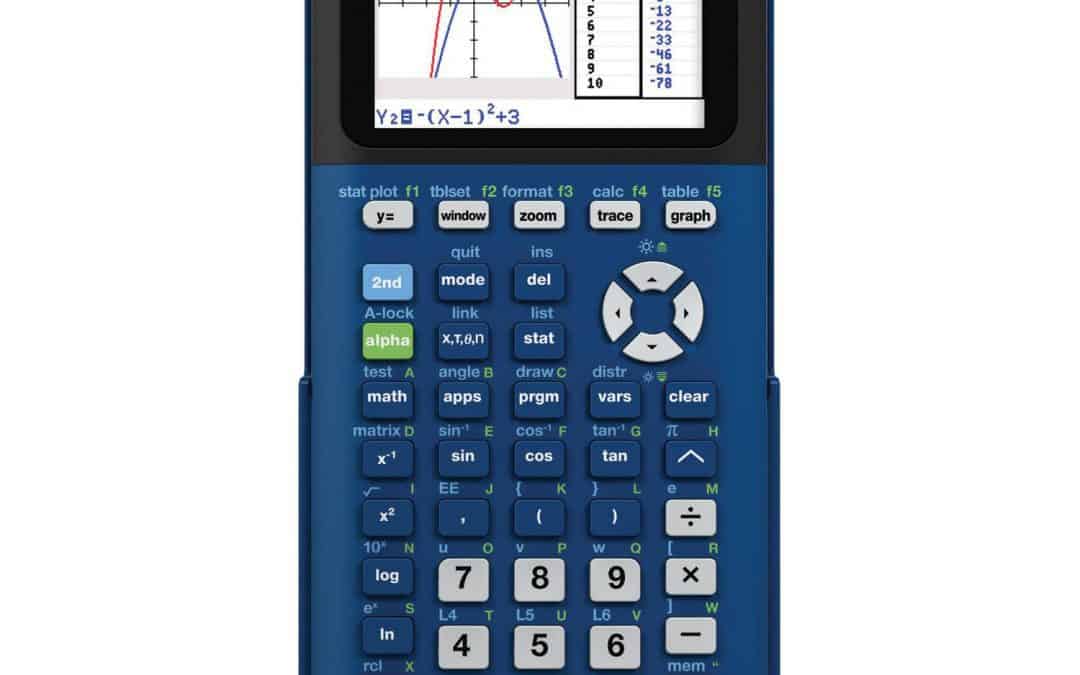
Models like the Texas Instruments TI-84 Plus CE or the Casio fx-9750GII (or fx-CG50) are industry standards, known for their robust functionality and relatively user-friendly interfaces, offering a powerful technological edge.
Specialized Features and Their SAT Relevance
Beyond the basic type, consider specific tech features that resonate with SAT Math:
- Input/Output: Look for “natural display” or “MathPrint” features that show equations as they would appear in a textbook, enhancing readability and reducing input errors.
- Equation Solver: A built-in solver can quickly find roots of polynomials or solutions to complex equations, a massive time-saver for certain SAT questions.
- Statistics Package: Essential for data analysis questions, which are present on the SAT. Being able to calculate mean, median, standard deviation, and perform linear regression quickly is a distinct advantage.
- Connectivity: While prohibited during the test, features like USB connectivity for transferring programs or updating firmware before the test can be useful for customization or ensuring your calculator is up-to-date.
Choosing between a scientific and graphing calculator largely depends on your comfort level with math and your willingness to invest time in learning a more advanced device. For many, the graphing calculator’s visual capabilities offer a clear technological advantage on the SAT.
Top Calculator Recommendations and Their Technical Prowess
Having identified the types and features, let’s look at specific models that consistently perform well and are widely accepted for the SAT.
Graphing Calculator Giants: Texas Instruments and Casio
These two brands dominate the graphing calculator market for good reason, offering reliable and feature-rich devices.
- Texas Instruments TI-84 Plus CE: This is arguably the most popular graphing calculator for the SAT and ACT.
- Technical Prowess: Features a vibrant, high-resolution color display, making graphs and data plots exceptionally clear. Its user interface is well-established, with tons of online tutorials and resources. It boasts excellent battery life (rechargeable), a fast processor, and a wide array of pre-loaded applications for algebra, geometry, statistics, and finance. Its “MathPrint” feature allows for natural input/output.
- SAT Relevance: Ideal for visualizing functions, solving systems of equations, performing statistical analysis, and working with matrices. Its widespread use means many teachers are familiar with it, facilitating learning.
- Casio fx-CG50 (PRIZM): A formidable competitor to the TI-84 Plus CE.
- Technical Prowess: Also features a high-resolution color display, often praised for its intuitive icon-based menu system and fast processing. It excels in 3D graphing capabilities (though less relevant for SAT) and natural textbook display. It offers comprehensive functions for algebra, calculus, geometry, and statistics.
- SAT Relevance: Provides similar advantages to the TI-84 Plus CE in terms of graphical problem-solving and advanced computational tools. Some users find its interface more modern and user-friendly.
Both models are excellent choices, offering robust technology to handle any SAT Math challenge. The choice often comes down to personal preference for interface and existing familiarity.
Reliable Scientific Options for Simpler Needs
For those preferring a scientific calculator, specific models stand out for their advanced features within their category.
- Texas Instruments TI-36X Pro:
- Technical Prowess: Features a multi-line “MathPrint” display that shows fractions, exponents, and roots as they appear in textbooks. It includes a robust polynomial solver, system of equations solver, vector/matrix capabilities, and excellent statistical functions. It’s powered by solar energy with battery backup.
- SAT Relevance: Offers many advanced problem-solving tools usually found in graphing calculators, but without the graphing capability or the higher price point. It’s an incredibly powerful scientific calculator for numerical tasks.
- Casio fx-115ES Plus 2nd Edition:
- Technical Prowess: Similar to the TI-36X Pro, it offers a natural textbook display, comprehensive scientific functions, equation solvers, and statistical calculations. It’s solar-powered with battery backup.
- SAT Relevance: A strong, reliable, and affordable option for students who need sophisticated numerical computing without the visual component.
These scientific calculators are far more advanced than basic four-function models, providing significant technological assistance for the SAT without breaking the bank or requiring extensive learning.
Navigating Used vs. New: Firmware and Functionality Checks
When considering a calculator purchase, especially a graphing one, the decision between new and used can be economical. However, buying used demands a careful technical check:
- Firmware: Ensure the calculator’s operating system (firmware) is up-to-date. Older firmware might lack newer features or have bugs. Most graphing calculators can be updated via a computer and USB cable.
- Battery Health: For rechargeable models, check the battery life. A worn-out battery could be a major issue.
- Screen Condition: Look for dead pixels, scratches, or fading.
- Button Responsiveness: Test every button to ensure it functions correctly and isn’t sticky.
- Overall Functionality: Perform a series of complex calculations and graphing tasks to verify all features work as expected.
A used calculator can be a great value, but only if its technical integrity is verified.
Mastering Your Device: Beyond Just Having the Right Tech
Possessing the most advanced calculator is only half the battle. True mastery comes from understanding how to leverage its technology effectively and efficiently under timed test conditions.
Practice and Familiarization: Software Proficiency is Key
Your calculator is a tool, and like any tool, proficiency comes with practice.
- Early Integration: Start using your chosen calculator well before the SAT, ideally as soon as you begin your test preparation.
- Solve Practice Problems: Use it for all your SAT math practice problems. Don’t save it just for specific “calculator-active” sections; integrate it into your general math studies.
- Learn Shortcuts: Graphing calculators, especially, have numerous shortcuts and specialized functions. Learning these can save precious seconds on test day. Understand how to quickly graph, find intercepts, use the table feature, and access equation solvers.
- Explore Features: Don’t just stick to the basics. Delve into the manual or online tutorials to discover all the relevant features your calculator offers. Many students underutilize the powerful technology they have at their fingertips.
Familiarity reduces anxiety and increases speed and accuracy, turning your calculator into a seamless extension of your problem-solving process.
Utilizing Calculator Features Strategically
Not every problem requires a calculator, and some are designed to be solved more quickly without one. Strategic use is critical.
- When to Use It:
- Complex arithmetic: Large numbers, fractions, decimals.
- Graphing questions: To visualize functions, find intersections, roots, and analyze graphs.
- Statistical analysis: To quickly compute means, medians, standard deviations, and regressions.
- Equation solving: For complex algebraic equations or systems that are time-consuming to solve manually.
- Checking answers: As a quick verification tool after manual calculation.
- When to Skip It:
- Simple arithmetic: Don’t waste time inputting 2+2.
- Conceptual problems: Questions testing mathematical principles rather than computation.
- Mental math is faster: If you can solve it in your head or with quick paper-and-pencil work, do so.
The goal isn’t to use the calculator for everything, but to intelligently deploy its technological capabilities where it offers the most significant advantage.
Troubleshooting Tips and Test-Day Tech Preparedness
On test day, even the best technology can encounter issues. Preparedness is key.
- Fresh Batteries/Full Charge: This cannot be stressed enough. Always insert new alkaline batteries or fully charge your rechargeable calculator the night before.
- Clear Memory (Optional but Recommended): For graphing calculators, consider clearing the memory to ensure no stray programs or data interfere with performance, especially if you borrowed it.
- Physical Check: Ensure the screen is clean, buttons are free, and there’s no physical damage.
- Know Basic Resets: Understand how to perform a soft reset if your calculator freezes.
- Backup Plan: While not always feasible, having a second, simpler scientific calculator as a backup (checked for functionality) is an ideal, albeit cautious, approach. If your primary calculator fails mid-test, you might be able to borrow a basic scientific one from a proctor, but don’t count on it.
Your calculator is your technological partner for the SAT Math section. Treat it with care and ensure its readiness.
The Future of Test Calculators: Digital Integration and Accessibility
The landscape of standardized testing is evolving, with more tests moving towards digital platforms. This shift brings new considerations for calculator technology.
On-Screen Calculators and Digital Test Formats
The College Board is already transitioning the SAT to a fully digital format globally by 2023 and in the U.S. by 2024. This digital format integrates an on-screen graphing calculator directly into the testing platform.
- Impact: This means students will no longer need to bring their own physical calculators. The digital platform will provide a consistent calculator experience for all test-takers, often modeled after popular graphing calculators like the Desmos graphing calculator, which is widely used in education.
- Preparation: Students still need to learn how to effectively use a graphing calculator, but their focus will shift to mastering the software interface provided on the digital test rather than a physical device. Practicing with the specific digital calculator provided by the College Board (via their Bluebook app) will be crucial.
- Accessibility: Integrated digital calculators can offer enhanced accessibility features, such as larger text, contrast adjustments, and compatibility with screen readers, which physical devices often lack.
This transition marks a significant technological shift, moving from personal hardware to standardized software integration.
Accessibility Features in Modern Calculators
Beyond the digital shift, modern physical calculators themselves often include accessibility features:
- High-contrast screens: Easier for students with visual impairments.
- Larger fonts: Improving readability.
- Tactile feedback: Helping students with motor skill challenges.
While the SAT has specific policies for accommodations, choosing a calculator that inherently offers some accessibility features can be beneficial during preparation.
Preparing for an Evolving Tech Landscape
As tests become more digitally integrated, the emphasis will move from choosing the right physical gadget to mastering the digital tools provided. Students should:
- Stay Informed: Keep abreast of College Board announcements regarding digital test formats and integrated calculator features.
- Practice with Digital Tools: Utilize any official practice platforms or apps that mimic the digital testing environment and its calculator.
- Focus on Foundational Skills: Regardless of the calculator type (physical or digital), a strong grasp of mathematical concepts remains paramount. The calculator is a tool, not a substitute for understanding.
The future points to a more standardized, digitally integrated calculator experience, but the core need for technological proficiency remains.
Conclusion
Choosing the right calculator for the SAT is a critical technical decision that can significantly impact your performance. It’s not just about selecting a device but understanding the College Board’s technological restrictions, appreciating the unique capabilities of scientific versus graphing calculators, and then mastering your chosen tool through dedicated practice. Whether you opt for a powerful graphing calculator like the TI-84 Plus CE or a robust scientific one like the TI-36X Pro, the key is to be familiar with its features, use them strategically, and ensure its reliability on test day. As testing evolves into a digital format, the focus will shift from hardware selection to mastering integrated software, but the principle remains the same: leverage the available technology wisely to maximize your SAT success.
aViewFromTheCave is a participant in the Amazon Services LLC Associates Program, an affiliate advertising program designed to provide a means for sites to earn advertising fees by advertising and linking to Amazon.com. Amazon, the Amazon logo, AmazonSupply, and the AmazonSupply logo are trademarks of Amazon.com, Inc. or its affiliates. As an Amazon Associate we earn affiliate commissions from qualifying purchases.