
In the intricate tapestry of modern technology, where data is the lifeblood of nearly every application, there exist crucial, often invisible, components that ensure this vital flow. One such foundational element is the Data Source Name, or DSN. For developers, database administrators, and IT professionals, understanding what a DSN is, how it functions, and its role in connecting applications to databases is not merely an advantage—it’s an absolute necessity.
The question “what is your current DSN?” might sound simple, but its implications span from a single user’s desktop application to complex enterprise systems, cloud environments, and sophisticated data analytics platforms. A DSN acts as an abstraction layer, a configured pointer that contains all the necessary information for an application to connect to a database without hardcoding every detail into the application itself. This seemingly small detail has profound impacts on flexibility, security, and maintainability across the entire tech stack.
This article will delve into the world of DSNs, exploring their definition, importance, various types, and practical applications. We’ll uncover how they streamline database connections, enhance security, and contribute to the robustness of data-driven systems. By the end, you’ll not only grasp the technicalities of DSNs but also appreciate their strategic value in the ever-evolving landscape of data connectivity.
The Unseen Backbone: Understanding What a DSN Truly Is
At its core, a DSN is a symbolic name that represents a connection to a specific data source. Rather than requiring applications to store and manage a myriad of parameters like server names, database names, authentication credentials, and driver details directly, a DSN provides a standardized, abstracted way to refer to these connections. It’s like a phone book entry for a database: you dial a name, and the system knows all the underlying numbers and settings to make the call.
Definition and Core Functionality
A Data Source Name (DSN) encapsulates a collection of configuration parameters that define a unique path to a database. These parameters typically include:
- Database Type: e.g., SQL Server, MySQL, PostgreSQL, Oracle, SQLite.
- Server Name or IP Address: The location of the database server.
- Database Name: The specific database instance on the server.
- Authentication Details: Username and password, or other authentication methods.
- Driver Information: The specific ODBC (Open Database Connectivity) or JDBC (Java Database Connectivity) driver required to communicate with the database.
- Port Number: The network port the database listens on.
- Other Driver-Specific Options: Encryption settings, connection timeouts, character sets, etc.
When an application wants to connect to a database, it simply references the DSN by its symbolic name. The operating system or the connection manager then looks up this name, retrieves the stored configuration parameters, and uses them to establish the connection via the appropriate database driver. This separation of connection details from the application code is a cornerstone of good software architecture.
Why DSNs Matter in Data-Driven Applications
The utility of DSNs extends far beyond mere convenience. They introduce several critical advantages for building and maintaining robust data-driven applications:
- Abstraction and Flexibility: Applications don’t need to be rewritten or recompiled if database connection details change. Updates can be made to the DSN configuration, and all applications using that DSN will automatically connect to the new location or with the new credentials. This is invaluable in development, testing, and production environments where database instances might frequently move or be replicated.
- Security: By externalizing connection strings, DSNs can help prevent sensitive information like passwords from being hardcoded into application source code. While DSNs themselves can store credentials, they are often managed by system administrators in secure configurations, and modern practices increasingly leverage secure vaults or environment variables.
- Maintainability and Centralization: DSNs offer a centralized point for managing database connections. This simplifies troubleshooting, auditing, and updating connection parameters across multiple applications or services that rely on the same database.
- Standardization: Especially with ODBC, DSNs provide a standardized interface for various applications (from Excel to custom enterprise software) to connect to disparate databases without needing specific database knowledge programmed into each application.
DSN vs. Connection String: Clarifying the Nuance
It’s common to hear the terms “DSN” and “connection string” used somewhat interchangeably, but there’s a subtle yet important distinction. A connection string is the literal string of parameters that an application uses to connect to a database. It explicitly contains all the details: Driver={SQL Server};Server=myServer;Database=myDB;Uid=myUser;Pwd=myPassword;.
A DSN, on the other hand, is a named reference to a stored connection string (or its equivalent parameters). When you configure a DSN, you are essentially creating a symbolic name for a specific set of connection string parameters. An application might then use DSN=myAppDataSource; instead of the full explicit string. While a DSN uses connection string parameters internally, it abstracts them behind a user-friendly name, making it a more indirect and often more manageable method of connection. In some contexts, particularly with programmatic connections, developers might bypass DSNs entirely and just use direct connection strings. Both serve the same ultimate purpose but differ in their level of abstraction and management.
Types of DSNs: A Spectrum of Connectivity
The world of DSNs isn’t monolithic; different types cater to various use cases, scope, and portability requirements. The most common distinctions arise within the Open Database Connectivity (ODBC) standard, a widely adopted API for accessing database management systems (DBMS).
User DSN: Personal and Practical
A User DSN is specific to a particular user account on a single machine. It is typically stored in the user’s profile and is only accessible by that user when logged into that specific computer.
- Use Cases: Ideal for individual developers, data analysts, or end-users who need to connect to a database from their workstation for personal tasks, reporting, or development work. For instance, a data analyst might set up a User DSN to connect their Excel spreadsheets or BI tools to a specific data warehouse.
- Advantages: Simple to set up, confined scope prevents unintended interference with other users or system services.
- Limitations: Not accessible by other users on the same machine, nor by system services running under different accounts. Not portable to other machines.
System DSN: Shared and Persistent
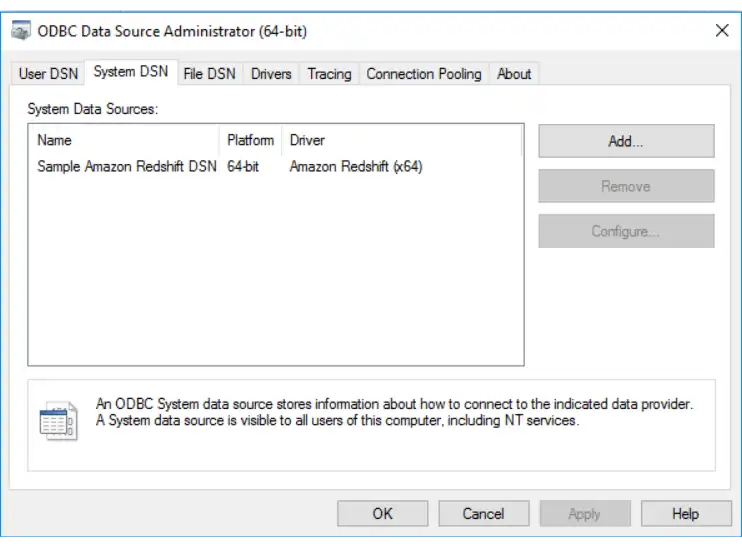
A System DSN is configured for an entire machine and is accessible by all users on that machine, as well as by system services (like web servers, scheduled tasks, or Windows services) that run on that computer, regardless of the user logged in. It is stored in the system registry (on Windows).
- Use Cases: Essential for server-side applications, web servers (e.g., IIS, Apache), application servers, and background services that need consistent database access without being tied to a specific interactive user session. If a web application needs to connect to a database, it would typically use a System DSN.
- Advantages: Machine-wide availability, ideal for server applications, persistent even when no user is logged in.
- Limitations: Requires administrative privileges to configure. Less portable than File DSNs.
File DSN: Portable and Flexible
Unlike User or System DSNs, which are stored in the system registry, a File DSN stores connection information in a simple text file (with a .dsn extension). This file contains the same parameters as a registry-based DSN but in a human-readable format.
- Use Cases: Excellent for sharing database connection configurations between different machines or users without reconfiguring registry entries. Useful in development environments where multiple developers need to use the same database connection string, or for deploying applications where the connection parameters are consistent but need to be easily distributed.
- Advantages: Highly portable, easy to share, simple to edit with a text editor, can be stored in source control.
- Limitations: The DSN file itself might contain sensitive information (though this can be mitigated by omitting credentials and prompting the user). Requires the client application to know the path to the DSN file.
Driver-Specific DSNs and Their Evolution
While ODBC DSNs are widely prevalent, it’s important to note that the concept of abstracting connection details extends to other connectivity standards and database ecosystems. JDBC (Java Database Connectivity), for instance, uses a similar concept where applications provide a URL-like string to connect to a database, often configured in external property files or application servers rather than a global DSN manager. Modern databases and cloud services increasingly favor direct connection strings or environment variables for specifying connection details, especially in containerized or serverless environments, moving away from system-wide DSN configurations. However, the underlying principle of abstracting connection details remains paramount.
Setting Up and Managing Your DSNs: A Practical Guide

Configuring and managing DSNs is a fundamental task for anyone working with data. While the specifics can vary slightly depending on the operating system and database type, the general principles remain consistent.
Configuring a DSN (Windows Example – ODBC)
On Windows, ODBC DSNs are managed through the “ODBC Data Source Administrator.” You can find this by searching for “ODBC Data Sources” in the Start Menu.
- Open ODBC Data Source Administrator: Select the 32-bit or 64-bit version depending on your application’s architecture.
- Choose DSN Type: Navigate to the “User DSN,” “System DSN,” or “File DSN” tab.
- Add New DSN: Click “Add…” to start the configuration wizard.
- Select Driver: Choose the appropriate ODBC driver for your database (e.g., “SQL Server,” “MySQL ODBC 8.0 Unicode Driver,” “PostgreSQL Unicode(x64)”).
- Configure Driver Settings: This is where you provide the core connection parameters:
- Data Source Name: The symbolic name your applications will use (e.g.,
MyWebAppDB). - Description: An optional descriptive text.
- Server: The database server’s name or IP address.
- Database: The specific database you wish to connect to.
- Authentication: Specify how the connection will be authenticated (Windows Authentication, SQL Server Authentication, etc.).
- Test Connection: Always use the “Test Connection” button to ensure your DSN configuration is correct before saving.
- Data Source Name: The symbolic name your applications will use (e.g.,
Programmatic DSNs (Connection Strings in Code)
While GUI-based DSNs are common for system-wide configurations, developers often use connection strings directly within their application code or configuration files. This is particularly prevalent in modern web development frameworks, ORMs (Object-Relational Mappers), and cloud-native applications.
- Example (Python with SQLAlchemy):
python

from sqlalchemy import create_engine

# Direct connection string

db_connection_str = 'mysql+mysqlconnector://user:password@host/dbname'

engine = create_engine(db_connection_str)

# Using a DSN name (if configured system-wide)

# db_connection_str = 'odbc://mySystemDSN'

# engine = create_engine(db_connection_str)
- Example (.NET with ADO.NET):
csharp

string connectionString = "Data Source=myServerAddress;Initial Catalog=myDataBase;Integrated Security=True";

// Or, referring to a DSN

// string connectionString = "DSN=mySystemDSN";

using (SqlConnection connection = new SqlConnection(connectionString))

{

    connection.Open();

    // ... perform database operations

}
These programmatic approaches offer fine-grained control and can integrate better with application deployment pipelines, especially when connection details are pulled from environment variables or secure configuration stores.
Best Practices for DSN Management
- Version Control for File DSNs: If using File DSNs, treat them like code and commit them to your version control system (Git) to track changes and facilitate team collaboration.
- Centralized Management: For enterprise environments, consider using configuration management tools or environment variable services to manage connection strings and DSN parameters centrally.
- Principle of Least Privilege: Configure DSNs with credentials that have only the necessary permissions on the database. Avoid using administrative accounts for application connections.
- Consistent Naming Conventions: Establish clear and consistent naming conventions for your DSNs (e.g.,
App_Production_DB,Reporting_Staging_Warehouse) to improve clarity and reduce confusion. - Documentation: Document your DSN configurations, including their purpose, associated applications, and any specific requirements.
Security, Performance, and Troubleshooting DSNs
While DSNs offer significant benefits, their configuration and management require attention to security, performance, and the ability to diagnose common issues.
Securing Your Data Connections
The security of your DSNs is paramount, as they are direct gateways to your databases.
- Credential Management:
- Avoid Storing Passwords in Plain Text: Where possible, avoid storing passwords directly within the DSN configuration, especially for File DSNs. Modern practices prefer using Integrated Security (Windows Authentication), Kerberos, or external secure credential vaults (e.g., Azure Key Vault, AWS Secrets Manager, HashiCorp Vault) that applications can query at runtime.
- Strong Passwords: If passwords must be stored, ensure they are strong, complex, and regularly rotated.
- Network Security:
- Firewalls: Configure network firewalls to restrict database access only to the necessary application servers and IP addresses.
- Encryption: Ensure that connections configured via DSNs use encryption (e.g., SSL/TLS) to protect data in transit between the application and the database.
- Access Control: Apply the principle of least privilege to the database user accounts associated with your DSNs. Grant only the minimum permissions required for the application’s function.
Performance Considerations
While DSNs themselves don’t inherently introduce significant performance overhead, how they are used can impact application responsiveness.
- Connection Pooling: Ensure your application or framework is utilizing connection pooling. Re-establishing a database connection for every query is expensive. Connection pooling allows applications to reuse existing, open connections, significantly improving performance. DSNs, by abstracting the connection details, facilitate the configuration of connection pooling parameters.
- Driver Selection: Choose the most efficient and up-to-date ODBC or JDBC driver for your specific database. Outdated or poorly optimized drivers can introduce performance bottlenecks.
- Network Latency: Be mindful of the physical distance and network latency between your application server and the database server. A well-configured DSN won’t mitigate inherent network slowness.
Common DSN Issues and Their Resolutions
Troubleshooting DSN-related problems is a common task. Here are some typical issues and how to approach them:
- “DSN Not Found” Error:
- Cause: The DSN name used by the application doesn’t exist or is misspelled.
- Resolution: Verify the DSN name in the application’s configuration and compare it exactly with the name configured in the ODBC Data Source Administrator (for Windows DSNs) or the file name (for File DSNs).
- “Login Failed” or “Access Denied”:
- Cause: Incorrect username/password, insufficient database permissions for the DSN’s associated user, or the user account is locked.
- Resolution: Double-check credentials. Verify that the user associated with the DSN has
CONNECT,SELECT,INSERT,UPDATE,DELETE(as needed) permissions on the database and specific tables. Check database logs for login failure details.
- “Driver Not Found” or “Specified Driver Could Not Be Loaded”:
- Cause: The required ODBC or JDBC driver is not installed on the machine where the application is running, or the DSN is configured to use a driver that doesn’t exist.
- Resolution: Install the correct database driver. Ensure the DSN is configured to use the installed driver version.
- Network Connectivity Issues:
- Cause: Firewall blocking the connection, database server is down, incorrect server name/IP address, or incorrect port.
- Resolution: Ping the database server’s IP address. Check firewall rules on both the client and server. Verify the server name and port in the DSN configuration. Check if the database service is running.
The Future of Data Connectivity: Beyond Traditional DSNs
While traditional DSNs remain relevant, especially in legacy systems and certain enterprise environments, the landscape of data connectivity is continuously evolving.
Cloud Databases and Serverless Functions
In cloud environments (AWS, Azure, GCP), managed database services often provide highly secure and dynamic connection mechanisms. Serverless functions (like AWS Lambda or Azure Functions) typically use environment variables or secret management services to inject connection strings at runtime, moving away from static DSN configurations. This approach offers greater agility, scalability, and security in dynamic cloud infrastructures.
Containerization and Orchestration
Container technologies (Docker) and orchestration platforms (Kubernetes) have fundamentally changed how applications are deployed and scaled. In these environments, connection details are often passed into containers via environment variables, Kubernetes secrets, or injected from service mesh configurations. This allows for highly portable and isolated application instances where database connections are dynamically configured based on the deployment environment.
The Enduring Principles
Despite these technological shifts, the core principles that DSNs embody—abstraction, externalization of connection details, and separation of concerns—remain crucial. Whether it’s a traditional ODBC DSN, a JDBC URL in an application server, an environment variable in a Docker container, or a secret fetched from a cloud vault, the goal is always the same: to provide a robust, secure, and flexible way for applications to connect to their data sources without embedding sensitive or environment-specific information directly into the code.
Conclusion
“What is your current DSN?” is a question that opens the door to understanding a fundamental aspect of data management and application development. From the individual developer setting up a personal connection to the vast enterprise managing hundreds of applications, Data Source Names (and their modern equivalents) serve as the unseen backbone, enabling seamless and secure communication between applications and the databases that power them.
By providing an abstraction layer, DSNs offer unparalleled flexibility, simplify management, and enhance the security posture of data connections. While the specific implementation and terminology may evolve with new technologies like cloud computing and containerization, the underlying concept of externalizing and managing connection parameters remains a critical best practice. Mastering DSNs and similar connectivity paradigms is not just about technical competence; it’s about building resilient, maintainable, and secure data-driven systems ready for the challenges of today and tomorrow.
aViewFromTheCave is a participant in the Amazon Services LLC Associates Program, an affiliate advertising program designed to provide a means for sites to earn advertising fees by advertising and linking to Amazon.com. Amazon, the Amazon logo, AmazonSupply, and the AmazonSupply logo are trademarks of Amazon.com, Inc. or its affiliates. As an Amazon Associate we earn affiliate commissions from qualifying purchases.