
In the ever-evolving landscape of home networking, understanding the various components and features of your router can significantly enhance your connectivity experience, as well as your digital security. Among the many acronyms and buttons that adorn modern routers, “WPS” often sparks curiosity. If you’ve ever wondered what the WPS key on your router is, how it works, and whether you should be using it, you’ve come to the right place. This article will delve into the intricacies of Wi-Fi Protected Setup (WPS), providing a comprehensive understanding of its purpose, functionality, and implications for your home network.
Understanding Wi-Fi Protected Setup (WPS)
Wi-Fi Protected Setup, commonly abbreviated as WPS, is a networking standard designed to simplify the process of establishing a secure wireless connection between a router and client devices. Introduced by the Wi-Fi Alliance in 2007, its primary objective was to make connecting to a Wi-Fi network as effortless as pressing a button, eliminating the need for users to manually enter complex Wi-Fi passwords (WPA2/WPA3 keys). This was particularly beneficial in an era when Wi-Fi passwords could be notoriously long and difficult to remember, especially on devices with limited input capabilities like printers or smart home devices.
At its core, WPS aims to address the user-friendliness aspect of Wi-Fi connectivity. Before WPS, connecting a new device to a secured Wi-Fi network typically involved accessing the router’s administrative interface, locating the Wi-Fi security settings, and then manually typing in the network’s SSID (network name) and password on the device you wanted to connect. This process could be cumbersome and prone to errors, especially for less tech-savvy individuals. WPS was envisioned as a plug-and-play solution, allowing users to connect their devices with minimal technical knowledge.
The Genesis of WPS: Simplifying Wireless Security
The proliferation of wireless networks in homes and offices brought with it a growing need for a simpler way to manage network access. While the security protocols like WEP (Wired Equivalent Privacy) and later WPA (Wi-Fi Protected Access) were being developed to secure wireless communications, the user experience of connecting devices remained a significant hurdle. Early security protocols were often vulnerable, and even with the more robust WPA and WPA2, entering long, complex passwords was a barrier to widespread adoption and ease of use.
The Wi-Fi Alliance, a global non-profit organization that owns the Wi-Fi trademark, recognized this challenge. They set out to create a standard that would allow for quick and easy association of devices with a Wi-Fi network without requiring the user to have in-depth knowledge of network security configurations. This led to the development of WPS, which was integrated into many routers and client devices as a feature to streamline this process. The goal was to make connecting to Wi-Fi as intuitive as plugging in a USB device.
How WPS Works: Mechanisms for Connection
WPS facilitates connections through a few distinct methods, each with its own approach to authenticating devices without direct password entry. These methods generally fall into two primary categories: Push Button Connect (PBC) and PIN (Personal Identification Number) entry.
Push Button Connect (PBC)
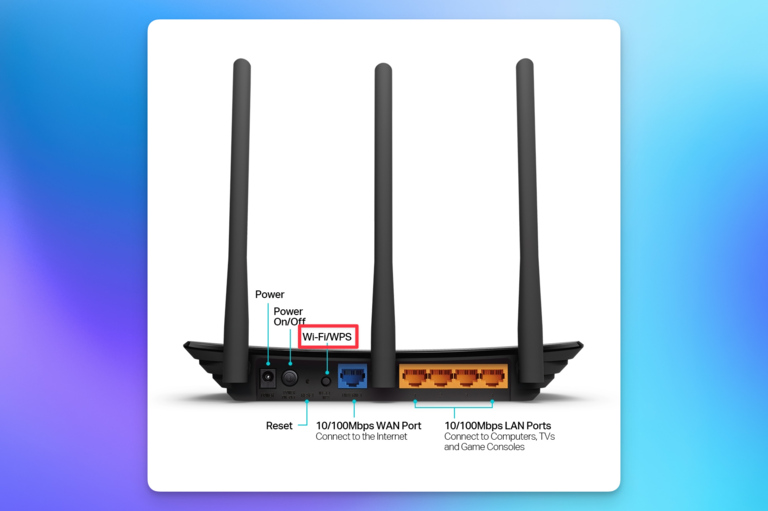
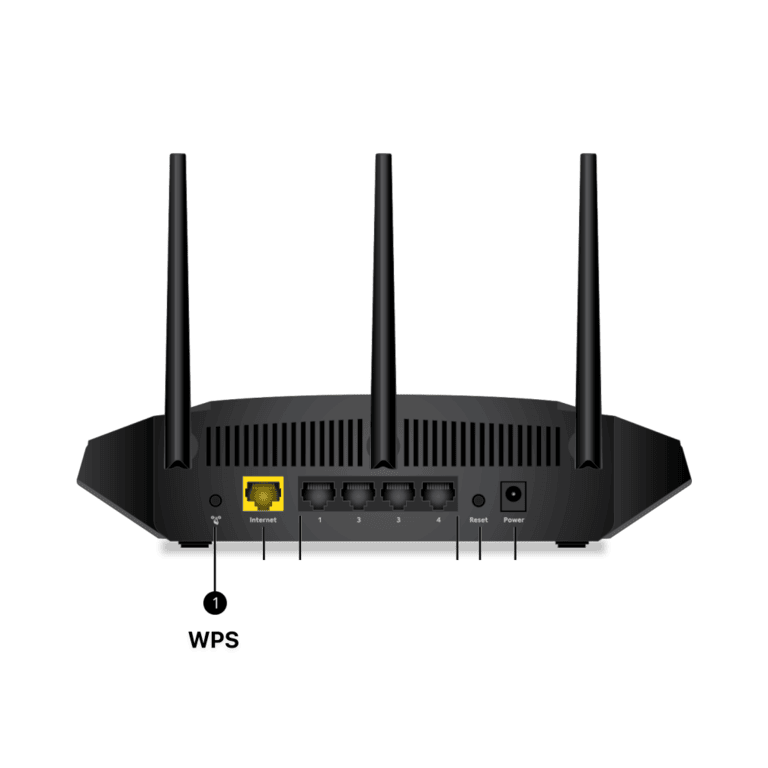
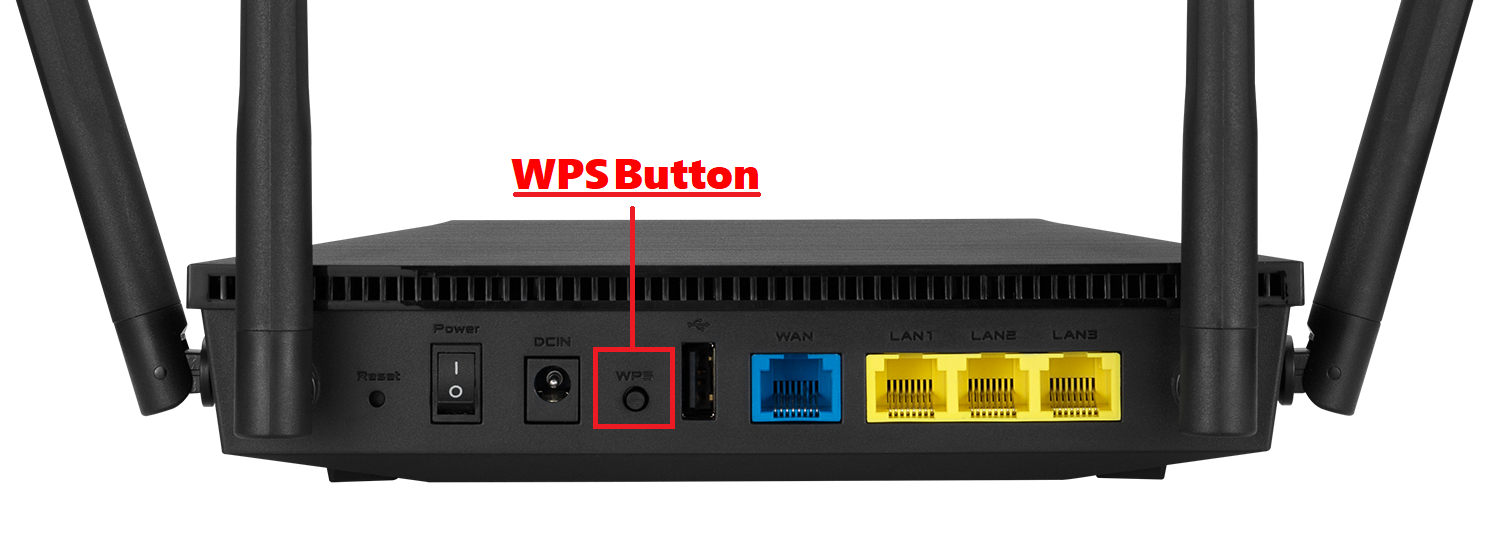
The most common and arguably the most user-friendly WPS method is Push Button Connect. This feature is typically represented by a physical button on your router, often labeled “WPS” or with a similar icon. When you initiate a connection using PBC on a client device (like a new smartphone, laptop, or smart TV), it enters a discovery mode. Simultaneously, you would press the WPS button on your router. The router and the client device then communicate for a limited window of time (usually around two minutes). During this period, they exchange information necessary to establish a secure connection. The router effectively transmits its network credentials to the client device, and the client device, upon successful authentication, is granted access to the network. No manual password entry is required. This method is ideal for quick, in-person connections.
PIN Entry
Another WPS method involves using a PIN. There are two variations of the PIN method:
- Router’s PIN: In this scenario, your router has a unique WPS PIN associated with it, often found on a sticker on the router itself or accessible through its web interface. You would then enter this PIN into the client device you wish to connect. The client device sends this PIN to the router, which verifies it and, if correct, grants access.
- Client Device’s PIN: Conversely, the client device might generate its own unique WPS PIN. You would then access your router’s settings (usually through a web browser) and navigate to the WPS configuration page. There, you would enter the PIN provided by the client device. The router then authenticates the device and allows it to connect.
While the PIN method offers an alternative to physical proximity required by PBC, it can be less intuitive and still involves a degree of manual input, albeit not the Wi-Fi password itself.
The Role of the WPS Key on Your Router
The term “WPS key” can sometimes be a source of confusion. In the context of WPS, there isn’t a single, universally defined “key” in the same way that a WPA2/WPA3 password acts as a key to encrypt your network traffic. Instead, “WPS key” can refer to a few different things depending on the method being used.
When people refer to the “WPS key,” they are often thinking of the PIN associated with the WPS functionality. As explained above, this PIN can be generated by the router or the client device. The router’s PIN is a static identifier, similar to a serial number for WPS, that helps it authenticate devices trying to connect via the PIN method. The client device’s PIN is a dynamic, temporary code generated specifically for that connection attempt.
In the case of Push Button Connect, there isn’t a numerical or alphanumeric “key” to enter. The “key” to the connection is the act of pressing the physical WPS button on both the router and the client device within the designated time frame. This physical action serves as the authorization signal, initiating the secure handshake process between the two devices.
It’s important to differentiate the WPS PIN from your actual Wi-Fi password (WPA2/WPA3 key). Your Wi-Fi password is used to encrypt all wireless traffic on your network. The WPS PIN, on the other hand, is primarily used as a mechanism to authenticate a device for a single connection session to your Wi-Fi network. Once the device is connected, it will typically store your Wi-Fi password for future automatic connections.
WPS PIN vs. Wi-Fi Password: A Critical Distinction
The distinction between a WPS PIN and your Wi-Fi password is fundamental to understanding network security. Your Wi-Fi password is the encryption key for your entire network. Anyone who knows this password can decrypt your data and gain access to your network. This password should be kept secure and shared only with trusted individuals.
The WPS PIN, however, functions as a temporary authentication token. When you use the PIN method, you are essentially proving to the router that you have authorization to connect. Once the connection is established, the device will then typically retrieve and store your actual Wi-Fi password from the router, allowing it to reconnect automatically in the future. This means that while the WPS PIN itself doesn’t grant direct access to your encrypted traffic, it can be an entry point for unauthorized devices to gain access to your network if not managed properly.
The Physical WPS Button: Triggering the Connection
The physical WPS button on your router is the most visible and commonly used aspect of WPS for many users. Its presence signifies that your router supports the Push Button Connect method. When you need to connect a new device and want to leverage the simplicity of WPS, you’ll locate this button. Pressing it initiates a timer on the router, signaling that it’s ready to accept a WPS connection request. This button is your direct physical interface for engaging with the WPS protocol.
Benefits and Drawbacks of Using WPS
Like most technologies, WPS offers a set of advantages that made it popular, but it also comes with significant security considerations that users should be aware of. Understanding these pros and cons is crucial for making an informed decision about whether to enable and use WPS on your home network.
Advantages: Convenience and Simplicity
The primary advantage of WPS is its unparalleled convenience. For users who are not technically inclined or who simply want the quickest way to connect a new device, WPS is a game-changer.
- Effortless Device Connection: For devices that support WPS, connecting them to your network becomes as simple as pressing a button or entering a short PIN. This eliminates the hassle of navigating complex menus and typing long passwords, especially on devices like printers, smart appliances, gaming consoles, or older smart TVs that might have less user-friendly interfaces for network setup.
- No Need to Remember Passwords: WPS bypasses the need for users to constantly recall their Wi-Fi password when setting up new devices. This can be a significant relief for many individuals who struggle to remember complex alphanumeric passwords.
- Improved Accessibility: It democratizes Wi-Fi access by making it accessible to a wider range of users, including those with disabilities or those who find complex technical procedures challenging.
The ease of use provided by WPS can significantly reduce frustration and technical support calls related to Wi-Fi setup.
Drawbacks: Security Vulnerabilities
Despite its convenience, WPS has been a subject of significant security scrutiny due to inherent vulnerabilities that can be exploited by malicious actors. These vulnerabilities have led many security experts to recommend disabling WPS altogether.
- PIN Brute-Force Attacks: The most significant vulnerability lies within the WPS PIN mechanism. The PIN is typically an 8-digit number, and the protocol is designed to verify the first four digits and then the last four digits separately. This means an attacker doesn’t need to guess all 8 digits at once. They can use automated tools to systematically try combinations of the first four digits, and if successful, then try combinations for the remaining four. This brute-force attack can be completed in a matter of hours, allowing an attacker to discover your WPS PIN and subsequently gain access to your Wi-Fi network.
- Exposure of Network Credentials: Once an attacker successfully exploits the WPS PIN vulnerability, they can obtain your Wi-Fi password and gain full access to your network. This can lead to a host of security risks, including unauthorized access to your devices, data theft, and using your internet connection for illicit activities.
- Lack of Encryption for WPS Handshake: In some older implementations of WPS, the initial handshake process for establishing a connection might not have been as robustly encrypted as the full WPA2/WPA3 encryption. While modern implementations have improved, the vulnerability in the PIN guessing remains a primary concern.
- Physical Access Advantage: While the PIN attack is remote, the physical WPS button (PBC) can also pose a risk if an unauthorized individual has physical access to your router and knows you are attempting to add a device. They could potentially press the button themselves during your connection attempt and gain access.
Due to these security risks, many network administrators and security professionals strongly advise against using WPS, especially the PIN method.
Modern Router Practices and WPS Alternatives
Given the security concerns associated with WPS, modern router manufacturers and security best practices are increasingly shifting towards more secure and user-friendly alternatives for network setup and device connection.
The Trend Towards Disabling WPS
Many router manufacturers now provide an option to disable WPS entirely through the router’s web interface. This is often the default setting on newer routers, reflecting the industry’s acknowledgment of the security risks. If your router has WPS enabled by default, it is highly recommended that you log into its administrative settings and disable it, particularly if you do not actively use the feature or if you have previously used the PIN method. This simple step significantly enhances your network’s security by removing a common attack vector.
Secure Alternatives for Device Connectivity
Fortunately, the landscape of Wi-Fi device connection has evolved, offering secure and convenient alternatives to WPS.
- WPA3 Security: The latest Wi-Fi security standard, WPA3, offers enhanced protection, including stronger encryption and improved handshake protocols. Devices supporting WPA3 provide a more secure connection experience.
- Mobile Apps and Manufacturer Portals: Many smart home devices, IoT gadgets, and even laptops and smartphones now come with dedicated mobile apps or web portals from their manufacturers. These apps guide users through the setup process, often involving temporary direct Wi-Fi connections to the device itself for initial configuration, or by securely retrieving the network credentials from your smartphone when it’s already connected to your home Wi-Fi.
- Bluetooth Pairing: Some devices utilize Bluetooth for the initial handshake and configuration of Wi-Fi credentials. This allows for a secure pairing process before the device connects to your Wi-Fi network.
- On-Device Setup (ODS): Many modern devices feature an “on-device setup” process where the device’s interface guides you through connecting to your Wi-Fi network without relying on WPS. This usually involves selecting your network and entering your password directly on the device’s screen or through a companion app.
By embracing these modern alternatives and disabling WPS, you can maintain a secure and robust home network while still enjoying the convenience of easy device connectivity. Understanding the nuances of your router’s features, including the WPS key and its implications, is a vital step in safeguarding your digital life.
aViewFromTheCave is a participant in the Amazon Services LLC Associates Program, an affiliate advertising program designed to provide a means for sites to earn advertising fees by advertising and linking to Amazon.com. Amazon, the Amazon logo, AmazonSupply, and the AmazonSupply logo are trademarks of Amazon.com, Inc. or its affiliates. As an Amazon Associate we earn affiliate commissions from qualifying purchases.