
In the intricate world of network infrastructure, efficient management of Virtual Local Area Networks (VLANs) is paramount for creating segmented, secure, and high-performing networks. As organizations scale and their network topologies grow more complex, the manual configuration of VLANs across dozens, or even hundreds, of switches becomes an error-prone and time-consuming endeavor. This challenge is precisely what the VLAN Trunking Protocol (VTP) was designed to address.
VTP is a Cisco proprietary messaging protocol that allows network administrators to manage VLAN definitions across a switched network centrally. By enabling switches to share VLAN configuration information, VTP significantly reduces the administrative overhead associated with maintaining consistent VLAN configurations, thereby enhancing network reliability and streamlining operational tasks.
The Foundation: Understanding VLANs and Trunks
Before diving deep into VTP, it’s essential to grasp the fundamental concepts of VLANs and trunking, as VTP operates directly on these principles.
The Problem VLANs Solve
Traditionally, a Local Area Network (LAN) was a single broadcast domain, meaning all devices connected to it could receive each other’s broadcast traffic. While simple, this architecture posed significant issues:
-
Security: Any device on the network could potentially access any other device.
-
Performance: Broadcast storms could cripple network performance, especially in larger networks.
-
Scalability: Adding new departments or users often meant physical rewiring or creating new, isolated networks.
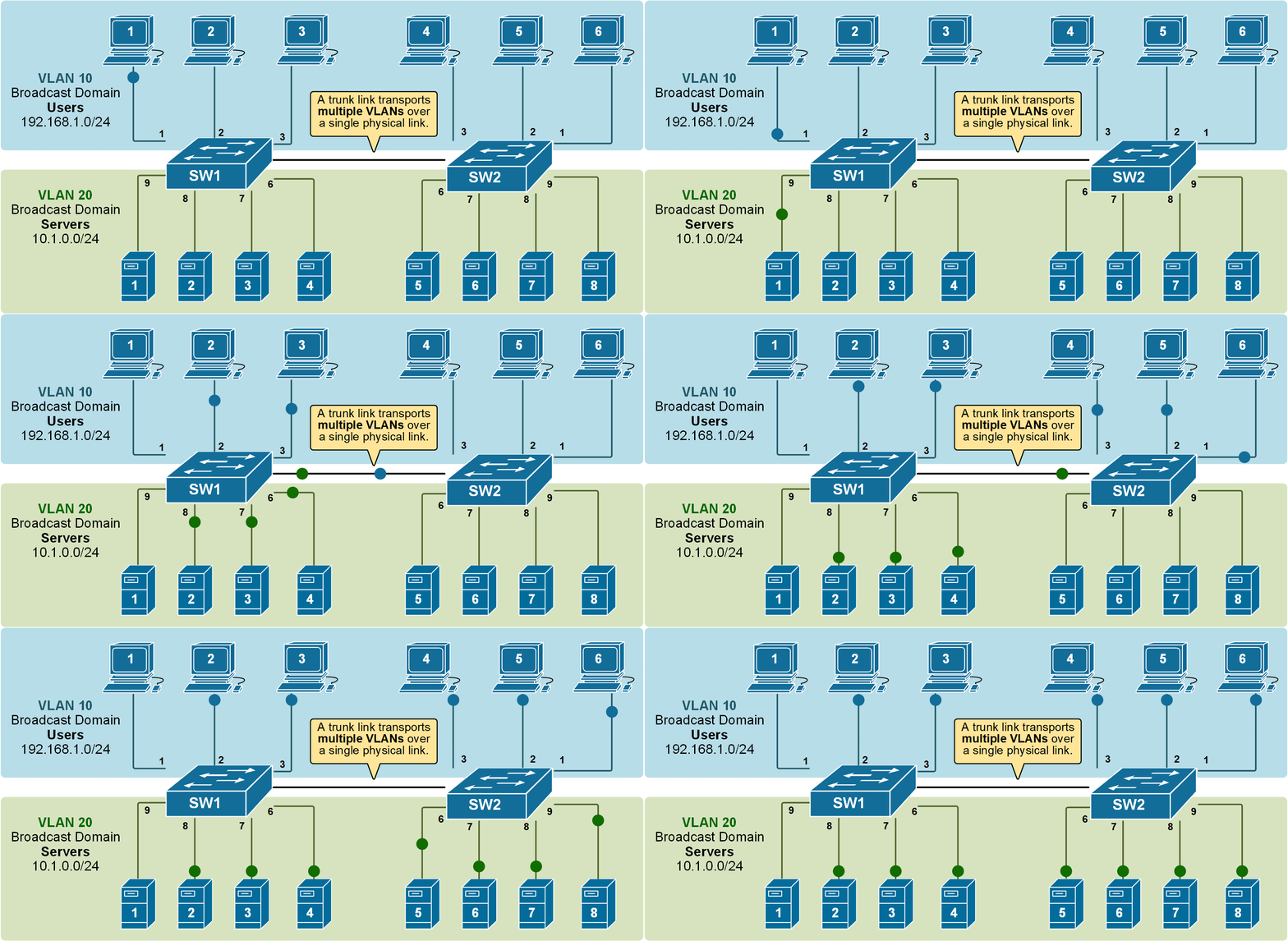
VLANs address these problems by logically segmenting a single physical network into multiple distinct broadcast domains. Devices within the same VLAN can communicate as if they are on the same physical segment, even if they are physically connected to different switches. Devices in different VLANs, however, cannot communicate directly and require a Layer 3 device (a router or Layer 3 switch) to route traffic between them.
How VLANs Work: Segmentation and Broadcast Domains
At its core, a VLAN works by tagging Ethernet frames with a VLAN ID (typically using the IEEE 802.1Q standard). When a switch receives a frame, it inspects the VLAN ID and forwards the frame only to ports configured for that specific VLAN. This creates the logical segmentation, ensuring that broadcast traffic for one VLAN does not propagate to another.
Consider an office building with different departments: HR, Finance, and IT. By placing all HR devices into VLAN 10, Finance devices into VLAN 20, and IT devices into VLAN 30, each department gets its own isolated network segment. This separation enhances security, prevents cross-departmental broadcast storms, and allows for more granular traffic management.
The Role of Trunk Links
While VLANs segment a single switch, a crucial aspect of enterprise networks is interconnecting multiple switches. This is where trunk links come into play. A trunk link is a point-to-point link between two switches (or a switch and a router) that carries traffic for multiple VLANs. Instead of dedicating a separate physical link for each VLAN between switches, a trunk link efficiently aggregates traffic.
When a frame traverses a trunk link, it is typically “tagged” with its corresponding VLAN ID. This tagging allows the receiving switch to identify which VLAN the frame belongs to and forward it to the appropriate destination port. Without trunk links, managing VLANs across an interconnected network would be incredibly cumbersome, requiring an exponential number of cables and ports.
Delving into VLAN Trunking Protocol (VTP)
With a solid understanding of VLANs and trunking, we can now appreciate the value and function of VTP. VTP streamlines the management of VLANs across an entire switched network by propagating VLAN configuration changes from a central switch to all other switches in the VTP domain.
What VTP Does: Centralized VLAN Management
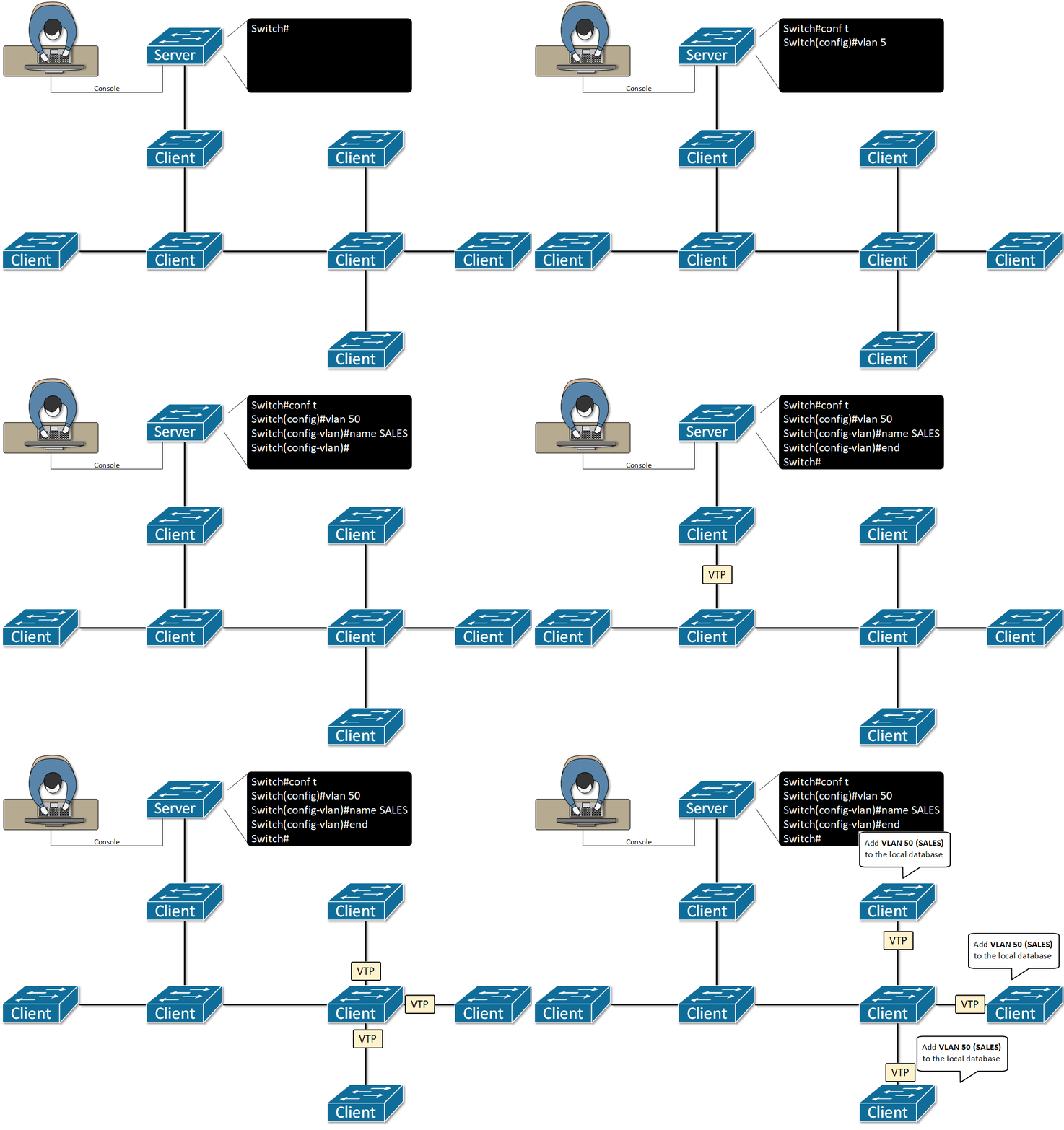
VTP eliminates the need to manually create, modify, or delete VLANs on every single switch in your network. Instead, you perform these actions on a designated VTP server switch, and VTP automatically communicates these changes to all other VTP-enabled switches in the same domain. This centralization ensures consistency, reduces human error, and saves significant administrative time.
For example, if you need to add VLAN 40 (Marketing) to your network, you only create it once on the VTP server. All other VTP client switches will then learn about VLAN 40 and be ready to accept devices assigned to it.
The VTP Domain: A Unified Configuration
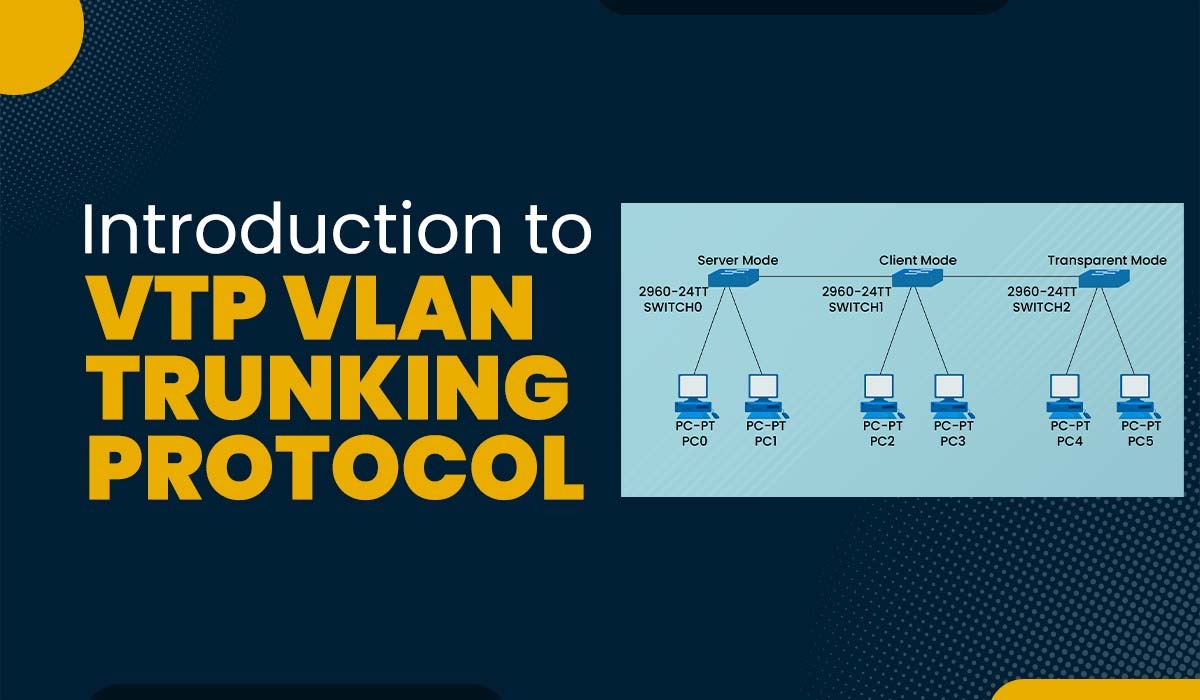
A VTP domain is a group of switches that share the same VTP domain name and collectively manage VLAN information. All switches within a VTP domain maintain a consistent VLAN database. Changes made on one switch in server mode within the domain are advertised to all other switches in the same domain.
Crucially, switches must have the same VTP domain name to exchange VTP advertisements. This acts as a security and isolation mechanism, preventing switches from one domain from inadvertently learning or overwriting VLAN configurations from another.
VTP Modes: Server, Client, and Transparent
VTP operates in three distinct modes, each dictating how a switch interacts with the VTP domain:
Server Mode: The Command Center
A switch configured in VTP server mode can create, modify, and delete VLANs. It saves these VLAN configurations in its NVRAM (Non-Volatile RAM) and propagates them to all other switches in the same VTP domain. Most importantly, a VTP server also processes incoming VTP advertisements from other servers (if multiple exist) and synchronizes its database. Typically, there is at least one VTP server in a domain.
Client Mode: Following Orders
A switch in VTP client mode cannot create, modify, or delete VLANs. Its sole purpose is to listen for VTP advertisements from a VTP server, update its own VLAN database based on those advertisements, and then forward the advertisements out its trunk ports. Client switches also save VLAN configurations in their NVRAM, but they cannot initiate changes.
Transparent Mode: Independent Operation
A switch in VTP transparent mode neither participates in the VTP domain nor learns VLAN information from VTP advertisements. It maintains its own independent VLAN database, which can be configured locally. However, a transparent mode switch will still forward VTP advertisements it receives out of its trunk ports, allowing other switches in the domain to receive updates. Switches in transparent mode do not update their revision number, nor do they synchronize with other switches based on VTP advertisements.
VTP Advertisements and Synchronization
VTP advertisements are multicast messages sent periodically (every 5 minutes) and immediately after a change, containing the VTP domain name, revision number, and the complete VLAN configuration. The revision number is critical: when a VTP server makes a change, it increments its revision number. Client switches (and other servers) compare their local revision number with the incoming advertisement. If the incoming advertisement has a higher revision number, the switch updates its VLAN database to match. This mechanism ensures that all switches converge to the most recent configuration.
VTP Pruning: Optimizing Bandwidth
VTP Pruning is an optional feature that can significantly optimize network bandwidth usage. Without pruning, if a broadcast or unknown unicast frame is sent in a specific VLAN, it is flooded across all trunk ports, even if no device on the receiving switch belongs to that VLAN. This wastes bandwidth on links that don’t need to carry that specific VLAN’s traffic.
VTP Pruning prevents unnecessary flooding by ensuring that broadcast, unknown unicast, and multicast traffic for a specific VLAN is only sent across trunk links that have active ports associated with that VLAN on the receiving switch. This makes more efficient use of trunk bandwidth and reduces the overall network load.
Advantages and Disadvantages of Using VTP
Like any networking protocol, VTP offers distinct benefits but also presents potential drawbacks that network administrators must consider.
Key Benefits: Efficiency and Consistency
-
Simplified Management: The primary advantage is the centralized management of VLANs, drastically reducing the manual effort required in large networks.
-
Reduced Configuration Errors: By propagating changes automatically, VTP minimizes the likelihood of human error that can occur when manually configuring VLANs on multiple switches, leading to consistent configurations across the network.
-
Faster Deployment: New VLANs can be rolled out across the entire network quickly and efficiently.
-
Consistent VLAN Naming: Ensures that VLAN names and IDs are uniform throughout the VTP domain.
-
VTP Pruning: Optimizes bandwidth utilization on trunk links by restricting unnecessary traffic.
Potential Drawbacks: Configuration Risks and Security Concerns
-
Single Point of Failure (Conceptual): While not a true single point of failure (multiple servers can exist), an accidental misconfiguration on a VTP server can propagate throughout the entire domain, potentially causing widespread network disruption.
-
Revision Number Overwrite: This is the most significant risk. If an old switch with a high VTP revision number (from a previous network or an old backup) is mistakenly introduced into a live VTP domain in server mode, it can overwrite the entire VLAN database of the domain with its outdated configuration, leading to service outages.
-
Security Vulnerabilities: VTP lacks strong authentication by default. While a VTP password can be configured, basic VTP versions do not encrypt VLAN information, making it susceptible to eavesdropping. VTP version 3 (VTPv3) offers enhanced security features, including secret password hashing and authentication for private VLANs.
-
Cisco Proprietary: VTP is a Cisco-proprietary protocol, meaning it only works with Cisco switches. This can be a limitation in multi-vendor environments.
Best Practices and Alternatives to VTP
Given VTP’s power and its potential pitfalls, careful implementation and consideration of alternatives are crucial.
Secure VTP Implementation
To mitigate the risks associated with VTP, consider these best practices:
-
Limit VTP Servers: Designate only one or two switches as VTP servers in your domain. Configure all other switches as VTP clients or transparent.
-
Use VTP Passwords: Always configure a VTP password. This helps prevent unauthorized switches from joining the domain and receiving or propagating VLAN changes.
-
Enable VTP Version 3 (VTPv3): If your hardware supports it, VTPv3 offers significant improvements in security (e.g., secret passwords, enhanced authentication), support for extended VLANs (1006-4094), and private VLANs.
-
Careful Introduction of Switches: Before connecting any new or factory-reset switch to a VTP-enabled network, ensure its VTP domain name, password, and mode are correctly configured, or set it to transparent mode initially. Check its VTP revision number carefully.
-
Backup Configurations: Regularly back up the VLAN database configurations of your VTP server switches.
When to Use (and Not to Use) VTP
VTP is most beneficial in medium to large-scale homogenous Cisco networks where rapid, consistent VLAN deployment and changes are frequent. It significantly reduces administrative overhead in such scenarios.
However, in smaller networks, highly secure environments, or multi-vendor networks, the risks associated with VTP (especially the revision number issue) might outweigh the benefits. In these cases, manual VLAN configuration is often preferred.
Manual VLAN Configuration: The Reliable Alternative
For many network engineers, especially in environments where extreme caution is prioritized, manual VLAN configuration on each switch is the preferred approach. While more time-consuming initially, it eliminates the risks associated with VTP’s automatic propagation of changes. Each switch’s VLAN database is configured independently, providing absolute control and preventing a single misconfiguration from affecting the entire network. This is often recommended in scenarios where the network design is relatively static or changes are infrequent.
Other Network Management Protocols
While VTP is widely known, other protocols exist for various aspects of network management. For instance, Generic VLAN Registration Protocol (GVRP) (and its successor, Multiple VLAN Registration Protocol (MVRP)) is an IEEE standard protocol that dynamically registers VLANs on trunk ports. Unlike VTP, which propagates the entire VLAN database, GVRP allows switches to dynamically negotiate which VLANs are active on a trunk link, offering a more standards-based alternative for dynamic VLAN management in certain contexts. However, its adoption is less widespread than VTP, particularly in Cisco-centric environments.
Configuring VTP: A Practical Overview
While this article doesn’t delve into specific CLI commands, understanding the conceptual steps for configuring VTP is important.
Setting Up a VTP Domain
The first step is to define the VTP domain name on your intended VTP server switch. All other switches in the domain must then be configured with the exact same domain name.
Assigning VTP Modes
Next, you’ll configure each switch to its appropriate VTP mode: server for the central management switch(es), client for switches that will learn VLANs, and transparent for switches that operate independently but still forward VTP advertisements.
VTP Password and Versioning
For security, a VTP password should be configured on all switches within the domain. For optimal functionality and security, enable the highest VTP version supported by your hardware, preferably VTPv3. This ensures that the protocol operates with the most advanced features and mitigations against common VTP issues.
In essence, successful VTP configuration hinges on meticulous planning, consistent application of domain names and passwords, and a clear understanding of the revision number’s role.
Conclusion
VLAN Trunking Protocol (VTP) stands as a powerful tool in the arsenal of network administrators managing complex switched environments. By centralizing VLAN creation, modification, and deletion, it offers significant benefits in terms of efficiency, consistency, and reduced operational overhead. However, its power comes with responsibilities, notably the potential for widespread disruption if not implemented with careful planning, robust security measures, and a keen awareness of its operational nuances, particularly the revision number mechanism.
For organizations running predominantly Cisco hardware and seeking to streamline VLAN management across numerous switches, VTP remains a compelling solution when configured according to best practices, leveraging features like VTPv3 and VTP pruning. Yet, for those prioritizing absolute control, operating in multi-vendor environments, or managing smaller, more static networks, the trusted method of manual VLAN configuration or other standards-based alternatives might prove to be the more prudent choice. Ultimately, the decision to deploy VTP should be based on a thorough understanding of an organization’s specific network requirements, risk tolerance, and administrative capabilities.
aViewFromTheCave is a participant in the Amazon Services LLC Associates Program, an affiliate advertising program designed to provide a means for sites to earn advertising fees by advertising and linking to Amazon.com. Amazon, the Amazon logo, AmazonSupply, and the AmazonSupply logo are trademarks of Amazon.com, Inc. or its affiliates. As an Amazon Associate we earn affiliate commissions from qualifying purchases.