
React, with its declarative paradigm and component-based architecture, has revolutionized how modern web applications are built. At its core, React is designed to make UI development predictable and efficient by managing the state of your application and re-rendering components only when necessary. Central to this efficiency are React Hooks, introduced in version 16.8, which allow developers to use state and other React features in functional components without writing a class.
Among the pantheon of essential hooks, useRef stands out as a powerful yet often misunderstood tool. While useState is for managing reactive state that triggers re-renders, and useEffect handles side effects, useRef addresses a distinct set of challenges: persisting mutable values across component renders without triggering re-renders, and directly interacting with the underlying DOM elements. This article will delve deep into useRef, exploring its dual capabilities, practical applications, and best practices to help you wield this hook effectively in your React projects.
Understanding React Hooks and the Need for useRef
React Hooks have fundamentally changed the landscape of functional components, empowering them with capabilities previously exclusive to class components. To appreciate useRef, it’s crucial to understand the context of React’s rendering model and the problem useRef aims to solve.
The Core Principles of React Hooks
Before hooks, state and lifecycle methods were managed in class components. Functional components, while simpler, were primarily for presenting UI based on props. Hooks bridge this gap, allowing functional components to “hook into” React features. useState, for instance, gives functional components local state, useEffect handles side effects like data fetching or subscriptions, and useContext provides a way to consume context. Each of these hooks plays a specific role in making components dynamic and interactive.
When state managed by useState changes, React re-renders the component and its children (if necessary) to reflect the new state. This declarative approach is React’s strength, abstracting away direct DOM manipulation and focusing on what the UI should look like based on the application’s state.
The Challenge of Mutable Values and Re-renders
However, there are scenarios where you need to store a value that:
-
Persists across renders: It shouldn’t be re-initialized every time the component re-renders.
-
Doesn’t trigger a re-render when it changes: Unlike state, changes to this value shouldn’t cause the UI to update.
-
Needs to interact directly with the DOM: Sometimes, you need to reach beyond React’s virtual DOM and manipulate a real DOM node.
Regular JavaScript variables declared inside a functional component would be re-initialized on every render, making them unsuitable for persistence. useState would work for persistence, but its primary purpose is to trigger re-renders, which might be undesirable for values that are internal to a component’s logic and don’t directly affect the visual output. This is precisely where useRef shines. It provides a way to create a mutable “box” that can hold any value, and whose contents persist across renders without causing the component to re-render when those contents change.
The Dual Power of useRef: Mutable Values and DOM References
useRef is a versatile hook, primarily serving two distinct, yet related, purposes: storing mutable values akin to instance variables in class components, and providing direct access to DOM elements.
Storing Mutable Values (like Instance Variables)
When you call useRef(), it returns a plain JavaScript object with a single property called .current. This property is initialized with the argument you pass to useRef (or null if no argument is provided). The magic lies in two key characteristics:
-
Persistence: The
refobject itself persists for the entire lifetime of the component. This means its.currentproperty will retain its value across re-renders. -
Non-reactive: Changing the
.currentproperty does not trigger a re-render of the component. This is the crucial distinction fromuseState.
This makes useRef ideal for storing values that need to be mutable and persistent but don’t directly influence the component’s render output. Think of it as a place to keep “behind-the-scenes” data that your component needs to access and modify without constantly updating the UI.
Example: Tracking Render Counts
import React, { useRef, useEffect } from 'react';


function MyComponent() {

  const renderCount = useRef(0);


  useEffect(() => {

    renderCount.current = renderCount.current + 1;

    console.log(`Component rendered ${renderCount.current} times`);

  }); // No dependency array here, runs on every render


  return (

    <div>

      <p>Check the console for render count.</p>

      {/* You could display renderCount.current here, but it wouldn't update until the next render */}

    </div>

  );

}
In this example, renderCount.current updates on every render, but changing it doesn’t cause a new render cycle itself. If we used useState for renderCount, every update would trigger an infinite loop of re-renders.
Directly Interacting with the DOM
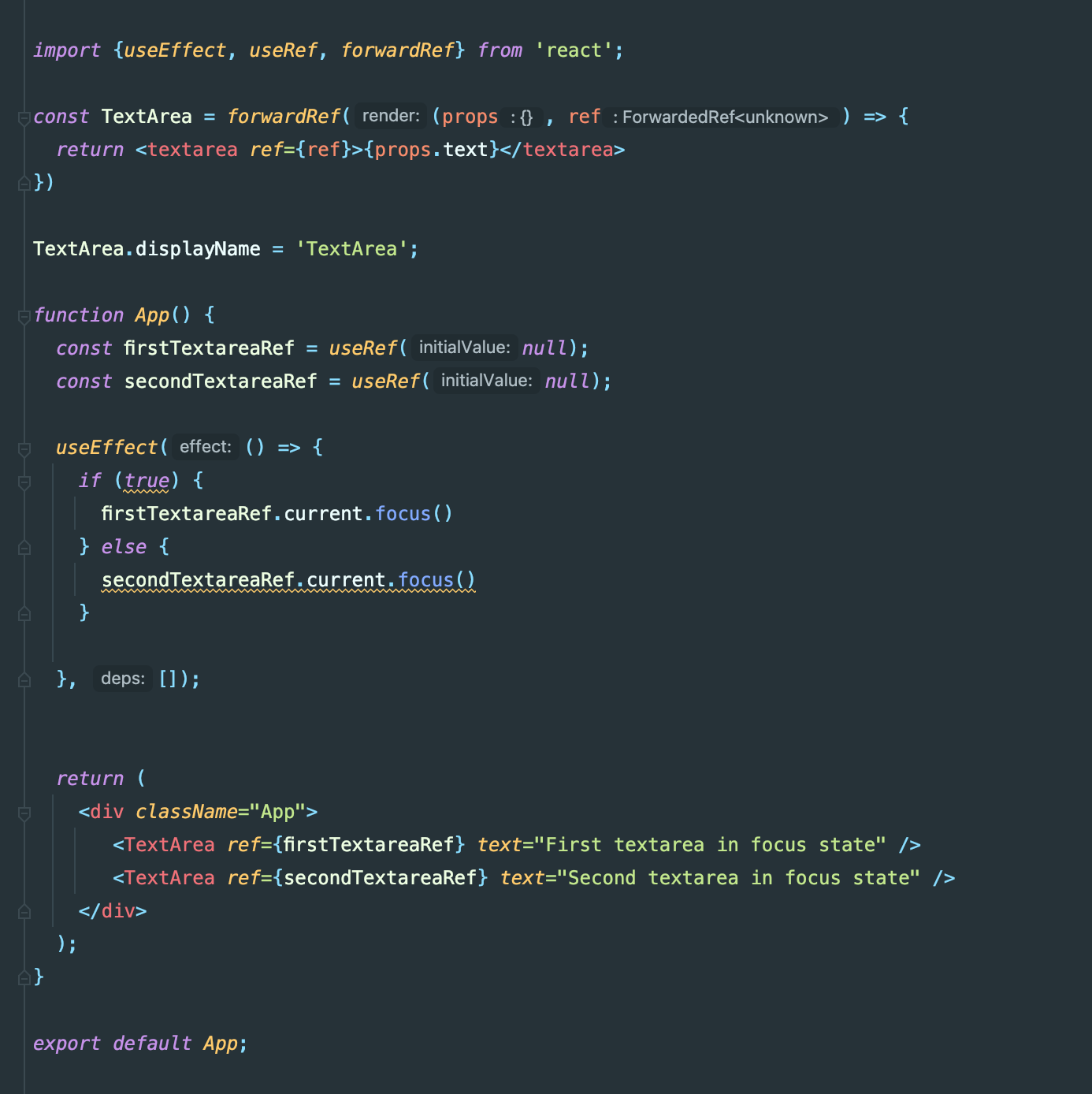
Perhaps the most common and intuitive use of useRef is to obtain a direct reference to a DOM element. While React’s declarative approach generally discourages direct DOM manipulation, there are legitimate scenarios where it becomes necessary. These often involve integrating with third-party libraries, managing focus, triggering media playback, or measuring element dimensions.
To get a DOM reference, you initialize useRef with null, then pass the ref object to the ref attribute of the JSX element you want to reference. React will automatically assign the actual DOM node to the .current property of your ref object once the component mounts.
Example: Focusing an Input Field
import React, { useRef } from 'react';


function FocusInput() {

  const inputRef = useRef(null);


  const handleFocusClick = () => {

    // inputRef.current will be the actual <input> DOM element

    if (inputRef.current) {

      inputRef.current.focus();

    }

  };


  return (

    <div>

      <input type="text" ref={inputRef} />

      <button onClick={handleFocusClick}>Focus Input</button>

    </div>

  );

}
Here, inputRef.current gives us direct access to the <input> element, allowing us to call its native focus() method. This kind of imperative interaction is precisely what useRef facilitates when working with the DOM.
Practical Applications and Code Examples
useRef is a fundamental tool for several common patterns in React development. Let’s explore some key use cases with illustrative examples.
Managing Timers and Intervals
When working with setTimeout or setInterval in useEffect, you often encounter issues with stale closures if the timer function needs to access current state or props. useRef can store the timer ID, allowing you to clear it reliably across re-renders and access the latest values without depending on useState to store the timer ID.
import React, { useState, useEffect, useRef } from 'react';


<p style="text-align:center;"><img class="center-image" src="https://kinsta.com/wp-content/uploads/2023/05/react-useref.jpg" alt=""></p>


function Timer() {

  const [count, setCount] = useState(0);

  const intervalRef = useRef(null); // To store the interval ID


  useEffect(() => {

    intervalRef.current = setInterval(() => {

      setCount(prevCount => prevCount + 1);

    }, 1000);


    return () => {

      // Cleanup: Clear the interval when the component unmounts or effect re-runs

      if (intervalRef.current) {

        clearInterval(intervalRef.current);

      }

    };

  }, []); // Empty dependency array means this effect runs once on mount


  const handleStop = () => {

    if (intervalRef.current) {

      clearInterval(intervalRef.current);

      intervalRef.current = null; // Optional: Reset ref after stopping

    }

  };


  return (

    <div>

      <h1>Count: {count}</h1>

      <button onClick={handleStop}>Stop Timer</button>

    </div>

  );

}
Here, intervalRef.current safely holds the setInterval ID, ensuring it can be cleared correctly even if the component re-renders.
Tracking Previous State or Props
It’s a common requirement to know what a piece of state or a prop was during the previous render. useRef is perfect for this, as it can store the value from the previous render cycle.
import React, { useState, useEffect, useRef } from 'react';


function PreviousValueTracker() {

  const [currentValue, setCurrentValue] = useState(0);

  const prevValueRef = useRef(currentValue); // Initialize with current value


  useEffect(() => {

    // After render, update prevValueRef to current value for the next render

    prevValueRef.current = currentValue;

  }); // No dependency array, runs after every render


  const prevValue = prevValueRef.current;


  return (

    <div>

      <p>Current Value: {currentValue}</p>

      <p>Previous Value: {prevValue}</p>

      <button onClick={() => setCurrentValue(currentValue + 1)}>Increment</button>

    </div>

  );

}
Note that prevValueRef.current holds the value from the previous render. On the first render, prevValue will be the same as currentValue because prevValueRef was initialized with it.
Implementing Focus Management
As seen previously, useRef is invaluable for programmatically controlling focus on input fields or other interactive elements. This is especially useful for accessibility, user experience, or handling form submissions.
import React, { useRef } from 'react';


function LoginForm() {

  const usernameInputRef = useRef(null);

  const passwordInputRef = useRef(null);


  const handleSubmit = (event) => {

    event.preventDefault();

    if (!usernameInputRef.current.value) {

      alert('Please enter a username.');

      usernameInputRef.current.focus();

      return;

    }

    if (!passwordInputRef.current.value) {

      alert('Please enter a password.');

      passwordInputRef.current.focus();

      return;

    }

    alert('Logged in!');

    // Typically, send data to a server here

  };


  return (

    <form onSubmit={handleSubmit}>

      <div>

        <label htmlFor="username">Username:</label>

        <input type="text" ref={usernameInputRef} />

      </div>

      <div>

        <label htmlFor="password">Password:</label>

        <input type="password" ref={passwordInputRef} />

      </div>

      <button type="submit">Login</button>

    </form>

  );

}
Storing Data That Doesn’t Drive UI Updates
Sometimes you have large objects, configurations, or cached data that a component needs but that don’t directly affect its visual output. Storing these in useRef prevents them from being redefined on every render (like a regular variable) and avoids unnecessary re-renders (like useState).
import React, { useRef, useState } from 'react';


const heavyConfig = {

  // A large, complex configuration object

  apiEndpoint: 'https://api.example.com',

  timeout: 5000,

  features: ['analytics', 'logging', 'feature-flags'],

  // ... many more properties

};


function SettingsComponent() {

  const configRef = useRef(heavyConfig); // Store the heavy config once

  const [theme, setTheme] = useState('light');


  const handleToggleTheme = () => {

    setTheme(prevTheme => (prevTheme === 'light' ? 'dark' : 'light'));

    // Access configRef.current without causing a re-render

    console.log("Current API endpoint:", configRef.current.apiEndpoint);

  };


  return (

    <div style={{ background: theme === 'light' ? '#fff' : '#333', color: theme === 'light' ? '#333' : '#fff' }}>

      <h1>Settings</h1>

      <p>Current Theme: {theme}</p>

      <button onClick={handleToggleTheme}>Toggle Theme</button>

      <p>API Endpoint from config: {configRef.current.apiEndpoint}</p>

    </div>

  );

}
configRef.current ensures that heavyConfig is stored and accessed efficiently without being re-evaluated on every render or causing redundant re-renders.
When to Use useRef (and When Not To)
While useRef is powerful, it’s essential to understand its intended use cases to avoid common anti-patterns and maintain a clean, idiomatic React codebase.
Best Practices for useRef
-
For Mutable, Non-Reactive Values: Use
useRefto store any value that needs to persist across renders but whose changes should not cause the component to re-render. This includes timer IDs, DOM nodes, previous state/props, or other mutable objects. -
For Direct DOM Interaction: Whenever you need to imperatively interact with a specific DOM element (e.g.,
focus(),play(),getBoundingClientRect(), integrating with non-React libraries),useRefis the go-to solution. -
Initialization: Initialize
useRefwith the desired initial value for its.currentproperty. For DOM refs,nullis the common starting point. -
Treat
.currentas Mutable: You are free to read and write toref.current. Just remember that React won’t react to these changes by re-rendering.
Common Pitfalls and Alternatives
-
Don’t Substitute for
useState: If changing a value should cause your component to re-render and update the UI, you should almost certainly be usinguseState. UsinguseReffor UI-driving state will lead to a non-reactive UI.// Anti-pattern: Don't use useRef for reactive data function BadExample() { const count = useRef(0); const increment = () => {count.current = count.current + 1; // UI won't update!};
return <button onClick={increment}>Count: {count.current}</button>;
}
-
Avoid Over-Reliance on Direct DOM Manipulation: React’s strength lies in its declarative nature. Most UI updates and interactions can, and should, be handled through state and props. Reserve direct DOM manipulation with
useReffor scenarios where the declarative approach is difficult or impossible. -
useRefDoesn’t Notify Changes: UnlikeuseStatesetters, changingref.currentdoesn’t provide a mechanism to notify other parts of your application or trigger effects. If you need to react to changes in aref‘s value, you might combine it withuseStateoruseEffect. For example, you could update auseStatevalue whenref.currentchanges, but this pattern is often a sign thatrefmight not be the primary tool for that specific use case. -
Consider
useCallbackanduseMemofor Performance: WhileuseRefhelps with values that don’t trigger re-renders,useCallbackanduseMemoare for optimizing functions and computationally expensive values that do participate in the render cycle. Don’t confuse their purposes.

Conclusion
useRef is an indispensable hook in the React ecosystem, providing a reliable mechanism for two crucial aspects of component development: managing mutable values that persist across renders without triggering updates, and gaining direct, imperative access to DOM elements. Its power lies in its ability to step outside React’s typical declarative flow when necessary, offering solutions for complex interactions, performance optimizations, and integrations with non-React functionalities.
By understanding its distinct purpose and adhering to best practices, developers can leverage useRef to write more robust, efficient, and well-behaved React applications. It’s not a replacement for useState or useEffect, but rather a complementary tool that, when used judiciously, completes the React Hooks toolkit, enabling you to tackle a wider array of front-end development challenges with confidence.