
In the modern digital landscape, we interact with thousands of unique identifiers every day, often without a second thought. Whether you are clicking a link in an email, scanning a QR code at a restaurant, or typing a search query into a browser, you are utilizing one of the most fundamental components of the internet: the URL. Standing for Uniform Resource Locator, a URL is much more than just a “web address.” It is the standardized naming convention that allows computers to locate and retrieve specific resources across the vast, decentralized network of the World Wide Web.

Understanding what a URL is and how it functions is essential for anyone looking to navigate the tech world, from casual users to aspiring developers. In this guide, we will break down the complex anatomy of a URL, explore the technical processes that occur when you hit “Enter,” and examine the best practices for security and structure in the digital age.
Decoding the Anatomy: The Structural Components of a URL
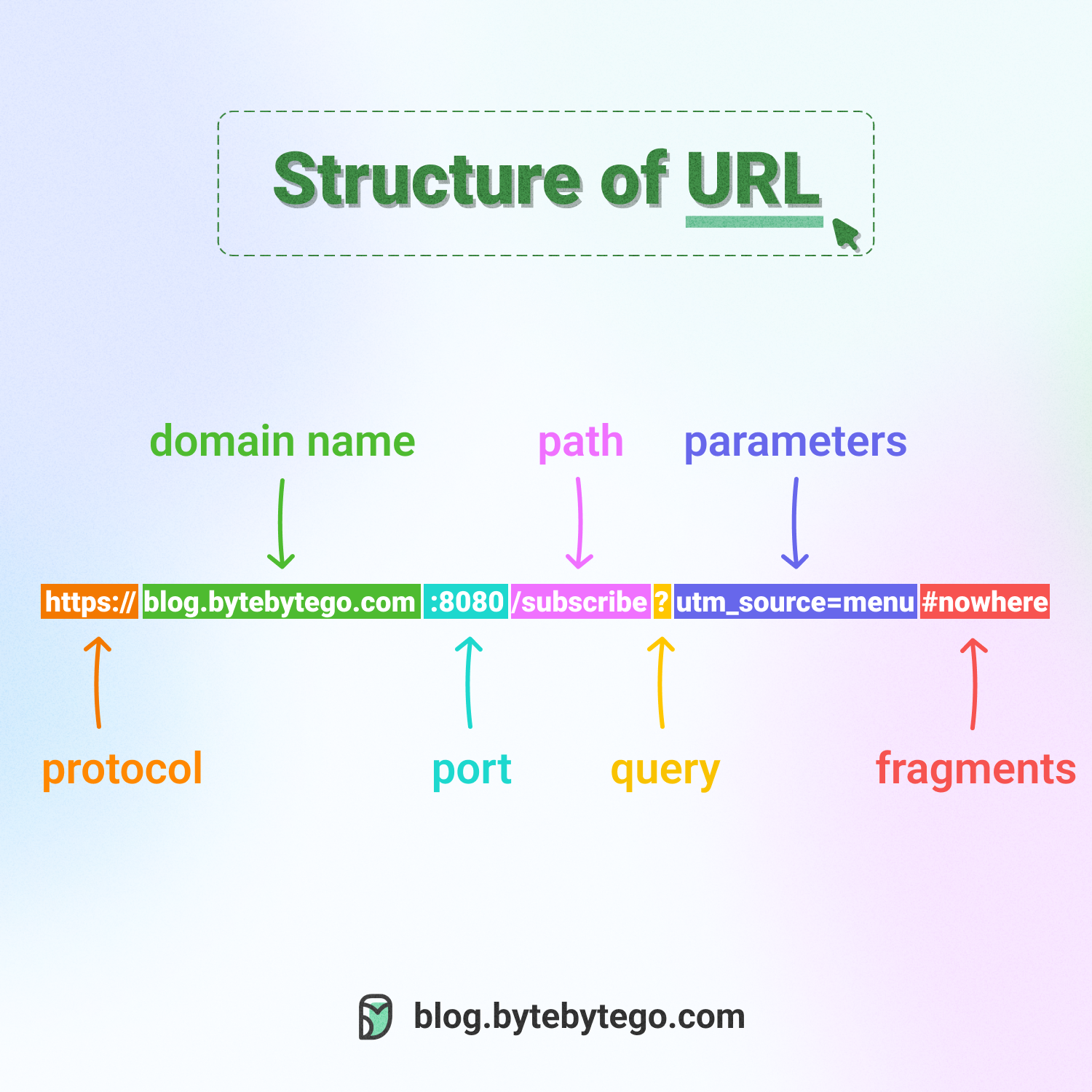
To the untrained eye, a URL might look like a random string of characters and symbols. However, every part of that string serves a specific purpose, following a strict syntax established by the Internet Engineering Task Force (IETF). Let’s break down a typical URL into its constituent parts to understand how it directs your computer to the right destination.
The Protocol (Scheme)
The very first part of a URL is the protocol, often followed by ://. This tells the browser how it should communicate with the server to retrieve the resource. The most common protocols are HTTP (Hypertext Transfer Protocol) and HTTPS (HTTP Secure). While HTTP was the standard for decades, HTTPS has become the modern requirement, as it encrypts the data transmitted between the user and the server, protecting sensitive information from interception. Other protocols include FTP (File Transfer Protocol) for moving files and mailto for opening email clients.
The Domain Name and TLD
Following the protocol is the domain name—the human-readable address of the website (e.g., example.com). This section consists of the name itself and the Top-Level Domain (TLD), such as .com, .org, .edu, or country-specific codes like .uk or .jp. The domain name is essentially a mask for a complex numerical IP address, making it easier for humans to remember where they want to go.
Subdomains
Positioned before the domain name, subdomains (like blog.example.com or support.example.com) are used to categorize and organize different sections of a website. The most famous subdomain is www, which historically indicated that the resource was part of the World Wide Web, though many modern sites now treat this as optional or redundant.
The Path and File Extension
The path follows the TLD and is separated by forward slashes (/). It functions similarly to the folder structure on your physical computer, directing the browser to a specific directory or page on the server. For example, in example.com/products/software, the path is /products/software. Sometimes, the path ends in a specific file extension like .html, .php, or .pdf, though modern “pretty” URLs often hide these extensions for a cleaner look.
Parameters and Fragments (Queries)
At the very end of some URLs, you might see a question mark followed by a string of text (e.g., ?id=123&sort=asc). These are query parameters, used to pass specific data to the server, such as search terms or filter settings. Additionally, a hash symbol (#) followed by a name indicates a fragment, which tells the browser to jump to a specific section or “anchor” within the webpage.
The Technical Lifecycle: How a URL Connects You to Data
When you type a URL into your browser’s address bar and press “Enter,” a complex series of technical handshakes occurs in milliseconds. This process is what allows a text-based address to transform into a visual, interactive website.
DNS Resolution: The Internet’s Phonebook
Computers do not speak the language of domain names; they speak the language of numbers, known as IP addresses (e.g., 192.0.2.1). The first step in the lifecycle is DNS (Domain Name System) Resolution. Your browser contacts a DNS server to “look up” the domain name provided in the URL. The DNS server returns the specific IP address of the web server where the website is hosted. Without DNS, we would have to memorize long strings of numbers for every site we wanted to visit.
Establishing a Connection via TCP/IP
Once the IP address is identified, your computer establishes a connection with the server using the TCP/IP (Transmission Control Protocol/Internet Protocol). This ensures that data is sent and received in the correct order and without errors. If you are using HTTPS, a “TLS handshake” also occurs at this stage, establishing the encrypted tunnel that keeps your browsing session private.
The HTTP Request and Response
With the connection established, your browser sends an HTTP Request to the server. This request includes the specific path and parameters defined in the URL. The server processes this request, finds the requested file or generates the data, and sends back an HTTP Response. This response includes a status code (like the famous 200 OK or the dreaded 404 Not Found) and the actual content of the page, usually in the form of HTML, CSS, and JavaScript.
Types of URLs and Their Strategic Roles
Not all URLs are created equal. Depending on the context—whether it’s internal website management or external marketing—different types of URLs are utilized to achieve specific technical goals.
Absolute vs. Relative URLs
An Absolute URL contains the entire address, including the protocol and domain (e.g., https://example.com/images/logo.png). These are used when linking to external websites. In contrast, a Relative URL only contains the path relative to the current folder (e.g., /images/logo.png). Developers use relative URLs within their own sites to make the code more portable; if the domain name changes, the internal links won’t break.
Canonical URLs and Search Engine Optimization (SEO)
In the world of web development, it is common for the same content to be accessible via multiple URLs (e.g., example.com/home and example.com/). To prevent search engines like Google from getting confused or penalizing the site for “duplicate content,” developers use Canonical URLs. This is a hidden tag in the HTML that tells search engines, “This is the primary, official version of this URL that should be indexed.”
Vanity and Shortened URLs
For marketing and social media, long URLs with many parameters are cumbersome. Vanity URLs are short, memorable addresses used for branding (e.g., brand.link/deal). URL Shorteners (like Bitly or TinyURL) take a massive URL and redirect it through a much smaller string. While convenient, these require a redirect service to function and add an extra step to the connection process.
Security Best Practices: Navigating the URL Landscape Safely
As the primary gateway to the internet, URLs are often manipulated by cybercriminals to facilitate phishing attacks and malware distribution. Understanding how to “read” a URL is a vital skill for digital security.
Identifying Phishing and “Typosquatting”
Hackers often use Typosquatting, where they register a domain name that is a common misspelling of a popular site (e.g., gogle.com instead of google.com). Always look closely at the domain name before entering passwords or financial data. Additionally, be wary of “homograph attacks,” where characters from different alphabets that look identical to Latin letters are used to trick the eye.
The Importance of the Padlock Icon
The presence of a padlock icon in the address bar indicates that the site is using HTTPS. This means the URL is being served over an encrypted connection. If a URL begins with http:// (without the ‘s’), any data you send—such as login credentials or credit card numbers—is sent in “plain text” and can be easily intercepted by anyone on the same network.
Deciphering Hidden Tracking
Many URLs today contain long strings of “tracking tokens,” often starting with utm_. These parameters tell the website owner exactly where you came from (e.g., a specific Facebook ad or an email newsletter). While generally harmless to your device, they are used to build a profile of your browsing habits. Privacy-conscious users often strip these parameters from the URL before sharing them with others to maintain a level of anonymity.

The Future of the URL: Is the Address Bar Disappearing?
As we move toward a more mobile-centric and app-based digital environment, the traditional URL is evolving. Modern browsers, especially on smartphones, have begun to hide the full path of the URL, showing only the primary domain name to simplify the user interface and prevent users from being overwhelmed by technical strings.
Furthermore, technologies like QR codes and NFC (Near Field Communication) are increasingly replacing the need to type URLs manually. However, underneath these user-friendly interfaces, the URL remains the indispensable backbone of the internet. Whether it is hidden behind a “Buy Now” button or encoded in a graphical square, the Uniform Resource Locator continues to be the primary map that guides us through the ever-expanding digital universe.
By understanding the architecture and function of the URL, you gain a deeper appreciation for the seamless complexity of the internet. It is the bridge between human thought and machine execution, a simple string of text that has the power to connect you to any piece of information, anywhere in the world, in the blink of an eye.
aViewFromTheCave is a participant in the Amazon Services LLC Associates Program, an affiliate advertising program designed to provide a means for sites to earn advertising fees by advertising and linking to Amazon.com. Amazon, the Amazon logo, AmazonSupply, and the AmazonSupply logo are trademarks of Amazon.com, Inc. or its affiliates. As an Amazon Associate we earn affiliate commissions from qualifying purchases.