
In the dynamic world of consumer electronics, where new acronyms and specifications emerge almost daily, it’s easy to feel overwhelmed when trying to make an informed purchase. Among the myriad terms you’ll encounter when browsing for a new television, “refresh rate” stands out as a crucial specification, particularly for those seeking the ultimate viewing experience. Often advertised prominently and linked to premium models, the refresh rate dictates how smoothly motion appears on your screen. But beyond the marketing buzz and technical jargon, what exactly is TV refresh rate, why does it matter, and how should it influence your next big tech investment?
This article delves deep into the heart of display technology, demystifying refresh rate and exploring its impact on everything from high-octane gaming to cinematic blockbusters and live sports. We’ll unravel the science behind the numbers, examine how leading brands leverage (and sometimes manipulate) this metric, and ultimately help you decide if a higher refresh rate is a must-have feature for your home entertainment setup, providing value for your hard-earned money.
Understanding the Fundamentals: What Does Refresh Rate Mean?
At its core, a television screen doesn’t display a single, continuous image. Instead, it presents a rapid succession of still images, much like a flipbook, to create the illusion of motion. The speed at which these images are updated is what we refer to as the refresh rate.
The Basics of Display Technology
Imagine your TV screen as a canvas that is constantly being repainted. Each “repaint” is a new frame, and the faster the canvas is repainted, the smoother the visual flow. When you watch a video, play a game, or stream a movie, the content itself is composed of individual frames. A standard film might be shot at 24 frames per second (fps), while a live sports broadcast could be 30 or 60 fps, and modern video games can easily hit 60 fps, 120 fps, or even higher. Your television’s job is to display these frames.
Hertz (Hz) Explained
Refresh rate is measured in Hertz (Hz), which simply denotes cycles per second. So, a TV with a 60Hz refresh rate means the image on the screen is updated 60 times every second. Similarly, a 120Hz TV updates the image 120 times per second, and so on.
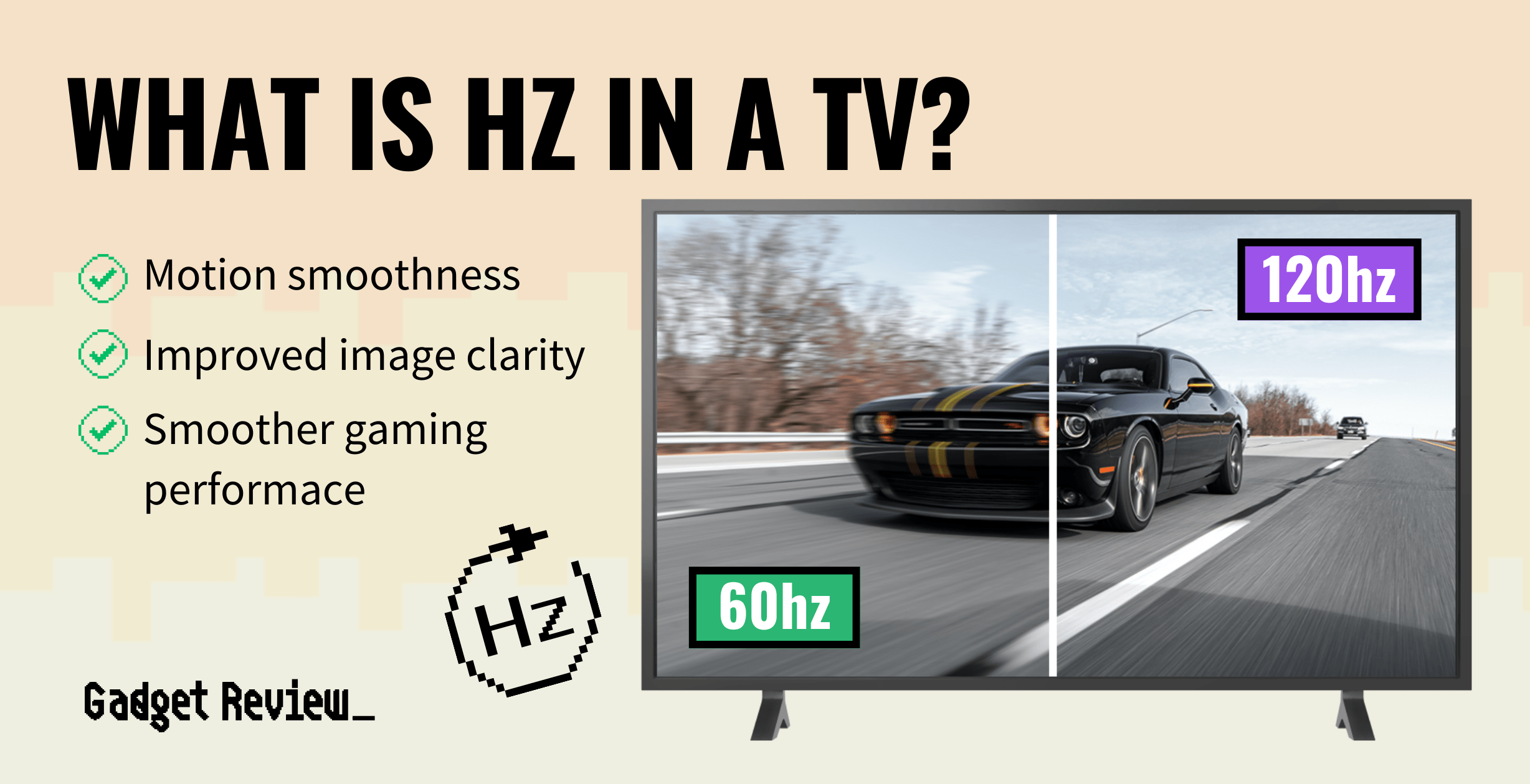
For a long time, 60Hz was the standard for most televisions, perfectly adequate for broadcast TV and many forms of digital media. However, as display technology advanced and the demands of high-definition content, particularly gaming, escalated, higher refresh rates became increasingly desirable. A higher Hertz count directly translates to the TV’s ability to display more frames per second, leading to a perceptibly smoother, more fluid, and less blurry image, especially during fast-moving scenes. This capability is a cornerstone of modern gadget reviews and a key indicator of a TV’s performance prowess.
Motion Clarity and Smoothness
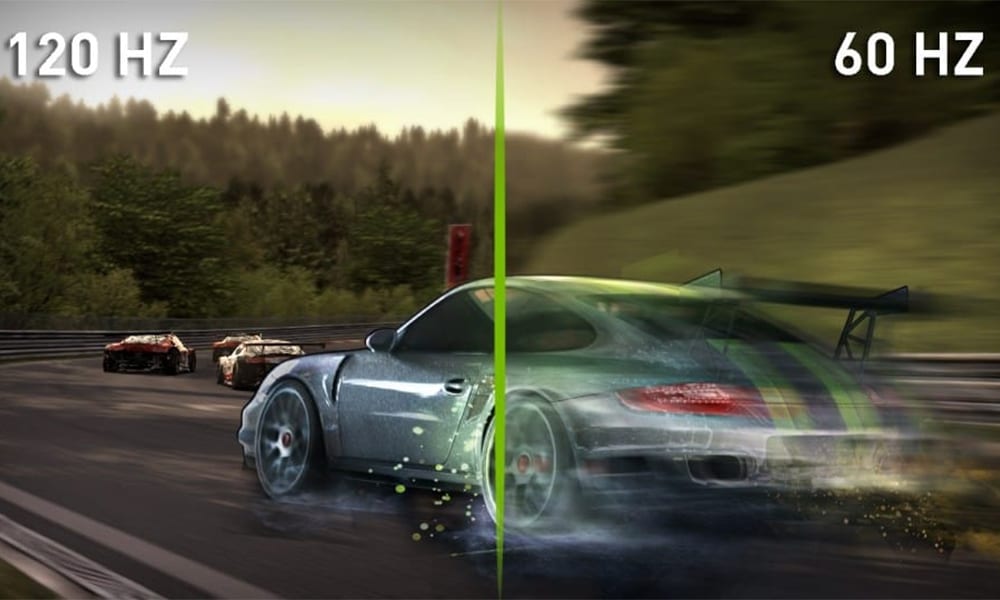
The primary benefit of a higher refresh rate is enhanced motion clarity and smoothness. When objects move quickly across the screen on a lower refresh rate display, you might notice a phenomenon called “motion blur” or “judder.” This occurs because the previous image remains on the screen for too long before the next one appears, creating a slight trail or stutter. A higher refresh rate significantly reduces this effect by displaying new frames more frequently, effectively bridging the gaps between successive images. The result is sharper edges on moving objects, more precise tracking of action, and an overall more immersive and comfortable viewing experience that minimizes eye strain during intense visual sequences.
Why Higher Refresh Rates Matter (and When They Don’t)
While the appeal of a silky-smooth display is universal, the practical benefits of a high refresh rate are most pronounced in specific scenarios. Understanding these distinctions is key to making an informed buying decision that aligns with your viewing habits and budget.
For Gamers: The Ultimate Advantage
For the gaming community, refresh rate isn’t just a luxury; it’s a competitive advantage and a fundamental aspect of the gaming experience. High refresh rates, typically 120Hz or higher, paired with a gaming console or PC capable of outputting high frame rates (FPS), dramatically reduce input lag and provide a much more responsive feel. In fast-paced competitive games, where split-second reactions matter, the ability to see the latest information on screen sooner and with greater clarity can make all the difference. Furthermore, features like Variable Refresh Rate (VRR), which synchronizes the TV’s refresh rate with the console’s frame rate, virtually eliminate screen tearing—a distracting visual artifact where the screen displays parts of multiple frames simultaneously. This synergy between high refresh rates, VRR, and low input lag makes modern TVs with advanced refresh capabilities essential gadgets for serious gamers, often highlighted in detailed technology reviews.
For Sports Enthusiasts and Action Movie Buffs
Beyond gaming, audiences who frequently watch live sports or action-packed movies and TV shows will also reap significant rewards from a higher refresh rate. Think of a football flying through the air, a race car speeding around a track, or a rapid camera pan in an intense chase scene. On a 60Hz display, these fast motions can appear blurry or choppy. A 120Hz or higher refresh rate allows these dynamic scenes to unfold with astonishing fluidity and crispness, making it easier to track the ball, follow the action, and fully appreciate the choreography of a meticulously filmed sequence. The enhanced motion clarity transforms the viewing experience, making you feel more connected to the action unfolding on screen.
The Role of Source Content
It’s crucial to understand that your TV’s refresh rate can only maximize the fluidity of the content it receives. If you’re watching a standard 24fps movie or a 30fps TV show, even a 120Hz TV will only display those 24 or 30 unique frames per second. The TV will then use internal processing to insert additional “intermediate” frames to fill the refresh rate capacity (e.g., repeating frames or using motion interpolation). This process, often called “motion smoothing” or “frame interpolation,” can sometimes lead to what’s known as the “soap opera effect”—where film content takes on an unnatural, overly smooth, video-like appearance. While some viewers appreciate this for certain content like sports, many cinephiles prefer to disable it for movies to preserve the original cinematic aesthetic. The true power of a high refresh rate is unlocked when paired with high frame rate source content, such as cutting-edge video games or specialized high-frame-rate video productions.
Diminishing Returns and Human Perception
While higher refresh rates offer tangible benefits, there’s a point of diminishing returns. The human eye and brain can only process information so quickly. While the jump from 60Hz to 120Hz is often quite noticeable, the difference between 120Hz and 240Hz (if a TV offers true native 240Hz, which is rare outside of gaming monitors) becomes much harder for most people to perceive, especially outside of highly specific gaming scenarios. For standard TV viewing and most movies, 120Hz is generally considered the sweet spot for premium performance without unnecessary overkill. Investing heavily in refresh rates beyond this, without corresponding high-frame-rate content or specialized use cases, might not deliver a proportionally better experience for the additional cost.
Navigating the Market: Marketing, Technologies, and Your Wallet
The television market is a highly competitive arena, and refresh rate is often a key battleground for brands vying for consumer attention. Understanding the nuances of marketing claims, key enabling technologies, and the financial implications is vital for making a smart purchase.
Marketing Jargon vs. Reality
One of the most significant challenges for consumers is deciphering marketing jargon. While “native refresh rate” refers to the panel’s actual hardware capability (e.g., 60Hz or 120Hz), many brands employ proprietary terms like “Motion Rate,” “Clear Motion Index,” “Trumotion,” “XR Motion Clarity,” or “Motionflow” to describe technologies that simulate a higher refresh rate. These technologies often involve backlight scanning, frame interpolation, or other processing techniques to enhance motion clarity, but they do not increase the panel’s native refresh rate.
For instance, a TV advertised with a “Motion Rate 240” might only have a native 60Hz panel, with the “240” being a marketing number derived from its motion processing. While these technologies can improve motion, they are distinct from a true native 120Hz panel. When researching TVs, always look for the “native refresh rate” or “panel refresh rate” in the specifications. Understanding this distinction is a crucial aspect of consumer brand literacy and protection against potentially misleading marketing. It impacts your perception of a brand’s transparency and value.
Key Technologies: VRR, ALLM, and HDMI 2.1
To fully leverage higher refresh rates, especially for modern gaming, your television needs to support certain complementary technologies.
- Variable Refresh Rate (VRR): As mentioned, VRR (including AMD FreeSync and NVIDIA G-Sync compatibility) allows the TV to dynamically adjust its refresh rate to match the frame rate output by a gaming console (like PS5, Xbox Series X/S) or PC. This eliminates screen tearing and minimizes stuttering, providing a much smoother gaming experience, even when frame rates fluctuate.
- Auto Low Latency Mode (ALLM): This feature automatically switches your TV into its lowest latency (Game) mode when it detects a gaming signal, reducing input lag without you having to manually adjust settings.
- HDMI 2.1: This is arguably the most critical connectivity standard for unlocking high refresh rates at 4K resolutions. Older HDMI 2.0 ports can handle 4K at 60Hz, but only HDMI 2.1 has the bandwidth to transmit 4K at 120Hz or even 8K at 60Hz. If you’re buying a new TV with the intention of high-refresh-rate gaming on current-gen consoles or a powerful PC, ensure it has at least one HDMI 2.1 port. These cutting-edge technologies represent the forefront of display trends and are essential for future-proofing your home entertainment setup.
Making an Informed Purchase: Is It Worth the Investment?
When it comes to your money, the decision to invest in a higher refresh rate TV boils down to your primary use cases and budget.
-
When to Prioritize 120Hz/Higher:
- Serious Gamers: If you primarily game on current-gen consoles or a PC and prioritize responsiveness and visual fluidity, a native 120Hz TV with HDMI 2.1 and VRR is a non-negotiable investment.
- Sports & Action Enthusiasts: If you’re a avid viewer of fast-paced sports or action films and value the clearest possible motion, the upgrade to 120Hz will be noticeable and rewarding.
- Future-Proofing: If you want your TV to remain competitive for years to come, especially with evolving content and gaming standards, a 120Hz panel is a safer bet.
-
When 60Hz is Perfectly Adequate:
- Casual Viewers: If your primary use is watching broadcast TV, standard streaming content (Netflix, Hulu, etc.), or older movies and shows, a 60Hz TV will serve you perfectly well. Most of this content isn’t produced at frame rates higher than 60fps anyway.
- Budget-Conscious Buyers: 60Hz TVs are significantly more affordable. If you’re looking to maximize screen size, picture quality (like OLED or Mini-LED tech), or other features within a strict budget, opting for a 60Hz panel can free up funds for other improvements.
- Limited High-Frame-Rate Content: If you don’t own high-refresh-rate gaming consoles or devices and don’t anticipate viewing much native high-frame-rate content, the extra refresh rate capacity of a 120Hz TV would largely go unused.
Ultimately, like any significant tech purchase, it’s about matching the gadget to your specific needs and ensuring your investment provides genuine value. Consider your viewing habits, research reviews, and align your choice with your personal finance goals.
Optimizing Your TV Refresh Rate Experience
Once you’ve purchased a TV with the right refresh rate for your needs, there are a few steps you can take to ensure you’re getting the most out of it.
Checking Your TV’s Specifications
Always confirm your TV’s native refresh rate. This information is usually found in the technical specifications section of the user manual or on the manufacturer’s website. Be wary of marketing terms and always seek out the genuine panel refresh rate. This habit of scrutinizing specs is a good productivity hack for any tech purchase.
Adjusting Settings for Different Content
Modern smart TVs offer a variety of picture modes and settings.
- Game Mode: For gaming, always ensure your TV is in Game Mode. This mode typically disables most post-processing (including motion smoothing) to minimize input lag and often automatically enables VRR and ALLM if your TV supports them.
- Motion Smoothing (Frame Interpolation): Experiment with motion smoothing settings. For sports, a low or medium setting might enhance fluidity without looking unnatural. For movies and cinematic content, it’s generally recommended to turn motion smoothing off (“Film Mode” or “Cinema Mode” might do this automatically) to preserve the original artistic intent and avoid the “soap opera effect.”
Pairing with Compatible Devices
Ensure your source devices are capable of outputting high frame rates. For gaming, confirm your PC graphics card settings or console display settings are configured to output 120Hz at the desired resolution. For PC users, you may need to adjust display settings within Windows or your graphics card control panel to achieve the desired refresh rate. Remember, a 120Hz TV is only as good as the content and devices feeding it.
In conclusion, TV refresh rate is a critical specification that profoundly impacts motion clarity and viewing smoothness, especially for gamers and fans of fast-paced content. While higher refresh rates like 120Hz offer undeniable benefits when paired with the right source material and supporting technologies like HDMI 2.1 and VRR, a 60Hz panel remains perfectly adequate for most casual viewing. By understanding the true meaning behind the numbers, navigating brand marketing claims, and assessing your individual needs and budget, you can confidently select a television that enhances your entertainment experience and represents a sound investment in your tech future.
aViewFromTheCave is a participant in the Amazon Services LLC Associates Program, an affiliate advertising program designed to provide a means for sites to earn advertising fees by advertising and linking to Amazon.com. Amazon, the Amazon logo, AmazonSupply, and the AmazonSupply logo are trademarks of Amazon.com, Inc. or its affiliates. As an Amazon Associate we earn affiliate commissions from qualifying purchases.