
Adobe Photoshop stands as an undisputed titan in the realm of digital image manipulation. For decades, its name has been synonymous with graphic design, photo retouching, and visual artistry, setting the industry standard for what’s possible with a static image. It’s a tool so pervasive that “Photoshopped” has become a verb, indicating any digital alteration of a picture. Given its monumental impact and versatility in the still image domain, it’s a natural and frequently asked question: “What is the video editor version of Photoshop?”
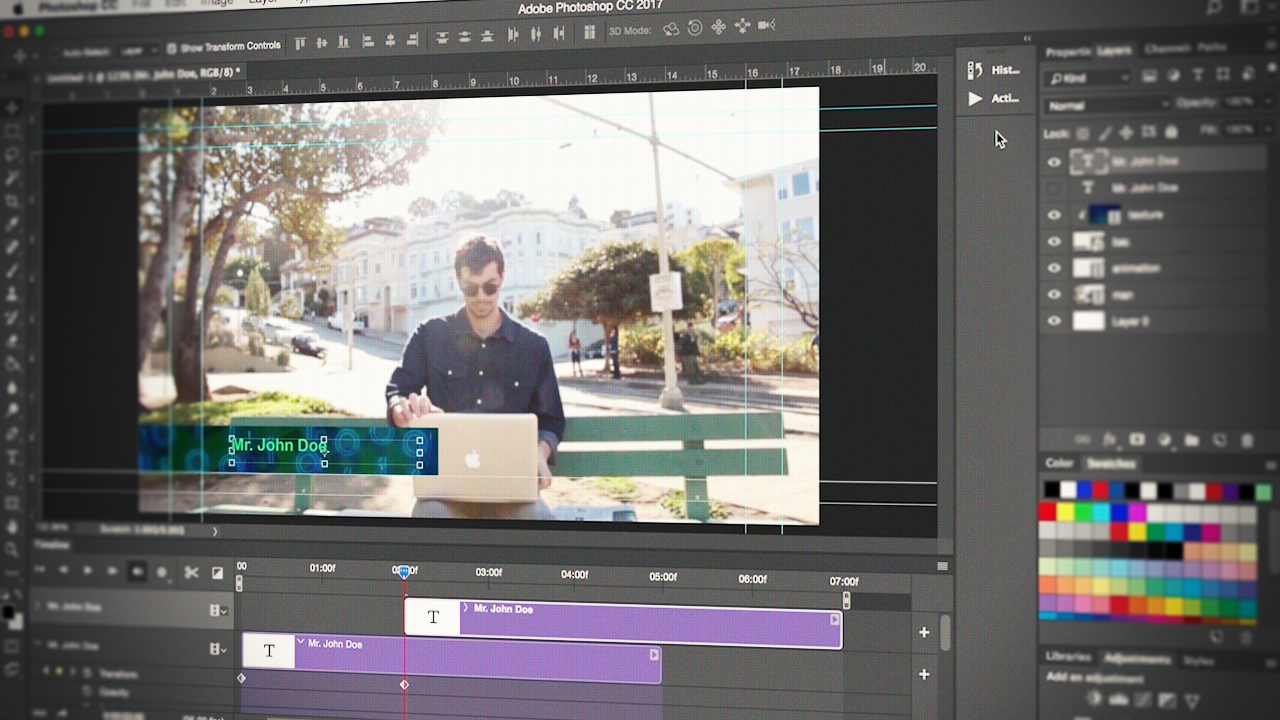
The query itself stems from a desire for a similarly powerful, intuitive, and feature-rich application but tailored for the dynamic world of video. While Photoshop itself offers rudimentary video editing capabilities, they are far from sufficient for professional motion graphics, complex sequences, or cinematic projects. The answer, however, isn’t a single, direct equivalent but rather a sophisticated ecosystem of highly specialized tools within Adobe’s Creative Cloud, each designed to excel in a particular facet of video production. This article will delve into the core applications that collectively serve as “the video editor version of Photoshop,” exploring their unique strengths, their integration, and how they empower creators to bring their moving images to life with the same precision and creativity expected from Photoshop.
The Photoshop Paradigm: A Foundation in Image Manipulation
To truly understand the “video editor version” of Photoshop, we must first appreciate what makes Photoshop itself so iconic and indispensable. Its success lies in a combination of profound capabilities and a revolutionary approach to digital art.
Pixel-Perfect Precision: What Makes Photoshop Iconic?
Photoshop’s enduring legacy is built on its unparalleled ability to manipulate raster graphics at a pixel level. Its layer-based architecture allows users to organize, edit, and combine multiple images, text, and effects non-destructively, preserving original data while enabling endless experimentation. Features like selection tools, masks, adjustment layers, smart objects, and a vast array of filters and brushes provide artists with granular control over every aspect of an image. It’s the industry standard for photo retouching, composite images, digital painting, and UI/UX design, making it a critical skill for graphic designers, photographers, and digital artists worldwide. Its extensive plugin architecture further extends its capabilities, ensuring it remains at the forefront of image editing technology. The sheer depth of its toolset and the precision it offers are what define the “Photoshop paradigm.”
Beyond Static Images: Photoshop’s Limited Video Capabilities
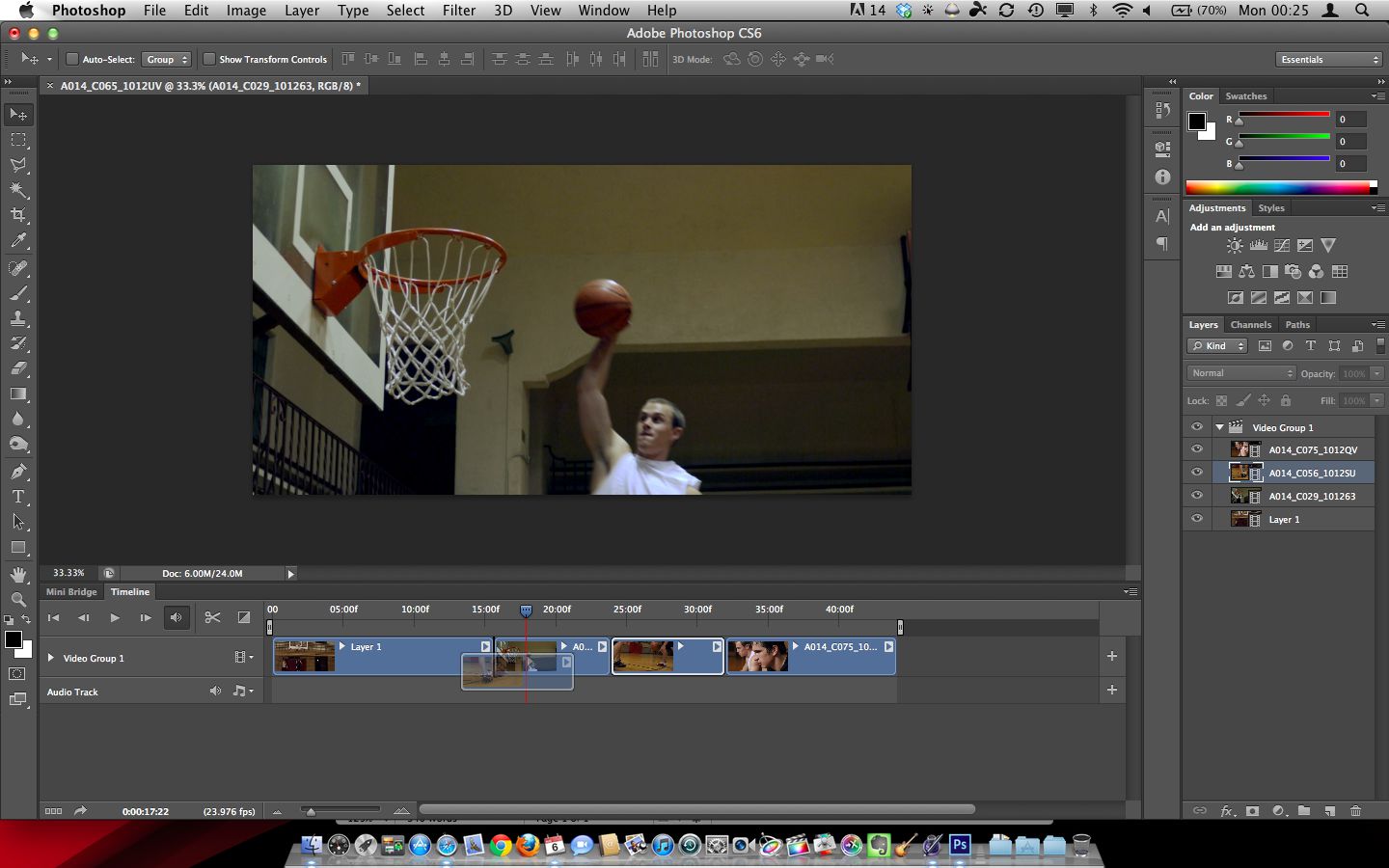
Interestingly, Photoshop isn’t entirely devoid of video functionality. Modern versions include a timeline panel that allows users to import video clips, apply effects, add audio, and even create frame-by-frame animations. This capability is primarily useful for creating short GIF animations, simple stop-motion videos, or applying complex graphic treatments to individual video frames that would be tedious in a traditional video editor. For instance, a designer might use Photoshop to create an intricate animated logo reveal or a short social media clip with highly stylized visual effects that leverage Photoshop’s unique layer blend modes and filtering options.
However, these video features are inherently limited. Photoshop lacks the multi-track editing, advanced audio mixing, sophisticated color grading, and real-time playback performance required for professional video production. It’s akin to using a high-end race car to haul bricks – while technically possible, it’s not designed for the task and struggles with efficiency and specialized requirements. For any serious video project, creators quickly discover the need for tools purpose-built for motion.
Adobe Premiere Pro: The Frontrunner for Video Editing
When seeking the direct counterpart to Photoshop in the video world, Adobe Premiere Pro immediately comes to mind. It holds a similar stature in video editing as Photoshop does in image editing: an industry standard, versatile, and deeply integrated into a broader creative ecosystem.
The Parallels: Why Premiere Pro is Photoshop’s Sibling
Premiere Pro mirrors Photoshop’s strengths in several crucial ways. Like Photoshop, it’s an industry-standard application, adopted by filmmakers, broadcasters, YouTubers, and corporate video producers globally. It employs a timeline-based editing approach, allowing users to arrange and sequence video clips, audio tracks, and graphics. Its non-destructive workflow means that original media files are never altered, providing a safe environment for experimentation and revisions. Premiere Pro’s interface, with its panels, workspaces, and customizable layouts, also feels familiar to Photoshop users, easing the learning curve within the Adobe ecosystem. The concept of “layers” in Photoshop translates to “tracks” in Premiere Pro, where video, audio, and graphics are stacked and manipulated independently.
Core Strengths: What Premiere Pro Brings to the Table
Premiere Pro is a powerful, comprehensive non-linear editor (NLE) designed for assembly, cutting, and basic effects application. Its core strengths include:
- Multi-track Editing: Seamlessly manage multiple video, audio, and graphic tracks to build complex sequences.
- Advanced Audio Tools: Comprehensive audio mixing, equalization, noise reduction, and integration with Adobe Audition for advanced sound design.
- Robust Color Correction and Grading: The Lumetri Color panel offers professional-grade tools for precise color adjustments, grading, and look creation, rivaling dedicated color grading software.
- Broad Format Support: Handles virtually any video and audio format, from consumer-grade codecs to high-end RAW footage, without the need for transcoding.
- Real-time Playback and Performance: Optimized for efficient editing, especially with modern hardware acceleration.
- Collaboration Features: Tools for team projects, allowing multiple editors to work on the same project simultaneously.
- Extensive Effects and Transitions: A vast library of built-in effects and transitions, expandable with third-party plugins.
Target Audience and Use Cases
Premiere Pro is the go-to tool for linear video editing. It’s used by documentary filmmakers assembling narratives, YouTubers producing daily vlogs, advertisers creating commercials, and corporate teams developing training videos. Its strength lies in its ability to take raw footage, structure it into a coherent story, enhance it with audio and color, and deliver a polished final product for various platforms. If you’re cutting a film, editing a documentary, or creating a narrative video, Premiere Pro is your primary workstation.
Adobe After Effects: The Motion Graphics & Visual Effects Powerhouse
While Premiere Pro handles the overall assembly and linear flow of a video, another Adobe application steps in where complex visual effects, motion graphics, and intricate animations are required: Adobe After Effects. This program is often described as “Photoshop for video” in terms of its layer-based compositing and visual manipulation capabilities, but specifically for motion.
Beyond Basic Editing: The Realm of Compositing and Animation
After Effects is not a linear video editor in the same vein as Premiere Pro. Instead, it’s a powerful compositing, motion graphics, and visual effects application. Its purpose is to create, animate, and enhance individual shots or short sequences that are then brought into a primary editor like Premiere Pro. Think of it as the workbench where you build intricate visual elements – animated logos, title sequences, visual effects like explosions or magical powers, sophisticated lower thirds, or complex character animations. It excels at layering visual elements, applying keyframed transformations, and integrating 3D elements and camera tracking.
Layer-Based Creativity: A Different Kind of Timeline
The core of After Effects’ power lies in its layer-based timeline, which functions more like Photoshop’s layer stack in motion. Each element – video clip, image, solid color, text, shape layer – exists on its own layer, which can be manipulated independently. Keyframing is central to After Effects, allowing users to define parameters (position, scale, rotation, opacity, effects) at specific points in time, and the software interpolates the movement or change between those points. Expressions, a JavaScript-based scripting language, further enhance control, enabling complex animations with minimal manual keyframing. The vast ecosystem of third-party plugins (e.g., Trapcode Suite, Video Copilot’s Element 3D) extends After Effects’ capabilities into advanced particle systems, 3D rendering, and more.
Complementary, Not Competitive, with Premiere Pro
It’s crucial to understand that After Effects and Premiere Pro are complementary tools, not competitors. They are designed to work seamlessly together. A typical workflow involves editing the main video in Premiere Pro, identifying shots that require advanced motion graphics or visual effects, sending those specific clips to After Effects via Dynamic Link, performing the intricate work there, and then having the updated composite automatically appear back in Premiere Pro without needing to render an intermediate file. This synergistic relationship is a cornerstone of the Adobe Creative Cloud workflow for video professionals.
The Broader Adobe Ecosystem: A Unified Creative Workflow
The question “what is the video editor version of PS” truly finds its most complete answer not in a single application, but in the intelligent integration of several specialized tools within the Adobe Creative Cloud. This ecosystem approach is where Adobe truly differentiates itself.
Dynamic Linking: Seamless Integration for Efficiency
Dynamic Link is the magical glue that binds Premiere Pro and After Effects, and to some extent, Audition (for audio) and Photoshop (for stills and graphic assets). This feature allows users to send compositions between applications without rendering, meaning changes made in After Effects are immediately reflected in Premiere Pro, and vice versa. This eliminates tedious export/import steps and saves immense amounts of time in production, fostering a fluid and efficient workflow. Imagine creating a complex title sequence in After Effects, and as you tweak animation timings or colors, those changes appear instantly in your Premiere Pro timeline without ever leaving your main editing environment. This level of integration is paramount for professional productions that rely on complex visual elements.
The Creative Cloud Advantage: A Suite of Specialized Tools
Adobe’s Creative Cloud subscription model offers access to a comprehensive suite of creative applications, each excelling in its niche. For video, this means not only Premiere Pro and After Effects but also:
- Audition: For advanced audio mixing, restoration, and sound design.
- Media Encoder: For encoding and exporting video to various formats and platforms.
- Character Animator: For animating 2D puppets from Photoshop or Illustrator artwork.
- Illustrator: For creating vector graphics that scale infinitely, perfect for logos and titles in video.
- Photoshop: For creating and refining still images, textures, and graphic elements that can be imported into video projects.
This integrated suite ensures that creators have the absolute best tool for every specific task, all communicating flawlessly within a unified environment. The philosophy is that a jack-of-all-trades application might do many things adequately, but specialized tools do their specific tasks exceptionally.
Choosing the Right Tool for Your Vision
The key to navigating the Adobe video ecosystem is understanding which tool is best suited for a given task:
- Photoshop: For creating or refining individual graphic elements, textures, or still images that will be used in a video. Also for very short, simple frame-by-frame animations or highly stylized static video frames.
- Premiere Pro: For the primary assembly of video clips, multi-track editing, linear storytelling, basic color correction, audio mixing, and adding standard transitions and effects. It’s for cutting the story.
- After Effects: For creating motion graphics, visual effects, complex animations, compositing multiple layers, advanced text animations, and any task requiring intricate visual manipulation beyond simple cuts and transitions. It’s for building dynamic visual elements.
Beyond Adobe: Alternative Video Editing Solutions
While the Adobe Creative Cloud provides the most direct and integrated answer to the “video editor version of PS,” it’s important to acknowledge that a vibrant landscape of alternative video editing solutions exists, each with its own strengths and target audience.
Professional Alternatives: DaVinci Resolve, Final Cut Pro
- Blackmagic Design DaVinci Resolve: Has rapidly grown in popularity, especially for its unparalleled color grading capabilities (its heritage) and robust free version. It’s a full-fledged NLE that now includes editing, visual effects (Fusion), motion graphics, and audio post-production (Fairlight) all within a single application. For some, its all-in-one approach is highly appealing, and its color grading is often considered superior to Premiere Pro’s.
- Apple Final Cut Pro (FCP): A professional-grade NLE exclusive to macOS, known for its magnetic timeline, excellent performance on Apple hardware, and streamlined interface. It’s a favorite among Apple users, offering a fast and efficient workflow, especially for solo creators and smaller production houses.

Beginner-Friendly & Budget Options
For those just starting out or on a tighter budget, several accessible options provide solid video editing capabilities without the steep learning curve or subscription cost of professional suites:
- Filmora (Wondershare): Known for its user-friendly interface, abundant effects, and templates, making it popular for content creators and beginners.
- Shotcut / Kdenlive / DaVinci Resolve Free: Open-source or free professional software that offer powerful tools for no cost, though they might require a bit more technical proficiency.
- CapCut: A highly popular mobile-first editor that has expanded to desktop, known for its TikTok integration and user-friendly features for social media content.
These alternatives cater to different needs and preferences, offering viable solutions depending on skill level, operating system, specific feature requirements, and budget. However, none match the sheer breadth of specialized, deeply integrated tools that Adobe offers as a direct parallel to Photoshop’s dominance in its field.
In conclusion, there isn’t a single “video editor version of Photoshop” because video production is a multifaceted discipline requiring a suite of specialized tools. Adobe has strategically built this suite around core applications: Premiere Pro for linear video editing and storytelling, and After Effects for intricate motion graphics and visual effects. These, combined with the power of Dynamic Link and the broader Creative Cloud ecosystem, collectively fulfill the desire for a Photoshop-level of precision, power, and versatility in the dynamic world of video. Understanding their individual strengths and how they integrate is key to unlocking professional-grade video production within the Adobe environment.
aViewFromTheCave is a participant in the Amazon Services LLC Associates Program, an affiliate advertising program designed to provide a means for sites to earn advertising fees by advertising and linking to Amazon.com. Amazon, the Amazon logo, AmazonSupply, and the AmazonSupply logo are trademarks of Amazon.com, Inc. or its affiliates. As an Amazon Associate we earn affiliate commissions from qualifying purchases.