
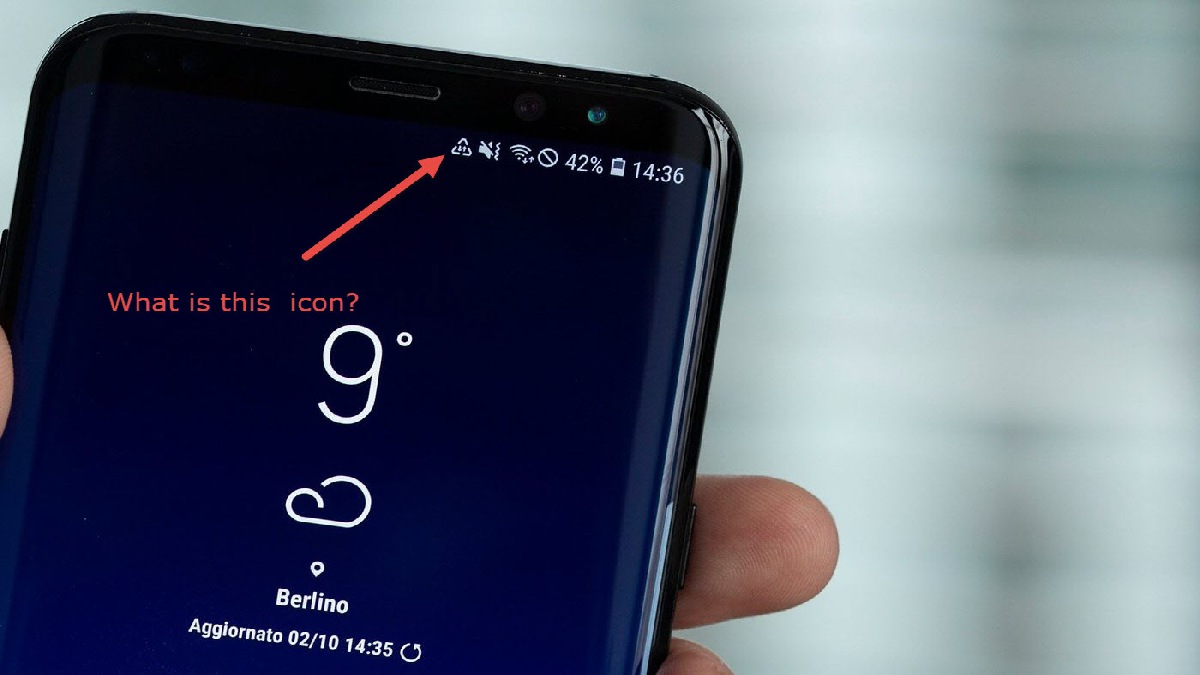
Mobile devices are marvels of modern engineering, yet they communicate through a visual language that often leaves users scratching their heads. You glance at your status bar, expecting the usual battery and signal icons, and suddenly, a mysterious triangle appears. While it might look like a simple geometric shape, this symbol carries significant weight regarding your device’s connectivity, data usage, or system settings. Depending on whether you are using an Android or an iOS device, or depending on your specific carrier settings, this icon can signify anything from a simple network roaming warning to a critical system alert.

Understanding the Roaming and Data Usage Triangle
For many Android users, the most common appearance of a triangle icon is directly related to cellular data and network roaming. This is typically a small, hollow, or filled triangle that appears next to your signal strength bars.
Identifying the Data Roaming Alert
When you travel outside your provider’s primary coverage area, your phone may automatically switch to a partner network. If your data roaming settings are toggled on, a small triangle—often with an exclamation point or specific arrow indicators—may appear to notify you that you are consuming data that might incur additional charges. This is your phone’s way of ensuring you are aware of your network status, especially if you are traveling internationally.
The Delta Symbol in System Settings
In some older versions of the Android operating system or specific carrier-branded interfaces, a triangle icon—often the Greek letter delta (Δ)—can indicate a system-level notification regarding data limits. If you have set a hard cap on your monthly data usage, the system may display this warning once you have hit a predetermined threshold, signaling that your background data processes may be throttled or suspended.
Connectivity and Network Status Indicators
Beyond roaming, triangles are frequently used in the iconography of cellular connectivity. It is important to distinguish between a functional triangle and a warning triangle, as their implications for your device’s performance differ significantly.
The Signal Strength Indicator
On various custom user interfaces (UI) overlaying the Android operating system, the signal strength itself is sometimes depicted as a triangle rather than the traditional bars. In this context, the fullness of the triangle represents the strength of your cellular connection. A fully opaque triangle indicates a robust connection, while a transparent or empty triangle suggests a weak signal or “searching” status.
The “Searching for Network” Warning
If you see a triangle containing an exclamation point, this is almost always a system alert. This signifies that your phone has lost its connection to the cellular tower and is currently unable to send or receive calls, texts, or mobile data. This often occurs in “dead zones,” such as basements, elevators, or remote rural areas. If the icon persists in an area where you usually have service, it may indicate that your SIM card has become dislodged or that there is an issue with your carrier’s provisioning of your device.
Special System Icons and Third-Party Applications
Not every triangle icon originates from the operating system itself. With the vast ecosystem of applications available on the Google Play Store and the Apple App Store, third-party software often employs custom notification icons that can occupy your status bar.

App-Specific Notifications
Certain security applications, VPNs (Virtual Private Networks), and firewall tools use a triangle icon to indicate that their service is active. For example, many VPN providers use a shield or a triangular “play” button icon to signify that your traffic is being encrypted and routed through a secure tunnel. If you have recently installed a security suite, look for a corresponding icon in your notification tray; swiping down will usually reveal which app is responsible for the alert.
Hardware-Related Alerts
In rare instances, a triangle alert can relate to hardware status. On some devices, this icon may appear if the internal hardware fails to recognize the SIM card, or if the internal diagnostic software detects an error with the SD card. If the triangle icon is accompanied by a notification that says “SD Card Removed” or “SIM Card Error,” it is time to perform a hard restart of the device or physically inspect the card tray.
Troubleshooting the Mysterious Triangle
When you encounter an unfamiliar icon on your phone, the best approach is to move from the least invasive diagnostic step to the most technical one. Do not panic; most of these icons are simply informational rather than indicative of permanent damage.
The Pull-Down Notification Tray
The most effective way to identify the meaning of any icon on your status bar is to swipe down from the top of your screen to open the notification center. Your phone is designed to bundle icons with their corresponding alerts. If you tap on the specific notification related to that triangle, the device will open the settings menu or the application responsible for the alert, providing a clear explanation of what is happening.
Checking Connectivity Settings
If the triangle relates to network roaming or data, navigate to your “Settings” menu. Under “Network & Internet” or “Connections,” tap on “Mobile Network.” Here, you can verify if “Data Roaming” is enabled. If you are not traveling and this is active, toggling it off will likely remove the icon and protect you from unexpected roaming fees. If the triangle is a “Searching” alert, toggling “Airplane Mode” on for ten seconds and then off again acts as a soft reset for your radio antenna, which often resolves connectivity hangs.
Inspecting Permissions and Background Apps
If the triangle belongs to a third-party application, it may be a permission request or a background service alert. Check your “App Management” settings to see which apps have permission to post notifications. By reviewing your recently installed apps, you can identify if a new tool is the source of the icon. Uninstalling or force-stopping suspicious apps is a standard procedure in digital hygiene, ensuring that no unwanted software is operating in the background.
When to Seek Professional Help
While the vast majority of triangle symbols are software-based notifications that can be cleared by the user, there are specific scenarios where professional intervention is required.
Persistent Hardware Warnings
If you have performed a factory reset—the ultimate software troubleshooting step—and a persistent triangle icon indicating a network or SD card error remains, there may be a physical fault within your device. This could be a damaged SIM reader or a failure of the internal storage interface. In these cases, contacting your carrier’s technical support or visiting an authorized service center is the recommended path.
Security and Malware Concerns
In highly rare cases, malicious software may use deceptive icons to trick users into clicking on notifications. If the triangle icon leads to a website asking for personal information or suspicious “system updates,” it is crucial to avoid interacting with it. Ensure your device’s security software is up to date and that you have not granted administrative privileges to unknown applications.
The triangle symbol on your phone is, ultimately, a communication tool. It is the bridge between the complex machine in your pocket and your awareness. By learning to interpret these visual signals, you gain greater control over your device, ensuring that your data usage, connectivity, and system health are exactly where you want them to be. Whether it is a simple reminder of your roaming status or a nudge to update your system, understanding your phone’s language is the first step toward becoming a more empowered and tech-savvy user.
aViewFromTheCave is a participant in the Amazon Services LLC Associates Program, an affiliate advertising program designed to provide a means for sites to earn advertising fees by advertising and linking to Amazon.com. Amazon, the Amazon logo, AmazonSupply, and the AmazonSupply logo are trademarks of Amazon.com, Inc. or its affiliates. As an Amazon Associate we earn affiliate commissions from qualifying purchases.