
In the realms of engineering, construction, digital design, and manufacturing, precision is the bedrock of success. Whether you are drafting an architectural blueprint in CAD software, configuring display settings for high-resolution monitors, or formatting technical documentation, the correct usage of measurement symbols is non-negotiable. While the metric system dominates much of the globe, the Imperial and United States Customary systems remain the standard for a vast array of technical and consumer-facing applications. Understanding how to correctly represent inches and feet is not merely a matter of grammar; it is a fundamental requirement for technical accuracy in design and software workflows.

The Standard Representation of Imperial Units
In technical communication and professional design documentation, specific punctuation marks serve as the universal shorthand for units of length. These symbols are essential for maintaining brevity in schematics and software code.
The Symbol for Feet
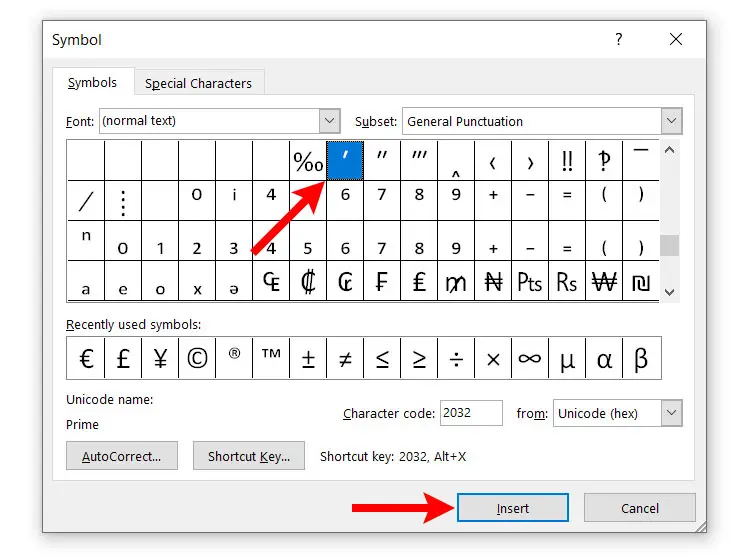
The symbol for a foot is the prime mark (′). Visually, it is often confused with a standard apostrophe or a single closing quotation mark, but it possesses a distinct vertical or slight diagonal orientation depending on the typeface. When communicating measurements, the prime mark is placed immediately following the numerical value without a space. For example, a measurement of six feet is written as 6′.
The Symbol for Inches
The symbol for an inch is the double prime mark (″). Similarly, this is frequently mistaken for a standard quotation mark or “straight quote.” In digital environments, such as code snippets or dimensioning tools within graphic design software, using the correct double prime is vital for ensuring that measurement values are parsed correctly by automated systems. Twelve inches is represented as 12″.
Digital Typographical Nuances and Software Compatibility
Navigating the landscape of digital fonts and software tools requires a keen eye for typographical detail. The distinction between “smart quotes” (curly quotes) and “straight primes” is a common pain point for designers and software engineers alike.
The Trap of Automatic Typography
Most modern word processors and design applications feature “smart quote” functionality. This feature automatically converts straight quotation marks into curly, directional quotes for better aesthetic appeal in prose. However, when documenting technical specifications, this feature is detrimental. Using a curly quotation mark (”) instead of a double prime (″) can result in errors when that data is imported into spreadsheets, CAD software, or programming scripts.
ASCII and Unicode Considerations
For those working in the tech sector, it is helpful to understand the character encoding behind these symbols. In basic ASCII, straight quotes and apostrophes are used as proxies for primes because the character sets were originally limited. In modern Unicode-based systems, dedicated characters exist for the prime (U+2032) and double prime (U+2033). Professionals working with web development or database management should prioritize using the correct Unicode characters to ensure cross-platform compatibility and semantic accuracy. If you are developing an interface that displays dimensions, ensure your font stack supports these specific characters to avoid rendering “tofu” boxes or incorrect glyphs.
Practical Applications in Design and Manufacturing
The correct application of these symbols extends far beyond simple writing; it is embedded in the workflow of various industrial and creative disciplines. Misunderstanding these symbols can lead to costly miscalculations in manufacturing and architectural projects.
Dimensioning in CAD and Engineering
In CAD software like AutoCAD, SolidWorks, or SketchUp, precision is paramount. When entering dimensions into a command line, the software relies on the prime and double prime to distinguish between unit types. If a user enters a dimension for a 36-inch length, inputting “36” might default to the project’s base units (which could be millimeters), whereas inputting “36″” explicitly tells the engine to treat the value as inches. Neglecting the double prime in these environments is one of the most common causes of scaling errors in technical drawing.
UI/UX Design and Hardware Specifications
When designing technical interfaces or marketing materials for hardware products—such as television panels, smartphone screen sizes, or industrial components—consistency is key. Design systems should define a style guide for how these measurements appear. In user interface design, it is common practice to avoid the prime symbols in favor of spelled-out labels (e.g., “12 inches”) when the audience is non-technical, to improve legibility. However, in “Pro” level software or technical dashboards, the use of symbols is preferred to save screen real estate and maintain a clean, professional aesthetic.
Best Practices for Professional Documentation
To ensure your professional output is both accurate and polished, adherence to a set of standardized rules is recommended.
Consistency Across Platforms
Whether you are writing a technical manual, a product specification sheet, or a customer-facing invoice, maintain consistency. Do not alternate between “12 inches” and “12″” within the same document unless there is a clear distinction in context. If the document is technical or data-heavy, adopt the symbol shorthand consistently. If the document is general business correspondence, spelling out the units or using the shorthand only for secondary measurements is often acceptable.
Avoiding Common Errors
One common mistake is placing a space between the number and the symbol. Unlike standard metric abbreviations (like 10 kg), where a space is required, Imperial symbols for feet and inches should be set tight to the number.
- Correct: 5′ 10″
- Incorrect: 5 ′ 10 ″
Another frequent error occurs when describing items that are less than one foot but are expressed using both units. Always ensure that the symbols are distinct and that you are not using a hyphen between the feet and inches, as this can be confused with a negative sign in technical specifications.
Leveraging Auto-Correction Settings
If you work primarily in environments like Adobe InDesign, Microsoft Excel, or VS Code, adjust your settings to disable “smart quotes” or “typographic quotes” when working in technical files. This simple configuration change prevents the software from “correcting” your symbols into decorative marks that may break your data or appear unprofessional in a technical context. In high-stakes manufacturing, these small details are the difference between a product being built to specification or failing to assemble entirely.

The Future of Measurement Standards
While the global move toward the metric system continues, the widespread reliance on Imperial measurements in the United States and within specific niche industries—such as the international aviation and maritime sectors—ensures that the usage of these symbols will remain relevant for the foreseeable future.
As software evolves, the way we input and display these measurements is becoming more intelligent. Modern CAD tools are increasingly capable of interpreting user intent even when symbols are omitted, but reliance on such “fuzzy logic” can be dangerous. Developing a disciplined approach to the use of the prime (′) and double prime (″) is a mark of professional maturity in any technical field. It demonstrates not only an attention to detail but a respect for the systems that rely on that data to function correctly. By mastering these symbols and the typographical nuances that surround them, you ensure that your technical communications remain clear, accurate, and ready for integration into the complex, interconnected world of modern software and industrial design.
aViewFromTheCave is a participant in the Amazon Services LLC Associates Program, an affiliate advertising program designed to provide a means for sites to earn advertising fees by advertising and linking to Amazon.com. Amazon, the Amazon logo, AmazonSupply, and the AmazonSupply logo are trademarks of Amazon.com, Inc. or its affiliates. As an Amazon Associate we earn affiliate commissions from qualifying purchases.