
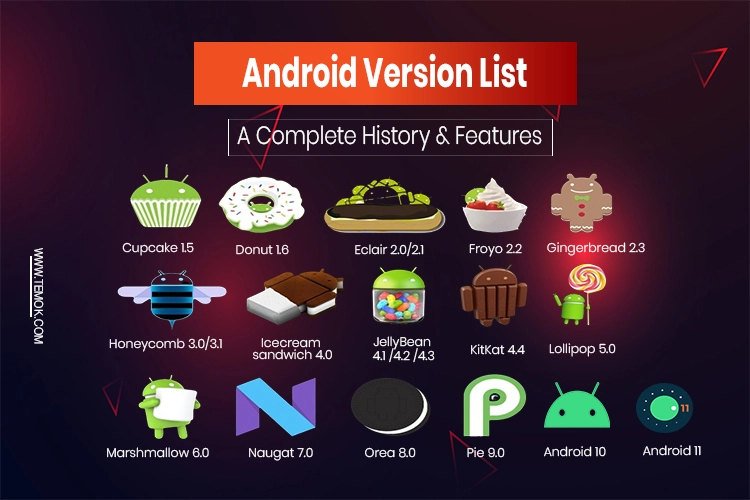
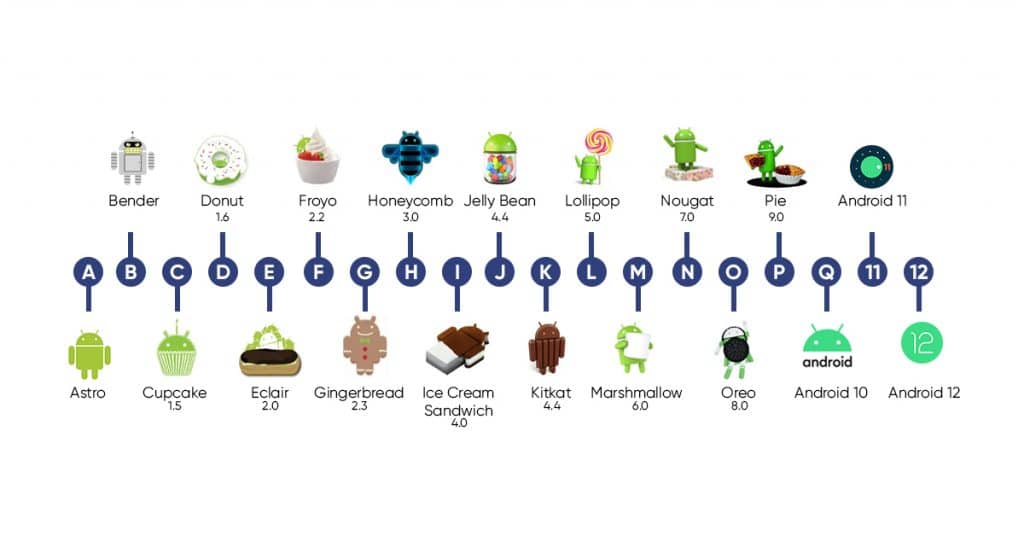
The mobile landscape is defined by a relentless cycle of innovation, and at the heart of this evolution lies the Android operating system. As of late 2024, the newest stable version of the world’s most popular mobile OS is Android 15, internally codenamed “Vanilla Ice Cream.” While the days of public dessert-themed naming conventions have largely transitioned into a more corporate, numerical branding strategy, the spirit of sweetening the user experience remains a core tenet of Google’s development philosophy.
Android 15 is not merely a cosmetic update; it represents a significant shift toward deeper hardware-software integration, advanced artificial intelligence, and a renewed focus on user privacy and security. In an era where the smartphone has become the primary hub for both personal and professional life, Android 15 seeks to refine the fundamentals while introducing cutting-edge features that leverage the power of modern processors and high-resolution displays.
The Core Philosophy of Android 15: Productivity and Refinement
Every iteration of Android targets specific pain points identified in previous versions. For Android 15, the focus is split between enhancing productivity for power users and refining the underlying architecture for better efficiency. Unlike the radical visual overhaul seen with the introduction of “Material You” in Android 12, Android 15 builds upon that aesthetic foundation, focusing instead on how users interact with their apps and how those apps manage system resources.
Enhanced Multitasking and Large Screen Optimization
With the rise of foldables and high-end tablets, Android 15 places a heavy emphasis on large-screen productivity. One of the standout features is the ability to save “App Pairs.” This allows users to launch two apps simultaneously in a split-screen view with a single tap. For professionals who frequently reference a spreadsheet while drafting an email or students who watch lectures while taking notes, this level of workflow automation is a significant upgrade.
Furthermore, the taskbar on tablets and foldables has been refined to be more intuitive. Users can now choose to pin the taskbar permanently or have it disappear when not in use, providing more screen real estate without sacrificing quick access to essential tools. These changes signal Google’s commitment to making Android a viable alternative to traditional desktop operating systems for lightweight productivity tasks.
Partial Screen Sharing
Privacy and professional utility intersect in the new Partial Screen Sharing feature. Historically, when a user shared their screen during a video call or recorded their display, the entire screen was visible, including sensitive notifications or background apps. Android 15 introduces the ability to share or record just a single app window. This ensures that even if a private message arrives during a presentation, it remains hidden from viewers, maintaining a level of professional decorum and personal privacy that was previously difficult to manage.
Advanced Security and the New “Private Space”
Security is no longer a peripheral feature of mobile operating systems; it is the foundation. Android 15 introduces several “under-the-hood” changes and user-facing features designed to protect data against both digital threats and physical theft.
The Introduction of Private Space
Perhaps the most significant addition to the security suite is “Private Space.” This feature acts as a sandboxed environment within the device where users can hide sensitive apps—such as banking, dating, or healthcare applications—behind an additional layer of authentication. When the Private Space is locked, the apps within it are effectively invisible to the rest of the system; they do not appear in the app drawer, the recent apps view, or notifications.
This is a vital evolution for users who may need to share their device with family members or colleagues. By isolating sensitive data in a dedicated, encrypted container, Android 15 provides peace of mind without requiring the user to manage multiple user profiles, which can be cumbersome.
Theft Detection and Enhanced Factory Reset Protection
Physical security also receives a major boost. Android 15 utilizes AI and motion sensors to detect “theft-related motions.” For example, if the device senses a sudden “snatch-and-run” movement—where someone grabs the phone and starts running or biking away—it can automatically lock the screen.
Additionally, Google has strengthened Factory Reset Protection (FRP). This makes it significantly harder for thieves to wipe and resell a stolen device. By requiring the owner’s credentials even after a hard reset, the “street value” of a stolen Android 15 device is drastically reduced, acting as a powerful deterrent against mobile-related crime.
The AI Revolution: Gemini Integration and On-Device Intelligence

While “AI” has become a ubiquitous buzzword in the tech industry, Android 15 integrates artificial intelligence in ways that are practical and largely transparent to the user. The integration of Google’s Gemini AI model into the core fabric of the OS represents a shift from cloud-dependent processing to on-device intelligence.
On-Device AI with Gemini Nano
Android 15 leverages Gemini Nano, Google’s most efficient AI model designed specifically for mobile hardware. By processing data locally on the device rather than sending it to a server, Android 15 ensures faster response times and better privacy. This manifests in features like “TalkBack” for visually impaired users, which now uses AI to provide detailed descriptions of images and screen elements that lack metadata.
Moreover, the “Circle to Search” feature, which gained popularity on the Pixel 8 and Galaxy S24 series, has been expanded and refined. In Android 15, this feature is more context-aware, allowing users to identify songs playing in their environment or solve complex math problems just by circling text or images on their screen.
Smart Connectivity and Satellite Support
As satellite communication becomes a standard feature for flagship hardware, Android 15 provides the necessary software infrastructure to support it. The OS now includes standardized support for Non-Terrestrial Network (NTN) connectivity. This means that in the absence of Wi-Fi or cellular signals, users can send and receive emergency messages via satellite. Android 15 also improves the user interface for these scenarios, guiding users to point their phones toward satellites to maintain a stable connection.
Performance Optimization and Developer Tools
For the more technically inclined, Android 15 introduces deep architectural changes that improve how the OS interacts with hardware. These updates are crucial for battery longevity and the overall “snappiness” of the interface.
The Android Dynamic Performance Framework (ADPF)
To cater to the growing mobile gaming and high-performance app market, Android 15 enhances the ADPF. This framework allows apps to communicate their workload requirements directly to the power and thermal management systems of the phone. This enables the device to adjust CPU and GPU frequencies more efficiently, preventing thermal throttling during intense gaming sessions while conserving battery during low-intensity tasks like reading an e-book.
Foreground Service Changes
One of the primary reasons for battery drain in older versions of Android was poorly optimized apps running in the background. Android 15 tightens the restrictions on “foreground services.” Apps are now required to be more transparent about why they are running in the background, and the system has more authority to kill processes that are consuming excessive resources. This results in a more consistent standby battery life across all devices running the new version.
Camera and Media Enhancements
Android 15 also brings “Low Light Boost” to the camera preview. This allows third-party apps—like Instagram or TikTok—to see a much brighter, clearer image in the viewfinder when shooting in dark environments, even before the photo is taken. Furthermore, the OS now offers more granular control over the camera flash, allowing developers to adjust the intensity of the “Single Tap” flash for better exposure in macro photography.
Future-Proofing: Update Cycles and Device Compatibility
The question of “what is the newest version of Android” is often followed by “when will my phone get it?” In recent years, the Android ecosystem has seen a dramatic improvement in update longevity. Google and Samsung have both committed to seven years of OS and security updates for their flagship devices (such as the Pixel 9 and Galaxy S24 series).
The Rollout Strategy
The newest version of Android typically debuts on Google’s own Pixel hardware. The Pixel 9, Pixel 8, and even older models back to the Pixel 6 are among the first to receive the stable build of Android 15. Following the Pixel rollout, major manufacturers like Samsung, OnePlus, Xiaomi, and Motorola begin deploying their customized versions (such as Samsung’s One UI 7).
This staggered rollout is a result of the “Skinning” process, where manufacturers add their own design language and exclusive features on top of the “AOSP” (Android Open Source Project) base. However, because of initiatives like Project Treble, the gap between Google’s release and manufacturer updates has shrunk significantly, with most flagship users receiving the latest version within weeks or a few months of the official launch.
Conclusion: The State of Android in 2024 and Beyond
Android 15 is a testament to the maturity of the mobile operating system. It is no longer about adding features for the sake of novelty; it is about refining the user experience to be more secure, more intelligent, and more adaptable to different form factors. By focusing on on-device AI, satellite connectivity, and robust privacy tools like Private Space, Google is positioning Android as a forward-looking platform capable of meeting the demands of a modern, tech-centric world.
As we look toward the future, the “newest version” of Android will continue to blur the lines between mobile and desktop functionality, driven by AI and a hardware-agnostic approach that ensures whether you are on a $200 budget phone or a $2,000 foldable, the experience remains cohesive, secure, and powerful. For now, Android 15 “Vanilla Ice Cream” stands as the pinnacle of that journey, offering a glimpse into the next decade of mobile computing.
aViewFromTheCave is a participant in the Amazon Services LLC Associates Program, an affiliate advertising program designed to provide a means for sites to earn advertising fees by advertising and linking to Amazon.com. Amazon, the Amazon logo, AmazonSupply, and the AmazonSupply logo are trademarks of Amazon.com, Inc. or its affiliates. As an Amazon Associate we earn affiliate commissions from qualifying purchases.