
In an era where technology evolves at a breakneck pace, the smartphone has become an extension of the human experience. However, with manufacturers releasing dozens of models annually—often with subtle variations in hardware and confusingly similar marketing names—it is surprisingly common for users to ask: “What is the name of my phone?”
Identifying your specific device is not merely a matter of curiosity. It is a fundamental technical requirement for downloading the correct software updates, purchasing compatible accessories, troubleshooting hardware glitches, and determining the fair market value for a resale or trade-in. This guide provides a deep dive into the methodologies for identifying your device, understanding its technical specifications, and navigating the complex landscape of mobile hardware.

The Technical Importance of Precise Device Identification
Before exploring the “how,” it is essential to understand the “why.” Knowing the exact name and model of your phone is the first step in digital literacy within the mobile ecosystem.
Software Updates and OS Compatibility
Operating systems, whether Android or iOS, are not “one size fits all.” Each update is tailored to specific hardware architectures. For instance, an Android security patch designed for a Samsung Galaxy S21 Ultra might not be compatible with the standard Galaxy S21, even though they belong to the same series. Identifying your device ensures you are searching for the correct firmware versions and understanding whether your hardware can support the latest features, such as AI-driven image processing or advanced encryption protocols.
Troubleshooting and Technical Support
When a device malfunctions, technical support forums and official help desks require specific information to provide solutions. A generic “my phone won’t turn on” is much harder to diagnose than “my Google Pixel 6 Pro is experiencing a boot loop.” Knowing your model name allows you to search for “known issues” specific to that hardware, saving hours of fruitless troubleshooting.
Resale Value and Trade-in Accuracy
The secondary market for smartphones is multi-billion-dollar industry. When trading in a device or selling it on a platform like Swappa or eBay, the difference between a 128GB model and a 256GB model, or a “Pro” vs. a “Pro Max,” can result in a price delta of hundreds of dollars. Accurate identification protects your financial interests and ensures the buyer receives the product they expect.
How to Identify Your Device: The Definitive Methodology
The process of identifying a smartphone varies depending on the operating system and the physical condition of the device.
For Android Users: Navigating the Ecosystem
Android is an open ecosystem, meaning that while the core software is similar, the interface (UI) can look different on a Samsung, OnePlus, or Xiaomi device. However, the path to finding the device name is generally standardized.
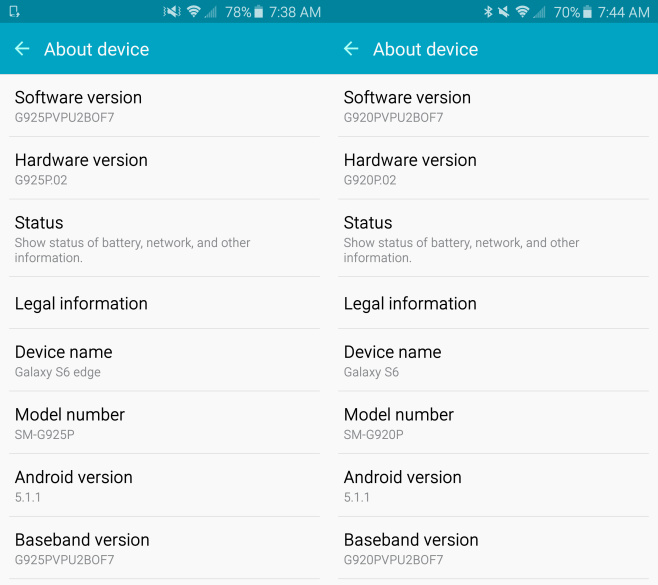
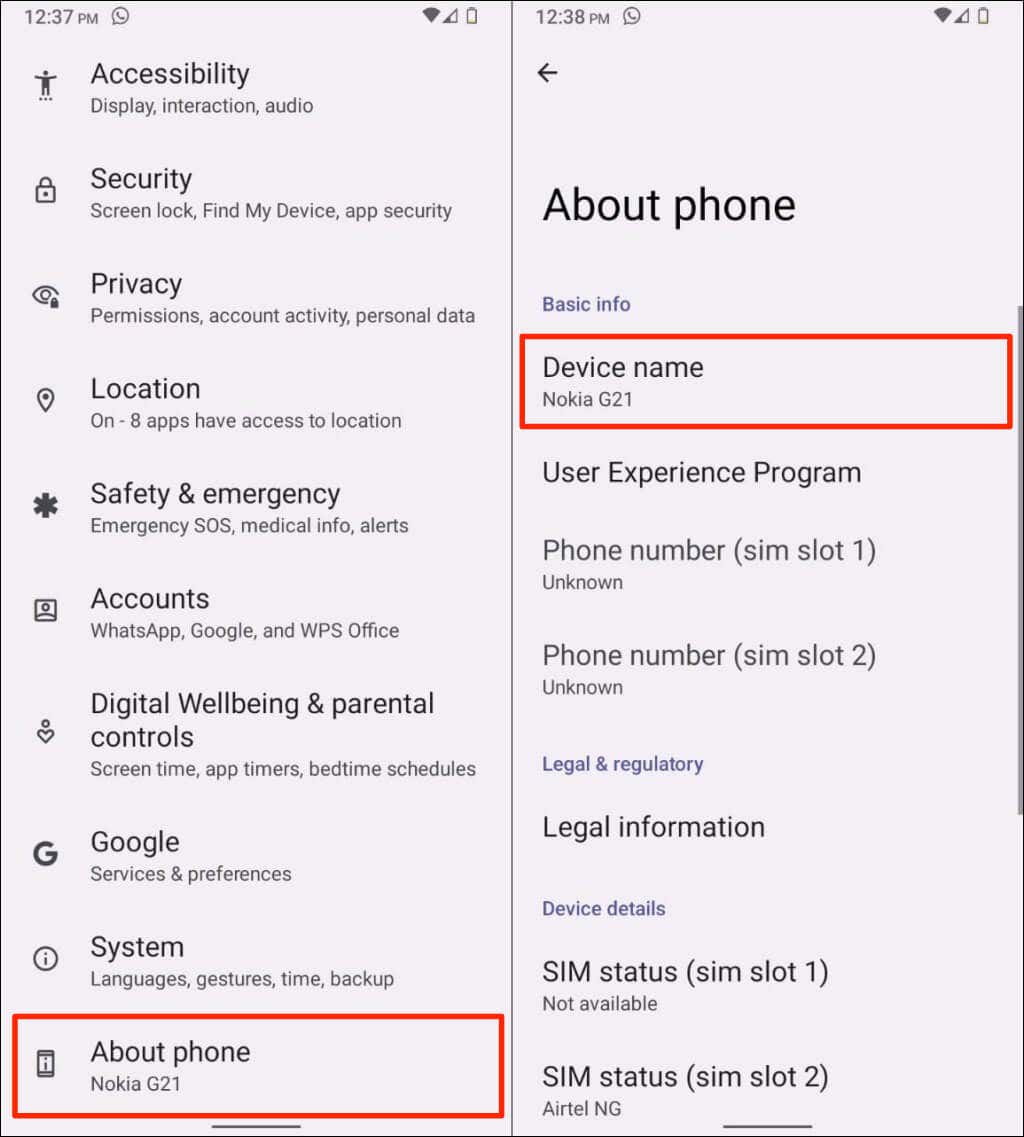
- The Settings Menu: Navigate to Settings > About Phone. In this section, most manufacturers prominently display the “Device Name” and “Model Name.”
- The Model Number: Just below the name, you will find a “Model Number” (e.g., SM-G998U). This is the technical identifier that distinguishes regional variants and carrier-specific models.
- Hardware Info Apps: If the software interface is unresponsive or if you require deeper technical specs, apps like CPU-Z or DevCheck provide a comprehensive breakdown of the device name, SoC (System on a Chip), RAM, and kernel version.
For iPhone (iOS) Users: Precision and Simplicity
Apple’s ecosystem is more controlled, making identification straightforward but equally critical for accessing services like AppleCare+.
- Software Method: Go to Settings > General > About. Here, Apple lists the “Model Name” (e.g., iPhone 14 Pro) and the “Model Number.”
- The Part Number Toggle: If you tap on the Model Number (which usually starts with an ‘M’ or ‘N’), it will toggle to a shorter code starting with ‘A’ (e.g., A2633). This ‘A’ number is the most accurate way to identify the specific hardware revision and the regions where it was intended for sale.
- Physical Markings: On older iPhones, the model number was printed on the back of the device. On newer models (iPhone 12 and later), the model number is often etched inside the SIM card tray slot, requiring a magnifying glass to read.
Decoding the Jargon: Model Names vs. Model Numbers
One of the most confusing aspects of the tech world is the discrepancy between what a phone is called in a commercial and what it is called by the system software.
Marketing Names vs. Internal Codes
A marketing name, such as “Samsung Galaxy S23 Ultra,” is designed for consumers. However, the internal model number (e.g., SM-S918B) is what the software recognizes. These codes often indicate:
- Region: Some codes are specific to North America (U), while others are Global (B) or intended for the Chinese market (0).
- Processor Variants: In the past, Samsung would use different processors (Snapdragon vs. Exynos) for the same marketing name, distinguishable only by the model number.
- Carrier Branding: Certain model numbers indicate that the phone was manufactured specifically for a carrier like Verizon or AT&T, which may affect which frequency bands the phone can access.
Regional Variants and Connectivity
Identifying your phone name helps you understand its “bands.” A phone’s “name” might be the same globally, but a model intended for the European market might lack the specific 5G mmWave antennas required for ultra-fast speeds on certain US carriers. By identifying the exact model number associated with your phone’s name, you can verify its compatibility with international roaming and local networks.
Advanced Hardware Identification and Digital Security
Beyond the name, your phone has unique identifiers that function like a digital fingerprint. Knowing where to find these is crucial for security.
The IMEI: The Digital Identity Card
The International Mobile Equipment Identity (IMEI) is a 15-digit number unique to your specific handset. If your phone is stolen, providing this number to the police and your carrier is the only way to “blacklist” the device, rendering it useless on cellular networks worldwide. You can find this by dialing *#06# on your phone’s keypad.
Checking Authenticity and Warranty
In a global market flooded with sophisticated “clones” or refurbished units sold as new, verifying your phone’s name against its serial number is a vital security step.
- Apple Users: Use the “Check Coverage” website by entering your serial number to see if the device name matches the physical hardware in your hand and to verify its warranty status.
- Android Users: Many manufacturers, such as Xiaomi and Samsung, offer verification portals where you can input the IMEI to ensure the phone is an authentic product and not a high-quality counterfeit.
Exploring Technical Specifications via Identification
Once you have identified the name of your phone, you can unlock a wealth of information regarding its internal capabilities.
Understanding the SoC and RAM
The “name” of your phone tells you what’s under the hood. If you identify your phone as a “OnePlus 11,” you immediately know it utilizes the Qualcomm Snapdragon 8 Gen 2 chipset. This information is vital for power users and gamers who need to know if their device can handle high-performance tasks or if the “throttling” they experience is a known characteristic of that specific hardware.
Battery Capacity and Charging Protocols
Not all chargers are created equal. By knowing your phone’s exact name, you can research its maximum supported wattage. Using a 100W charger on a phone that only supports 18W (like an older iPhone) won’t damage it, but it won’t charge it any faster. Conversely, knowing your phone supports “USB Power Delivery” or “Qualcomm Quick Charge” allows you to buy the most efficient peripheral tech.
Conclusion: Mastering Your Mobile Identity
In the complex landscape of modern technology, “What is the name of my phone?” is the gateway question to better device management. Whether you are navigating the settings of a new Android flagship or checking the “A-series” model number on an iPhone, this information empowers you to take control of your digital life.
By understanding the distinction between marketing names and technical model numbers, recognizing the importance of the IMEI for security, and using your device’s identity to research compatibility and performance, you transition from being a passive user to an informed technologist. Your smartphone is a powerful tool; knowing its name and identity is the first step in utilizing that tool to its fullest potential. In the end, precision in identification leads to better security, higher resale values, and a more seamless technological experience.
aViewFromTheCave is a participant in the Amazon Services LLC Associates Program, an affiliate advertising program designed to provide a means for sites to earn advertising fees by advertising and linking to Amazon.com. Amazon, the Amazon logo, AmazonSupply, and the AmazonSupply logo are trademarks of Amazon.com, Inc. or its affiliates. As an Amazon Associate we earn affiliate commissions from qualifying purchases.