
In the fast-evolving landscape of mobile technology, staying informed about the latest software versions for your devices isn’t just a matter of curiosity; it’s a critical aspect of security, functionality, and user experience. For iPhone and iPad users, the operating system in question is iOS (and iPadOS, its tablet-optimized counterpart). Knowing “what is the most current version of iOS” is fundamental to unlocking the full potential of your Apple device, protecting your data, and ensuring compatibility with the latest applications and services.
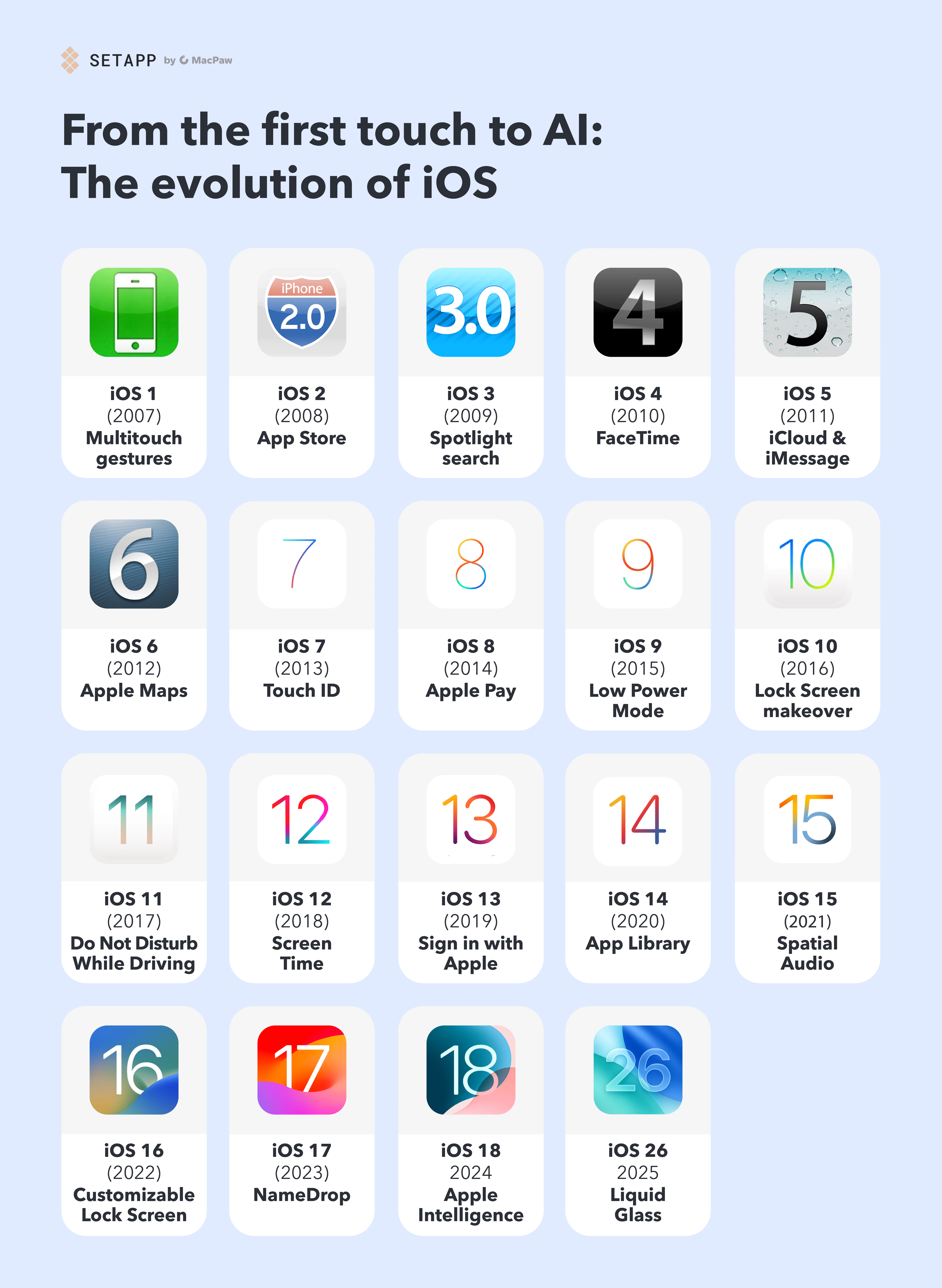
This article will not only identify the most recent stable release of iOS but will also delve into why keeping your device updated is paramount, explore the significant enhancements it brings, guide you through the update process, and briefly touch upon the broader implications for the Apple ecosystem. By the end, you’ll have a comprehensive understanding of iOS versioning and the importance of maintaining an updated digital life.
The Latest Iteration of iOS and Why It Matters
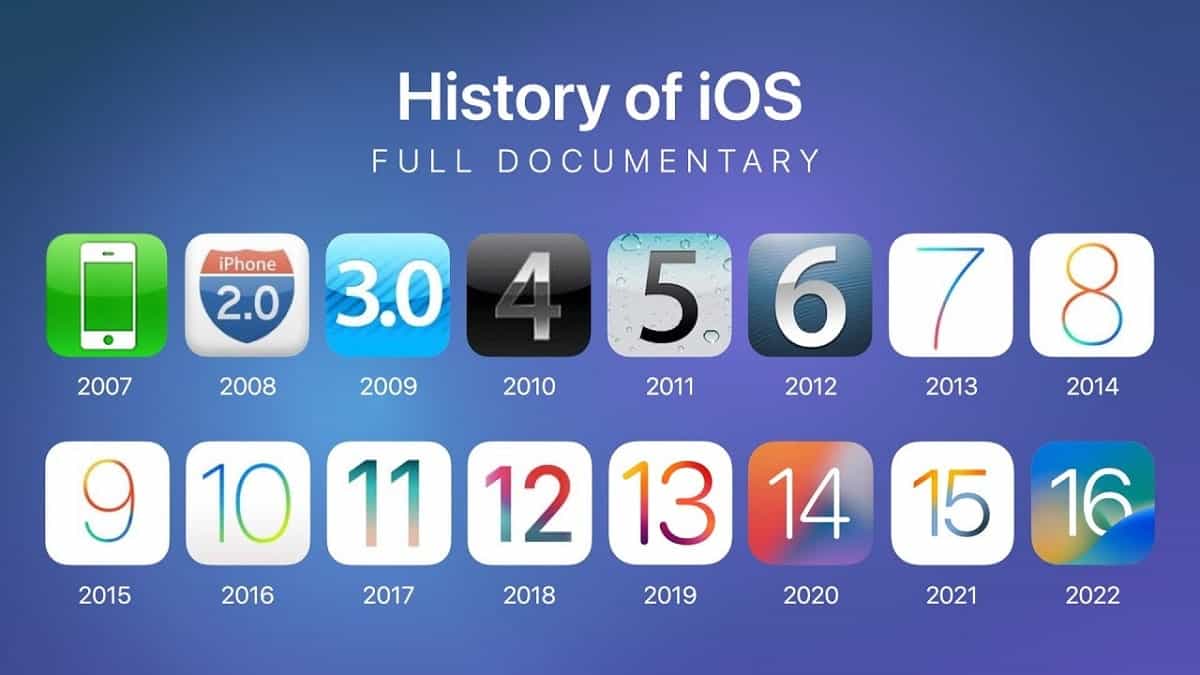
Apple consistently pushes the boundaries of mobile computing with annual major iOS releases, punctuated by more frequent point updates. These updates are more than just numerical increments; they represent months, sometimes years, of development aimed at refining the user experience, enhancing security, and introducing groundbreaking features.
Identifying the Current Stable Release
As of the latest public release cycle, the most current major version of Apple’s mobile operating system for iPhones is iOS 17. Following its initial launch, Apple has continued to release subsequent point updates (e.g., iOS 17.1, 17.2, 17.3, 17.4, 17.5, and further security patches like 17.5.1), which typically introduce minor features, performance enhancements, and crucial bug fixes or security patches. These point releases are critical for maintaining the stability and security of your device.
It’s important to differentiate between a “major” release (like iOS 17) and “point” releases (like iOS 17.x.x). Major releases bring significant new features and often a refreshed user interface, while point releases focus on incremental improvements and essential maintenance. To get the exact, most current build number, users should always check directly on their device or Apple’s official support pages, as these can change frequently with new security patches.
Understanding iOS Versioning: Major vs. Point Releases
Apple’s software release strategy involves a predictable cadence. Every year, typically in September, a new major version of iOS is launched, following an announcement at the Worldwide Developers Conference (WWDC) in June and a subsequent public beta testing phase. This major release (e.g., iOS 17) brings a host of new features, design tweaks, and underlying architectural improvements.
Throughout the year, until the next major release, Apple rolls out several “point updates” (e.g., 17.1, 17.2, 17.3). These updates are crucial for several reasons:
-
Bug Fixes: Addressing glitches and performance issues discovered after the initial major release.
-
Security Patches: Plugging vulnerabilities that could be exploited by malicious actors, protecting user data and device integrity.
-
Minor Features: Occasionally introducing smaller, incremental features that weren’t ready for the initial major launch or refining existing ones.
-
Performance Improvements: Optimizing the operating system to run more smoothly and efficiently on compatible hardware.
Understanding this versioning helps users appreciate the continuous effort Apple puts into refining its ecosystem and underscores why staying updated to the latest available point release of the current major version is so vital.
The Critical Importance of Staying Updated
Beyond merely having the latest features, updating your iOS device carries profound benefits that impact security, performance, and overall user satisfaction:
-
Enhanced Security: This is arguably the most critical reason. Each update often includes patches for newly discovered security vulnerabilities. Running an outdated version leaves your device susceptible to malware, data breaches, and other cyber threats. Apple is a prime target for attackers, and their swift response to vulnerabilities through updates is a cornerstone of their security posture.
-
Access to New Features: Major iOS updates introduce innovative functionalities that can revolutionize how you use your iPhone or iPad. From new communication tools and customization options to health monitoring features and improved accessibility, staying updated ensures you’re not missing out on advancements designed to enhance your digital life.
-
Improved Performance and Stability: Updates often include performance optimizations that can make your device feel faster and more responsive. They also address bugs and stability issues, leading to fewer app crashes and a smoother overall experience.
-
App Compatibility: App developers typically target the latest iOS versions for their newest features and optimizations. Running an older iOS version can lead to apps not functioning correctly, or in some cases, not being installable at all.
-
Better Battery Life: While sometimes new features can initially impact battery life, Apple often includes power management optimizations in subsequent updates to improve efficiency.
-
Extended Device Lifespan: Staying updated can prolong the usable life of your device by keeping it secure and compatible with the latest software and apps, delaying the need for an upgrade.
Key Features and Enhancements in Recent iOS Versions
Each major iOS release builds upon its predecessors, introducing a suite of features designed to make the iPhone more personal, intuitive, and secure. Focusing on iOS 17 and its immediate predecessors reveals a clear trajectory towards deeper personalization, enhanced communication, and robust privacy controls.
Privacy and Security Upgrades
Apple has consistently positioned itself as a champion of user privacy, and recent iOS versions reinforce this commitment. Enhancements include:
-
Communication Safety: Expanding protections for children from viewing and sharing sexually explicit images beyond Messages to other apps.
-
Locked Private Browsing: Safari’s Private Browsing mode gains additional protection, requiring Face ID or Touch ID to unlock tabs.
-
Link Tracking Protection: Automatically removing identifying tracking parameters from URLs in Mail, Messages, and Safari Private Browsing.
-
Password Management: Improved features for sharing passwords and passkeys securely with trusted contacts.
-
Safety Check: A feature introduced in iOS 16, refined in 17, allowing users in abusive situations to quickly review and reset access granted to others.
These features underscore Apple’s dedication to giving users more control over their data and digital safety, a critical aspect in today’s digital age.
User Interface and Experience Improvements
Recent iOS updates have focused on making the iPhone experience more personal and convenient:
-
Contact Posters: A significant personalization feature in iOS 17, allowing users to customize how they appear to others when they call, with custom photos, Memoji, and typography.
-
StandBy Mode: When charging in landscape orientation, the iPhone transforms into a full-screen smart display, showing widgets, photo frames, or clock styles.
-
Interactive Widgets: Widgets on the Home Screen, Lock Screen, and StandBy become interactive, allowing users to perform actions directly without opening the app.
-
Improved Customization: Expanded options for Lock Screen customization, including depth effect for photos, new fonts, and widgets.
-
AirDrop Enhancements: Simplified sharing by bringing devices close together, and the ability to continue large AirDrop transfers over the internet when you move out of range.
-
Journal App: A new app introduced in iOS 17, designed to help users reflect on their day, suggesting moments to remember based on photos, workouts, and more.
These improvements aim to make the iPhone feel more uniquely tailored to each individual and enhance everyday interactions.
New Productivity and Communication Tools
Communication and productivity are at the core of the iPhone experience, and recent updates have brought notable advancements:
-
Messages App Overhaul: Significant updates to the Messages app, including “Check In” (to notify friends/family when you’ve arrived safely), improved search filters, swipe to reply, and a redesigned app drawer.
-
VoiceMail Enhancements (Live Voicemail): Transcribing incoming voicemails in real-time, allowing users to decide whether to pick up the call or let the caller leave a message.
-
FaceTime Improvements: Support for video and audio messages when a call isn’t answered, and new reactions that can be triggered with gestures.
-
Safari Profile Management: Creating separate profiles in Safari for work and personal browsing, keeping history, extensions, Tab Groups, and favorites separate.
-
Reminders and Notes Upgrades: New smart lists, section organization, and collaboration features to enhance productivity.
These tools streamline how users communicate, organize their lives, and get things done on their devices.
Health and Wellness Integration
Apple continues to deepen the integration of health and wellness features into iOS, emphasizing proactive health management:
-
Mindfulness and Mental Well-being: Tools to log daily moods and emotions, track trends, and access educational resources.
-
Visual Acuity and Myopia Risk: Features leveraging the TrueDepth camera to help reduce myopia risk by measuring time spent in daylight.
-
Medications Tracking: Reminders and tracking for medications, vitamins, and supplements.
-
Health Sharing: Securely sharing health data with trusted individuals or healthcare providers.
These features highlight the iPhone’s role not just as a communication device but as a powerful personal health companion.
How to Check and Update Your iOS Device
Ensuring your device is running the most current version of iOS is a straightforward process. Apple has made it incredibly user-friendly, prioritizing accessibility for all users.
Step-by-Step Guide to Verifying Your Current Version
Before updating, it’s good practice to know what version you’re currently running.
-
Unlock your iPhone or iPad.
-
Tap on the Settings app (it looks like a gear icon).
-
Scroll down and tap on General.
-
Tap on About.
-
Look for “iOS Version” or “Software Version.” The number displayed here (e.g., 17.5.1) is your device’s current iOS version.
Simple Instructions for Updating Your iPhone or iPad
Updating your iOS device is usually a simple, over-the-air (OTA) process. Before you begin, ensure:
-
Your device is connected to Wi-Fi. Downloading updates over cellular data might incur charges and can be slow.
-
Your device has at least 50% battery charge, or is connected to power. An update can drain your battery quickly, and a device shutting down mid-update can cause serious issues.
-
You have sufficient storage space. Updates can range from a few hundred MBs to several GBs. Check your available storage in
Settings > General > iPhone Storage. -
Backup your device to iCloud or your computer. While updates are generally safe, a backup provides peace of mind in case anything goes wrong. Go to
Settings > [Your Name] > iCloud > iCloud Backupand tap “Back Up Now.”
Once ready, follow these steps:
-
Go to Settings > General.
-
Tap Software Update.
-
Your device will check for available updates. If an update is available, you will see details about it.
-
Tap Download and Install. You might be prompted to enter your passcode.
-
Agree to the Terms and Conditions.
-
The update will begin downloading. Once downloaded, you’ll have the option to “Install Now” or “Install Later.”
-
Tap Install Now. Your device will restart during the installation process. Do not interrupt this process.
After the device restarts, it will be running the latest available iOS version.
Troubleshooting Common Update Issues
While updates are typically smooth, you might occasionally encounter issues:
-
“Unable to Check for Update” or “Unable to Install Update”: This often indicates a network issue. Try connecting to a different Wi-Fi network, restarting your router, or restarting your iPhone. If the issue persists, your device might be too old to support the latest iOS, or Apple’s servers are temporarily overloaded.
-
Update Stuck or Frozen: If your iPhone gets stuck on the Apple logo or during the update process, try a forced restart (the method varies by iPhone model, but usually involves pressing and holding volume and side buttons). If that doesn’t work, you might need to connect it to a computer and use Finder (macOS) or iTunes (Windows) to restore or update.
-
Not Enough Storage: Delete unused apps, photos, or videos to free up space. You can also try updating via a computer, which uses less device storage.
-
Battery Drain After Update: Sometimes, after a major update, the system needs time to re-index files and optimize processes, which can temporarily increase battery usage. Give it a few days. If the drain persists, check battery usage in
Settings > Batteryto identify problematic apps.
For persistent issues, Apple Support or an authorized service provider can offer further assistance.
The iOS Ecosystem: Beyond the Version Number
Understanding the most current iOS version is just one piece of a much larger and intricately designed ecosystem. Apple’s control over both hardware and software allows for an unparalleled level of integration, influencing everything from device lifespan to app development and future technological trends.
Hardware Compatibility and Lifespan
A critical factor in the iOS update cycle is hardware compatibility. With each new major iOS version, Apple typically drops support for older iPhone models that can no longer meet the performance requirements of the new operating system. For example, iOS 17 supports iPhone XR/XS and newer models, meaning older devices like the iPhone X or earlier are limited to iOS 16. This planned obsolescence, while sometimes frustrating for users, ensures that devices running the latest OS can deliver the intended user experience without significant performance bottlenecks. It also implicitly encourages users to upgrade their hardware, fueling Apple’s sales cycle. Knowing which iOS version your device can support is crucial when considering its long-term viability.
App Development and Developer Considerations
The release of a new iOS version has significant implications for the developer community. Developers eagerly adopt new APIs (Application Programming Interfaces) and features introduced in the latest iOS to enhance their apps, provide new functionalities, and optimize performance. Staying updated means apps can leverage the newest capabilities, offering users the best possible experience. Conversely, developers must also consider backward compatibility for users on older iOS versions, often requiring a delicate balance between adopting new tech and maintaining a broad user base. The evolution of iOS directly dictates the evolution of the App Store and the innovations available to users.
The Future of iOS: Glimpses into Upcoming Releases
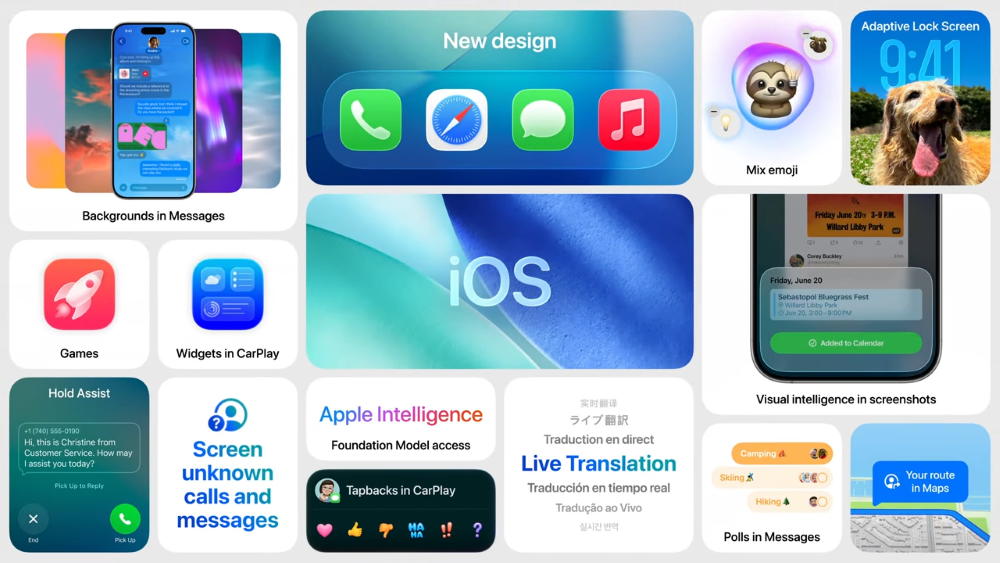
Apple’s annual WWDC event offers the world a sneak peek into the future of iOS. While specifics are always under wraps until the official announcement, the trajectory of iOS development points towards several key areas:
-
Deeper AI Integration: Expect artificial intelligence and machine learning to become even more ingrained into system-level functions, enhancing everything from Siri’s capabilities to photo editing and predictive text.
-
Expanded AR/VR Capabilities: With the advent of devices like the Apple Vision Pro, future iOS (and particularly iPadOS) versions will likely feature deeper integration with augmented and virtual reality experiences, opening new possibilities for interaction and application.
-
Health and Wellness Innovations: Apple’s commitment to health is unwavering. Future updates will undoubtedly bring more sophisticated health monitoring, data analysis, and perhaps integration with a broader range of medical devices.
-
Enhanced Inter-device Connectivity: Expect even more seamless handoffs and interactions between your iPhone, iPad, Mac, Apple Watch, and other Apple devices, creating an even more cohesive ecosystem.
-
Privacy and Security Evolution: As cyber threats evolve, so too will Apple’s defenses, with continuous improvements to privacy controls, data encryption, and user authentication methods.
These trends highlight Apple’s ongoing pursuit of a powerful, secure, and increasingly integrated digital experience, always with the user at the forefront.
Conclusion
Understanding “what is the most current version of iOS” is more than just knowing a number; it’s about appreciating the continuous cycle of innovation, security, and user experience enhancements that Apple delivers. By ensuring your iPhone or iPad is running the latest stable release, you safeguard your data, unlock new functionalities, and maintain optimal device performance.
From groundbreaking privacy features and intuitive UI refinements to powerful productivity tools and deep health integrations, each iOS update represents a significant leap forward. Making it a habit to check for and install these updates is a simple yet profoundly impactful action, keeping your device relevant, secure, and ready to tackle the challenges and opportunities of the digital world. Stay informed, stay updated, and fully embrace the potential of your Apple technology.
aViewFromTheCave is a participant in the Amazon Services LLC Associates Program, an affiliate advertising program designed to provide a means for sites to earn advertising fees by advertising and linking to Amazon.com. Amazon, the Amazon logo, AmazonSupply, and the AmazonSupply logo are trademarks of Amazon.com, Inc. or its affiliates. As an Amazon Associate we earn affiliate commissions from qualifying purchases.