
The Amazon Fire TV Stick, a ubiquitous streaming device, has become a central hub for home entertainment. Its affordability and ease of use have made it a popular choice for millions. However, a segment of users explores a practice known as “jailbreaking” the Fire Stick. This term often sparks curiosity and sometimes apprehension, leading to questions about its nature, purpose, and implications. This article delves into the world of Fire Stick jailbreaking, demystifying the process and its associated factors within the realm of technology.
Understanding the “Jailbreak” Concept on Fire TV Devices
At its core, “jailbreaking” in the context of a Fire Stick refers to the process of removing software restrictions imposed by Amazon. This is analogous to the concept of jailbreaking on Apple’s iOS devices, where users gain root access to the operating system. For the Fire Stick, which runs a customized version of Android, jailbreaking essentially grants users elevated privileges, allowing them to install and run applications that are not officially available through the Amazon Appstore.

The Nature of Fire Stick Software and Restrictions
The Fire TV operating system, Fire OS, is built upon the Android Open Source Project (AOSP). However, Amazon heavily curates and restricts the user experience. This curation is evident in several ways:
- The Amazon Appstore: This is the primary, and for most users, the only sanctioned method of installing applications. Amazon controls which apps are available, often prioritizing its own services and those of its partners. While the Appstore is extensive, it doesn’t encompass the full spectrum of Android applications.
- Sideloading Restrictions: Android devices generally allow users to “sideload” applications, meaning installing apps from sources other than the official app store. Fire Sticks have a built-in mechanism for this, but it’s often disabled by default or requires specific user actions to enable. Even with sideloading enabled, Amazon’s underlying system can still impose limitations.
- Root Access and System Modifications: Jailbreaking goes beyond simply sideloading. It aims to gain “root access,” which is the highest level of administrative privilege on an operating system. With root access, users can modify system files, change the device’s default behavior, and install applications that require deeper system integration.
Why Users Consider Jailbreaking Their Fire Stick
The primary motivations behind jailbreaking a Fire Stick are centered around expanding its functionality and accessing content and applications beyond Amazon’s curated ecosystem.
- Access to a Wider Range of Applications: Many popular Android applications are not available on the Amazon Appstore. This can include emulators for classic video games, media players with advanced customization options, productivity tools, or even alternative app stores that offer a broader selection. Jailbreaking facilitates the installation of these “unapproved” apps.
- Enhanced Media Playback Capabilities: Some users jailbreak to install alternative media players like Kodi. Kodi is an open-source media center software that can be customized with various add-ons, allowing users to access a vast array of streaming content, including live TV, movies, and TV shows from various sources.
- Customization and User Interface Modifications: While less common for the average user, advanced users might jailbreak to alter the Fire Stick’s user interface, remove pre-installed bloatware, or optimize system performance.
- Potential for Cost Savings (with caveats): This is a controversial area and often a primary driver for many users. While jailbreaking itself doesn’t directly provide free access to paid content, it enables the installation of applications and add-ons that claim to offer free access to copyrighted material. It is crucial to understand that this often infringes on copyright laws and can lead to legal issues.
The Technical Process of Jailbreaking a Fire Stick
Jailbreaking a Fire Stick is not a single, standardized procedure. The method can vary significantly depending on the specific Fire TV device model, its firmware version, and the current security patches implemented by Amazon. While the exact steps are constantly evolving and often require specific technical knowledge, the general approach involves exploiting vulnerabilities in the device’s software.
Common Methods and Tools Used for Jailbreaking
Historically, several methods have been employed for jailbreaking Fire Sticks. These often involve a combination of enabling developer options, sideloading specific applications, and sometimes utilizing exploits.
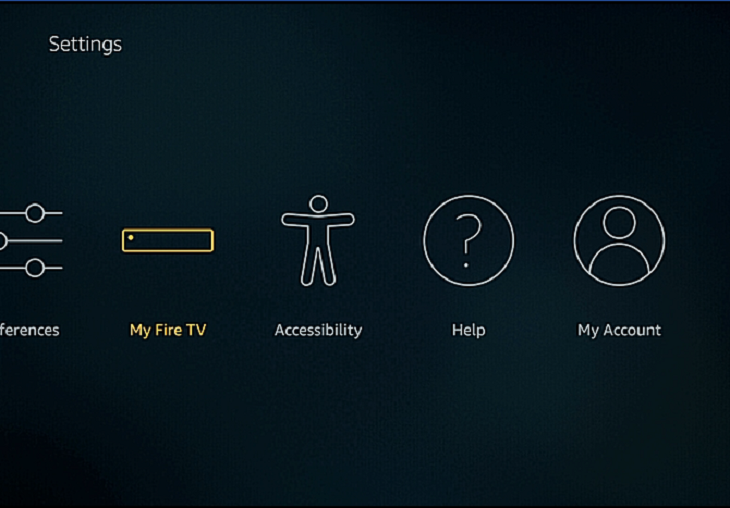
- Enabling Developer Options: This is a prerequisite for most jailbreaking methods. Users typically navigate to “My Fire TV” in the settings, then “Developer Options,” and enable “ADB debugging” and “Apps from Unknown Sources.” The latter allows the installation of apps not found in the Amazon Appstore.
- Sideloading Essential Apps: Once developer options are enabled, users can sideload essential tools like “Downloader” or “ES File Explorer” (though the latter has had privacy concerns). These apps are then used to download and install further applications or scripts required for the jailbreaking process.
- Exploiting Firmware Vulnerabilities: More advanced jailbreaks often rely on identifying and exploiting security vulnerabilities within the Fire TV’s firmware. These vulnerabilities can allow for the elevation of privileges to root level. Some methods might involve temporarily booting the device into a special mode or using specific hardware connections.
- Rooting Tools and Scripts: Various third-party tools and scripts have been developed by the developer community to automate and simplify the jailbreaking process. These tools often package the necessary exploits and commands to achieve root access. However, the effectiveness and safety of these tools can vary greatly, and they are not endorsed by Amazon.
The Role of Firmware Updates and Security Patches
Amazon is actively aware of the jailbreaking community and its efforts. As a result, they regularly release firmware updates for their Fire TV devices. These updates are crucial for several reasons, including:
- Security Enhancements: Updates often patch the very vulnerabilities that jailbreaking methods exploit. This means that a jailbreak that works on one firmware version might be rendered useless by a subsequent update.
- Performance Improvements and Bug Fixes: Beyond security, updates aim to improve the overall user experience, fix bugs, and introduce new features.
- Discouraging Unauthorized Use: By patching vulnerabilities, Amazon aims to prevent users from accessing unauthorized content or modifying the device in ways that could compromise its integrity or Amazon’s ecosystem.
This constant cat-and-mouse game between Amazon and the jailbreaking community means that methods that were effective yesterday may not be effective today. Users who wish to jailbreak must often stay updated with the latest developments in online forums and communities dedicated to Fire Stick modding.
Legal, Ethical, and Security Considerations of a Jailbroken Fire Stick
While the allure of unlocking additional functionality is strong, it’s imperative to understand the significant legal, ethical, and security implications associated with jailbreaking a Fire Stick. These aspects often get overlooked by users focused solely on the perceived benefits.

Copyright Infringement and Content Access
One of the most significant concerns surrounding jailbreaking is its association with accessing copyrighted content without proper authorization. Many third-party applications and add-ons for platforms like Kodi that can be installed on a jailbroken Fire Stick are designed to stream movies, TV shows, live sports, and other premium content for free.
- Illegality of Piracy: Streaming or downloading copyrighted material without paying for it or having explicit permission from the copyright holder is illegal in most jurisdictions. Engaging in such activities can lead to legal repercussions, including fines and even criminal charges.
- Risks of Unverified Sources: The add-ons and repositories that facilitate access to free, copyrighted content are often created and maintained by individuals or groups outside of official app stores. These sources are not vetted by Amazon or legitimate content providers, and the legality of the content they offer is questionable.
- Impact on Content Creators: The widespread availability of pirated content directly harms content creators, studios, and distributors by reducing legitimate revenue streams. This can ultimately impact the production of new content.
Security Risks and Malware
Jailbreaking, by its very nature, involves circumventing built-in security measures. This opens the door to a host of potential security risks that are generally mitigated by Amazon’s controlled ecosystem.
- Malware and Spyware: Installing applications from unknown sources significantly increases the risk of downloading malware, spyware, or viruses. These malicious programs can steal personal information, track user activity, or even take control of the device.
- Compromised Device Integrity: Root access allows for deep system modifications. If these modifications are not performed correctly, or if malicious software gains root privileges, it can lead to device instability, performance degradation, or even render the Fire Stick unusable.
- Lack of Updates and Support: Once jailbroken, users might be hesitant to install official Amazon firmware updates for fear of breaking the jailbreak. This leaves the device vulnerable to known security flaws that are patched in legitimate updates. Furthermore, Amazon is unlikely to provide support for a device that has been modified.
Voiding the Warranty and Device Stability
Modifying a device beyond its intended use can have consequences for warranty coverage and overall device stability.
- Voiding the Manufacturer’s Warranty: Amazon’s terms of service typically state that unauthorized modifications to the device will void the warranty. If a jailbroken Fire Stick malfunctions or experiences hardware failure, Amazon may refuse to repair or replace it, leaving the user responsible for the cost of a new device.
- Performance and Stability Issues: The Fire TV operating system is optimized for Amazon’s hardware and software. Introducing unauthorized applications, system modifications, or exploiting vulnerabilities can lead to performance issues, app crashes, unexpected reboots, and an overall less stable user experience.
- Bricking the Device: In rare but possible scenarios, an incorrect jailbreaking procedure or a compromised update could render the Fire Stick completely inoperable, a phenomenon commonly referred to as “bricking” the device.
Alternatives to Jailbreaking for Enhanced Fire Stick Functionality
For users interested in expanding their Fire Stick’s capabilities without venturing into the legally and technically precarious world of jailbreaking, several legitimate and secure alternatives exist. These methods leverage the features Amazon has made available or employ well-established, authorized software.
Utilizing Sideloading Responsibly for Legitimate Apps
The ability to sideload applications, which is a precursor to jailbreaking, can be utilized in a safe and legal manner to access a wider range of useful apps. This involves enabling “Apps from Unknown Sources” in the developer options and then downloading APK files from reputable sources.
- Popular and Useful Sideloaded Apps: This approach is commonly used to install legitimate applications not found in the Amazon Appstore, such as:
- Third-party media players: VLC Media Player, MX Player, which offer more advanced playback features than the default player.
- File managers: ES File Explorer (with caution due to privacy concerns), FX File Explorer, for easier file management and transfer.
- Productivity apps: Cloud storage clients, specific VPN apps that might not be on the Amazon Appstore.
- Gaming emulators: For users who want to play classic games from older consoles, provided they own the ROMs legally.
- Ensuring Source Reputability: The key to safe sideloading is to download APK files only from trusted and well-known websites. Avoid downloading from suspicious or unknown sources that might bundle malware with legitimate-looking apps.
- Maintaining Device Security: Even with legitimate sideloaded apps, it’s wise to run a reputable antivirus scan on APK files before installation if possible, although this is often difficult on the Fire Stick itself.
Leveraging Official Apps and Services
The Amazon Appstore has a vast and growing selection of applications, including many that can significantly enhance the entertainment experience without any modification.
- Streaming Services: Access to all major streaming platforms like Netflix, Hulu, Disney+, HBO Max, Peacock, and many more.
- Live TV Services: Options like YouTube TV, Sling TV, and Philo offer comprehensive live television packages.
- Gaming: The Amazon Appstore includes a variety of games, some of which can be played with a compatible controller.
- Productivity and Utility Apps: While not as extensive as on other platforms, there are still useful apps for news, weather, and basic productivity.
- Kodi with Official Repositories: While Kodi itself is a powerful media center, its true potential for customization comes with add-ons. Users can install Kodi and then carefully select add-ons from official, reputable repositories that offer legal content sources, such as public domain archives or legal streaming services.
Utilizing VPNs for Enhanced Privacy and Access
For users concerned about online privacy or geo-restricted content, a Virtual Private Network (VPN) is a powerful and legal tool. Many reputable VPN providers offer dedicated apps for the Fire Stick, which can be installed directly from the Amazon Appstore.
- Improved Online Privacy: A VPN encrypts your internet traffic, making it more difficult for your Internet Service Provider (ISP) or other entities to track your online activities.
- Accessing Geo-Restricted Content: By connecting to a server in a different country, a VPN can allow you to access streaming content or websites that are otherwise unavailable in your region. This is particularly useful for accessing your home country’s streaming library while traveling abroad.
- Enhanced Security on Public Wi-Fi: If you use your Fire Stick on public Wi-Fi networks, a VPN adds an extra layer of security.
- No System Modification Required: VPNs operate as regular applications and do not require jailbreaking or any system modifications, making them a safe and straightforward way to enhance your online experience.
In conclusion, while the concept of “jailbreaking” a Fire Stick might appear to offer a gateway to unlimited possibilities, the associated risks—legal, security, and functional—are substantial. By understanding these risks and exploring the numerous legitimate and secure alternatives available, users can maximize their Fire TV experience while maintaining a safe and compliant digital environment.
aViewFromTheCave is a participant in the Amazon Services LLC Associates Program, an affiliate advertising program designed to provide a means for sites to earn advertising fees by advertising and linking to Amazon.com. Amazon, the Amazon logo, AmazonSupply, and the AmazonSupply logo are trademarks of Amazon.com, Inc. or its affiliates. As an Amazon Associate we earn affiliate commissions from qualifying purchases.