
Minecraft, at its heart, is a game of blocks, creativity, and boundless possibility. While many players focus on building grand structures or exploring vast landscapes, a significant portion of its appeal lies in its intricate Redstone mechanics. Redstone allows players to create complex contraptions, automate tasks, and design ingenious systems that bring their builds to life. Among the many essential Redstone components, the Dropper stands out as a versatile, yet often misunderstood, block that is fundamental to advanced automation.
Unlike its more action-oriented cousin, the Dispenser, the Dropper’s purpose is more subtle but no less critical. It acts as a conduit, precisely moving items from one location to another, serving as the backbone for everything from simple storage systems to intricate logistical networks. Understanding the Dropper’s capabilities is a pivotal step for any player looking to elevate their Redstone game, transforming manual chores into elegant, automated processes. This article delves deep into the essence of the Minecraft Dropper, exploring its core mechanics, diverse applications, and advanced techniques to help you master this often-overlooked hero of automation.
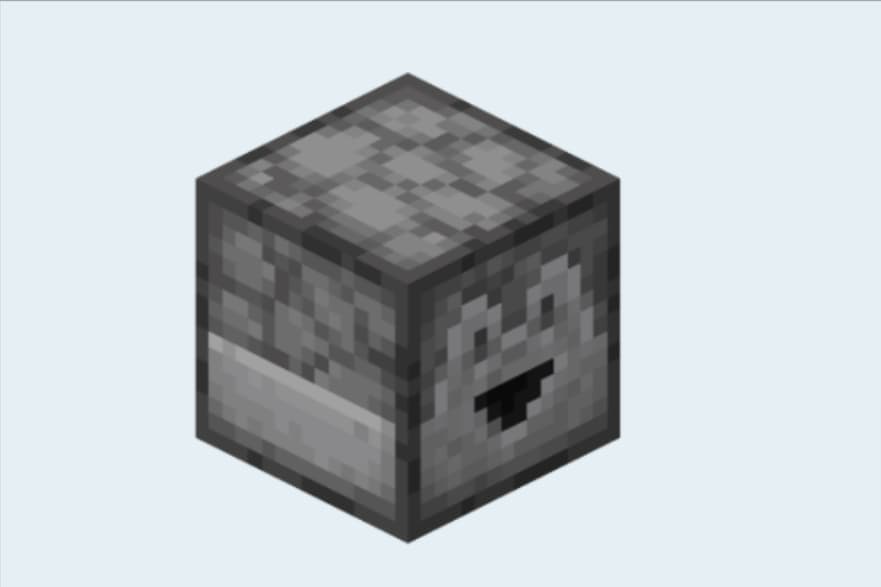
The Core Mechanics: Understanding the Dropper’s Functionality
To harness the power of the Dropper, one must first grasp its fundamental operation. At its core, the Dropper is designed for a singular, yet incredibly useful, purpose: to move items. This seemingly simple function opens up a world of possibilities within Minecraft’s Redstone ecosystem.
Basic Operation: Item Ejection
A Dropper is essentially a block with an internal inventory of nine slots, much like a chest or a furnace. Its primary function activates when it receives a Redstone signal: it ejects a single random item from one of its inventory slots into the world as an item entity. This ejection occurs from the “front” face of the Dropper, which is the side you are facing when you place it. Unlike a Dispenser, which can “use” items (e.g., shoot arrows, plant seeds, deploy water), the Dropper only drops items. They simply pop out, ready to be picked up by a player, a Hopper, or to fall into another container or into the void. This distinction is paramount when designing Redstone contraptions, as it dictates whether an item is consumed or merely transported. The ability to precisely eject one item at a time makes the Dropper indispensable for systems requiring controlled item flow.
Orientation and Output
The direction in which a Dropper is placed is crucial, as it dictates where the ejected item will go. When you place a Dropper, its “mouth” or output face will point towards you. This allows for precise control over item trajectories. If the Dropper is facing into an empty block space, the item will fall into that space. If it’s facing into another container (like a chest, a furnace, or another Dropper/Dispenser), the item will be transferred directly into that container’s inventory, provided there’s space. This feature is particularly useful for creating compact item transfer systems, especially when dealing with vertical movement where gravity isn’t always helpful. Understanding how to orient Droppers correctly is the first step towards building efficient item transportation networks.
Crafting the Dropper
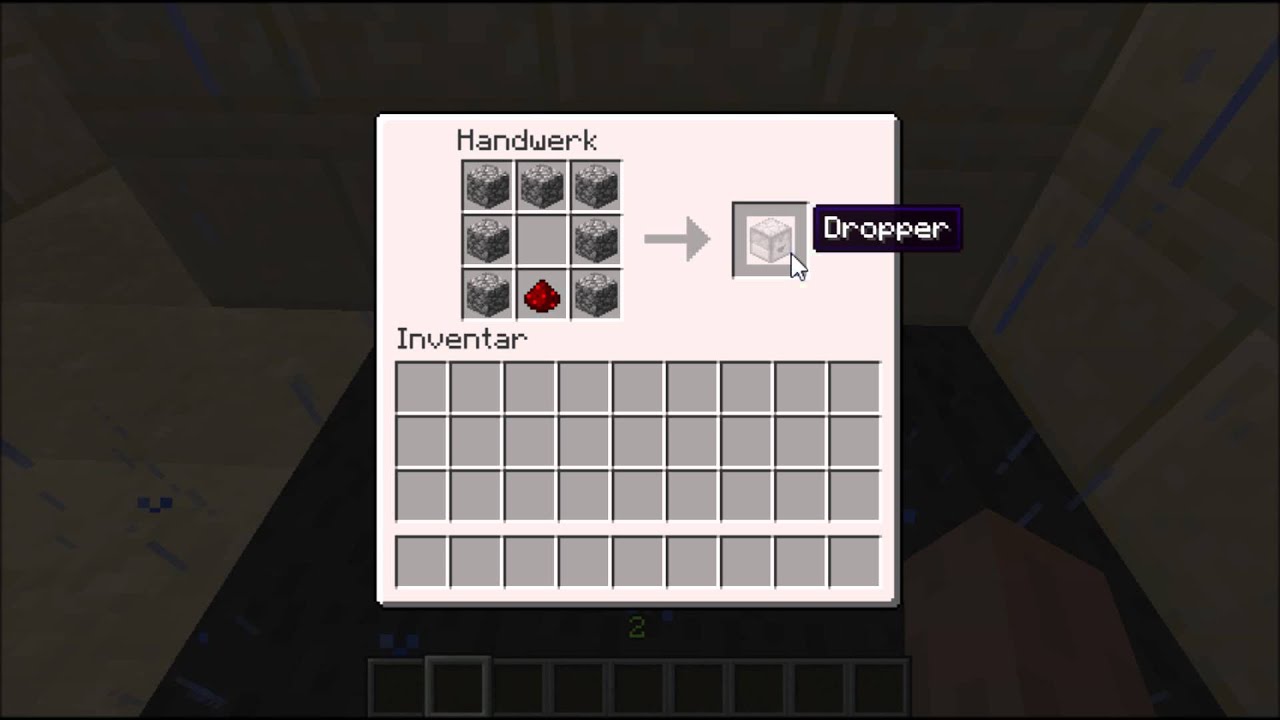
Crafting a Dropper is a relatively straightforward process, requiring common materials. The recipe involves eight pieces of Cobblestone surrounding a single piece of Redstone Dust in a crafting table. This accessibility means that even players in the early stages of their survival world can begin experimenting with automated systems relatively quickly. The simplicity of its recipe belies the complexity of the systems it can enable, making it a powerful tool from the moment you acquire your first Redstone Dust.
Beyond Basic Ejection: Creative Applications of the Dropper
While its core function is simple, the Dropper’s versatility truly shines in its creative applications. It forms the backbone of numerous automated systems, transforming mundane tasks into efficient, hands-free operations.
Item Transportation and Storage Systems
One of the most common and vital uses for Droppers is in item transportation, particularly for vertical movement. Hoppers are excellent for horizontal and downward item flow, but they cannot push items upwards. This is where Droppers come in. By placing a Dropper directly beneath a Hopper and powering it repeatedly, items can be “pumped” upwards from one Dropper to another, effectively creating an item elevator. This mechanism is crucial for transferring items from automated farms (often located at bedrock level) to storage systems higher up, or for compact multi-level sorting systems. When combined with Hoppers and chests, Droppers enable the creation of highly efficient, automated storage units that sort, distribute, and store vast quantities of resources without player intervention. This is invaluable in large-scale Minecraft operations, where managing inventory can quickly become overwhelming.
Automated Farms and Resource Collection
Droppers are indispensable in almost any automated farm. In mob farms, collected loot needs to be moved from the collection area to storage. Droppers, often working in conjunction with Hoppers, can precisely transport these items, even elevating them to processing units or central storage. Similarly, in automated crop farms, after crops are harvested, Droppers can be used to send seeds back into Dispensers for replanting, or to move harvested produce to collection points. They are also excellent for item disposal systems, ejecting unwanted items into lava or the void, preventing inventory overflow in continuous farming operations. This ability to handle and direct items makes farms significantly more efficient and less labor-intensive.
Redstone Puzzles and Mini-Games
Beyond utilitarian applications, Droppers also play a fascinating role in Redstone puzzles and mini-games. Their ability to eject a random item from their inventory can be leveraged to create elements of chance or decision-making. For instance, a Dropper might randomly dispense one of several items, each triggering a different outcome in a puzzle or a mini-game challenge. They can also be part of “keycard” systems, where players must insert a specific item into a Dropper to activate a secret door or mechanism. By detecting the presence or absence of certain items using comparators, Droppers can be integrated into complex logic gates, adding depth and interactivity to player-made adventures and challenges.
Dropper vs. Dispenser: A Crucial Distinction
While often confused due to their similar appearance and Redstone interaction, the Dropper and Dispenser are fundamentally different blocks, each designed for specific purposes. Understanding these distinctions is key to designing effective Redstone contraptions.
Key Functional Differences
The most critical difference lies in their interaction with items. A Dropper ejects items as entities into the world. If you put an arrow in a Dropper and power it, an arrow item will pop out and fall. If you put a bucket of water in it, a bucket of water item will pop out. A Dispenser, however, uses the item. If you put an arrow in a Dispenser and power it, it will shoot the arrow as a projectile. A bucket of water will be placed as a water source block. This distinction applies to a wide array of items: a Dispenser will light TNT, shear sheep (if facing them), place blocks, plant seeds, or even put on armor if aimed at a player or mob. A Dropper will merely drop these items as entities.
Crafting Differences
Their crafting recipes also reflect their different functionalities. As mentioned, a Dropper requires eight Cobblestone and one Redstone Dust. A Dispenser, on the other hand, requires seven Cobblestone, one Redstone Dust, and one Bow. The inclusion of the Bow for the Dispenser recipe is a clear indicator of its item-using, projectile-firing capabilities, contrasting with the Dropper’s more passive item-moving role.
When to Use Which
Choosing between a Dropper and a Dispenser depends entirely on the desired outcome.
-
Use a Dropper when you need to transport items from one point to another, especially vertically, or into another container. Use it for item elevators, automated sorting systems, compact storage, or simple item disposal. If the goal is to get an item out of an inventory and into the world or another inventory without consuming it, the Dropper is your choice.
-
Use a Dispenser when you want the item to perform an action. This includes building automated defenses (shooting arrows/fire charges), automatic farms (planting seeds, collecting water, bonemealing crops), automatic enchanting setups (placing and retracting water/lava), or anything that requires the item’s inherent function to be executed.
Advanced Dropper Redstone Techniques
Once the basic mechanics are mastered, Droppers reveal their potential in more sophisticated Redstone circuits, enabling complex automation and logic.
Dropper Clocks and Item Streams
Droppers are integral to creating highly efficient item clocks and streams. By setting up a loop where items are constantly being transferred between two or more Droppers (often with Hoppers), you can create a reliable Redstone clock. A comparator monitoring one of these Droppers will emit a signal when an item is present, and turn off when it’s absent, creating a pulsed output. These “item streams” are incredibly useful for maintaining a constant flow of items, or for generating precise Redstone pulses for specific durations. For instance, a Dropper-based item filter, using a comparator to detect a specific quantity of an item, can trigger an action only when a certain threshold is met, adding a layer of control to automated systems.
Elevators and Vertical Conveyors
Beyond simple single-stage item elevators, Droppers can be chained together in clever configurations to create compact and extremely efficient vertical item conveyors. By alternating Hoppers and Droppers, and powering the Droppers with a rapid Redstone clock, items can be rocketed upwards through dozens of blocks in mere seconds. These designs are critical for mega-bases where centralized storage needs to receive items from numerous distant or deep-lying farms. Advanced techniques involve optimizing the clock speed and power delivery to minimize lag and ensure smooth, consistent item flow, making these structures cornerstones of highly automated Minecraft worlds.
Data Storage and Logic Gates
In highly advanced Redstone, Droppers can even serve as rudimentary data storage or logic components. By using specific items as “data bits” within a Dropper’s inventory, and then using comparators to detect the presence or quantity of these items, complex conditional logic can be implemented. For example, a system might only activate if a Dropper contains a certain number of specific items, effectively acting as a multi-item filter or a primitive form of memory. While more complex than traditional Redstone logic gates, this application demonstrates the Dropper’s flexibility and the boundless creativity possible with Minecraft’s Redstone mechanics.
Optimizing Dropper Builds: Tips and Best Practices
Building with Droppers efficiently requires attention to detail and an understanding of Redstone best practices. Optimizing your designs can significantly impact performance and reliability.
Powering Considerations
Droppers require a Redstone signal to activate. This can come from direct power (a lever, button, Redstone block placed adjacent) or indirect power (Redstone dust leading to it, a repeater, or a comparator). For continuous operation, a Redstone clock is typically used to provide repeated pulses. The speed and duration of these pulses are critical. For item elevators, a fast clock is necessary to keep items moving. For other systems, a slower, more deliberate pulse might be required. Understanding how to create and manage various Redstone clock types (e.g., Hopper clocks, comparator clocks) is vital for efficient Dropper operation.
Minimizing Lag and Maximizing Efficiency
Large-scale automation in Minecraft can sometimes lead to performance issues, particularly on servers or less powerful computers. When designing with Droppers, especially in item streams or elevators, consider:
-
Item Entity Minimization: Avoid dropping items into the world unnecessarily. Always aim to have items immediately picked up by Hoppers or Droppers. Uncollected item entities can accumulate and cause significant lag.
-
Chunk Loading: Ensure that all parts of your Dropper system, especially those involved in continuous operation, are within loaded chunks. Unloaded chunks will halt your system, potentially backing up items.
-
Hopper Limits: Hoppers can transfer items at a rate of 2.5 items per second. While Droppers can fire faster, the Hoppers feeding or receiving from them might become a bottleneck. Design your system to match the lowest common denominator for optimal flow.
-
Compact Design: While aesthetics are important, compact designs often mean less Redstone dust, fewer blocks, and potentially less processing overhead.
Troubleshooting Common Dropper Issues
Even the most experienced Redstone engineers encounter issues. Common Dropper problems include:
-
Dropper Not Firing:
-
No Redstone signal, or an insufficient signal (too weak).
-
The Dropper itself is broken (this is rare, but can happen if it’s been moved by pistons strangely).
-
The Redstone power source is not functioning (e.g., button pressed but no dust leading to dropper).
-
-
Items Getting Stuck/Not Moving:
-
The Dropper’s inventory is full, or the target container (e.g., chest, another Dropper) is full.
-
Hoppers are placed incorrectly (facing the wrong way, or not connected).
-
The item flow is too fast for the receiving Hoppers/Droppers to keep up.
-
The system is in an unloaded chunk, causing it to stop mid-operation.
-
-
Inefficient Item Flow:
-
Mismatched transfer rates between Hoppers and Droppers.
-
Over-complicated Redstone that introduces unnecessary delays.
-
Lack of proper filtering, leading to unwanted items clogging the system.
-
Systematic checking of Redstone power, inventory levels, and block placement will usually resolve most Dropper-related issues.

Conclusion
The Minecraft Dropper, though seemingly humble in its function, is an indispensable component in the toolkit of any aspiring Redstone engineer. From its basic ability to eject items to its critical role in vertical item transportation, automated farms, and even complex logic circuits, the Dropper is a testament to the depth and versatility of Minecraft’s Redstone mechanics. By understanding its core operation, appreciating its distinction from the Dispenser, and embracing advanced design principles, players can unlock unprecedented levels of automation and efficiency in their virtual worlds.
Mastering the Dropper is more than just learning about another block; it’s about embracing a mindset of problem-solving, creative engineering, and continuous innovation. As you experiment with your own Dropper designs, you’ll not only streamline your Minecraft experience but also deepen your understanding of fundamental technological concepts. So, the next time you’re faced with a daunting task of item management, remember the silent power of the Dropper, and let it guide you towards a more automated, efficient, and enjoyable Minecraft adventure.
aViewFromTheCave is a participant in the Amazon Services LLC Associates Program, an affiliate advertising program designed to provide a means for sites to earn advertising fees by advertising and linking to Amazon.com. Amazon, the Amazon logo, AmazonSupply, and the AmazonSupply logo are trademarks of Amazon.com, Inc. or its affiliates. As an Amazon Associate we earn affiliate commissions from qualifying purchases.