
In the realm of professional technical writing, software documentation, and digital publishing, the precision of information delivery is paramount. Whether you are drafting a white paper on cybersecurity protocols, a user manual for a new SaaS platform, or a complex research paper on machine learning, the way you cite sources and provide supplementary information can significantly impact the readability and authority of your work. Two primary methods dominate the landscape of digital citation: footnotes and endnotes.
While both serve the same fundamental purpose—providing additional context or sourcing without cluttering the main body of text—their technical implementation, user experience (UX) implications, and roles in document architecture differ substantially. Understanding these differences is essential for anyone utilizing modern word processing software, markdown editors, or collaborative digital tools.

The Technical Architecture of Citations: Footnotes vs. Endnotes
From a technical standpoint, the primary difference between footnotes and endnotes is their placement and the way they affect the document’s layout. These elements are managed by the document’s layout engine, which calculates white space and pagination based on the volume of secondary information provided.
Defining Footnotes in Digital Layouts
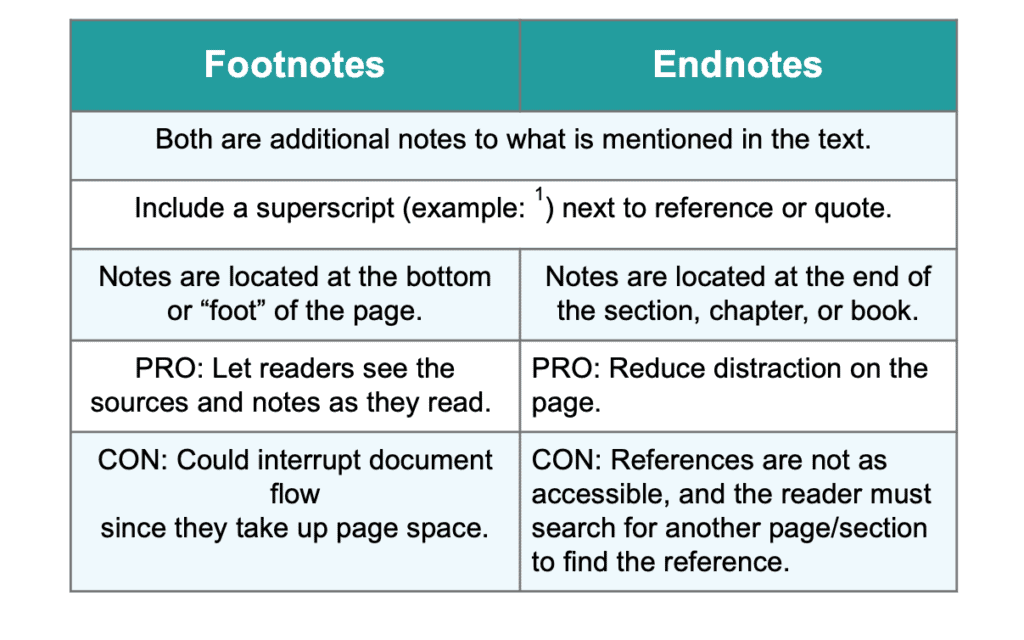
Footnotes are positioned at the “foot” or bottom of the specific page where the reference appears. In software like Microsoft Word or Adobe InDesign, the layout engine reserves a portion of the page’s bottom margin to accommodate these notes. If a page contains three reference markers, the corresponding footnotes will all appear at the base of that same page.
Footnotes are primarily used for immediate gratification. They allow the reader to glance down, absorb a quick clarification or source validation, and return to the main text without losing their place. In the context of technology tutorials or software reviews, footnotes are often used to define technical jargon or provide URLs to specific software versions mentioned in the paragraph.
Defining Endnotes in Document Structures
Endnotes, as the name suggests, are compiled at the end of a section, chapter, or the entire document. Instead of occupying the bottom of each individual page, they are aggregated into a comprehensive list. This creates a clean, uninterrupted reading experience on the main pages, moving all “clutter” to the back of the digital file.
In complex technical manuals or long-form tech journals, endnotes are preferred when the citations are extensive. If a document has 200 citations, placing them as footnotes would consume significant vertical space on every page, potentially disrupting the flow of diagrams, code blocks, and charts. Endnotes keep the focus on the primary technical content.
Software Implementation: Word Processors and Dynamic Linking
Modern software has transformed citations from static text into dynamic, hyperlinked elements. How different apps handle these can dictate which format a tech professional chooses.
Microsoft Word and Google Docs: The Standard Approach
In the world’s most common word processors, footnotes and endnotes are managed via the “References” or “Insert” menus. These programs use automated numbering systems. If you insert a new footnote between two existing ones, the software dynamically renumbers every subsequent note throughout the document.
A key feature in digital versions of these documents is the “hover” or “click” functionality. In a PDF or a live Google Doc, clicking a footnote or endnote marker will often jump the view to the corresponding note. However, footnotes are generally easier for users to navigate in a standard paginated view, whereas endnotes often require a “Back” button or a second click to return to the original text location.
LaTeX and Markdown: Documentation for Developers
For software engineers and data scientists, document preparation often happens in LaTeX or Markdown rather than traditional visual editors.
- LaTeX: This system offers granular control over citation placement. Using packages like
hyperlink, developers can ensure that footnotes appear precisely where needed, even in multi-column layouts common in tech journals. - Markdown: Standard Markdown does not natively support footnotes in the same way rich text editors do, but extensions like GitHub Flavored Markdown (GFM) or Pandoc allow for footnote syntax (
[^1]). In these environments, footnotes are almost always rendered as endnotes at the bottom of the webpage or README file, as continuous scrolling web pages do not have a traditional “bottom of the page” until the very end.
Digital Security and Metadata
Citations also play a role in document metadata and security. When sharing technical briefs or proprietary software audits, it is important to know that footnotes and endnotes are indexed differently by search algorithms and document scrapers. Footnotes are often perceived by AI summarization tools as part of the page’s local context, whereas endnotes may be categorized as a separate bibliography or “back matter,” which can change how an AI tool interprets the hierarchy of the information.
User Experience and Digital Readability
Choosing between endnotes and footnotes is not just a matter of style; it is a user experience decision. In the tech industry, where information density is high, the “cognitive load” on the reader must be managed carefully.
When to Use Footnotes for Better UX
Footnotes are superior for “supplemental content.” If you are writing a tutorial on setting up a Python environment and you want to mention a common bug that occurs in a specific version of macOS, a footnote is the perfect tool. The reader sees the mention, glances down to see the fix, and continues with the tutorial.
Pros of Footnotes in Tech Writing:
- Immediate Access: No need to scroll to the end of the document.
- Contextual Relevancy: The note is physically near the data it supports.
- Enhanced Authority: Seeing sources at the bottom of the page can instantly build trust with a technical audience.
When to Use Endnotes for Better UX
Endnotes are better for “bibliographic data.” If you are writing a deep-dive review of the latest flagship smartphones and you need to cite 50 different benchmarking tests, putting those URLs and data points at the bottom of every page will make the document look messy and intimidating. By using endnotes, you provide a clean reading experience for the casual reader while offering the data-hungry “power user” a full list of sources at the end.
Pros of Endnotes in Tech Writing:
- Visual Cleanliness: Keeps the UI of the page focused on text and graphics.
- Uninterrupted Flow: Ideal for long-form narratives or case studies.
- Centralized Reference: Easy to print or export as a standalone bibliography.
Automating Citations with AI and Modern Plugins
The manual labor of tracking footnotes and endnotes is largely a thing of the past thanks to AI-powered tools and specialized citation managers. For tech-savvy writers, these tools are essential for maintaining accuracy across large-scale projects.
Integration with Zotero and Mendeley
Tools like Zotero and Mendeley are industry standards for managing digital libraries. These apps function as browser extensions and desktop software that automatically extract metadata from technical journals, websites, and PDFs. When integrated with a word processor, these tools allow a writer to toggle between footnotes and endnotes with a single click. This flexibility is crucial if you are repurposing a technical blog post (which might favor footnotes) into a formal white paper (which might require endnotes).
The Role of AI in Note Generation
Generative AI tools are now being used to summarize long-form endnotes into concise footnotes. For example, if an endnote contains a 200-word legal disclaimer or a detailed technical specification, an AI tool can help a writer distill that into a 20-word footnote that provides the most critical information to the reader immediately. Furthermore, AI can scan a document to ensure that all footnote markers have corresponding entries, a task that was previously a tedious part of the manual editing process.

Choosing the Right Format for Your Digital Project
How do you decide which one to use? The decision usually depends on the medium of delivery and the expectations of your audience.
- Technical Blogs and Online Articles: Use footnotes, but ensure they are implemented as “pop-up” or “hover” notes if the CMS supports it. This mimics the footnote experience in a digital-first, non-paginated environment.
- Software Documentation and Manuals: Use footnotes for warnings, versioning notes, and quick tips. Use endnotes for comprehensive lists of third-party licenses and detailed bibliographies.
- Academic Tech Papers: Follow the specific style guide required (APA, IEEE, or Chicago). IEEE, common in engineering, typically uses a numbered endnote system that refers to a reference list at the conclusion of the paper.
- E-books and Mobile Apps: Endnotes are generally preferred for e-readers (like Kindle) because the concept of a “page” is fluid depending on the user’s font size settings. Hyperlinked endnotes allow the reader to jump to the back and then jump back to their original position with ease.
In conclusion, the difference between footnotes and endnotes in the tech world is defined by the balance between immediate context and overall document cleanliness. Footnotes provide the quick, on-the-spot data necessary for following complex instructions, while endnotes offer a streamlined, distraction-free environment for deep reading. By leveraging modern software and AI tools, technical writers can implement these systems effectively, ensuring their digital documentation is both authoritative and accessible.
aViewFromTheCave is a participant in the Amazon Services LLC Associates Program, an affiliate advertising program designed to provide a means for sites to earn advertising fees by advertising and linking to Amazon.com. Amazon, the Amazon logo, AmazonSupply, and the AmazonSupply logo are trademarks of Amazon.com, Inc. or its affiliates. As an Amazon Associate we earn affiliate commissions from qualifying purchases.