
In the vast and intricate landscape of modern technology, where information flows ceaselessly and decisions are increasingly data-driven, a fundamental construct quietly underpins nearly every digital interaction: the data table. Often taken for granted, this structured organization of data is not merely a technical concept; it is the bedrock upon which databases are built, applications function, analyses are performed, and insights are gleaned. From the simplest spreadsheet to the most complex relational database, understanding “what is the data table” is crucial for anyone navigating or contributing to the digital realm. It is the silent workhorse of information systems, providing clarity, order, and accessibility to the raw elements that power our technological world. This article delves into the core definition, structural components, diverse applications, and best practices surrounding data tables, firmly positioning them as an indispensable element within the technology ecosystem.
The Ubiquitous Foundation: Defining the Data Table
At its heart, a data table is a systematic way to organize and store information. Imagine a neatly ordered ledger or a meticulously filed cabinet – the digital equivalent is far more powerful and versatile, yet shares the same fundamental goal of structured organization.
A Simple Definition
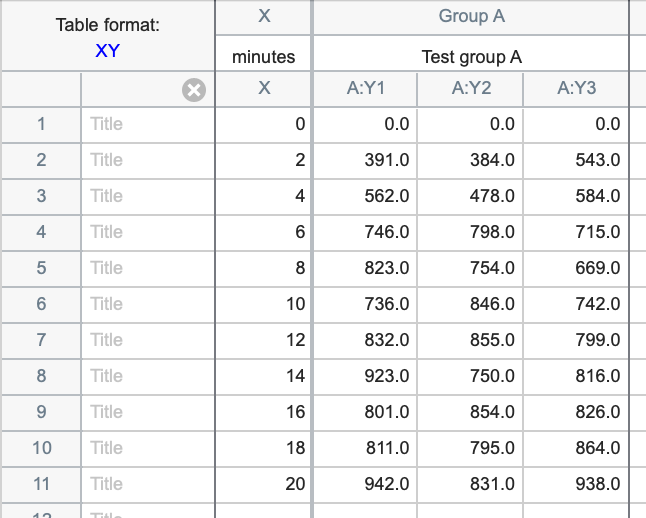
A data table is a collection of related data entries organized into rows and columns. Each column represents a specific attribute or field, defining the type of data it holds (e.g., Name, Age, Product ID). Each row, conversely, represents a single record or entry, containing a set of values for each of the defined attributes. This two-dimensional structure makes data easy to comprehend, access, and manipulate. It provides a consistent framework for storing discrete pieces of information, ensuring that every piece of data has a designated place and context.
Historical Context and Evolution
While the term “data table” gained prominence with the advent of digital computing and database management systems, the concept of organizing information in a tabular format predates computers by centuries. Ledgers, record books, and even early scientific observations often employed a column-and-row structure.
The true evolution began in the 1960s and 70s with the development of the relational model for databases by Edgar F. Codd at IBM. Codd’s revolutionary idea was to organize data into relations (which we now call tables), with strict rules for relationships between these tables. This mathematical foundation provided the robustness and flexibility needed for complex data management. Early mainframe systems adopted these principles, leading to the rise of commercial relational database management systems (RDBMS) like Oracle, DB2, and SQL Server.
The 1980s and 90s saw the proliferation of personal computers and spreadsheet software, bringing tabular data organization to the masses. HTML tables revolutionized how data was presented on the burgeoning World Wide Web, and increasingly sophisticated programming languages provided tools to interact with data tables programmatically. Today, with the explosion of big data and AI, the data table, in various forms, remains the primary unit for storing and processing vast quantities of information.
Core Structural Elements: Rows, Columns, and Cells
Understanding a data table requires recognizing its fundamental building blocks:
-
Columns (Fields/Attributes): These vertical entities define the characteristics or categories of data. For instance, in a table storing customer information, columns might include
CustomerID,FirstName,LastName,Email, andRegistrationDate. Each column has a specific data type (e.g., text, number, date) and typically a unique name within the table. -
Rows (Records/Tuples): These horizontal entities represent a single, complete instance of data. Following the customer example, one row would contain all the information for a specific customer:
123,John,Doe,john.doe@example.com,2023-01-15. Each row is an individual record. -
Cells: The intersection of a row and a column forms a cell, which holds a single, atomic piece of data. For example, the cell at the intersection of the
FirstNamecolumn and John Doe’s row would contain “John.”
This simple yet powerful structure ensures that data is consistently stored, making it easier to query, analyze, and maintain.
The Mechanics Behind the Data: Anatomy and Principles
Beyond its basic structure, the effectiveness of a data table hinges on several key mechanical and theoretical principles that ensure data integrity, facilitate relationships, and optimize retrieval.
Data Types and Integrity
Every column in a data table is assigned a specific data type. This is crucial for several reasons:
-
Data Integrity: It ensures that only appropriate data is stored in a column (e.g., preventing text from being entered into a numeric column). Common data types include
INTEGER,VARCHAR(for text),BOOLEAN,DATE,TIMESTAMP, andFLOAT. -
Memory Efficiency: Knowing the data type allows the system to allocate the correct amount of memory.
-
Query Optimization: Data types inform the database how to perform comparisons and operations efficiently.
Data integrity also extends to rules like NOT NULL constraints, which prevent certain columns from being left empty, ensuring critical information is always present.
Primary and Foreign Keys: Establishing Relationships
One of the most powerful features of relational data tables is their ability to form relationships with each other, creating a network of interconnected information. This is achieved through keys:
-
Primary Key (PK): A column (or set of columns) whose values uniquely identify each row in a table. For example,
CustomerIDwould be a primary key in aCustomerstable. Primary keys are crucial for distinguishing between records and for establishing relationships with other tables. They must be unique and cannot contain null values. -
Foreign Key (FK): A column (or set of columns) in one table that refers to the primary key in another table. Foreign keys establish a link or relationship between two tables. For instance, an
Orderstable might have aCustomerIDcolumn that is a foreign key, referencing theCustomerIDprimary key in theCustomerstable. This allows us to determine which customer placed a particular order.
These keys are the glue that binds multiple data tables into a coherent database, enabling complex queries and preserving data consistency across the system.

Indexes: Accelerating Data Retrieval
As data tables grow larger, searching for specific information can become slow. This is where indexes come into play. An index is a special lookup table that the database search engine can use to speed up data retrieval, much like an index in a book. When you create an index on a column (or columns), the database stores a sorted list of values from that column along with pointers to the corresponding rows in the main table. This allows the database to quickly jump to the relevant data without scanning every single row. While indexes significantly improve read performance, they do add overhead to data modification operations (inserts, updates, deletes) because the index itself must also be updated.
Diverse Applications Across the Tech Ecosystem
The simplicity and versatility of the data table ensure its pervasive presence across virtually every facet of technology.
Database Management Systems (DBMS)
The most prominent application of data tables is within Database Management Systems (DBMS), particularly Relational Database Management Systems (RDBMS). SQL (Structured Query Language) is specifically designed to interact with these tables, allowing users and applications to create, read, update, and delete (CRUD) data. Databases, composed of numerous interconnected tables, power everything from e-commerce websites and banking systems to social media platforms and enterprise resource planning (ERP) software. They are the backbone of data persistence, ensuring information is stored reliably and can be retrieved efficiently.
Web Development and User Interfaces
In web development, data tables are essential for both backend data storage and frontend data presentation. On the backend, web applications frequently interact with databases to fetch or store data through APIs, which often return data in tabular or table-like (e.g., JSON arrays of objects) structures. On the frontend, HTML <table> elements are used to display tabular data directly to users, such as product listings, financial reports, or user profiles. Frameworks and libraries also offer sophisticated components for creating interactive data grids, complete with sorting, filtering, and pagination capabilities, enhancing user experience for data exploration.
Data Analysis, Business Intelligence, and Machine Learning
The realm of data analysis, business intelligence (BI), and machine learning (ML) relies heavily on data tables. Analysts use tables to organize raw data, clean it, and prepare it for insights. BI tools often present reports and dashboards based on aggregated data from tables. In machine learning, datasets are almost always structured in a tabular format, where rows represent individual samples or observations, and columns represent features or attributes. Algorithms learn patterns from these structured tables to make predictions or classifications. Tools like Pandas in Python, a fundamental library for data science, are built around the DataFrame, which is essentially an in-memory representation of a data table.
Spreadsheets and Collaborative Tools
While not always considered “databases” in the formal sense, spreadsheet applications like Microsoft Excel, Google Sheets, and LibreOffice Calc are powerful tools built entirely around the concept of a data table. They allow users to manually enter, organize, analyze, and visualize data in a tabular format. These tools are indispensable for personal finance, small business tracking, scientific data collection, and collaborative project management. They serve as an accessible entry point for millions into the world of structured data.
Best Practices for Effective Data Table Management and Future Outlook
Managing data tables effectively is critical for system performance, data integrity, and long-term scalability. Adhering to best practices ensures robust and reliable data infrastructure.
Design Principles: Normalization and Optimization
-
Normalization: This is a process of organizing the columns and tables of a relational database to minimize data redundancy and improve data integrity. Normalization involves breaking down large tables into smaller, related tables and defining relationships between them. For instance, instead of storing a customer’s address multiple times for each order, you would store it once in a
Customerstable and link to it from anOrderstable using a foreign key. This reduces storage space, prevents update anomalies, and makes the database more flexible. -
Denormalization: In contrast, for specific analytical workloads where read performance is paramount, a controlled level of redundancy (denormalization) might be introduced. This involves combining data from multiple tables into a single table, often in data warehouses, to reduce the number of joins required for complex queries, thereby speeding up retrieval.
-
Appropriate Data Types: Choosing the correct data type for each column (e.g.,
SMALLINTvs.BIGINTfor numbers,VARCHAR(50)vs.VARCHAR(255)for text) minimizes storage space and improves query efficiency.
Ensuring Data Security and Privacy
Data tables, by their nature, contain valuable information, making data security and privacy paramount.
-
Access Control: Implementing strict role-based access control (RBAC) ensures that only authorized users or applications can read, write, or modify specific tables or even specific columns.
-
Encryption: Encrypting sensitive data at rest (when stored) and in transit (when moved across networks) protects it from unauthorized access.
-
Auditing: Maintaining logs of who accessed or modified data provides an audit trail for compliance and security investigations.
-
Data Masking/Anonymization: For development, testing, or analytical purposes, sensitive personal data within tables should be masked or anonymized to protect individual privacy, especially important for compliance with regulations like GDPR or HIPAA.
Performance Considerations and Scalability
As data volumes grow, the performance of data tables becomes critical.
-
Indexing Strategy: Judicious use of indexes on frequently queried columns dramatically improves read performance. However, over-indexing can slow down write operations, so a balanced strategy is crucial.
-
Partitioning: For very large tables, partitioning (dividing a table into smaller, more manageable pieces based on a specific criterion like date or ID range) can improve query performance and ease maintenance.
-
Hardware and Software Optimization: Proper server hardware (CPU, RAM, fast storage) and database configuration (e.g., buffer sizes, caching) are essential for optimal performance.
-
Query Optimization: Writing efficient SQL queries that minimize resource consumption is key. This often involves understanding how the database query optimizer works.
The Future: Data Lakes, AI, and Semantic Tables
The evolution of data tables continues at a rapid pace:
-
Data Lakes and Lakehouses: While traditional tables are structured, the rise of data lakes allows for storing vast amounts of raw, unstructured, and semi-structured data. Lakehouse architectures are emerging to bring the structure and query capabilities of data warehouses to data lakes, often organizing this raw data into table-like structures for analysis.
-
AI and Automation: Artificial intelligence is increasingly being used to automate tasks related to data table management, such as schema design, data cleaning, and index optimization. Machine learning models can also operate directly on tabular data for predictions and insights.
-
Semantic Tables: As data becomes more complex, there’s a growing need for tables that not only store data but also embed rich semantic meaning and context. Graph databases, while not strictly tabular, represent a shift towards storing relationships and meaning more explicitly, which can influence how tabular data is interpreted and integrated.
-
Real-time Processing: Technologies like stream processing are pushing the boundaries of traditional tables by allowing data to be processed and analyzed as it arrives, creating “living” tables that reflect the most current state of affairs.
In conclusion, the data table, in its various forms and manifestations, remains an unwavering pillar of modern technology. From its foundational role in databases to its omnipresence in web applications, data analysis, and the very future of AI-driven insights, understanding its structure, mechanics, and best practices is not just a technicality—it is a prerequisite for effective engagement with the digital world. As technology continues to evolve, the data table will adapt, remaining at the core of how we organize, understand, and leverage the ever-growing ocean of information.
aViewFromTheCave is a participant in the Amazon Services LLC Associates Program, an affiliate advertising program designed to provide a means for sites to earn advertising fees by advertising and linking to Amazon.com. Amazon, the Amazon logo, AmazonSupply, and the AmazonSupply logo are trademarks of Amazon.com, Inc. or its affiliates. As an Amazon Associate we earn affiliate commissions from qualifying purchases.