
When shopping for a new television, consumers are often bombarded with an array of technical specifications, from 4K and 8K resolutions to HDR10+ and Dolby Vision. However, among the most critical yet frequently misunderstood metrics is the refresh rate. Often touted by manufacturers as a primary selling point, the refresh rate significantly impacts how motion is perceived on screen.
Choosing the “best” refresh rate is not merely a matter of picking the highest number available; it requires an understanding of how hardware interacts with content, the limitations of human biology, and the specific needs of the user—whether they are a cinephile, a casual viewer, or a competitive gamer. In this guide, we will dissect the technology behind refresh rates to help you determine the optimal configuration for your next display.
Understanding Refresh Rate and the Mechanics of Motion
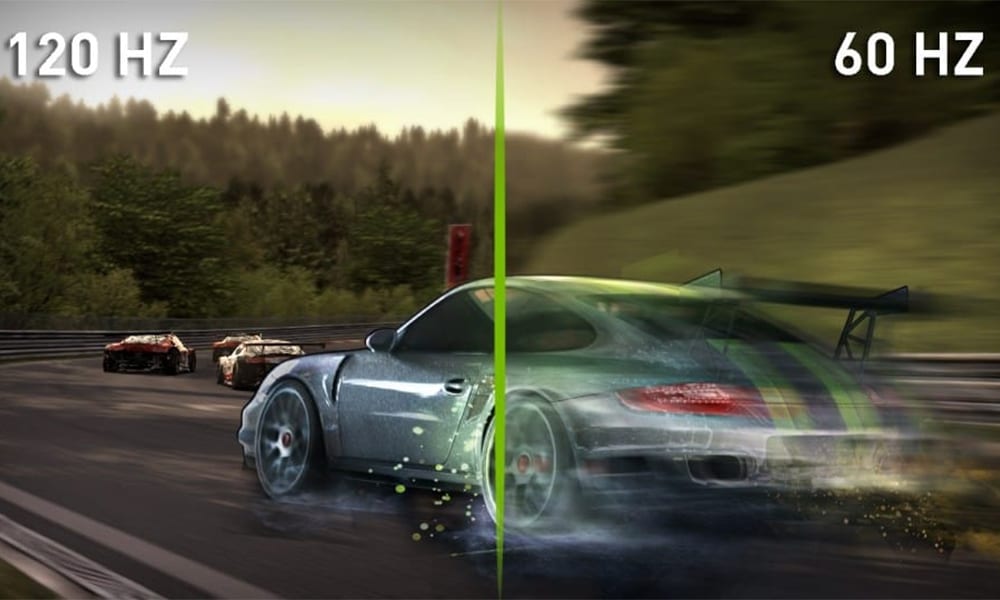
To understand what makes a refresh rate “best,” one must first understand what it actually does. The refresh rate, measured in Hertz (Hz), refers to how many times per second the image on the screen is updated. A 60Hz television refreshes the image 60 times every second, while a 120Hz television does so 120 times.
The Relationship Between Refresh Rate and Frame Rate
It is a common misconception to use “refresh rate” and “frame rate” (FPS) interchangeably. While related, they represent two different parts of the visual equation. The frame rate is determined by the source material or the device sending the signal (such as a gaming console or a Blu-ray player), whereas the refresh rate is a hardware limitation of the display itself.
When these two numbers are out of sync, visual artifacts can occur. For instance, if a movie is shot at 24 frames per second (the cinematic standard) but played on a 60Hz screen, the math doesn’t align perfectly. The TV must use a process called “3:2 pulldown” to stretch those 24 frames across 60 refreshes, which can lead to “judder”—a slight stuttering effect during panning shots. This is why the technical community often views higher native refresh rates as a baseline for premium quality.
The Science of Motion Blur and Human Perception
The human eye perceives motion on a screen through a phenomenon called “persistence of vision.” In older CRT monitors, the screen flickered, but modern LCD and OLED panels use a “hold-type” display technology. This means an image stays static on the screen until the next frame replaces it. Because our eyes are constantly moving to track objects, this “hold” creates perceived motion blur.
A higher refresh rate reduces the time each frame remains on the screen, which, when paired with high-frame-rate content, significantly sharpens the image during fast movement. From a technical standpoint, a higher refresh rate provides a more “fluid” experience, but the utility of that fluidity depends entirely on what you are watching.
Why Higher Refresh Rates Matter for Different Media
The “best” refresh rate is highly situational. A display that is perfect for watching the nightly news might be entirely inadequate for high-performance gaming. Understanding how different types of media utilize refresh rates is key to making an informed purchase.
Enhancing the Gaming Experience: VRR and ALLM
For gamers, the refresh rate is arguably the most important spec after resolution. With the advent of the PlayStation 5 and Xbox Series X, 120Hz gaming has become a standard for the enthusiast market. These consoles can output 4K at 120Hz, providing a level of responsiveness and visual clarity that 60Hz panels simply cannot match.
Furthermore, high-refresh-rate TVs often come equipped with Variable Refresh Rate (VRR) technology. VRR allows the TV to dynamically adjust its refresh rate in real-time to match the frame rate output of the console. This eliminates “screen tearing”—where the TV displays pieces of two different frames at once—and reduces input lag, which is the delay between pressing a button and seeing the action on screen. If you are a gamer, 120Hz is the gold standard.
Smoothness in Sports and High-Action Cinema
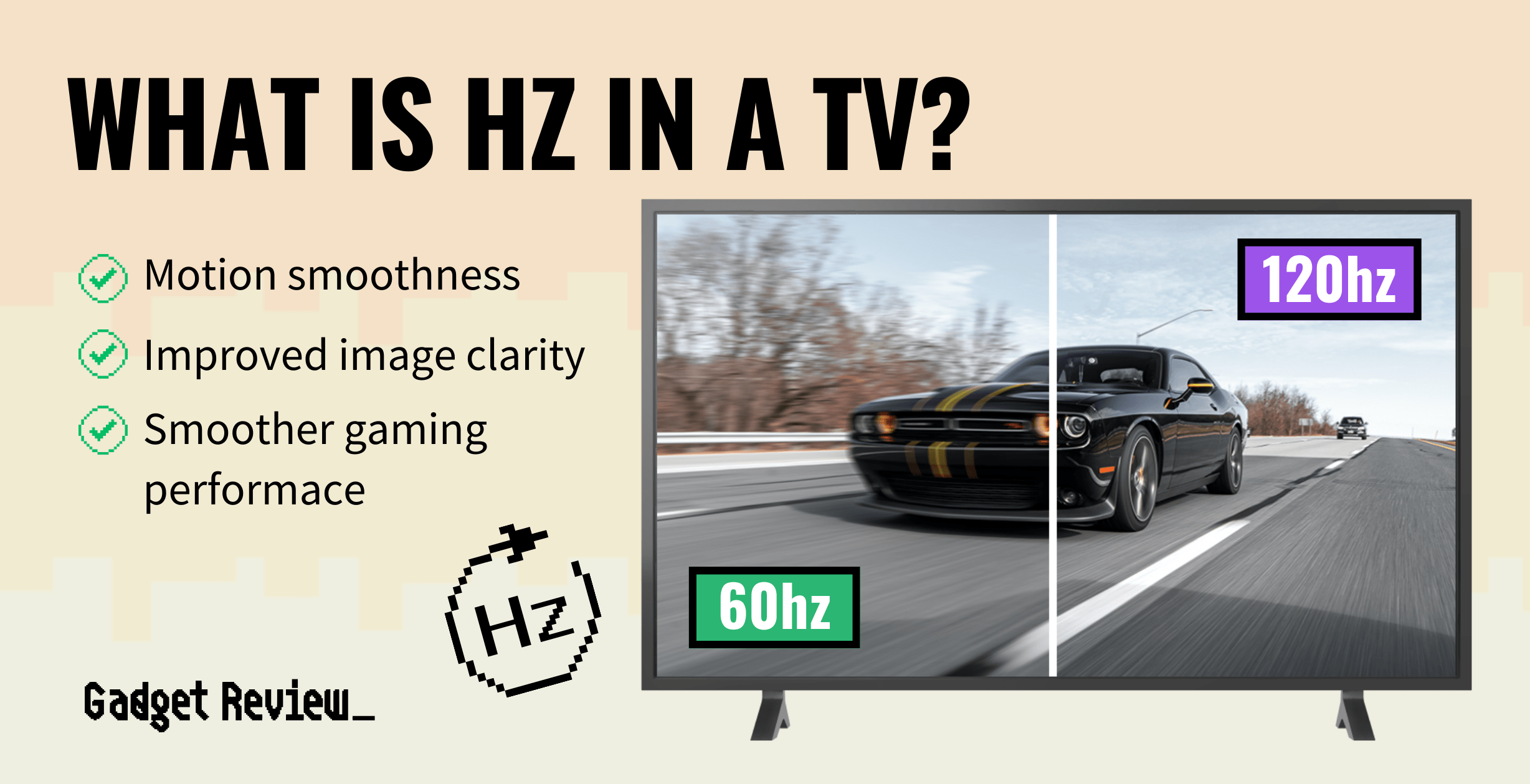
Sports fans benefit immensely from higher refresh rates. Because objects like footballs or race cars move across the screen at high speeds, a 60Hz screen often struggles to keep the image sharp, resulting in a “trailing” effect. A 120Hz panel can more accurately track these fast-moving objects.
In the world of cinema, the benefit is slightly more nuanced. As mentioned, movies are filmed at 24Hz. A 120Hz TV is a mathematical multiple of 24 (24 x 5 = 120). This allows the TV to display each film frame exactly five times, completely eliminating the need for 3:2 pulldown and providing a much smoother, judder-free viewing experience that is faithful to the director’s original intent.
Debunking Marketing Myths: Effective vs. Native Refresh Rates
One of the most frustrating aspects of the TV market is the use of proprietary marketing jargon to mask the actual technical capabilities of a panel. Many mid-range TVs claim to have a “Motion Rate” or “Clear Motion Index” of 120 or 240, but these are rarely the actual native refresh rates.
The “Motion Rate” and “Clear Motion” Trap
Manufacturers often use software processing to simulate the appearance of a higher refresh rate. For example, a TV with a native 60Hz panel might be marketed as “Motion Rate 120.” This is achieved through techniques like motion interpolation—commonly known as the “Soap Opera Effect.” The TV’s processor creates “fake” frames and inserts them between the real ones to make motion look smoother. While some users enjoy this, many tech enthusiasts find it distracting and unnatural. When looking for the best refresh rate, always look for the “Native Refresh Rate” in the fine print.
Black Frame Insertion (BFI) and Backlight Strobing
Another tech-heavy method used to improve motion is Black Frame Insertion (BFI). Instead of adding fake frames, the TV briefly turns off the backlight or inserts a black frame between every actual frame. This mimics the “flicker” of old cinema projectors and resets our visual system, significantly reducing perceived motion blur. High-end TVs often offer adjustable BFI settings. While this makes motion look incredibly crisp, the trade-off is often a reduction in overall screen brightness.
Choosing the Right Refresh Rate for Your Lifestyle
After analyzing the technical landscape, the question remains: what is the best refresh rate for you? The answer depends on your budget and your primary use case.
When 60Hz Is More Than Enough
For the vast majority of consumers, a native 60Hz refresh rate is perfectly adequate. If your TV usage consists primarily of streaming Netflix, watching cable news, or viewing standard YouTube videos, you will rarely encounter content that exceeds 60 frames per second. Most streaming platforms cap their output at 60Hz (or 24Hz for movies), meaning the extra overhead of a 120Hz panel remains largely unused for general viewing. Choosing a high-quality 60Hz OLED or a well-engineered 60Hz LED can offer a better visual experience (in terms of color and contrast) than a cheap 120Hz model with poor brightness.
The 120Hz and 144Hz Premium: Is It Worth the Investment?
If you are an early adopter, a competitive gamer, or someone who primarily watches live sports, the jump to 120Hz is a transformative upgrade. In the tech world, the move from 60Hz to 120Hz is often described as “life-changing” because of how much more fluid the user interface and gameplay become.
Furthermore, some high-end gaming TVs are now pushing into 144Hz. While 144Hz is a standard in the PC monitor world, it is becoming increasingly common in the TV market for users who connect high-end gaming rigs to their living room displays. However, for most, 120Hz remains the “sweet spot” of the current technological cycle. It provides the best balance of motion clarity, compatibility with modern consoles, and cinematic accuracy.

Final Technical Verdict
In the current landscape of display technology, the native 120Hz refresh rate stands as the best overall choice for anyone looking to future-proof their home theater. It offers the technical versatility to handle high-speed gaming via HDMI 2.1, eliminates judder in 24p cinema, and provides superior clarity for live sports.
However, technology is never one-size-fits-all. A refresh rate is only as good as the panel it sits on and the processor that drives it. When making your selection, prioritize a native refresh rate over marketed “motion rates,” and ensure that the TV includes the necessary ports (HDMI 2.1) to actually utilize those extra frames. By understanding these technical nuances, you can move past the marketing fluff and choose a TV that delivers a truly superior visual experience.
aViewFromTheCave is a participant in the Amazon Services LLC Associates Program, an affiliate advertising program designed to provide a means for sites to earn advertising fees by advertising and linking to Amazon.com. Amazon, the Amazon logo, AmazonSupply, and the AmazonSupply logo are trademarks of Amazon.com, Inc. or its affiliates. As an Amazon Associate we earn affiliate commissions from qualifying purchases.