
In the modern era of hyper-connectivity, the boundary between our physical lives and our digital presence has become increasingly blurred. For families, managing this intersection is no longer just a matter of discipline; it is a technical challenge that requires robust software solutions. T-Mobile Family Mode is a flagship suite of parental control tools designed to give account holders granular authority over how and when devices on their plan access the internet. At the heart of this suite lies a powerful feature known as “Off Time.”

Understanding “Off Time” is essential for any modern household looking to implement a healthy digital hygiene routine. It is not merely a kill-switch for the internet; it is a sophisticated scheduling tool that automates the transition from a connected state to a focused or restful state. By leveraging network-level controls and device-specific software, T-Mobile Family Mode ensures that technology serves the family, rather than the family serving their devices.
Understanding the Mechanics of T-Mobile Family Mode
Before diving specifically into the “Off Time” feature, it is crucial to understand the technical ecosystem in which it operates. T-Mobile Family Mode is a comprehensive management platform that consists of two primary components: the Parent App (installed on the primary administrator’s phone) and the Family Mode Home Base (an optional hardware component for home Wi-Fi management) or the Family Mode child app installed on individual devices.
How the App Synchronizes with the T-Mobile Network
Unlike basic parental controls that might only work on a single device, T-Mobile Family Mode operates through a combination of local device management and network-level synchronization. When an administrator sets a restriction, the command is sent via the T-Mobile cloud to the specific device. On Android and iOS, this is often facilitated through a Virtual Private Network (VPN) profile or Management Profile that intercepts data requests.
This technical architecture allows the “Off Time” feature to be incredibly effective. Because the control is tied to the device’s data routing, it can block internet access regardless of whether the child is using the T-Mobile cellular network or a third-party Wi-Fi connection.
Key Features Beyond Scheduling
While “Off Time” is a primary focus for many users, it exists alongside other high-tech features such as real-time location tracking, content filtering, and usage analytics. The “Off Time” feature works in tandem with these tools to provide a holistic view of digital behavior. For instance, an administrator can see that a device was active right up until the scheduled Off Time, providing insights into whether the current schedules are being respected or if further technical restrictions are required.
Deciphering “Off Time”: More Than Just a Digital Curfew
The “Off Time” feature is specifically designed to automate the process of disconnecting. In the T-Mobile Family Mode interface, “Off Time” refers to pre-scheduled periods during which internet access is restricted for specific family members. This is distinct from the “Pause” button, which is an ad-hoc, manual intervention.
Setting Up Recurring Schedules
The power of “Off Time” lies in its “set it and forget it” capability. Administrators can create recurring windows for different times of the day. Common use cases include:
- Bedtime: Automatically disabling internet access from 9:00 PM to 7:00 AM to ensure restorative sleep.
- Homework Hour: Restricting distracting apps and social media during peak study hours.
- Family Dinner: A short, daily window where all devices are muted to encourage face-to-face interaction.
Technically, these schedules are pushed to the device and enforced locally. This means that even if the device loses connection to the T-Mobile network briefly, the local management profile knows to restrict access once the clock hits the designated time.
Ad-hoc Pausing vs. Automated Off Time
It is important to distinguish between “Off Time” and the “Pause” function. “Off Time” is a proactive technical strategy, whereas “Pause” is reactive. When you pause the internet, you are initiating an immediate, indefinite block that must be manually resumed. “Off Time,” conversely, follows a logic-based calendar. For tech-savvy parents, the automation of Off Time reduces the “friction” of digital parenting, as the software becomes the “enforcer,” removing the need for daily manual intervention.
The Technical Benefits of Implementing Off Time
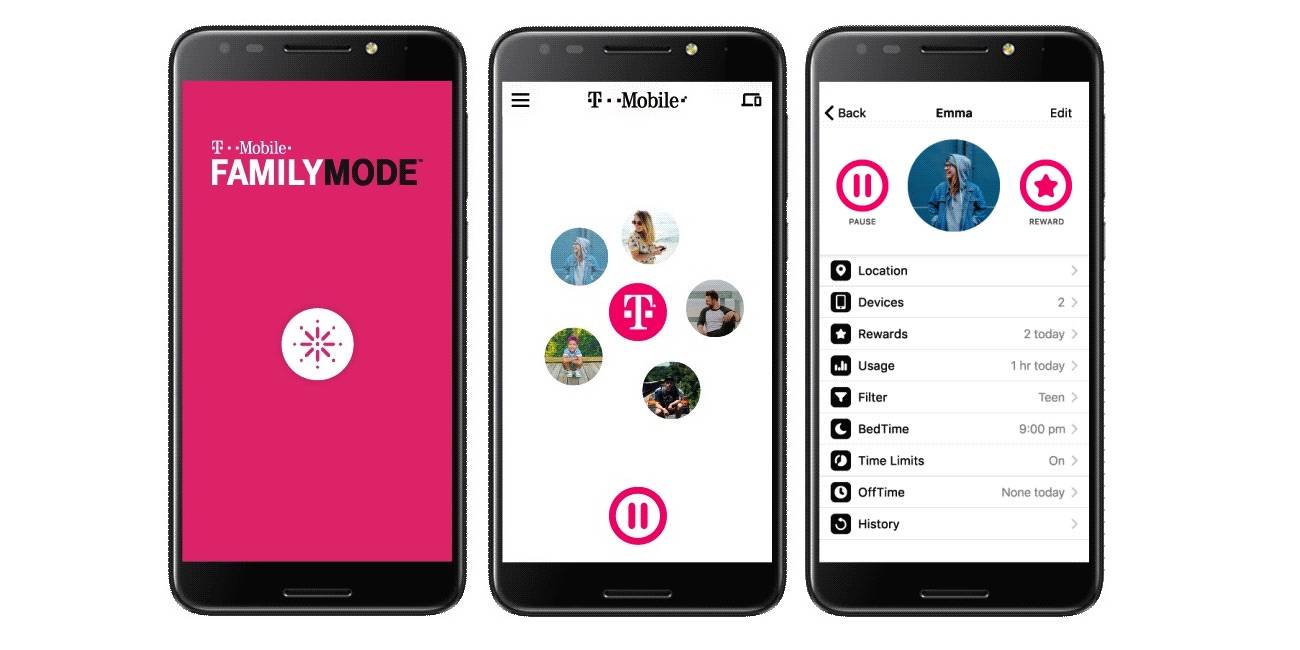
Implementing Off Time isn’t just about limiting screen time; it’s about optimizing the technical health of the device and the biological health of the user. From a technology standpoint, constant connectivity has several downsides that Off Time helps mitigate.
Reducing Blue Light Exposure and Promoting Sleep Hygiene
From a hardware and health-tech perspective, the “Always-On” nature of smartphones is detrimental to human circadian rhythms. Most modern displays emit high levels of blue light, which inhibits the production of melatonin. By using T-Mobile Family Mode Off Time to enforce a digital curfew, users are technically assisting their bodies in transitioning to a sleep state. When the device “goes dark” at 10 PM, the temptation to scroll through high-contrast, high-stimulation apps is removed, allowing the user’s internal clock to reset.
Minimizing Data Consumption and Background App Activity
A secondary, often overlooked technical benefit of Off Time is the reduction in background data usage. Many apps continue to ping servers, update content, and send telemetry data even when the screen is off. By enforcing an Off Time period, the device’s network activity is curtailed. This can lead to:
- Extended Battery Longevity: Less background processing means fewer charge cycles, which preserves the chemical health of the lithium-ion battery over time.
- Data Cap Preservation: For those on limited data plans, shutting down connectivity during the night prevents “ghost usage” from background updates.
Configuration and Troubleshooting: A Step-by-Step Tutorial
To effectively utilize Off Time, one must navigate the T-Mobile Family Mode interface correctly. The software is designed to be user-friendly, but there are technical nuances that can affect performance.
Step-by-Step Guide to Activating Off Time
- Open the Family Mode App: Log in as the primary account holder.
- Select a Profile: Tap on the specific family member for whom you want to set a schedule.
- Navigate to “Off Time”: Within the profile dashboard, look for the “Off Time” icon (usually represented by a clock or a crescent moon).
- Add a Schedule: Select “Add an Off Time.” You will be prompted to name the event (e.g., “School Night Bedtime”).
- Set the Parameters: Choose the start and end times and select which days of the week this schedule should apply.
- Save and Sync: Once saved, the app will sync this instruction to the child’s device. You may see a notification on the child’s device indicating that a management profile is active.
Common Technical Glitches and How to Resolve Them
Occasionally, users may find that Off Time does not trigger as expected. This is usually due to one of three technical issues:
- VPN Interference: If the child has installed a third-party VPN or “ad-blocker” that uses a VPN profile, it may conflict with the T-Mobile Family Mode profile. To fix this, ensure that the Family Mode VPN is the primary active profile in the device settings.
- Time Zone Discrepancies: If the child’s device is manually set to a different time zone, the Off Time might trigger early or late. Ensure all devices are set to “Set Automatically” for time and date.
- App Uninstallation: Tech-savvy children might attempt to delete the Family Mode app. T-Mobile has built-in protections for this, but administrators should regularly check the “Devices” tab to ensure all monitored devices are still “Protected.”
The Future of Parental Controls in the 5G Era
As we move deeper into the 5G era, tools like T-Mobile Family Mode are evolving from simple filters into comprehensive digital assistants. The “Off Time” feature is the precursor to more intelligent, AI-driven management systems.
AI-Driven Content Filtering and Real-Time Monitoring
In the near future, we can expect Off Time to be smarter. Instead of a hard cut-off, AI could analyze the type of activity occurring. For example, if a student is using a verified educational app to finish a project, the AI might suggest an “Off Time Extension,” whereas it would strictly enforce the cut-off for gaming or social media. This level of nuanced control is only possible through the high bandwidth and low latency of 5G networks, which allow for real-time data analysis.

Integrating IoT Devices into the Family Mode Ecosystem
The concept of “Off Time” is also expanding beyond the smartphone. As our homes become smarter, T-Mobile’s Home Base allows Family Mode to extend to smart TVs, gaming consoles, and tablets. In a fully integrated tech ecosystem, “Off Time” could simultaneously dim the smart lights, lock the gaming console, and disable the Wi-Fi on the tablet, creating a synchronized environment conducive to focus or rest.
T-Mobile Family Mode Off Time represents a critical tool in the modern technological arsenal. It acknowledges that while the internet is an infinite resource, human attention and health are finite. By mastering the technical aspects of these scheduling tools, users can ensure that their family’s relationship with technology remains productive, safe, and, most importantly, balanced.
aViewFromTheCave is a participant in the Amazon Services LLC Associates Program, an affiliate advertising program designed to provide a means for sites to earn advertising fees by advertising and linking to Amazon.com. Amazon, the Amazon logo, AmazonSupply, and the AmazonSupply logo are trademarks of Amazon.com, Inc. or its affiliates. As an Amazon Associate we earn affiliate commissions from qualifying purchases.