
In the ever-evolving landscape of digital productivity, the ability to effectively manage multiple applications and tasks simultaneously is paramount. For years, users of desktop operating systems have enjoyed sophisticated windowing environments, while mobile platforms have gradually introduced more robust multitasking capabilities. Apple’s Stage Manager feature represents a significant leap forward in this domain, offering a fresh approach to window organization and focus for its macOS and iPadOS platforms. More than just another windowing utility, Stage Manager re-imagines how users interact with their applications, aiming to streamline workflows, reduce digital clutter, and enhance concentration without sacrificing the power of a multi-app environment.

Introduced as a cornerstone feature in macOS Ventura and iPadOS 16, Stage Manager isn’t merely an incremental update; it’s a philosophical shift in how Apple envisages multitasking for a modern, hybrid computing experience. At its core, Stage Manager provides a new way to arrange windows, keeping the primary application front and center while neatly organizing other recent applications on the side. This structure aims to provide both focus on the task at hand and quick access to other necessary tools, striking a balance that many traditional windowing systems often struggle to achieve. By offering a clearer, more organized workspace, Stage Manager empowers users to navigate complex projects with greater ease, making it a pivotal tool for power users, creative professionals, and anyone seeking a more efficient digital workspace.
The Evolution of Multitasking on Apple Devices
To truly appreciate the innovation behind Stage Manager, it’s essential to understand the journey of multitasking on Apple’s platforms, particularly how it has diverged and converged between its desktop and mobile operating systems over the years. This historical context illuminates the challenges Stage Manager aims to solve and the advancements it builds upon.
Pre-Stage Manager iOS/iPadOS Multitasking: A Gradual Ascent
For a long time, iOS devices, including the iPad, were synonymous with a single-application-at-a-time user experience. While intuitive for casual use, this posed limitations for productivity-focused tasks. Apple gradually introduced more sophisticated multitasking features, recognizing the iPad’s growing potential as a computing device.
Split View and Slide Over were monumental steps. Split View allowed users to run two apps side-by-side, resizing their proportions to suit the task. This was a direct answer to the demand for concurrent work, enabling tasks like referencing a document while writing an email, or browsing the web while taking notes. Slide Over, on the other hand, offered a floating third app that could be quickly pulled in from the side, used briefly, and then tucked away, ideal for quick replies, calculator access, or brief research. While effective, these methods sometimes felt rigid or limited, especially when dealing with more than two or three applications. Managing multiple Split View pairings or juggling several Slide Over apps could become cumbersome, leading to a fragmented workflow where context switching remained a friction point. The screen real estate, even on larger iPads, felt constrained, pushing users to constantly open and close apps rather than keeping them readily accessible in an organized fashion.
macOS Multitasking Heritage: Desktops, Spaces, and Mission Control
On the desktop side, macOS (and its predecessors) has always boasted a robust windowing environment, allowing users to open dozens of applications and windows simultaneously. Tools like Spaces (virtual desktops) and Mission Control were designed to manage this potential chaos. Spaces allowed users to create multiple distinct desktop environments, each holding a different set of open applications or windows, ideal for segmenting work (e.g., one space for development, another for communication, a third for research). Mission Control offered an aerial view of all open windows, applications, and spaces, providing a quick way to locate and switch between tasks.
While powerful, this traditional macOS approach, with its reliance on overlapping windows and manual organization, could still lead to “window fatigue.” Users often found themselves constantly arranging, resizing, and minimizing windows, or hunting for a specific application amidst a crowded desktop. The flexibility was immense, but so was the potential for distraction and disorganization. Stage Manager emerges as an alternative or complementary approach, offering a more opinionated yet intelligent way to manage windows, particularly beneficial for those who prefer a more structured and less cluttered visual environment, or those transitioning from more constrained mobile multitasking paradigms.
Unpacking Stage Manager: A Deeper Dive
Stage Manager is designed to strike a harmonious balance between focused work and effortless access to multiple applications. It’s a fresh take on managing digital clutter and enhancing user concentration.
Core Functionality and User Experience
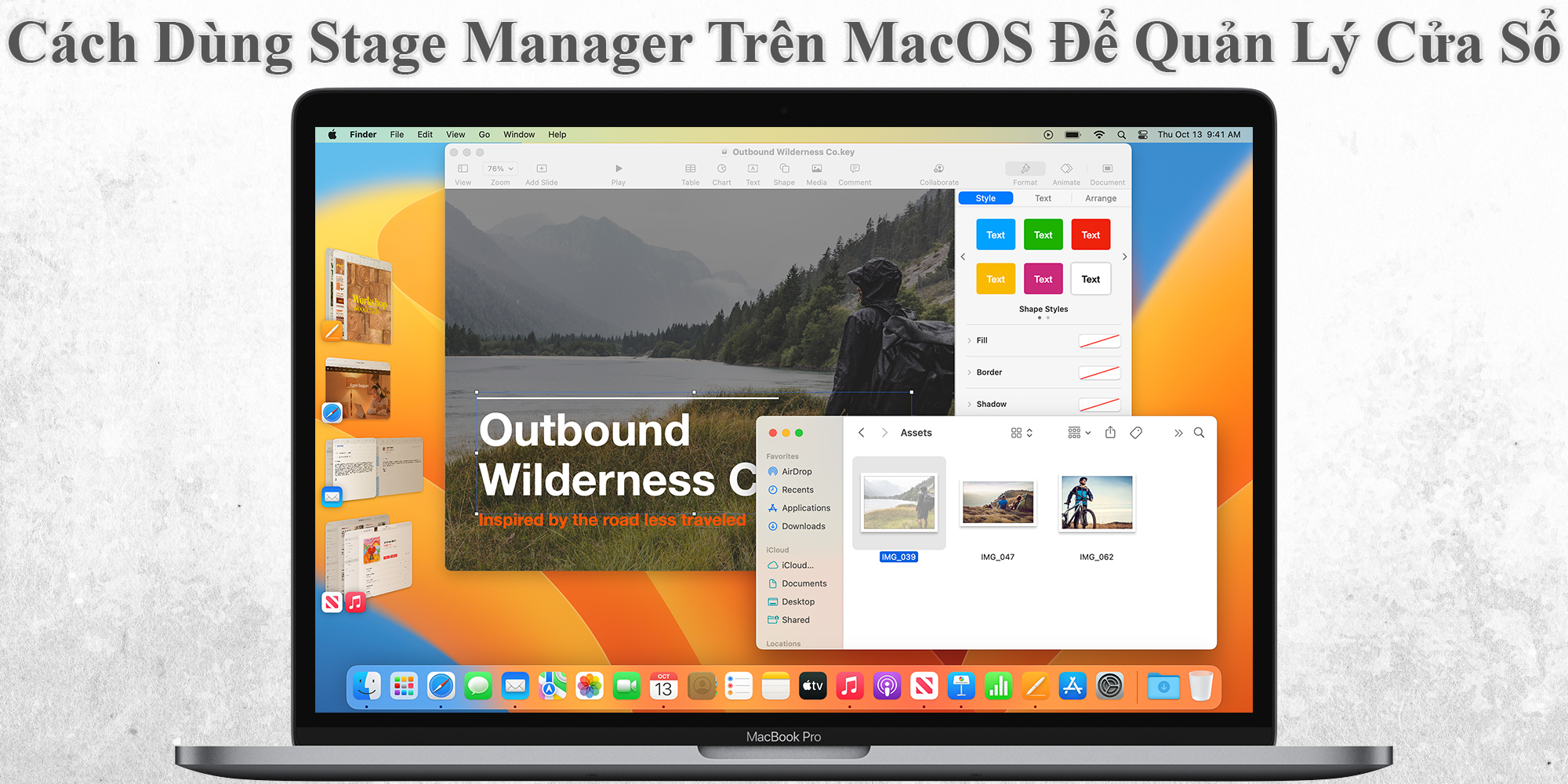
At the heart of Stage Manager is its unique windowing paradigm. When activated, Stage Manager automatically moves all open windows and applications into a clean, focused display. The primary application, or group of applications, takes center stage, occupying the main portion of the screen. This prominent positioning ensures that the user’s immediate attention is drawn to their active task.
To the left side of the screen, Stage Manager presents a vertically stacked strip of thumbnails. These thumbnails represent other recently used applications or groups of applications. They are live previews, allowing users to quickly see the state of other ongoing tasks without fully switching to them. A simple click on any thumbnail instantly brings that application (or group) to the main stage, while the previous app slides gracefully to the side panel. This fluid motion and visual feedback make context switching intuitive and quick.
One of Stage Manager’s most powerful features is its ability to group applications. Users aren’t limited to a single app in the center; they can drag and drop multiple application windows onto the main stage to form a “group.” This group then acts as a single entity, appearing as one thumbnail in the side panel. For example, a writer might group a word processor, a research browser, and a note-taking app together. When they click this group’s thumbnail, all three applications appear together, perfectly arranged as they were left. This “spatial memory” allows users to define specific workspaces for specific tasks, dramatically reducing the setup time when switching between projects.
Key Benefits and Use Cases
Stage Manager offers several compelling benefits that cater to a wide range of users and workflows:
-
Improved Focus: By keeping only the most relevant applications front and center and tidying away others, Stage Manager minimizes visual distractions, helping users maintain concentration on their current task.
-
Enhanced Spatial Memory: The consistent layout of the main stage and the side panel means users develop a better sense of where their applications are. Grouping further reinforces this, as users can associate specific tasks with specific application layouts.
-
Streamlined Workflows: For professionals who frequently juggle multiple applications—developers, designers, researchers, writers, data analysts—Stage Manager can significantly streamline their daily operations. Instead of manually arranging windows or searching through a crowded Mission Control, they can switch between entire project setups with a single click.
-
Clutter Reduction: It provides an elegant solution to “window sprawl,” a common issue on large displays or for users who open many applications. The side panel neatly contains everything, providing a sense of order without hiding essential tools.
Customization and Control
While Stage Manager offers an opinionated structure, it also provides a good degree of customization:
-
Window Arrangement: Users can freely resize and reposition windows within the main stage. Stage Manager remembers these layouts for each group, so they reappear exactly as left.
-
Side Panel Visibility: The side panel can be set to auto-hide, offering maximum screen real estate for the main application, and then reappearing when the cursor moves to the edge of the screen.
-
Adding/Removing Apps from Groups: Apps can be easily dragged in or out of the main stage to create or modify groups dynamically.
-
Access to Desktop: The desktop remains accessible, allowing users to drag files into open applications on the stage or quickly access desktop items.
Stage Manager Across the Apple Ecosystem
One of the most exciting aspects of Stage Manager is its availability and implementation across both iPadOS and macOS, bringing a new level of consistency and power to Apple’s diverse hardware lineup.
Stage Manager on iPadOS: A Transformative Experience
For the iPad, Stage Manager is nothing short of revolutionary. It fundamentally changes how users multitask on the device, pushing it closer to a desktop-class computing experience. Prior to Stage Manager, iPad multitasking (Split View, Slide Over) was functional but rigid, often limited to two or three apps at a time, and not offering truly freeform windowing.
With Stage Manager, iPad users gain the ability to:
-
Overlap and Resize Windows: For the first time, iPad apps can be opened in overlapping, resizable windows, just like on a Mac. This flexibility allows for more sophisticated layouts and workflows.
-
Create Application Groups: Just like on macOS, users can group multiple apps together, effectively creating custom workspaces that can be recalled with a tap.
-
Full External Display Support: This is where Stage Manager truly shines on the iPad. For M1/M2 iPads, Stage Manager enables full external display support, extending the workspace rather than mirroring it. This means users can have up to eight applications open simultaneously: four on the iPad’s internal display and four on the external monitor, each in its own Stage Manager group. This transforms the iPad into a highly capable workstation, ideal for professionals who need multi-screen setups on the go. This capability significantly elevates the iPad’s utility for tasks requiring extensive screen real estate, such as video editing, graphic design, or complex data analysis.
Stage Manager on macOS: Enhancing Desktop Organization
On macOS, Stage Manager serves as an alternative or complementary window management system to existing features like Spaces and Mission Control. While macOS already boasts powerful multitasking capabilities, Stage Manager offers a different paradigm, particularly appealing to users who prefer a more structured and less cluttered view of their active applications.
Stage Manager on macOS allows users to:
-
Declutter the Desktop: It automatically moves all background windows and icons off the main stage, providing a clean, focused environment. The desktop itself remains accessible for drag-and-drop operations, but it doesn’t interfere with the active applications.
-
Complement Existing Tools: Users can still leverage Spaces to create multiple Stage Manager environments, or use Mission Control to get an overview of all open Stage Manager groups and traditional desktop windows. It’s not a replacement but an additional tool in the macOS multitasking arsenal.
-
Seamless Transition: For users accustomed to the more structured environment of iPadOS, Stage Manager on macOS offers a familiar and consistent way to manage windows, making the transition between devices smoother.
Bridging the Gap: Consistency and Continuity
Stage Manager plays a crucial role in bringing a unified multitasking experience across Apple’s ecosystem. By offering similar features and interaction models on both iPadOS and macOS, it helps blur the lines between what was once distinct mobile and desktop computing. This consistency benefits users by:
-
Reducing Learning Curve: Once a user understands Stage Manager on one platform, they can leverage its benefits almost immediately on the other.
-
Fostering Workflow Continuity: A user can start a project on their iPad, using Stage Manager to organize their apps, and then seamlessly continue that project on their Mac with a similar organizational paradigm, maintaining their focus and efficiency.
-
Leveraging Hardware Strengths: It allows the iPad to harness its powerful M-series chips for true desktop-class windowing, while offering Mac users a new option for managing complex workspaces.
Who Benefits Most from Stage Manager?
While Stage Manager is designed to be accessible to all users, certain demographics and workflows are particularly poised to gain significant advantages from its unique approach to window management.
Power Users and Professionals
This group represents the primary target audience for Stage Manager. Professionals across various fields often require numerous applications open simultaneously to accomplish their tasks efficiently.
-
Developers: Juggling IDEs, documentation browsers, terminal windows, and design mockups.
-
Designers: Working with multiple design tools, image references, and communication apps.
-
Writers & Researchers: Managing word processors, numerous browser tabs for research, PDF readers, and note-taking applications.
-
Video Editors: Handling editing software, media browsers, communication tools, and project notes.
-
Data Analysts: Utilizing spreadsheets, visualization tools, coding environments, and web-based dashboards.
For these individuals, Stage Manager’s ability to group apps into logical workspaces and quickly switch between these groups is a game-changer. It provides a structured environment that minimizes mental overhead associated with window management, allowing them to dedicate more cognitive resources to the actual work.
Users with Specific Workflows
Beyond the general category of “professionals,” Stage Manager is exceptionally useful for anyone who frequently jumps between predefined sets of applications for different activities.
-
Students: Organizing apps for different courses (e.g., one group for biology, another for literature).
-
Project Managers: Keeping project management software, communication tools, and relevant documents grouped for each ongoing project.
-
Freelancers: Switching between client-specific workspaces without having to manually set up windows each time.
The “spatial memory” aspect of Stage Manager—where it remembers the layout of your grouped windows—is particularly beneficial here, providing instant recall of specific work environments.

The Learning Curve and Adaptability
While Stage Manager offers compelling benefits, it does introduce a new paradigm that requires some initial adaptation. Users accustomed to traditional overlapping windows or solely single-app mobile experiences may find the concept slightly different at first. However, the learning curve is generally shallow, and the intuitive drag-and-drop gestures, combined with clear visual feedback, make it easy to grasp.
Over time, users tend to find that the initial investment in learning Stage Manager pays dividends in terms of reduced cognitive load, increased focus, and a more streamlined workflow. It’s a tool that, once integrated into one’s habits, can significantly enhance digital productivity and reduce the frustration of a cluttered screen. For many, Stage Manager represents not just a feature, but a fundamental improvement in how they interact with their digital workspace, moving from simply managing windows to intelligently orchestrating their entire workflow.
Stage Manager is more than just a new way to arrange windows; it’s a statement about the future of multitasking on Apple platforms. By bringing a refined, focused, and adaptable windowing experience to both macOS and iPadOS, Apple has addressed long-standing challenges in productivity and digital organization. Whether you’re a power user craving precise control over your workspace, a creative professional seeking to minimize distractions, or an iPad user pushing the boundaries of mobile productivity with external displays, Stage Manager offers a compelling solution. It embodies Apple’s commitment to creating seamless, intuitive, and powerful user experiences that empower individuals to do their best work, truly transforming the way we interact with our digital tools.
aViewFromTheCave is a participant in the Amazon Services LLC Associates Program, an affiliate advertising program designed to provide a means for sites to earn advertising fees by advertising and linking to Amazon.com. Amazon, the Amazon logo, AmazonSupply, and the AmazonSupply logo are trademarks of Amazon.com, Inc. or its affiliates. As an Amazon Associate we earn affiliate commissions from qualifying purchases.