
In the ever-evolving landscape of digital imagery and display technology, the term “resolution scale” often emerges, sometimes explicitly, sometimes implicitly. Understanding its nuances is crucial for anyone involved in visual content creation, display calibration, or even casual technology appreciation. At its core, resolution scale refers to the relationship between the native resolution of an image or digital asset and the resolution of the display device it’s being rendered on, and critically, how this relationship is managed to achieve optimal visual quality. It’s not just about the number of pixels; it’s about how those pixels are interpreted and presented.
This concept is fundamental to achieving sharp, detailed visuals across a wide array of devices, from high-resolution monitors and 4K televisions to mobile phone screens and virtual reality headsets. When resolution scale is discussed, we’re delving into the technical intricacies that ensure an image doesn’t appear blurry, pixelated, or oddly proportioned when its pixel density differs from the display’s capabilities. It’s a balancing act between detail, performance, and the inherent limitations of both the source material and the viewing medium.
Understanding the Fundamentals: Pixels, Resolution, and Scaling
Before we can fully grasp resolution scale, it’s essential to lay the groundwork by understanding its constituent elements: pixels, resolution, and the process of scaling itself. These concepts are inextricably linked and form the bedrock upon which resolution scaling is built.
The Building Blocks: Pixels and Resolution
A pixel (short for “picture element”) is the smallest addressable element in a raster image or the smallest controllable element of light on a screen. Think of it as a tiny dot of color. The more pixels an image or display has, the more detail it can potentially convey.
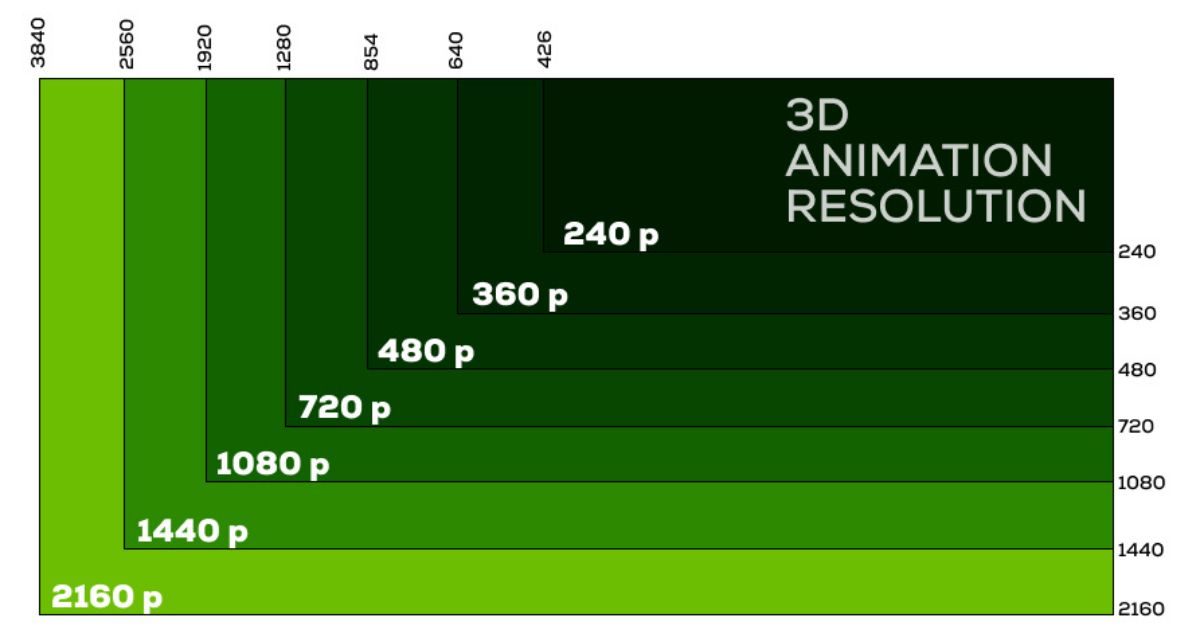
Resolution, in the context of digital displays and images, refers to the number of distinct pixels that can be displayed in each dimension. It is typically expressed as width × height. For example, a display with a resolution of 1920 × 1080 means it has 1920 pixels across its width and 1080 pixels down its height. A higher resolution generally means a sharper and more detailed image. Common resolutions include:
- HD (High Definition): 1280 × 720
- Full HD (FHD): 1920 × 1080
- QHD (Quad HD) / 2K: 2560 × 1440
- UHD (Ultra HD) / 4K: 3840 × 2160
- 8K: 7680 × 4320
Images themselves also have a resolution, determined by the number of pixels captured by a camera sensor or created by image editing software. When an image’s resolution doesn’t match a display’s native resolution, scaling becomes necessary.
The Process of Scaling: Upscaling and Downscaling
Scaling is the process of resizing a digital image. There are two primary forms:
- Upscaling: Increasing the resolution of an image. This is typically done when a lower-resolution image is displayed on a higher-resolution screen. The goal is to add pixels in a way that minimizes visual artifacts and maintains as much perceived detail as possible. Without intelligent upscaling, an image might appear blurry or pixelated.
- Downscaling: Decreasing the resolution of an image. This is often done when a high-resolution image needs to be displayed on a lower-resolution screen or stored in a smaller file size. The challenge here is to remove pixels without losing essential detail or introducing aliasing (jagged edges).
The algorithms used for upscaling and downscaling play a pivotal role in the quality of the final output. Simple methods like nearest-neighbor interpolation (which just copies the nearest pixel’s color) can lead to blocky or jagged results. More advanced algorithms, such as bilinear, bicubic, and more sophisticated AI-driven techniques, analyze surrounding pixels to predict and generate new pixels, aiming for a smoother and more natural appearance.
How Resolution Scale Impacts Visual Experience
The interaction between an image’s resolution and the display’s resolution, managed through scaling, directly dictates the visual fidelity of what we see. When this relationship is not optimized, users can experience a range of visual degradations. Understanding the ideal scenarios and the common pitfalls is key to appreciating the importance of effective resolution scaling.
Optimal Scenarios: Native Resolution and Pixel Perfect Display
The most visually pleasing scenario occurs when the resolution of the digital content perfectly matches the native resolution of the display. In this case, each pixel in the image corresponds directly to a pixel on the screen. This is often referred to as a “1:1 pixel mapping.”

- Sharpness and Detail: When native resolutions align, every pixel rendered is sharp and distinct. This allows for the maximum amount of detail to be displayed without any interpolation artifacts. Text is crisp, lines are smooth, and fine textures are clearly discernible.
- Performance Benefits: Rendering at native resolution often places less computational load on the graphics processing unit (GPU) or display controller, as there’s no need for complex scaling algorithms to be applied in real-time. This can lead to smoother frame rates in games and faster rendering times for visual applications.
- Consistency: A pixel-perfect display ensures that the visual information presented by the content creator is faithfully reproduced, without any artificial alterations.
However, achieving this ideal scenario is not always possible or practical. Content is often created at one resolution and viewed on a multitude of devices with varying resolutions. This is where the concept of resolution scaling becomes indispensable.
Challenges and Artifacts: When Resolution Mismatches Occur
When the resolution of the content does not match the display’s native resolution, the display’s hardware or software must engage scaling algorithms. This process, while necessary, can introduce undesirable visual artifacts if not implemented effectively.
- Pixelation (Blockiness): Most commonly seen when upscaling low-resolution images. If an image is simply enlarged without adding new detail, the individual pixels become larger and more apparent, leading to a blocky appearance. This is especially noticeable on text and sharp edges.
- Blurriness: Another consequence of upscaling, particularly with simpler interpolation methods. The process of creating new pixels can result in a loss of sharp definition, making the image appear soft or out of focus.
- Aliasing (Jaggies): Occurs when downscaling or during certain types of upscaling, especially on diagonal lines or curves. The algorithm struggles to accurately represent the continuous nature of lines with discrete pixels, leading to a staircase-like or “jagged” appearance.
- Moire Patterns: Sometimes observed when displaying images with fine, repeating patterns (like grids or textures) on a display that is scaling the image. The interaction between the pattern’s frequency and the display’s pixel grid can create distracting wavy lines.
- Aspect Ratio Distortion: If scaling is performed incorrectly, the image might be stretched or squashed, distorting its original proportions and making objects appear unnaturally wide or thin.
The effectiveness of resolution scaling directly impacts user satisfaction. For instance, in video games, a game rendered at a lower resolution and then upscaled to a 4K monitor might not look as good as a game rendered natively at 4K, even if the latter requires more powerful hardware.
Resolution Scaling in Modern Technology
The concept of resolution scale is pervasive across many technological domains, influencing how we interact with everything from our smartphones to high-end gaming rigs. Different fields have developed specific approaches and terms to manage this crucial aspect of visual rendering.
Display Scaling and Operating Systems
Modern operating systems (Windows, macOS, Linux, Android, iOS) incorporate sophisticated display scaling features. These features allow users to adjust the size of text, icons, and other user interface elements to be more readable on displays of different sizes and resolutions.
- DPI (Dots Per Inch) / PPI (Pixels Per Inch) Awareness: Operating systems use DPI or PPI information to determine the density of a display. This allows them to apply appropriate scaling factors. A higher DPI screen will have elements rendered at a smaller physical size by default, so the OS scales them up to maintain comfortable readability.
- Text Scaling: This is a primary function of OS scaling, ensuring that text remains legible on high-resolution displays where default font sizes might appear too small.
- App Scaling: While OS scaling can handle most UI elements, individual applications may also need to be “DPI-aware” to scale their content correctly. Older or poorly designed applications might appear blurry or have misplaced elements on scaled displays.
- Virtual Resolution: Some systems allow for a “virtual resolution” that is higher than the display’s native resolution, forcing content to be rendered at a higher quality and then downscaled. This can sometimes result in sharper text and UI elements than rendering at the native resolution, though it increases GPU load.
Graphics Rendering and Gaming
In the realm of computer graphics and gaming, resolution scale often refers to a specific in-game setting that controls the resolution at which the game’s internal rendering engine operates, independent of the display’s native resolution.
- Render Scale: This is a common setting in PC games. A “render scale” of 100% means the game is rendered at the same resolution as the display. A render scale of 50% means the game is rendered at half the width and half the height of the display resolution, and then upscaled to fill the screen. Conversely, a render scale of 200% would render the game at twice the width and height, then downscaled to the display resolution.
- Upscaling Technologies (DLSS, FSR, XeSS): These are advanced technologies developed by GPU manufacturers and others to improve performance without significantly sacrificing visual quality. They work by rendering the game at a lower internal resolution and then using AI or sophisticated algorithms to upscale the image to the display’s native resolution. This dramatically boosts frame rates, allowing for higher graphical settings or smoother gameplay on less powerful hardware. The “resolution scale” managed by these technologies is effectively the internal rendering resolution before the AI upscaling process.
- Performance vs. Fidelity Trade-off: The “resolution scale” setting in games directly influences this trade-off. Lowering the render scale improves performance but can lead to a softer or less detailed image. Increasing it enhances visual fidelity but demands more graphical processing power.

Digital Content Creation and Displays
For professionals creating visual content, understanding resolution scale is vital for ensuring their work looks as intended across various platforms and devices.
- Asset Optimization: When preparing images or videos for web or mobile, creators often downscale them to reduce file sizes and ensure faster loading times. Intelligent downscaling is critical to maintain clarity.
- High-Resolution Displays: The proliferation of 4K and 5K monitors means that creators can now produce and appreciate content with an unprecedented level of detail. However, it also means that lower-resolution assets viewed on these displays will require effective upscaling.
- VR/AR Headsets: Virtual and augmented reality devices present unique challenges. The high pixel density required for immersive experiences and the close proximity of the displays to the eyes mean that scaling artifacts are particularly noticeable and can detract from the virtual environment. Therefore, content for VR/AR often needs to be rendered at very high effective resolutions.
In conclusion, “resolution scale” is a multifaceted concept that bridges the gap between the resolution of digital content and the resolution of the display hardware. It encompasses the fundamental principles of pixels and resolution, the technical processes of upscaling and downscaling, and the practical implications for visual fidelity and performance across a vast spectrum of modern technologies. Mastering this concept ensures that the digital visuals we create and consume are as sharp, detailed, and engaging as possible.
aViewFromTheCave is a participant in the Amazon Services LLC Associates Program, an affiliate advertising program designed to provide a means for sites to earn advertising fees by advertising and linking to Amazon.com. Amazon, the Amazon logo, AmazonSupply, and the AmazonSupply logo are trademarks of Amazon.com, Inc. or its affiliates. As an Amazon Associate we earn affiliate commissions from qualifying purchases.