
Microsoft Publisher, once a staple for small businesses, educators, and individuals seeking to create professional-looking documents without the complexity of high-end design software, is gradually fading into the annals of computing history. While it offered an accessible gateway to desktop publishing (DTP), the evolving technological landscape and changing user demands have rendered it less relevant. Its eventual discontinuation, announced for 2024, marks the end of an era and prompts a crucial question for its former users and those entering the design space: what modern alternatives have risen to fill the void left by Publisher?

The answer isn’t a single, direct replacement, but rather a diverse ecosystem of tools, each excelling in specific areas where Publisher once offered a compromise. From integrated office suites and intuitive cloud-based platforms to powerful professional design software, the options are now more varied, specialized, and often more collaborative than ever before. Understanding these alternatives requires a look at the shifting paradigms of document creation, design accessibility, and software development within the tech world.
The Shifting Landscape of Desktop Publishing
The decline of Microsoft Publisher isn’t a story of failure but of evolution. The very definition of “desktop publishing” has changed dramatically over the last two decades, driven by advancements in software capabilities, the ubiquity of internet connectivity, and a growing demand for user-friendly design tools.
Publisher’s Legacy and Limitations
Launched in 1991, Microsoft Publisher carved out a niche by offering an intuitive, template-driven approach to creating newsletters, brochures, flyers, and business cards. Its strength lay in its ability to empower users without formal design training to produce visually appealing print materials. It bridged the gap between basic word processors and complex professional layout programs like QuarkXPress or Adobe InDesign. For many small businesses, it was the go-to tool for quick, internal marketing collateral or simple customer communications.
However, Publisher had significant limitations that ultimately hindered its long-term viability. It was primarily a Windows-only application, immediately excluding a large segment of users. Its file formats were proprietary and often problematic to share or convert. More critically, its feature set, while adequate for basic tasks, couldn’t compete with the precision and power offered by professional design software for complex layouts, advanced typography, or high-quality print production. Furthermore, its focus on print-centric design felt increasingly dated in an era dominated by digital content and web-first strategies.
The Rise of Integrated Design Tools
As other software suites matured, the need for a standalone, intermediate DTP application diminished. Word processors like Microsoft Word and Google Docs began incorporating more sophisticated layout and graphic design features. Presentation software like PowerPoint and Google Slides evolved to allow for more visual storytelling and basic poster/flyer creation. These applications, already integral to many workflows, started absorbing the tasks that users might have previously turned to Publisher for, often with the added benefit of easier collaboration and integration within their respective ecosystems.
The market also saw a proliferation of tools designed specifically for digital content, responsive web design, and social media graphics. These specialized tools often offered a far more streamlined and effective way to achieve specific design goals than Publisher could. The concept of a single “desktop publishing” application became less relevant as design tasks splintered into various specialized software categories.
Why Dedicated DTP Software is Evolving
The modern trend in software development favors either highly specialized, powerful tools for professionals (e.g., Adobe Creative Cloud) or highly accessible, cloud-based tools for general users (e.g., Canva, Google Workspace). Publisher sat uncomfortably in the middle, lacking the professional depth of the former and the cloud-native collaborative prowess of the latter. The future of document creation emphasizes flexibility, cross-platform accessibility, real-time collaboration, and seamless integration with other digital workflows – areas where Publisher struggled to keep pace.
Cloud-First and Collaborative Solutions
For many former Publisher users, especially those focused on everyday documents, internal communications, or basic marketing materials, the most natural successors come in the form of cloud-based platforms that prioritize ease of use and collaboration.
Google Workspace (Docs, Slides, Drawings)
Google’s suite of office applications offers a powerful, entirely cloud-native alternative. While not a direct DTP application, its components collectively handle many tasks Publisher once did:
- Google Docs: With improved layout controls, extensive template galleries, and the ability to insert images, tables, and drawing objects, Docs can effectively create newsletters, flyers, and simple brochures, especially when collaboration is key.
- Google Slides: Beyond presentations, Slides is surprisingly versatile for creating posters, infographics, and social media graphics due to its canvas-based approach and ease of manipulating visual elements.
- Google Drawings: Often overlooked, Drawings provides a freeform canvas ideal for creating diagrams, flowcharts, and even basic layouts that can then be embedded into Docs or Slides.
The primary advantage of Google Workspace is its real-time collaboration features, ubiquitous accessibility from any device with an internet connection, and deep integration with other Google services. This makes it an excellent choice for teams and individuals who prioritize sharing and co-creation.
Microsoft 365 (Word, PowerPoint)
Microsoft, recognizing the changing landscape, has bolstered its flagship Office applications to absorb many of Publisher’s functionalities.
- Microsoft Word: Modern versions of Word have significantly enhanced layout capabilities, advanced typography options, and a vast library of professional templates for brochures, flyers, and newsletters. Features like text boxes, shapes, SmartArt, and integrated image editing make it far more capable than its predecessors in handling visually rich documents. For many, Word has become the de facto desktop publisher for everyday business and personal needs.
- Microsoft PowerPoint: Similar to Google Slides, PowerPoint’s robust design tools, extensive template library, and canvas-based approach make it surprisingly effective for creating single-page layouts, posters, and even simple e-books. Its ability to export to various image and PDF formats further enhances its versatility beyond presentations.
For existing Microsoft users, Word and PowerPoint within the Microsoft 365 ecosystem offer a familiar interface, seamless integration, and the advantage of being part of a comprehensive productivity suite, often already subscribed to.
Canva: The Democratization of Design
Perhaps the most prominent and impactful successor for a vast segment of Publisher’s audience is Canva. Launched in 2013, Canva revolutionized graphic design by making it accessible and affordable for everyone.
- User-Friendly Interface: Canva’s drag-and-drop interface and intuitive design tools require virtually no prior design experience.
- Extensive Template Library: It boasts an enormous and constantly updated library of templates for virtually any design need – social media posts, presentations, posters, flyers, brochures, business cards, invitations, infographics, and more.
- Rich Asset Collection: Users have access to millions of stock photos, icons, illustrations, fonts, and video clips, many of which are included in its free or affordable Pro subscription.
- Cloud-Native and Collaborative: Like Google Workspace, Canva is entirely cloud-based, enabling real-time collaboration and accessibility from any device.
Canva has become the go-to platform for individuals, small businesses, non-profits, and educators who need to create professional-looking visual content quickly and efficiently without investing in expensive software or extensive training. It democratizes design in a way Publisher could only dream of, making it a powerful contender for many of Publisher’s former use cases, especially for digital outputs.
Professional-Grade Design Software
For those who require more sophisticated control, precision, and a broader range of features for high-quality print or complex digital layouts, professional-grade design software is the natural progression. While these tools have a steeper learning curve and often come with a higher cost, they offer unparalleled capabilities.
Adobe Creative Cloud (InDesign, Illustrator, Photoshop)
Adobe has long been the industry standard for professional creative work, and its Creative Cloud suite offers the most direct, albeit significantly more powerful, replacements for Publisher.
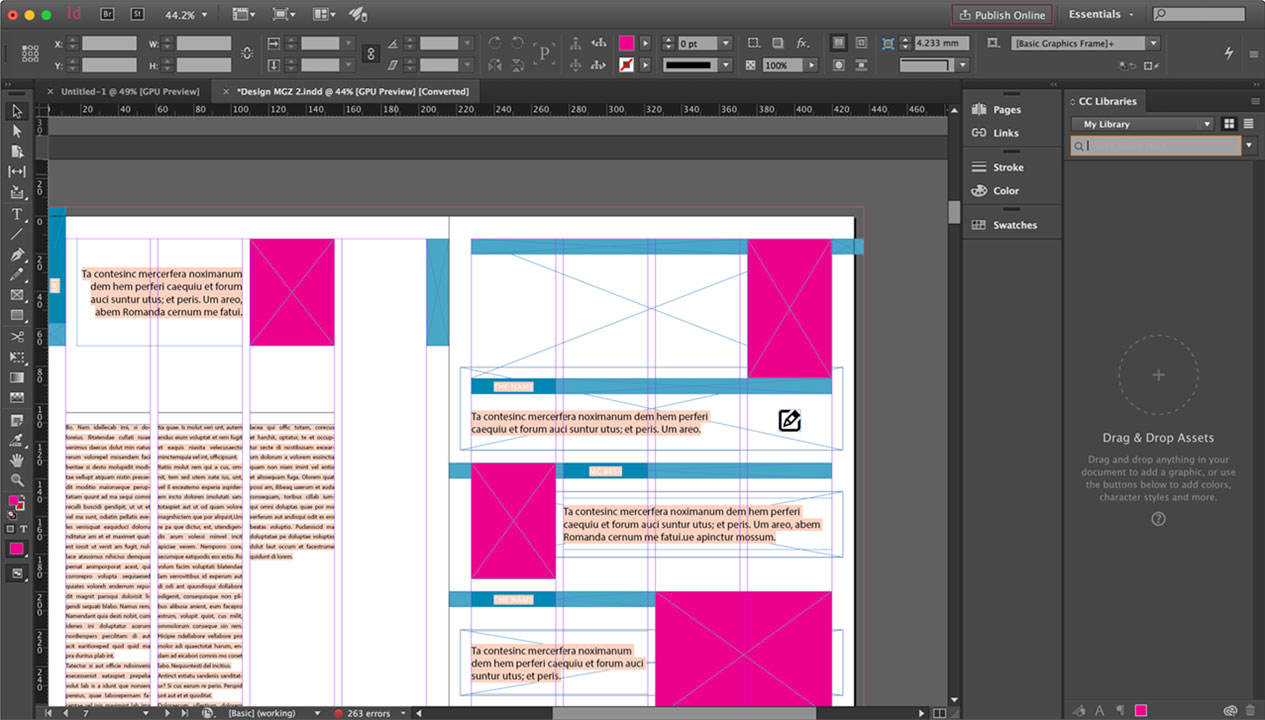
- Adobe InDesign: This is the undisputed king of professional layout and desktop publishing. Designed specifically for creating multi-page documents like magazines, books, brochures, and interactive PDFs, InDesign offers precise control over typography, sophisticated grid systems, advanced image handling, and powerful print preparation tools. It’s the closest in purpose to Publisher but on an entirely different professional level.
- Adobe Illustrator: For vector graphics, logos, illustrations, and scalable designs that Publisher simply couldn’t handle, Illustrator is the tool of choice.
- Adobe Photoshop: While not a DTP tool itself, Photoshop is indispensable for professional image manipulation, photo editing, and preparing raster graphics for inclusion in any layout.
The Adobe Creative Cloud suite operates on a subscription model and represents a significant investment in terms of both cost and learning time, making it suitable for professional designers, marketing agencies, and businesses with high-volume, high-quality design needs.
Affinity Suite (Publisher, Designer, Photo)
For users seeking professional capabilities without the recurring subscription cost of Adobe, Serif’s Affinity Suite offers a compelling alternative.
- Affinity Publisher: This is arguably the most direct professional competitor to Adobe InDesign and, by extension, a powerful successor to Publisher for those requiring advanced layout. It offers a comprehensive set of DTP features, including master pages, text wrapping, advanced typography, and pre-press controls, at a one-time purchase price. Its unique “StudioLink” technology allows seamless switching between Affinity Photo and Affinity Designer directly within Publisher.
- Affinity Designer: A robust vector graphic editor comparable to Adobe Illustrator.
- Affinity Photo: A powerful raster image editor similar to Adobe Photoshop.
The Affinity Suite provides a professional-grade solution that is increasingly popular among freelancers, small studios, and users who prefer a perpetual license model while maintaining high standards for their design output.
QuarkXPress: The Enduring Classic
While perhaps less talked about in general circles, QuarkXPress remains a powerful and relevant professional desktop publishing application. Once the industry leader before InDesign’s ascendance, QuarkXPress continues to be developed and used by professional publishers for complex page layouts, magazine production, and high-end printing. It offers advanced features for typography, automation, and digital publishing, catering to a niche of seasoned professionals who value its specific workflow and robust feature set.
Niche and Specialized Tools
Beyond the broad categories of cloud-based general design and professional suites, a plethora of niche tools has emerged to address specific design needs that Publisher might have once awkwardly handled.
Web-Based Design Tools for Specific Outputs
The rise of specialized web applications means that for particular types of documents or visuals, dedicated tools often offer a more efficient and effective solution.
- Infographics: Platforms like Piktochart, Venngage, and Infogram specialize in creating visually compelling infographics, offering templates and data visualization tools far beyond what Publisher could provide.
- Resumes: Websites like Resume.io, Canva, and Zety provide tailored templates and guided processes for creating professional resumes and cover letters.
- Digital Cards/Invitations: Tools like Evite, Paperless Post, and even many online print shops offer sophisticated web-based builders for digital and print invitations, often with integrated RSVP management.
- Simple Web Pages/Landing Pages: Platforms like Wix, Squarespace, and Leadpages allow users to design visually rich web content without coding, potentially replacing the need to design basic web elements in DTP software.
These tools are highly efficient for their specific purposes, reducing the design burden and often incorporating interactive or digital-first features.
Office Suites with Enhanced Layout
Open-source alternatives also provide viable options for DTP-like functionalities.
- LibreOffice Draw/Writer: Part of the free and open-source LibreOffice suite, Writer offers decent layout capabilities for brochures and newsletters, while Draw provides a vector graphics editor that can be used for more freeform design tasks. These are excellent choices for users seeking a zero-cost solution, particularly within educational or non-profit sectors.
Marketing Automation Platforms (MAPs)
For businesses heavily invested in digital marketing, many MAPs (e.g., HubSpot, Mailchimp, Salesforce Marketing Cloud) now integrate robust design tools directly within their platforms. These tools allow users to create branded email templates, landing pages, forms, and social media graphics without ever leaving the marketing ecosystem. This consolidation reduces the need for external DTP software for certain marketing collateral, streamlining workflows and ensuring brand consistency across campaigns.
The Future of Document Creation and Design
The demise of Microsoft Publisher is not a step backward but a testament to the accelerated pace of technological innovation in the creative sphere. The future of document creation and design is characterized by several key trends.
AI-Powered Design Assistance
Artificial intelligence is rapidly integrating into design tools, offering capabilities that will further democratize design. We can expect AI to assist with:
- Layout Suggestions: Automatically proposing optimal layouts based on content and user preferences.
- Content Generation: Helping to write copy or generate image variations.
- Brand Consistency: Ensuring elements adhere to brand guidelines across all designs.
- Image Background Removal and Enhancements: Simplifying complex photo editing tasks.
Tools like Canva’s Magic Design or Adobe’s Generative AI features are just the beginning, promising to make sophisticated design even more accessible to non-professionals.
The Blurring Lines Between Software Categories
The concept of a singular “desktop publishing” application is becoming increasingly obsolete. Design capabilities are being integrated into word processors, presentation software, marketing platforms, and web builders. The distinction between a “designer” and a “content creator” is narrowing as more tools empower individuals to handle both aspects. This trend suggests that future “replacements” for Publisher will continue to be versatile, multi-purpose platforms rather than dedicated, standalone DTP software.
User Experience and Accessibility as Key Drivers
Ultimately, the success of any new design tool hinges on its user experience and accessibility. Software that empowers users to achieve professional results with minimal effort and learning curve will thrive. Cloud-based, collaborative platforms that work seamlessly across devices will continue to dominate for general users, while professional tools will focus on enhancing efficiency, precision, and integration within complex creative workflows. The legacy of Microsoft Publisher will be remembered as a pioneer, but its replacements are embracing a future where design is integrated, intelligent, and universally accessible.
aViewFromTheCave is a participant in the Amazon Services LLC Associates Program, an affiliate advertising program designed to provide a means for sites to earn advertising fees by advertising and linking to Amazon.com. Amazon, the Amazon logo, AmazonSupply, and the AmazonSupply logo are trademarks of Amazon.com, Inc. or its affiliates. As an Amazon Associate we earn affiliate commissions from qualifying purchases.