
In our increasingly digital world, the phrase “reenter account number” is a common, almost instinctive prompt we encounter across a myriad of online platforms and applications. From setting up a new banking app to confirming a purchase on an e-commerce site, or even registering for a new social media platform, this simple instruction serves as a silent, yet incredibly vital, guardian of our digital interactions. While it might sometimes feel like an added layer of friction, slowing down our swift online journeys, its purpose is far from arbitrary. At its core, “reenter account number” is a fundamental technological mechanism designed to enhance data accuracy, bolster digital security, and ultimately, protect both users and service providers from costly errors and malicious activities.

This article delves deep into the technical, security, and user experience facets of this ubiquitous prompt. We will explore why it exists, how it functions behind the scenes, its profound implications for data integrity and cybersecurity, and the best practices for both users navigating these prompts and developers implementing them. Far from being a mere redundancy, re-entering an account number is a sophisticated, multi-layered defense strategy, reflecting a critical balance between user convenience and robust digital protection in the complex landscape of modern technology.
The Ubiquitous Prompt: Understanding “Reenter Account Number”
The request to “reenter your account number” is so common that many users perform it without a second thought. However, this seemingly simple action is a cornerstone of responsible digital design, serving multiple critical functions that underpin the reliability and security of online systems. Understanding its various roles illuminates its indispensable value in the digital realm.
A Core Mechanism for Data Integrity
At its most basic level, requiring a user to reenter an account number (or any critical data like an email, password, or security code) is an essential measure for ensuring data accuracy. Human error is an undeniable factor in data entry. A single misplaced digit, an extra character, or an overlooked typo can lead to significant problems—from funds being sent to the wrong recipient, to an account not being created correctly, or a password being irrevocably lost. By asking for the input twice, the system provides a simple, yet effective, mechanism for the user to self-correct potential mistakes before they are committed to the system.
When you enter a number the first time, your fingers might slip, or your attention might waver. Re-entering it forces you to perform the action again, engaging your cognitive functions to ensure the second input matches the first. If the two entries do not match, the system typically flags an error, prompting the user to review and correct their input. This pre-emptive validation prevents incorrect data from corrupting databases, avoids frustrating customer service interactions down the line, and maintains the overall integrity of the system’s information. It’s a proactive step that leverages human verification to maintain computational accuracy, minimizing downstream issues that could arise from even minor data discrepancies.
Reinforcing Digital Security
Beyond mere accuracy, the “reenter account number” prompt plays a crucial role in enhancing digital security. In an era rife with phishing attempts, credential stuffing, and various forms of online fraud, every layer of verification contributes significantly to the overall security posture of an application or service. For sensitive operations, such as creating a financial account, transferring funds, or changing security settings, the act of re-entry acts as a secondary confirmation that the user genuinely intends the action and has correctly provided the necessary identifier.
This practice aligns with the concept of “something you know” in multi-factor authentication. While not a full multi-factor approach, it ensures that the user actively knows and can correctly reproduce the critical piece of information, rather than merely having it pre-filled or copied from an uncertain source. For instance, if a malicious script somehow pre-filled a hidden field with an incorrect account number, requiring the user to manually re-enter and confirm it could thwart the attack. It forces active user participation and validation, making it harder for automated bots or social engineering tactics to succeed without direct, confirmed user input. This small step can be the difference between a secure transaction and a significant security breach.
Common Scenarios Where It Appears
The application of the “reenter account number” principle spans a wide array of digital interactions, reflecting its versatile utility across different sectors. Understanding these common scenarios helps users appreciate its relevance in their daily online activities.
-
Banking and Financial Services: This is perhaps the most critical area. When opening a new account, setting up a payee for fund transfers, confirming large transactions, or even changing profile details, re-entering account numbers or other financial identifiers is standard. This safeguards against erroneous transactions and protects against fraud.
-
E-commerce and Online Shopping: While less common for basic product purchases, it often appears when linking payment methods (e.g., bank accounts for direct debits), setting up recurring billing, or refunding large amounts, where the precision of an account number is paramount.
-
Software Installations and Registrations: For enterprise software licenses, unique product keys, or administrative account setups, re-entering critical IDs ensures the software is correctly licensed and linked to the right user or organization.
-
Password and Account Recovery: When resetting a password, users are frequently asked to confirm their new password by re-entering it. Similarly, during account recovery, reconfirming an associated email or phone number serves the same data integrity and security purpose.
-
Government and Healthcare Portals: Due to the highly sensitive nature of personal data and official records, any interaction involving unique identifiers (like social security numbers, patient IDs, or tax IDs) often mandates re-entry to ensure absolute accuracy and prevent potentially catastrophic errors.
These diverse applications underscore that “reenter account number” is not a niche security feature but a broadly adopted best practice for managing critical information across the digital landscape.
The Technical Underpinnings: How It Works Behind the Scenes
While the user experience of re-entering an account number seems straightforward, the underlying technical processes involve sophisticated validation and comparison mechanisms. Developers employ various techniques to implement this feature effectively, balancing stringent security requirements with user-friendly design.
Input Field Validation and Comparison
At its core, the technical implementation of “reenter account number” involves a simple, yet powerful, comparison algorithm. When a user provides two inputs for the same data point (e.g., account_number_field1 and account_number_field2), the system performs an immediate, real-time comparison.
-
Client-Side Validation: Often, initial validation occurs directly within the user’s web browser or application (client-side). As the user types, JavaScript or similar client-side scripts can check for basic formatting, length, and even character types. Once both fields are filled, the client-side script compares
field1andfield2. If they don’t match, an immediate error message is displayed, preventing the submission of mismatched data to the server. This provides instant feedback, improving user experience by allowing corrections before a server roundtrip. -
Server-Side Validation: Regardless of client-side checks, robust systems always perform server-side validation. When the form data is submitted to the server, the server-side application (e.g., using Python, Java, PHP, Node.js) receives both inputs. It then performs its own comparison. This is crucial because client-side validation can be bypassed. Server-side validation is the ultimate arbiter of data integrity and security, ensuring that only correctly matched data is processed and stored in the database.
This dual-layer validation process ensures that even if a user or a malicious actor tries to circumvent client-side checks, the server will still catch the discrepancy, rejecting the transaction or preventing the creation of an incorrect record.
Role in Secure Protocols (e.g., Encryption Key Verification)
The principle of re-entry extends beyond simple account numbers to more complex and critical data, particularly in the realm of cryptography and secure communications. For instance, when setting up encryption for a secure drive, creating a digital certificate, or configuring secure tunnels, users might be asked to “reenter your passphrase” or “confirm your encryption key.”
In these scenarios, the stakes are significantly higher. An incorrect account number might mean a lost transaction, but an incorrectly entered encryption key or passphrase can render data permanently inaccessible or compromise the security of an entire system. The re-entry mechanism here is not just about accuracy but about ensuring that the user has correctly registered a highly sensitive and often non-recoverable piece of information. The system must be absolutely sure that what the user thinks they entered is what was entered, because there might be no “forgot password” equivalent for a lost encryption key. This rigorous confirmation is integral to maintaining the confidentiality and integrity of highly sensitive digital assets.
User Experience (UX) Design Considerations
While vital for security and accuracy, the “reenter account number” prompt can introduce friction for users. Good UX design aims to mitigate this friction while preserving the security benefits. Developers and UX designers focus on making this process as seamless and intuitive as possible.
-
Clear Labeling and Instructions: Labels like “Account Number” and “Reenter Account Number” (or “Confirm Account Number”) must be distinct and unambiguous. Clear, concise instructions should explain why this step is necessary, fostering user trust and compliance.
-
Real-time Feedback: As users type, dynamic feedback (e.g., green checkmarks for a match, red warnings for a mismatch) can guide them. This immediate validation reduces frustration and helps users correct errors quickly.
-
Error Message Clarity: If the inputs don’t match, error messages should be polite, specific, and actionable (e.g., “The account numbers do not match. Please check both entries and try again.”).
-
Accessibility: Ensure the fields are accessible for users with disabilities, compatible with screen readers, and navigable via keyboard.
-
“Show/Hide” Toggles: For sensitive numerical inputs that aren’t passwords, offering an option to temporarily reveal the entered number (like “show password” functionality) can help users visually verify their input before confirming. This balances security (masking by default) with usability (allowing self-correction).
-
Intelligent Autofill Management: While generally helpful, autofill can sometimes interfere with re-entry prompts if it fills both fields identically without user oversight. Designers must decide when to allow or restrict autofill for such sensitive fields to prevent unintended bypasses of the verification step.

By meticulously considering these UX aspects, developers can implement the “reenter account number” functionality in a way that is secure, accurate, and user-friendly, transforming a potential point of friction into a smooth part of the digital workflow.
Beyond Simplicity: Why “Reenter” is More Than Just Double-Checking
The concept of re-entering data goes beyond mere typo prevention and basic security. It plays a subtle yet significant role in mitigating advanced threats, meeting regulatory compliance, and even influencing user behavior through psychological mechanisms.
Mitigating Phishing and Social Engineering Risks
In the sophisticated world of cyber threats, “reenter account number” can serve as an indirect defense against phishing and social engineering attacks. Phishing websites are designed to mimic legitimate sites, tricking users into revealing sensitive information. Often, these sites might try to pre-fill fields or subtly manipulate forms.
By requiring manual re-entry, the system forces users to actively type the information rather than simply copying and pasting from an unknown source or passively relying on pre-filled data. This active engagement can subtly encourage vigilance. If a user is forced to type an account number twice, they might be more likely to notice if the website URL looks suspicious, if the site’s design elements are slightly off, or if the prompt itself feels unusual. It adds a cognitive load that, while minor, can be just enough to trigger a user’s awareness of something potentially amiss, thereby indirectly acting as a protective barrier against deceptive tactics that rely on user passivity and haste.
Compliance and Regulatory Requirements
In highly regulated industries, the “reenter account number” practice isn’t just a best practice; it’s often a mandatory requirement. Sectors like finance, healthcare, and government agencies operate under stringent data accuracy and security regulations (e.g., GDPR, HIPAA, PCI DSS). These regulations mandate robust controls to protect sensitive personal and financial information.
Double-entry mechanisms contribute directly to fulfilling these compliance obligations. For example, financial regulations might require multiple points of verification for transactions exceeding a certain threshold or for the modification of critical account details. Healthcare data protection acts necessitate extreme caution when handling patient identifiers. By enforcing re-entry for unique identifiers, organizations can demonstrate due diligence in preventing data entry errors that could lead to privacy breaches, financial discrepancies, or incorrect medical treatments. This adherence to compliance not only safeguards data but also helps organizations avoid hefty fines and reputational damage.
The Psychology of Confirmation
From a psychological perspective, requiring users to reenter data leverages the principle of cognitive confirmation. When users type information once, they might do so quickly or distractedly. The act of re-entry forces a brief pause, a moment of active confirmation. This mental “double-check” encourages a more deliberate processing of the information being entered.
This is particularly effective for high-stakes actions. For example, before confirming a large financial transfer or a permanent account deletion, the system might prompt for a final re-entry of an account ID or confirmation code. This is designed to make the user consciously acknowledge the gravity of their action, reducing impulsive errors or actions taken without full understanding. It taps into our natural inclination to verify important decisions, adding a layer of psychological assurance that the user genuinely intends to proceed with the action and has provided the correct information.
Best Practices for Users and Developers
The effectiveness of “reenter account number” hinges on both intelligent implementation by developers and diligent engagement by users. Adopting best practices on both sides ensures that this critical security and accuracy measure fulfills its purpose without unnecessary friction.
For Users: Adopt a Mindful Approach
As a user, understanding the rationale behind the “reenter account number” prompt can transform it from an annoyance into a valuable security habit.
-
Type Carefully and Deliberately: Avoid rushing through data entry, especially for sensitive numbers. Take a moment to focus on each digit.
-
Avoid Distractions: Minimize distractions when inputting critical information. A momentary lapse in concentration is often the cause of data entry errors.
-
Understand the “Why”: Recognize that the prompt is there for your protection—to prevent errors that could lead to financial losses, data breaches, or inaccessible accounts. Approaching it with this understanding fosters patience and accuracy.
-
Leverage “Show/Hide” Options (When Available): If an option to show the entered number is provided, use it to visually verify both entries before submitting.
-
Be Skeptical of Unusual Prompts: If a website or app asks you to reenter an account number in an unexpected context or format, pause and verify the legitimacy of the site/app before proceeding. This is part of general cybersecurity awareness.
By adopting a mindful and deliberate approach, users can significantly enhance the security and accuracy of their digital interactions, making the “reenter account number” prompt a smooth part of their workflow rather than a frustrating hurdle.
For Developers: Balancing Security and Usability
Developers face the challenge of implementing “reenter account number” in a way that maximizes its security benefits without unduly frustrating users. Striking this balance is key to good user experience and robust system design.
-
Contextual Application: Don’t overuse the prompt. Apply it primarily for sensitive, critical, or non-recoverable data (e.g., financial account numbers, passwords, encryption keys, unique identifiers). Requiring re-entry for a non-critical piece of data like a profile name can unnecessarily irritate users.
-
Smart Validation Logic: Implement both client-side and server-side validation. Use regular expressions, checksums (like the Luhn algorithm for credit card numbers), or other algorithms where applicable, to validate the format of the account number even before comparing the two fields. This provides earlier feedback on incorrect data.
-
Clear and Concise Error Messages: As discussed, error messages should be helpful, guiding the user to correct the specific issue without being accusatory or vague.
-
Consider Partial Masking: For very long account numbers, masking all but the last few digits in the input fields (e.g.,
XXXX-XXXX-XXXX-1234) can provide a degree of security while still allowing users to verify a portion of their input. -
Accessibility First: Ensure the input fields are fully accessible according to WCAG guidelines, including proper labeling, keyboard navigation, and compatibility with assistive technologies.
-
Performance Optimization: Ensure that the client-side validation is fast and responsive, avoiding any noticeable delay that could frustrate users.
When to Use It (and When Not To)
The decision of whether to implement a “reenter” prompt should always be a thoughtful one, guided by the sensitivity of the data and the potential impact of an error.
-
Use it for:
-
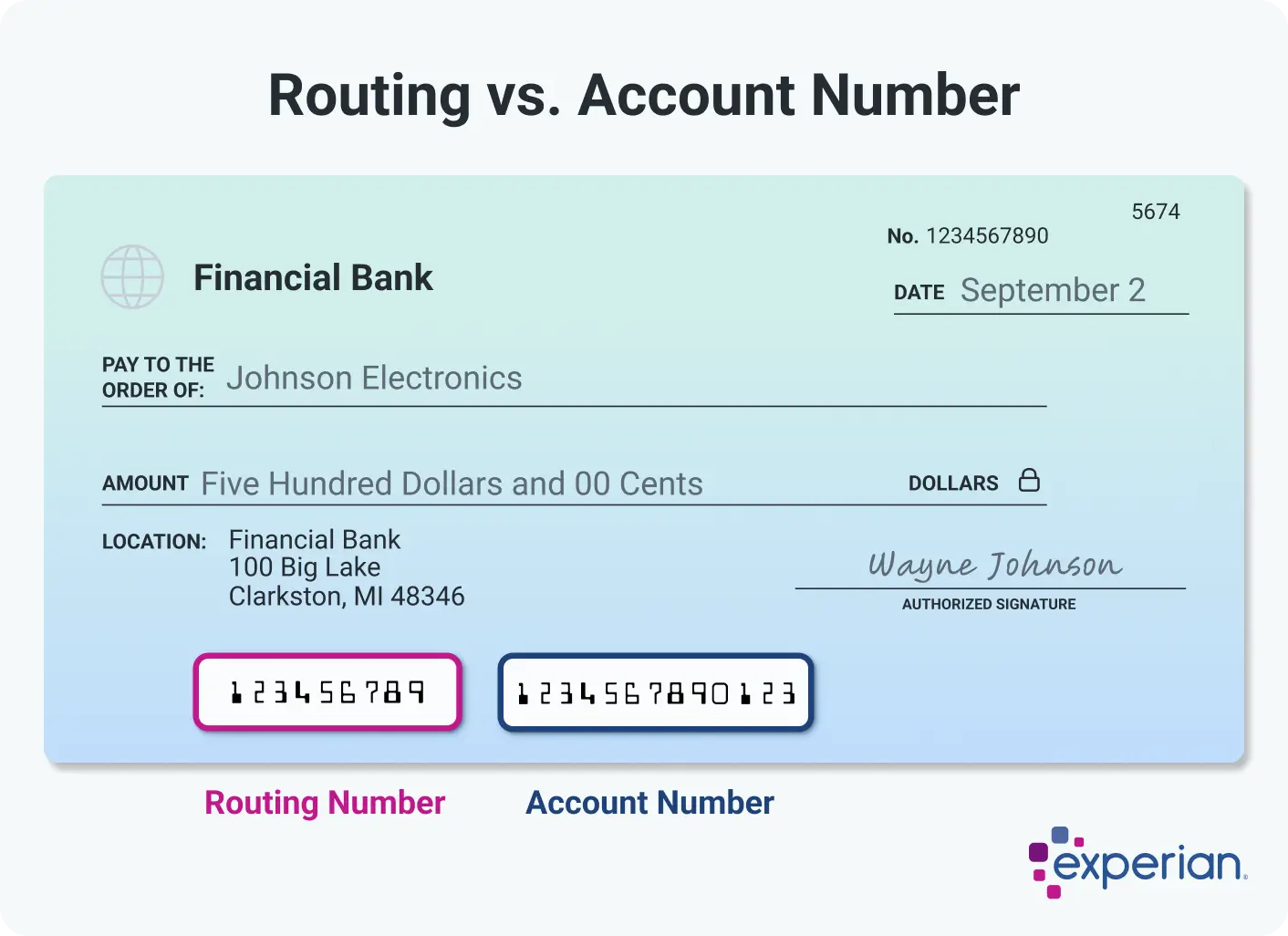
Financial Account Numbers: Bank accounts, credit card numbers, routing numbers.
-
Passwords/PINs: New password creation and changes.
-
Encryption Keys/Passphrases: Any data that, if entered incorrectly, could lead to permanent data loss or security compromise.
-
Critical Identifiers: Government IDs, social security numbers, medical record numbers.
-
Irreversible Actions: Confirming account deletion or significant configuration changes.
-
-
Avoid using it for:
-
Non-sensitive Information: Names, addresses (unless highly critical for delivery/legal reasons), non-essential profile details.
-
Repetitive Data Entry: If a user needs to enter many fields, excessive re-entry prompts can lead to fatigue and frustration.
-
Data with Low Impact of Error: Information where a typo would have minimal or easily correctable consequences.
-
Thoughtful application ensures the “reenter account number” feature is a powerful tool for security and accuracy, rather than an unnecessary hurdle.
Conclusion
The humble “reenter account number” prompt, often overlooked or simply tolerated, is a sophisticated and essential component of modern digital technology. It stands as a testament to the meticulous design required to build secure, reliable, and user-friendly online systems. Far from being a mere inconvenience, it is a multi-faceted guardian, simultaneously ensuring data accuracy, bolstering digital security against a spectrum of threats, and even playing a subtle psychological role in confirming user intent.
For users, understanding its purpose fosters a more mindful approach to online interactions, transforming a routine task into an active act of self-protection. For developers, its implementation represents a critical balancing act—integrating robust security and data integrity measures with an intuitive and efficient user experience. In a world increasingly reliant on digital transactions and data, the careful application and understanding of “reenter account number” remain a cornerstone of trust, ensuring that our digital journeys are both accurate and secure. It is a quiet hero in the architecture of the internet, silently upholding the integrity of the data that powers our connected lives.
aViewFromTheCave is a participant in the Amazon Services LLC Associates Program, an affiliate advertising program designed to provide a means for sites to earn advertising fees by advertising and linking to Amazon.com. Amazon, the Amazon logo, AmazonSupply, and the AmazonSupply logo are trademarks of Amazon.com, Inc. or its affiliates. As an Amazon Associate we earn affiliate commissions from qualifying purchases.