
When building a high-performance PC or upgrading a server, most users focus on the headline specifications: capacity (e.g., 32GB) and speed (e.g., 6000MT/s). However, beneath these surface-level metrics lies a technical characteristic that significantly influences system stability, memory bandwidth, and overall latency: Memory Rank.
In the world of Double Data Rate (DDR) SDRAM, “Rank” refers to a specific data block or set of chips that the memory controller can access independently. While it is often overlooked by casual consumers, understanding rank is essential for enthusiasts and professionals who want to maximize their hardware’s potential.

Defining Memory Rank: The Core Concept
To understand rank, one must first understand how a computer communicates with its memory. The CPU does not interact with a memory stick as a single, monolithic entity. Instead, it views memory as a collection of addressable blocks.
The 64-Bit Data Path
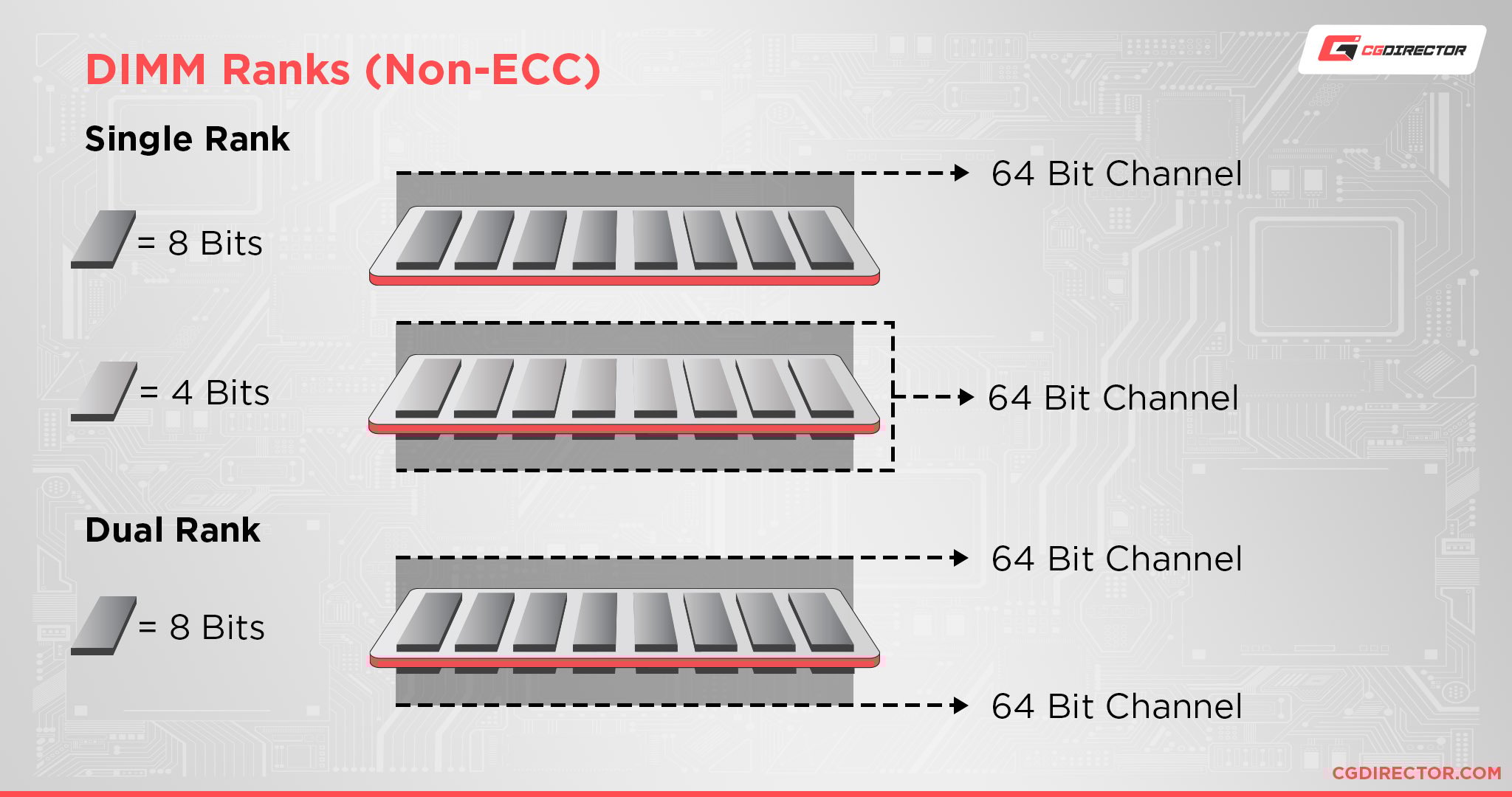
A memory rank is defined as a block or area of data that is 64 bits wide. This 64-bit width is the standard data bus width for modern consumer processors. On systems utilizing Error Correction Code (ECC) memory, typically found in servers and workstations, the rank is 72 bits wide to accommodate the extra 8 bits of parity data.
When a motherboard’s memory controller sends a command to a RAM module, it communicates with one rank at a time. If a memory module has one rank (Single Rank), all the memory chips on that stick are accessed simultaneously to fill the 64-bit data bus. If a module has two ranks (Dual Rank), the chips are divided into two separate sets, each capable of filling the 64-bit bus, though only one can be active on the bus at any given nanosecond.
How Rank Differs from Physical Sides
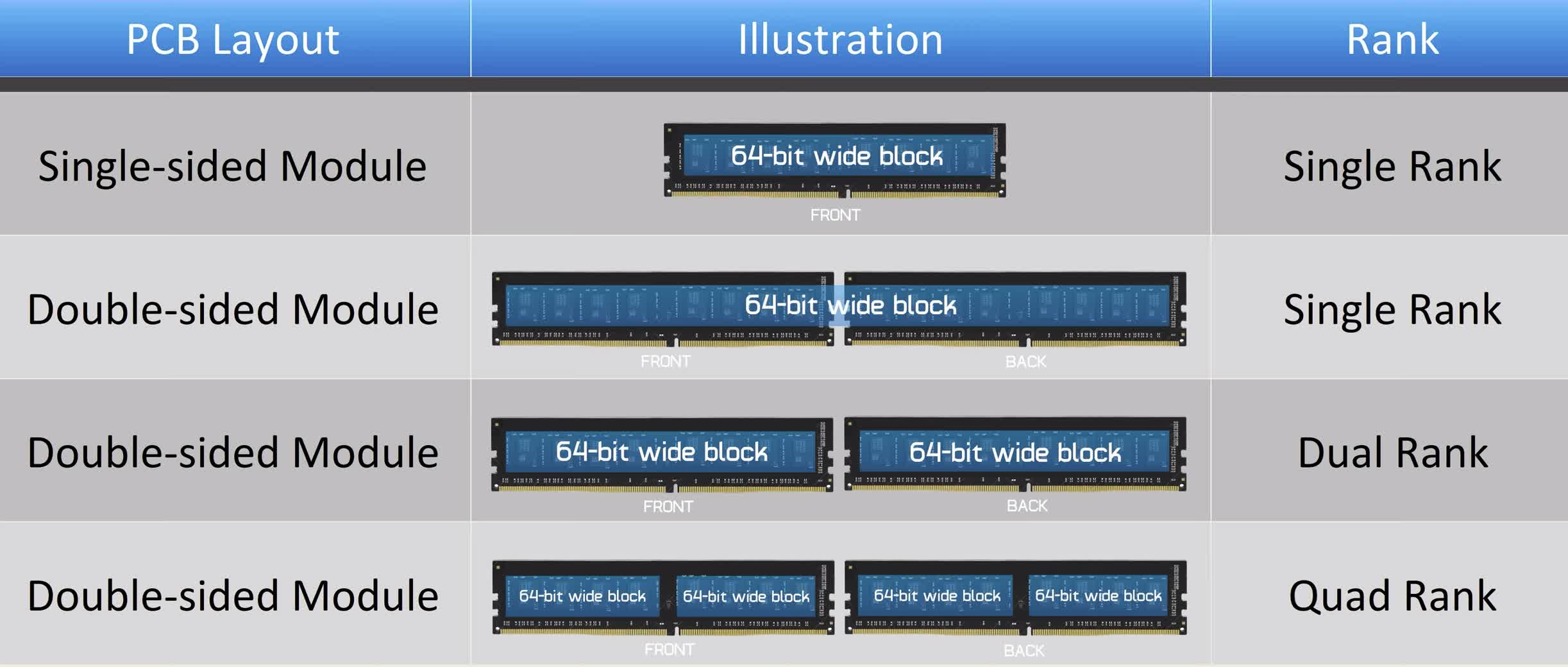
A common misconception in the tech community is that “Single Rank” means “Single Sided” and “Dual Rank” means “Double Sided.” While these often correlate, they are not the same thing.
“Sides” refers to the physical layout of the DRAM chips on the Printed Circuit Board (PCB). A single-sided module has chips on only one side, while a double-sided module has them on both. “Rank,” however, is a logical distinction. It is entirely possible to have a single-sided module that is dual-rank if the high-density chips are wired into two logical groups. Conversely, some older high-capacity modules might be double-sided but still function as a single rank. When optimizing a system, you should always look at the rank specification (1R, 2R, or 4R) rather than the physical appearance of the stick.
Single-Rank vs. Multi-Rank: Analyzing the Differences
Memory modules are typically categorized into three main types: Single Rank (1R), Dual Rank (2R), and Quad Rank (4R). The choice between these can have a profound impact on how the Integrated Memory Controller (IMC) inside your CPU manages data.
Single-Rank (1R) Modules
Single-rank modules are the most common in the consumer market, particularly for entry-level and mid-range DDR4 and DDR5 kits. In a 1R configuration, all the memory chips are tied to a single “chip select” signal.
The primary advantage of single-rank memory is that it puts less strain on the memory controller. Because there is only one set of electrical loads to manage per module, the IMC can often hit much higher clock speeds. This is why professional overclockers almost exclusively use single-rank sticks to achieve world-record frequencies. If your goal is to push your RAM to 8000MT/s or higher, single-rank is usually the only way to maintain stability.
Dual-Rank (2R) and Quad-Rank (4R) Modules
Dual-rank modules contain two 64-bit blocks of data on one stick. To the CPU, a single dual-rank stick looks like two single-rank sticks plugged into the same channel. Quad-rank modules are even denser, often found in high-capacity LRDIMMs (Load-Reduced DIMMs) for servers.
The trade-off with multi-rank memory is electrical complexity. Each additional rank adds more “load” to the memory bus. This increased capacitance makes it harder for the memory controller to maintain clean signals at high frequencies. Consequently, dual-rank kits often have lower maximum rated speeds than their single-rank counterparts. However, as we will explore in the next section, they make up for this through a process called “interleaving.”
The Impact of Rank on System Performance
One might wonder why anyone would choose dual-rank memory if it is harder to overclock. The answer lies in architectural efficiency. While single-rank memory is “faster” in terms of raw megahertz, dual-rank memory is often “smarter” in how it handles data requests.
Memory Interleaving Explained
Memory interleaving is the primary performance benefit of multi-rank configurations. When the CPU finishes reading from or writing to one rank, that rank must undergo a “precharge” period before it can be accessed again. This is essentially a “cool-down” period where the rows of the memory cells are closed.
In a dual-rank system, the memory controller can perform “Rank Interleaving.” While Rank 0 is busy with a precharge cycle, the controller can immediately start accessing Rank 1. This “hides” the latency associated with memory refreshing and precharging. In many workloads, particularly gaming and content creation, the performance gain from interleaving can outweigh the benefits of the slightly higher clock speeds found in single-rank kits.
Latency and Command Rates
Another factor influenced by rank is the Command Rate (CR). Most RAM runs at a Command Rate of 1T or 2T. 1T means the memory controller can send commands to the memory every clock cycle, while 2T requires a one-cycle delay.
Because multi-rank configurations put more electrical stress on the memory controller, they often require a 2T command rate to remain stable, especially when four slots on a motherboard are filled. This can introduce a small amount of latency. However, modern DDR5 technology has mitigated many of these issues through the introduction of dual 32-bit sub-channels, which allows for more granular control and better efficiency regardless of rank.
Rank and Motherboard Compatibility
The relationship between memory rank and your motherboard is one of the most critical aspects of system building. Every motherboard and CPU combination has a limit on the total number of ranks it can support.
Addressable Ranks per Channel
Most consumer motherboards (dual-channel) have four DIMM slots, divided into two channels (A and B). Each channel can typically handle a maximum of 4 ranks.
If you install two dual-rank sticks (one in Channel A, one in Channel B), you have used 2 ranks per channel, which is well within the limits. However, if you populate all four slots with dual-rank sticks, you are hitting the 4-rank-per-channel limit. In this scenario, the memory controller is under immense pressure. This is why many high-end motherboards will automatically downclock your RAM speed if you fill all four slots. For example, a kit rated for 6000MT/s might only run stably at 4800MT/s when eight total ranks are present across four slots.
Overclocking Limitations
For users interested in XMP (Intel) or EXPO (AMD) profiles, rank density is a major bottleneck. Single-rank sticks allow the IMC to “breathe,” providing the overhead necessary for aggressive timing adjustments. If you are a competitive gamer looking for the lowest possible frame times, a high-frequency single-rank kit (usually 2x16GB in the DDR5 era) is the gold standard.
Conversely, if you need 128GB of RAM for video editing, you will likely be forced into a multi-rank configuration. In this case, you must accept that the “advertised” speed of the RAM might be harder to achieve, requiring manual voltage tweaks or a more robust motherboard with an 8-layer or 10-layer PCB to handle the signal integrity requirements.
Choosing the Right RAM: When Rank Matters Most
Deciding between single and dual rank depends entirely on your specific use case. As the industry transitions fully to DDR5, the nuances are changing, but the fundamental principles of data organization remain.
Gaming vs. Workstation Needs
For gamers, the “sweet spot” has historically been 2x16GB dual-rank kits (for DDR4) or high-speed single-rank kits (for DDR5). Modern games benefit more from high frequency and low latency than they do from the massive bandwidth provided by quad-rank setups. Most benchmarks show that in a 2-stick configuration, the performance difference between 1R and 2R is marginal—usually within 3-5%—but dual-rank tends to offer more consistent 1% low frame rates due to interleaving.
Workstations, however, prioritize capacity and bandwidth. If you are running virtual machines, rendering 3D scenes, or compiling massive codebases, the rank interleaving of dual or quad-rank memory provides a tangible boost to throughput. In these scenarios, the ability to have more “pages” of memory open simultaneously is more valuable than a few hundred extra megahertz of clock speed.
Future-Proofing with DDR5
DDR5 has changed the conversation regarding rank. Every DDR5 stick, even a single-rank one, features two independent 32-bit sub-channels. This effectively gives a single-rank DDR5 stick some of the interleaving benefits that previously required dual-rank DDR4.
Furthermore, as chip density increases (with the move to 24Gbit and 32Gbit chips), we are seeing 32GB sticks that are still single-rank. This allows users to have high capacity without the electrical penalties of dual-rank configurations. When buying memory today, the best advice is to check the QVL (Qualified Vendor List) of your motherboard. The QVL will specify exactly how many sticks and which rank configurations have been tested to work at specific speeds.
In conclusion, while “Rank” might seem like an obscure technical detail, it is the invisible architecture that dictates how your CPU and RAM interact. By matching your rank configuration to your workload—prioritizing speed and single-rank for gaming, or capacity and rank-interleaving for productivity—you can ensure your system operates at its absolute peak efficiency.
aViewFromTheCave is a participant in the Amazon Services LLC Associates Program, an affiliate advertising program designed to provide a means for sites to earn advertising fees by advertising and linking to Amazon.com. Amazon, the Amazon logo, AmazonSupply, and the AmazonSupply logo are trademarks of Amazon.com, Inc. or its affiliates. As an Amazon Associate we earn affiliate commissions from qualifying purchases.