
In the dynamic landscape of modern business, managing finances effectively is not just a necessity; it’s a strategic imperative. For countless businesses, from budding startups to established enterprises, QuickBooks Online (QBO) has emerged as the quintessential solution, redefining how companies approach their accounting. Far more than just a digital ledger, QBO represents a robust ecosystem of technological tools designed to simplify complex financial tasks, provide real-time insights, and empower business owners and accountants alike. At its core, QBO is a cloud-based accounting software that harnesses the power of the internet to deliver a comprehensive suite of financial management functionalities, making it an indispensable asset in the digital age.
This article delves deep into the technological essence of QuickBooks Online, exploring its architecture, key software features, integration capabilities, and the overall tech-driven value it brings to the table. Understanding QBO is not merely about knowing what it does, but appreciating how its underlying technology enables such profound efficiency and insight.
The Core Technology Behind QuickBooks Online
QuickBooks Online’s power and versatility stem directly from its sophisticated technological foundation. Unlike traditional desktop software that requires installation and local data storage, QBO operates entirely in the cloud, leveraging a model that prioritizes accessibility, scalability, and robust security.
Cloud-Native Architecture: Freedom and Flexibility
At the heart of QBO is its cloud-native architecture. This means the software is designed and built specifically to run in a cloud environment, taking full advantage of cloud computing benefits. For users, this translates into unparalleled freedom and flexibility:
- Anywhere, Anytime Access: Business owners, managers, and accountants can access their financial data from any device (desktop, laptop, tablet, smartphone) with an internet connection. This eliminates geographical barriers, facilitating remote work and real-time collaboration among teams, even if they are spread across different locations.
- Real-time Data: Because all data resides in the cloud, updates are instantaneous. When a transaction is recorded or an invoice is paid, the financial reports and dashboards reflect these changes immediately. This real-time visibility is crucial for making timely, informed business decisions.
- Automatic Backups and Disaster Recovery: One of the most significant advantages of cloud architecture is the built-in resilience. Intuit, as the vendor, is responsible for maintaining the servers, performing regular data backups, and ensuring disaster recovery protocols are in place. This dramatically reduces the risk of data loss for businesses due to hardware failures, theft, or other local incidents.
- Reduced IT Overhead: Businesses no longer need to invest in expensive server hardware, manage software installations, or worry about maintaining complex IT infrastructure. Intuit handles all the technical heavy lifting, allowing businesses to focus on their core operations rather than IT management.
Software as a Service (SaaS) Model: Efficiency and Evolution
QuickBooks Online operates under a Software as a Service (SaaS) model. In this subscription-based approach, users pay a recurring fee (monthly or annually) to access the software and its features over the internet. This model offers several distinct technological and operational advantages:
- Scalability: SaaS solutions are inherently scalable. As a business grows, it can easily upgrade its QBO subscription level to unlock more features (e.g., inventory management, more user access, advanced reporting) without needing to migrate data or reinstall software. This elasticity ensures the accounting system can evolve with the business.
- Lower Upfront Costs: Instead of a large one-time purchase, the subscription model spreads costs over time, making sophisticated accounting software accessible to small and medium-sized businesses that might not have the capital for traditional on-premise solutions.
- Continuous Feature Improvements and Updates: A cornerstone of the SaaS model is automatic updates. Intuit regularly rolls out new features, performance enhancements, and security patches without any action required from the user. This means QBO users always have access to the latest technology and compliance standards, without the hassle of manual installations.
- Vendor Management of Infrastructure: Intuit manages the entire underlying infrastructure, including servers, networks, and operating systems. This offloads a significant burden from businesses, ensuring optimal performance and availability.
Data Security and Encryption: Protecting Your Financial Information
For any business, the security of financial data is paramount. QBO leverages cutting-edge technology to ensure the confidentiality, integrity, and availability of user data, addressing common concerns associated with cloud storage:
- Encryption: All data transmitted to and from QBO is encrypted using bank-grade TLS (Transport Layer Security) 1.2 or higher, ensuring secure communication channels. Additionally, data stored at rest on Intuit’s servers is also encrypted, adding another layer of protection against unauthorized access.
- Multi-Factor Authentication (MFA): QBO supports and often encourages MFA, requiring users to verify their identity through a secondary device (like a smartphone) in addition to their password. This significantly enhances account security, making it much harder for unauthorized parties to gain access.
- Physical and Digital Security Measures: Intuit’s data centers employ robust physical security measures (e.g., restricted access, surveillance) and digital security protocols (firewalls, intrusion detection systems, regular vulnerability scanning) to protect against both physical and cyber threats.
- Compliance Standards: Intuit adheres to various industry and regulatory compliance standards, demonstrating its commitment to data protection and privacy, which is crucial for businesses operating in regulated environments.
Key Features and Functionalities of QBO as a Software Solution
Beyond its robust architecture, QuickBooks Online shines through its comprehensive suite of features, all designed to streamline various aspects of financial management. Each functionality is meticulously crafted to be intuitive yet powerful, leveraging software design principles to simplify complex accounting tasks.
Streamlined Bookkeeping and Transaction Management
QBO excels at automating and simplifying core bookkeeping tasks:
- Bank and Credit Card Account Integration: The software securely connects to thousands of financial institutions, automatically importing bank and credit card transactions. This eliminates manual data entry, reduces errors, and saves significant time.
- Smart Categorization and Rules: QBO uses intelligent algorithms to suggest categories for imported transactions. Users can also set up custom rules to automatically categorize recurring transactions, ensuring consistency and accuracy.
- Reconciliation: The software provides a structured process for reconciling bank and credit card statements, helping businesses ensure their records match their financial institution’s records, identifying discrepancies quickly.
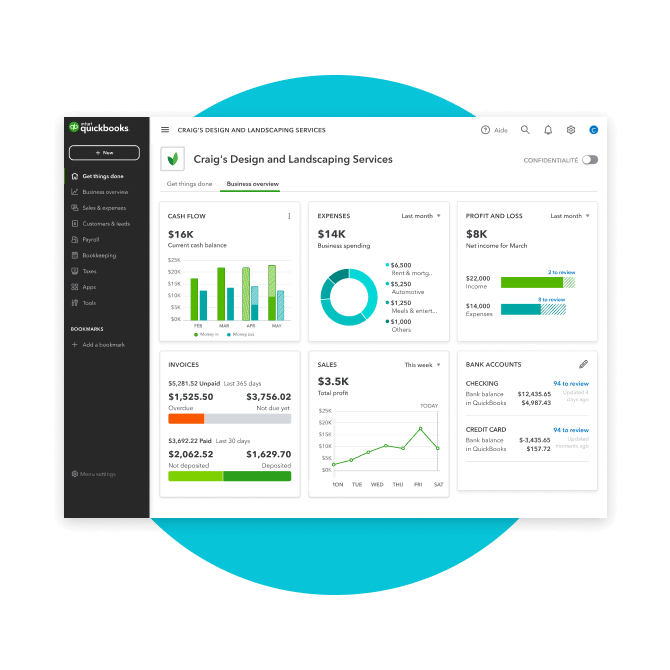
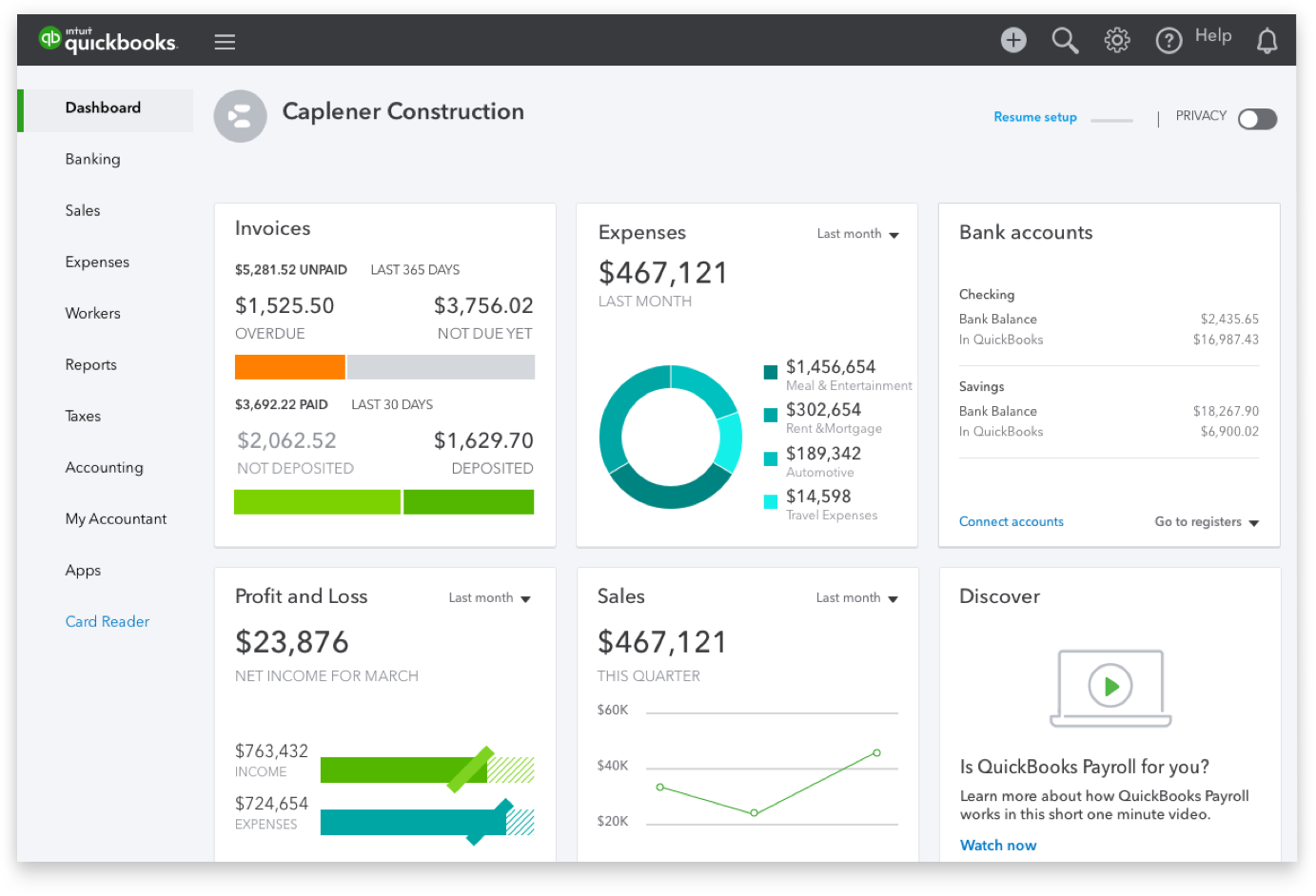
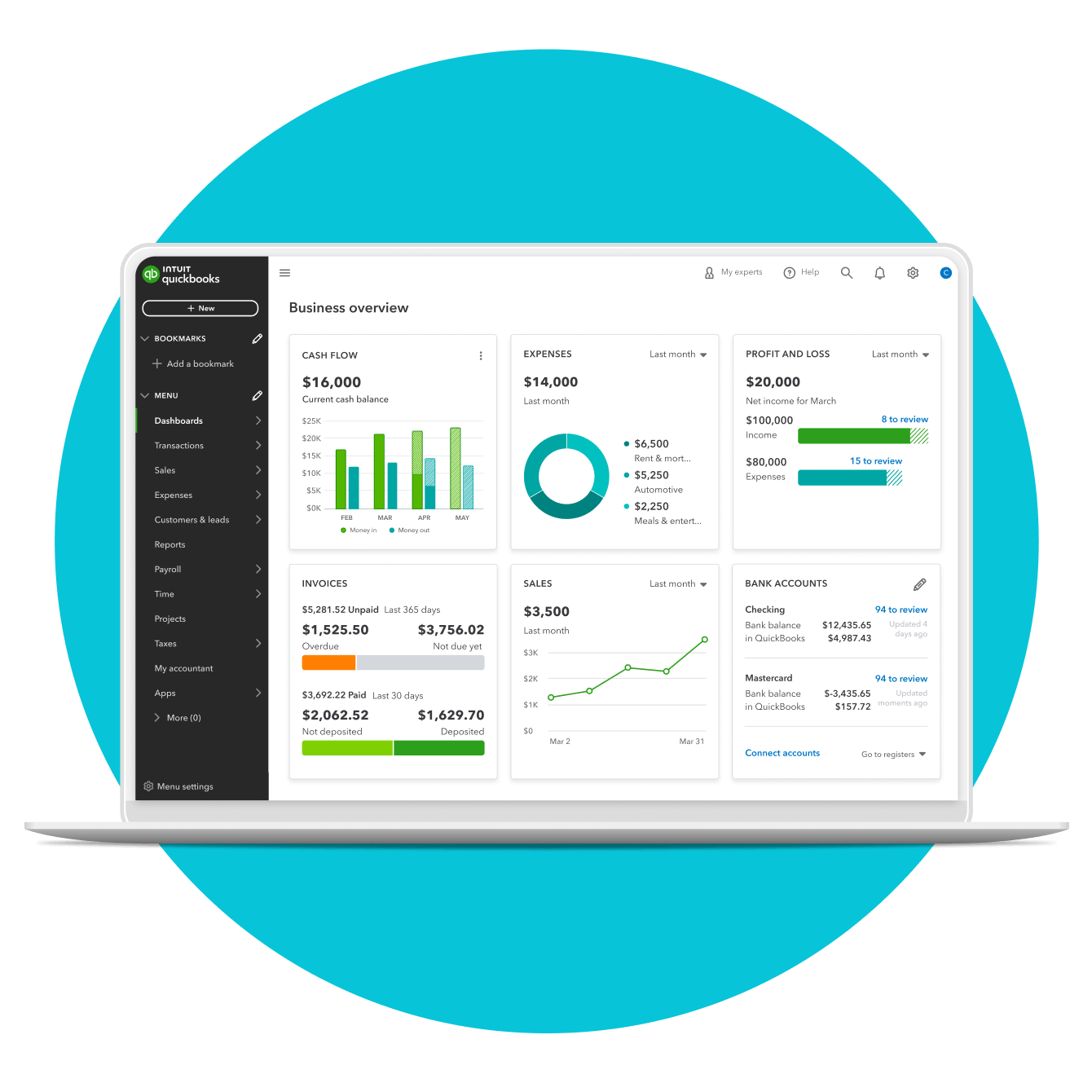
- Customizable Dashboard: Upon logging in, users are greeted with a customizable dashboard that provides an at-a-glance overview of key financial metrics, such as profit and loss, outstanding invoices, and bank balances. This visual representation leverages data visualization techniques for quick insights.
Invoicing and Accounts Receivable: Optimizing Cash Flow
Managing who owes you money is critical for cash flow. QBO provides powerful tools for accounts receivable:
- Professional Invoice Generation: Users can create and customize professional-looking invoices with their company branding. The software supports various invoice types, including recurring invoices and progress invoices for projects.
- Automated Payment Reminders: QBO can automatically send gentle reminders to customers for upcoming or overdue payments, reducing the need for manual follow-ups.
- Online Payment Integration: Through QuickBooks Payments, customers can pay invoices directly online via credit card, debit card, or bank transfer (ACH), significantly speeding up the payment cycle and improving cash flow. The technology facilitates secure transaction processing and direct deposit into the business’s bank account.
Expense Tracking and Accounts Payable: Managing Outflows
Controlling expenses is equally important. QBO simplifies the management of money flowing out of the business:
- Bill Management: Businesses can easily record bills from vendors, track due dates, and schedule payments, helping avoid late fees and manage cash flow effectively.
- Vendor Management: QBO maintains a comprehensive database of vendors, including contact information, payment terms, and historical transaction data.
- Receipt Capture: The QBO mobile app (a key tech component) allows users to snap photos of receipts, which are then uploaded, categorized, and matched to transactions, eliminating the need for shoeboxes full of paper receipts. This leverages optical character recognition (OCR) technology for data extraction.
Reporting and Analytics: Unlocking Financial Insights
One of the most valuable aspects of QBO’s technology is its ability to transform raw financial data into actionable insights:
- Comprehensive Financial Reports: Users can generate a wide array of standard and customizable reports, including Profit & Loss statements, Balance Sheets, Cash Flow statements, Accounts Receivable Aging reports, and Sales by Customer. These reports are crucial for understanding business performance and compliance.
- Customizable Dashboards and Visualizations: Beyond the main dashboard, QBO offers various tools to visualize financial data, making it easier to identify trends, pinpoint areas of concern, and evaluate financial health without needing a deep accounting background.
- Budgeting and Forecasting Tools: The software allows businesses to create budgets, track actuals against budgeted amounts, and even run basic forecasts to anticipate future financial performance, aiding strategic planning.
Payroll Integration (QuickBooks Payroll): Automated Compensation
For businesses with employees, QBO offers seamless integration with QuickBooks Payroll, often presented as an add-on service that extends the core software’s capabilities:
- Automated Payroll Processing: This module automates salary calculations, tax withholdings, and direct deposits, simplifying one of the most complex and time-sensitive aspects of business operations.
- Tax Compliance: QuickBooks Payroll automatically calculates, files, and pays federal and state payroll taxes, helping businesses stay compliant with ever-changing tax laws.
- Employee Self-Service: Employees can often access their pay stubs and W-2s online, reducing administrative overhead for HR and accounting departments.
Navigating the QBO Ecosystem: Integrations and Accessibility
QuickBooks Online is not just a standalone application; it’s a central hub within a broader ecosystem of business tools, empowered by its open API and mobile-first design philosophy. This interconnectedness is a testament to its advanced software architecture.
The Power of Third-Party App Integrations
A significant technological strength of QBO is its robust App Store, which hosts thousands of third-party applications that integrate seamlessly with the platform. This extensibility allows businesses to create a tailored technology stack that meets their unique operational needs:
- Extending Functionality: Businesses can connect QBO to specialized apps for inventory management, CRM (Customer Relationship Management), e-commerce platforms (like Shopify or Amazon), time tracking, project management, expense reporting, and more. This eliminates data silos and provides a unified view of operations.
- API-Driven Connectivity: The seamless integration is made possible through Intuit’s well-documented Application Programming Interface (API), which allows external software to securely communicate and exchange data with QBO. This fosters an ecosystem of innovation where developers can build solutions that augment QBO’s core offerings.
- Reduced Manual Data Entry: By integrating critical business applications, data flows automatically between systems, significantly reducing manual data entry, minimizing errors, and freeing up valuable time for strategic tasks.
- Creating a Unified Tech Stack: For many businesses, QBO becomes the financial backbone, connecting disparate operational tools into a cohesive and efficient technology stack.
Mobile Accessibility and User Experience
Recognizing the shift towards mobile-first operations, Intuit has heavily invested in the QBO mobile app, which is a powerful extension of the desktop experience:
- Full-Featured Mobile App: The QBO app (available for iOS and Android) offers a surprising array of functionalities, including invoicing, expense tracking (with receipt capture), dashboard viewing, customer and vendor management, and basic reporting. This enables business owners to manage finances on the go, from anywhere.
- Responsive Web Interface: Beyond the dedicated app, the QBO web interface is designed with responsiveness in mind, ensuring a consistent and optimized user experience across various screen sizes, from large monitors to smaller tablets.
- Intuitive Design for Non-Accountants: Intuit continuously refines QBO’s user interface (UI) and user experience (UX) to make it intuitive even for users without formal accounting training. This focus on accessibility through smart design is a key technological differentiator.
Scalability Across Different QBO Versions
QBO offers various subscription levels (Simple Start, Essentials, Plus, Advanced), each tailored to different business sizes and needs. This tiered approach is a thoughtful application of software scalability:
- Feature Laddering: As businesses grow, they can upgrade their subscription to unlock more advanced features like inventory management, project costing, multi-currency support, and increased user access. This means businesses don’t pay for features they don’t need initially but can easily access them as their requirements evolve.
- Role-Based Access Control: Higher-tier subscriptions offer more granular control over user permissions, allowing businesses to define what each user can see and do within the software, enhancing internal control and security.
- Performance Optimization: While the core technology remains the same, Intuit optimizes the backend to handle increasing data volumes and user loads for larger businesses utilizing the Advanced plan, ensuring consistent performance.
Implementation, Support, and Learning Resources
Adopting any new software, especially one as critical as accounting, requires robust support and resources. QBO provides a comprehensive suite of tools and pathways to ensure users can effectively implement and utilize its technology.
Getting Started with QBO: Smooth Onboarding
Intuit has invested in technology and processes to make the onboarding experience as smooth as possible:
- Guided Setup Wizards: Upon initial setup, QBO offers step-by-step wizards to guide users through crucial first steps, such as setting up company details, connecting bank accounts, and customizing the chart of accounts.
- Data Import Tools: The software provides tools to import existing customer, vendor, product, and service data, and even historical transactions from spreadsheets or other accounting systems, facilitating a transition.
- Learning Tutorials and Videos: Within the application and on Intuit’s website, users have access to a wealth of tutorials, videos, and guides designed to help them understand each feature and best practices.
Intuit’s Support and Community: A Network of Help
Beyond the software itself, the support infrastructure is a critical technological component:
- Multi-Channel Support: Intuit offers various support channels, including phone, chat, email, and extensive online knowledge bases, ensuring users can find answers to their questions regardless of their preferred method.
- Active User Community Forums: QBO boasts a large and active online community where users can ask questions, share tips, and troubleshoot issues with peers and Intuit experts. This collaborative environment leverages collective intelligence to enhance the user experience.
- ProAdvisor Network: Intuit maintains a global network of certified QuickBooks ProAdvisors – accounting professionals specially trained in QBO. These experts provide consulting, setup, and ongoing support services, bridging the gap between software functionality and specific business accounting needs.
Continuous Updates and Feature Evolution: Staying Ahead
One of the defining characteristics of SaaS technology like QBO is its continuous evolution:
- Agile Development: Intuit employs agile development methodologies, allowing them to rapidly develop, test, and deploy new features and improvements. This ensures the software remains responsive to user feedback, market changes, and evolving accounting standards.
- User Feedback Integration: Intuit actively solicits and integrates user feedback into its product development roadmap. Features are often refined or added based on real-world business needs, fostering a user-centric design approach.
- Staying Current with Technology and Regulations: QBO is constantly updated to incorporate the latest technological advancements (e.g., AI/machine learning for categorization, enhanced security protocols) and to remain compliant with the latest tax laws and financial regulations, removing a significant burden from business owners.
Conclusion
QuickBooks Online (QBO) stands as a towering example of how robust technology can transform fundamental business processes. More than just an accounting application, it is a sophisticated, cloud-native SaaS platform designed to be the central nervous system for a business’s financial operations. From its secure, accessible cloud architecture to its comprehensive suite of features for bookkeeping, invoicing, expense tracking, and reporting, QBO empowers businesses of all sizes to manage their finances with unprecedented efficiency and insight.
Its ability to seamlessly integrate with a vast ecosystem of third-party applications, its mobile accessibility, and its commitment to continuous improvement underscore its position as a leading technological solution in the business world. For any enterprise seeking to modernize its financial management, leverage real-time data for strategic decision-making, and benefit from a secure, scalable, and ever-evolving software solution, understanding “what is QBO” is to grasp the power of intelligent technology applied to the core of business success.
aViewFromTheCave is a participant in the Amazon Services LLC Associates Program, an affiliate advertising program designed to provide a means for sites to earn advertising fees by advertising and linking to Amazon.com. Amazon, the Amazon logo, AmazonSupply, and the AmazonSupply logo are trademarks of Amazon.com, Inc. or its affiliates. As an Amazon Associate we earn affiliate commissions from qualifying purchases.