
In the dynamic landscape of modern business, efficient financial management is not merely a convenience but a strategic imperative. For countless small to medium-sized enterprises (SMEs), freelancers, and even larger organizations, a ubiquitous name stands out as the go-to solution: QuickBooks, often abbreviated as QB. Far more than just a digital ledger, QuickBooks represents a comprehensive suite of software tools designed to simplify and automate the complexities of accounting, bookkeeping, and financial reporting. Understanding “what is QB” means delving into its technological architecture, its vast array of features, and its transformative impact on how businesses manage their money.

At its core, QuickBooks is an accounting software developed and marketed by Intuit. It provides a robust platform for managing income and expenses, tracking assets and liabilities, processing payroll, invoicing clients, and generating critical financial reports. Its evolution from a desktop-only application to a versatile cloud-based ecosystem reflects the broader trends in software development and the increasing demand for accessible, integrated, and scalable digital solutions. For any business owner or financial professional seeking to streamline operations, enhance accuracy, and gain deeper insights into their financial health, comprehending the full scope of QuickBooks’ capabilities is essential.
The Essence of QuickBooks: More Than Just Bookkeeping
To truly grasp “what is QB,” one must look beyond its functional label and recognize it as a cornerstone of modern business technology. It’s an integrated system that automates many tasks traditionally performed manually, thereby reducing errors and freeing up valuable time.
Defining QuickBooks: A Software Ecosystem
QuickBooks is not a single product but rather a family of software solutions tailored to various business sizes and needs. At its heart, it’s a computerized accounting system that allows users to record financial transactions, manage customer and vendor information, track inventory, and handle payroll. What sets it apart is its user-friendly interface, which demystifies complex accounting principles for non-accountants, alongside its powerful capabilities that satisfy seasoned financial professionals. It’s an ecosystem comprising different versions (Online, Desktop, Self-Employed, Commerce) that offer varying levels of functionality and deployment options, all designed to centralize financial data.
Historical Context and Evolution
QuickBooks debuted in 1998, building on the success of its predecessor, Quicken, which was primarily for personal finance. Intuit recognized a significant gap in the market for small business accounting software that was both powerful and intuitive. Early versions were desktop-based, requiring installation on individual computers. This foundational technology proved revolutionary, replacing manual ledgers and complex spreadsheets with a structured, digital database.
The most significant technological leap came with the advent of cloud computing. Intuit launched QuickBooks Online (QBO) in 2001, but it wasn’t until the 2010s that QBO truly began to dominate, leveraging the scalability, accessibility, and collaborative features inherent in cloud-based software. This evolution transformed QuickBooks from a static application into a dynamic, always-on financial hub accessible from anywhere, any time, on any device. This shift positioned QuickBooks not just as software, but as a critical cloud-based platform for business operations.
Core Functionality: The Pillars of Financial Management
The technological bedrock of QuickBooks supports several fundamental pillars of financial management:
-
General Ledger Management: Automating the core accounting cycle, from journal entries to trial balances.
-
Accounts Receivable: Managing customer invoices, tracking payments, and automating reminders.
-
Accounts Payable: Handling vendor bills, scheduling payments, and managing expenses.
-
Bank Reconciliation: Streamlining the process of matching bank statements with ledger entries.
-
Reporting: Generating a wide array of financial reports (e.g., Profit & Loss, Balance Sheet, Cash Flow) with a few clicks, offering real-time insights.
These core functionalities, built on robust database architecture and intuitive user interfaces, represent the foundational value proposition of QuickBooks as a technological solution.
Key Features and Capabilities: Driving Business Efficiency
The technological sophistication of QuickBooks is best understood through its extensive feature set, each designed to address specific financial challenges faced by businesses. These features work in concert to create a holistic financial management system.
Streamlined Income and Expense Tracking
One of QuickBooks’ most celebrated features is its ability to effortlessly track income and expenses. Users can connect their bank accounts and credit cards directly to the software, allowing for automatic transaction downloads. Advanced algorithms within QuickBooks attempt to categorize these transactions, learning from user input to improve accuracy over time. This automation significantly reduces manual data entry, minimizes errors, and provides a real-time snapshot of where money is coming from and where it’s going. The underlying technology often utilizes secure API integrations with financial institutions, ensuring data integrity and security.
Invoicing and Payment Processing
QuickBooks offers comprehensive tools for creating professional invoices, sending them to clients, and tracking their payment status. It supports various payment methods, including credit cards, bank transfers (ACH), and e-checks, often integrating directly with payment gateways like QuickBooks Payments or third-party providers. This integration means businesses can send an invoice and accept payment directly within the software, streamlining the accounts receivable process and improving cash flow. The system also automates payment reminders, reducing the need for manual follow-ups.
Payroll Management Integration
For businesses with employees, QuickBooks provides robust payroll capabilities. This feature allows users to calculate wages, deductions, and taxes, generate paychecks, and manage direct deposits. It also automates the preparation of payroll tax forms (e.g., W-2s, 941s), ensuring compliance with federal and state regulations. The integration of payroll directly into the accounting software means all financial data, including employee compensation, is centralized, simplifying reporting and reconciliation. This relies on complex tax rule engines and secure data handling protocols.
Reporting and Financial Insights
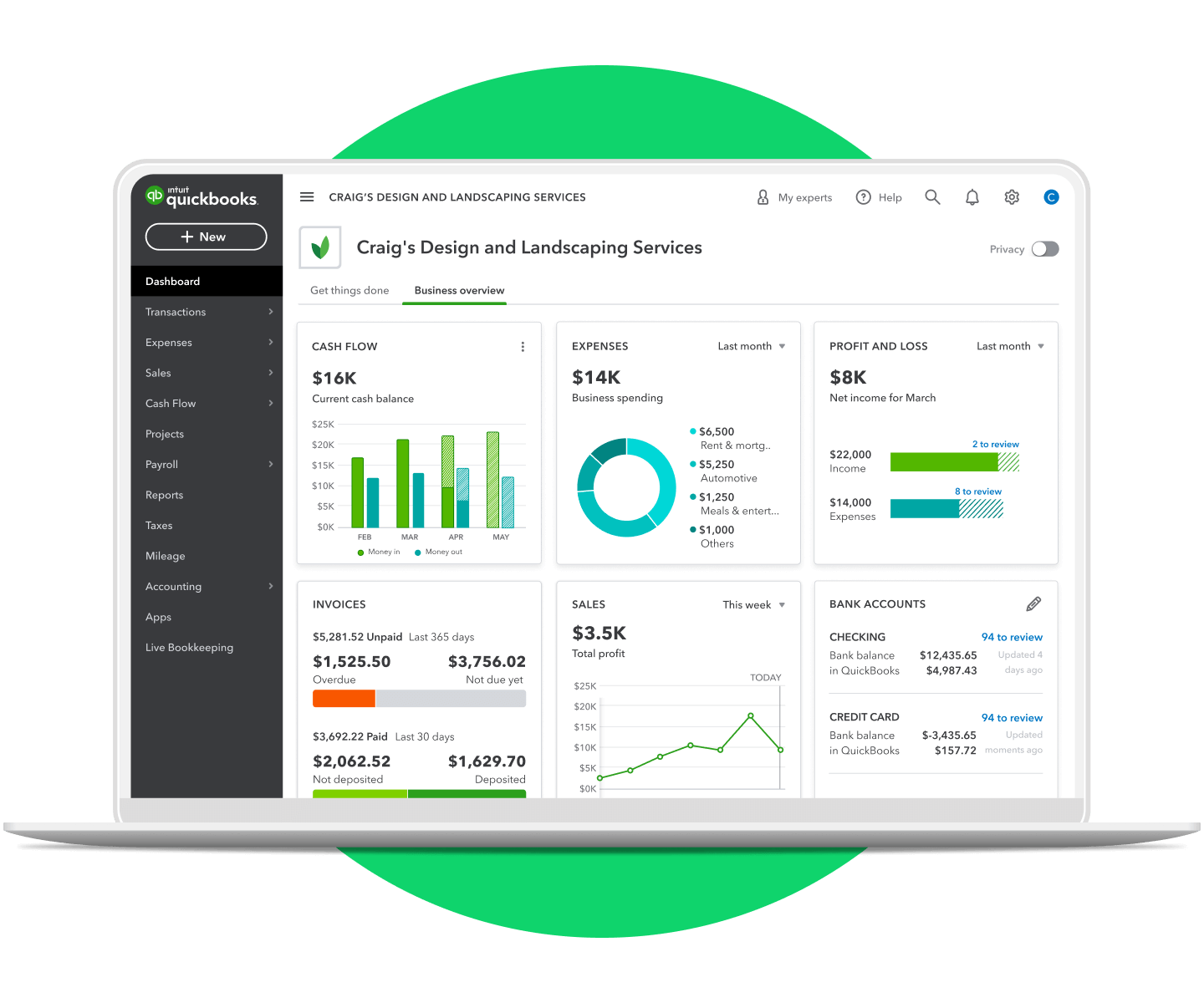
Perhaps one of the most powerful technological aspects of QuickBooks is its reporting engine. With a few clicks, users can generate dozens of customizable reports, including Profit & Loss (Income Statement), Balance Sheet, Cash Flow Statement, Accounts Receivable Aging, and Sales by Customer. These reports transform raw financial data into actionable insights, helping business owners understand profitability, liquidity, and overall financial health. The ability to customize reports, drill down into specific transactions, and export data in various formats (e.g., Excel, PDF) makes QuickBooks an invaluable analytical tool. This robust reporting functionality is underpinned by sophisticated database queries and data visualization capabilities.
Inventory Management and Project Tracking
Beyond core accounting, QuickBooks extends its functionality to operational aspects of a business. Its inventory management features allow tracking of products, calculating costs of goods sold, and managing stock levels, complete with alerts for reordering. For service-based businesses or those managing complex deliverables, project tracking capabilities enable users to monitor project profitability by allocating expenses, income, and employee time to specific projects. These features enhance operational efficiency and provide granular financial insights at the project or product level.
QuickBooks Product Lineup: Tailoring Solutions for Every Business
Intuit has strategically developed different versions of QuickBooks to cater to the diverse technological and operational needs of various business segments. Understanding these distinctions is key to selecting the right QB solution.
QuickBooks Online: Cloud-Powered Flexibility

QuickBooks Online (QBO) is the flagship product and the most popular version, embodying the modern shift towards cloud computing. It’s a web-based application accessible from any device with an internet connection. QBO offers unparalleled flexibility, collaboration features (multiple users can access simultaneously), automatic data backups, and continuous updates without manual installation. Its architecture is designed for scalability, supporting various subscription tiers (Simple Start, Essentials, Plus, Advanced) that offer increasing levels of features, from basic income/expense tracking to comprehensive inventory management and advanced reporting. Its strength lies in its accessibility, real-time data synchronization, and extensive integration capabilities with hundreds of third-party apps.
QuickBooks Desktop: Robust On-Premise Control
While QBO dominates, QuickBooks Desktop (QBD) remains a strong contender, particularly for businesses that prefer an on-premise solution or require specific industry-specific functionalities. Available in versions like Pro, Premier, and Enterprise, QBD is installed directly on a computer or server. It often boasts more powerful reporting customization, batch invoicing, and certain niche industry features (e.g., job costing for contractors) that were historically more robust than their online counterparts. Although it lacks the inherent real-time collaboration of QBO, QBD offers a familiar interface for long-time users and can be hosted on a cloud server for remote access, bridging some of the gap with QBO.
QuickBooks Self-Employed: Simplicity for Freelancers
Targeted specifically at freelancers, independent contractors, and sole proprietors, QuickBooks Self-Employed (QBSE) is a streamlined version designed to simplify tax preparation. It focuses on separating business and personal expenses, tracking mileage, organizing receipts, and estimating quarterly taxes. Its simplified interface and feature set are perfect for those who don’t need full-fledged double-entry accounting but require efficient tools for managing their independent business finances. The technology behind it is geared towards simplicity and automation for specific tax-related needs.
QuickBooks Commerce: E-commerce Integration
Formerly TradeGecko, QuickBooks Commerce is an advanced solution for product-based businesses, particularly those engaged in e-commerce. It integrates inventory, order management, and multi-channel sales into a unified platform. This allows businesses to manage sales across various online stores (e.g., Shopify, Amazon), physical locations, and wholesale channels, all while synchronizing data with QuickBooks Online for accurate accounting. This complex integration technology helps businesses streamline their entire product lifecycle, from procurement to sales and fulfillment, ensuring that financial records accurately reflect inventory movements and sales performance.
Advantages and Benefits: Why Businesses Choose QuickBooks
The pervasive adoption of QuickBooks across diverse industries is a testament to its significant advantages and the tangible benefits it delivers through its technological capabilities.
User-Friendly Interface and Accessibility
One of QuickBooks’ most significant strengths, particularly for non-accountants, is its intuitive design. The user interface is crafted to be straightforward, making complex accounting tasks accessible. This ease of use, combined with the 24/7 accessibility of QuickBooks Online from any device, empowers business owners and their teams to manage finances without needing deep accounting expertise. This reduces the learning curve and allows for quicker adoption, maximizing the return on investment in the software.
Automation and Time Savings
Automation is a cornerstone of QuickBooks’ value proposition. From automatic transaction downloads and categorization to scheduled invoices and recurring expenses, the software significantly reduces manual data entry and repetitive tasks. This automation not only saves countless hours that can be redirected to core business activities but also minimizes the potential for human error, leading to more accurate financial records.
Enhanced Financial Accuracy and Compliance
By systematizing financial data entry and calculations, QuickBooks dramatically improves the accuracy of financial records. Its built-in checks and balances, coupled with standardized accounting practices, help businesses maintain compliant books. For tax purposes, the ability to easily generate accurate reports and categorize expenses correctly is invaluable, reducing the stress and complexity associated with tax season and audit preparedness.
Scalability and Ecosystem Integration
QuickBooks is designed to grow with a business. Its various product tiers ensure that as a company expands, its accounting software can adapt to new demands without requiring a complete overhaul. Furthermore, QuickBooks boasts a vast ecosystem of third-party integrations, from CRM systems and e-commerce platforms to payment processors and industry-specific tools. This extensive API compatibility allows businesses to create a seamless operational flow, connecting their financial data with other critical business functions, thereby enhancing overall efficiency and data synergy.
Empowering Informed Decision-Making
The real-time insights provided by QuickBooks are arguably its most powerful benefit. With up-to-date financial reports readily available, business owners can quickly assess profitability, cash flow, and key performance indicators. This immediate access to accurate data empowers them to make informed strategic decisions, identify trends, spot potential issues early, and capitalize on opportunities, ultimately driving business growth and stability.
Navigating the QuickBooks Ecosystem: Tips for Optimal Utilization
Maximizing the benefits of QuickBooks requires more than just knowing “what is QB” and its features; it involves strategic implementation and ongoing engagement with its ecosystem.
Best Practices for Setup and Data Migration
A successful QuickBooks experience begins with proper setup. This involves accurately entering opening balances, customizing charts of accounts, and correctly configuring tax settings. For businesses migrating from other systems, meticulous data migration is crucial to ensure continuity and accuracy. Utilizing Intuit’s onboarding tools or consulting with a QuickBooks ProAdvisor can help ensure a smooth transition and correct initial configuration, laying a solid foundation for financial management.
Leveraging Integrations and Apps
The true power of QuickBooks Online, in particular, lies in its vast app marketplace. Exploring and integrating relevant third-party applications can significantly extend QuickBooks’ functionality, tailoring it to specific industry needs or automating additional workflows (e.g., time tracking, CRM, expense management). Businesses should research and select apps that genuinely complement their operations and further streamline their processes, using the open API structure to their advantage.
Continuous Learning and Support Resources
Intuit provides extensive support resources, including detailed help articles, online communities, webinars, and live support. Regularly engaging with these resources and staying updated on new features and best practices is vital for optimizing QuickBooks usage. Furthermore, investing in ongoing training for team members ensures that the software is used to its full potential, and that all users are proficient in its capabilities.
Security Considerations for Financial Data
Given that QuickBooks handles sensitive financial data, understanding and implementing robust security practices is paramount. This includes using strong, unique passwords, enabling multi-factor authentication (MFA), regularly backing up data (especially for Desktop versions), and being vigilant against phishing attempts. Intuit employs enterprise-grade security measures for QuickBooks Online, but user diligence remains a critical layer of protection against cyber threats.
In conclusion, “what is QB” transcends a simple definition of accounting software. It represents a sophisticated technological solution that has revolutionized financial management for millions of businesses worldwide. By offering an intuitive interface, robust features for tracking, invoicing, payroll, and reporting, and a versatile product lineup, QuickBooks empowers businesses to achieve greater accuracy, efficiency, and insight into their financial health. As technology continues to evolve, QuickBooks remains at the forefront, continually adapting to meet the ever-changing demands of the modern business landscape.
aViewFromTheCave is a participant in the Amazon Services LLC Associates Program, an affiliate advertising program designed to provide a means for sites to earn advertising fees by advertising and linking to Amazon.com. Amazon, the Amazon logo, AmazonSupply, and the AmazonSupply logo are trademarks of Amazon.com, Inc. or its affiliates. As an Amazon Associate we earn affiliate commissions from qualifying purchases.