
In the rapidly evolving landscape of digital technology, the boundary between a traditional website and a mobile application is becoming increasingly blurred. For years, developers and organizations faced a binary choice: build a high-reach website that works in a browser or develop a high-performance native application specifically for iOS or Android. However, a transformative technology has emerged to bridge this gap: the Progressive Web App (PWA).
A Progressive Web App is a type of application software delivered through the web, built using common web technologies including HTML, CSS, and JavaScript. It is intended to work on any platform that uses a standards-compliant browser, including both desktop and mobile devices. Unlike traditional apps, PWAs do not require separate bundling or distribution through digital stores like the Apple App Store or Google Play Store. Instead, they provide an app-like experience directly within the browser, leveraging modern web APIs to offer features once reserved exclusively for native software.

Understanding the Technical Architecture of Progressive Web Apps
To understand what makes a PWA “progressive,” one must look at the underlying software architecture. A PWA is not a single piece of software but a collection of technologies working in tandem to provide a seamless user experience.
Service Workers: The Heart of the PWA
The most critical technical component of a PWA is the Service Worker. A Service Worker is a script that your browser runs in the background, separate from a web page, opening the door to features that don’t need a web page or user interaction. Technically, it is a client-side proxy written in JavaScript that sits between the web application, the browser, and the network.
Service workers allow developers to intercept network requests and cache resources. This capability is what enables the “Progressive” nature of the app—if the network is down, the service worker can serve a cached version of the site, allowing the application to function offline. They also handle background tasks such as push notifications and background data synchronization.
Web App Manifests: Defining the User Experience
While the Service Worker handles the logic, the Web App Manifest handles the “identity” of the application. This is a simple JSON file that tells the browser about your web application and how it should behave when “installed” on the user’s mobile device or desktop. It includes metadata such as the app’s name, icons, start URL, and display configuration. By defining a “standalone” or “fullscreen” display mode in the manifest, developers can remove the browser’s address bar and navigation buttons, making the web app look and feel like a native software installation.
HTTPS: Security as a Standard
Because Service Workers have the power to intercept network requests and modify responses, security is paramount. PWAs require a secure connection (HTTPS) to function. This ensures that the application is served over a secure channel, protecting user data and preventing man-in-the-middle attacks. From a technical standpoint, this requirement has pushed the web toward a more secure standard across the board.
Key Features and Technological Advantages
The rise of PWAs is driven by their ability to solve long-standing issues in web performance and mobile accessibility. By utilizing modern web APIs, PWAs offer a suite of features that significantly enhance the technical capabilities of a standard website.
Offline Capabilities and Connectivity Independence
One of the greatest technical hurdles for web applications has always been the dependency on a live internet connection. PWAs solve this through sophisticated caching strategies. By using the Cache Storage API, developers can pre-cache entire sections of an application. This means that once a user has visited the PWA once, they can return to it even in “airplane mode” or in areas with poor connectivity. The software can still load its UI and even process data locally, syncing it back to the server once a connection is re-established.
Speed and Performance Optimization
Performance is a core pillar of the PWA philosophy. PWAs are built to be fast, adhering to the RAIL (Response, Animation, Idle, Load) model of performance. Because much of the application’s core logic and assets are stored locally via the Service Worker, the “Time to Interactive” (TTI) is significantly lower than that of a traditional website. This instant-loading capability is crucial in a tech environment where a one-second delay in page load can result in a massive drop in user engagement.
Cross-Platform Compatibility and “Write Once” Philosophy
From a software engineering perspective, PWAs are incredibly efficient. Instead of maintaining three separate codebases—one for the web, one for iOS (Swift/Objective-C), and one for Android (Java/Kotlin)—developers can maintain a single JavaScript-based codebase. PWAs are inherently responsive, meaning the UI adapts automatically to different screen sizes and orientations. This “write once, run anywhere” approach reduces technical debt and streamlines the deployment cycle.

PWA vs. Native Apps vs. Traditional Websites
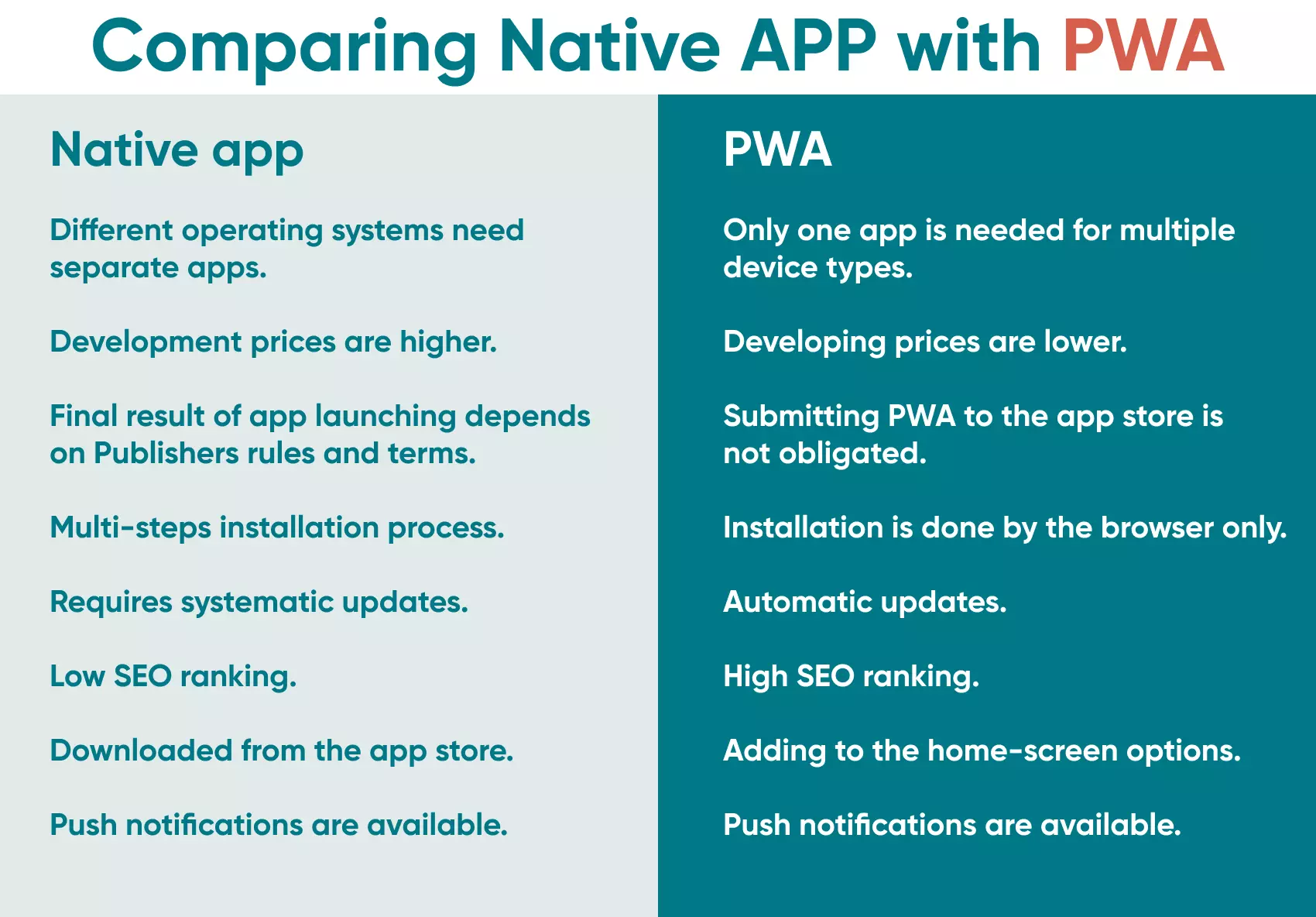
To fully grasp the position of PWAs in the tech ecosystem, it is helpful to compare them against the two extremes: native applications and traditional responsive websites.
The Hybrid Nature of PWAs
PWAs occupy a unique middle ground. Like a website, they are discoverable via search engines, can be shared via a URL, and do not require a cumbersome download from an app store. Like a native app, they can reside on the user’s home screen, send push notifications, and access hardware features. This hybrid nature allows PWAs to leverage the high reach of the web with the high engagement of native software.
Installation and Home Screen Access
Native apps require the user to navigate to an app store, search, authenticate, and download several hundred megabytes of data. PWAs eliminate this friction. When a user visits a PWA-enabled site, the browser can prompt them to “Add to Home Screen.” This process is instantaneous and requires only a few kilobytes of data to download the manifest and register the service worker. Once added, the PWA icon appears alongside native apps, providing a permanent entry point into the software.
Push Notifications and User Engagement
Engagement has long been the primary reason developers chose native apps over web apps. However, the Web Push API and Notifications API have changed the game. PWAs can now send system-level notifications to users even when the browser is closed. This allows for real-time updates, alerts, and re-engagement strategies that were previously impossible for web-based tools.
The Impact of PWA on Modern Software Development
The adoption of PWAs is fundamentally changing how technology teams approach product development and distribution. It is not just about the end-user experience; it is about the lifecycle of software itself.
Reducing Development Fragmentation
In traditional development cycles, a feature update must be pushed to the web, then submitted to the App Store and Google Play, often waiting days for approval. With PWAs, the deployment is instantaneous. Once the new code is pushed to the web server, the Service Worker detects the update and refreshes the application for the user. This enables a continuous integration/continuous deployment (CI/CD) workflow that is much more agile than traditional app development.
Improving App Store Independence
The “app store tax” and the strict, sometimes arbitrary, guidelines of digital marketplaces have long been a pain point for developers. PWAs offer a way to bypass these gatekeepers. Since they are accessed via a browser, they are not subject to the 30% commission on digital goods or the lengthy review processes. This democratization of software distribution allows for more innovation and faster iteration in the tech sector.
SEO Benefits and Discoverability
Unlike native apps, which are hidden behind the “walled gardens” of app stores, PWAs are fully indexable by search engines. This is a massive technical advantage. A PWA can be optimized using standard SEO techniques, allowing it to rank in Google search results. When a user clicks a link, they are instantly inside the application, rather than being redirected to a store page to download a separate file.
The Future Landscape: Where is PWA Heading?
As web browsers continue to evolve, the gap between PWAs and native apps is narrowing even further. New web APIs are constantly being introduced to provide web apps with more access to system hardware.
Deep Integration and System Access
Through projects like “Project Fugu” (the Web Capabilities project), browsers are gaining the ability to interact with file systems, serial ports, and contact lists. We are reaching a point where a PWA can perform tasks like professional photo editing, file management, and hardware configuration—tasks that were once considered the exclusive domain of desktop software.
Desktop PWA Adoption
While much of the focus has been on mobile, PWAs are making significant inroads on desktop operating systems like Windows, macOS, and ChromeOS. Major software suites, including Microsoft Office and Spotify, have adopted PWA versions of their tools. On desktop, PWAs provide a lightweight alternative to resource-heavy native installations, allowing for better system performance and easier updates.
Conclusion: The New Standard for Web Software
Progressive Web Apps represent the natural evolution of the internet. By combining the accessibility of the web with the power of native software, they offer a compelling solution for the modern technological landscape. For developers, they offer a streamlined, cross-platform workflow; for users, they offer a fast, reliable, and integrated experience. As browser technology continues to advance, the PWA is set to become the standard for how we build, deploy, and interact with software in the digital age.
aViewFromTheCave is a participant in the Amazon Services LLC Associates Program, an affiliate advertising program designed to provide a means for sites to earn advertising fees by advertising and linking to Amazon.com. Amazon, the Amazon logo, AmazonSupply, and the AmazonSupply logo are trademarks of Amazon.com, Inc. or its affiliates. As an Amazon Associate we earn affiliate commissions from qualifying purchases.