
In the contemporary digital landscape, our smartphones serve as the central hub for our personal and professional identities. From banking applications to encrypted communication tools, the security of these devices is paramount. While most users are familiar with biometric locks and screen PINs, there is a secondary, more fundamental layer of security embedded within the Subscriber Identity Module (SIM) card itself: the PUK code.
Short for “Personal Unblocking Key,” the PUK code is a critical fail-safe designed to protect your cellular data from unauthorized access. However, for many users, the PUK remains an obscure term until the moment their device displays a “SIM Blocked” notification. Understanding what a PUK code is, how it functions within the architecture of mobile security, and how to retrieve it is essential for anyone navigating the modern tech ecosystem.

1. The Mechanics of SIM Security: PINs vs. PUKs
To understand the PUK code, one must first understand the security hierarchy of the SIM card. The SIM card is not just a piece of plastic; it is a microchip that stores your International Mobile Subscriber Identity (IMSI) and the related keys used to identify and authenticate subscribers on mobile telephony devices.
How SIM Cards Protect Your Data
The primary line of defense for a SIM card is the PIN (Personal Identification Number). When enabled, the SIM PIN requires the user to authenticate themselves every time the device is powered on or the SIM is moved to a new handset. This prevents a thief from simply taking your SIM card and using it in another phone to make expensive international calls or, more dangerously, receive two-factor authentication (2FA) codes for your bank accounts.
The Threshold: Why the PUK Exists
The PUK code exists as a high-level security override. Most SIM cards allow a user only three attempts to enter the correct PIN. If these three attempts fail, the SIM card enters a “locked” state to prevent “brute-force” attacks—a method where a hacker or unauthorized user tries every possible number combination to gain access. Once the SIM is locked, the standard PIN will no longer work, regardless of whether you remember it. At this juncture, the PUK code is the only key that can bypass the lockout and reset the SIM’s security parameters.
2. How to Locate Your PUK Code Safely
Because the PUK code is a unique 8-digit key hardcoded into the SIM card at the time of manufacture, it cannot be changed by the user. This permanence makes it highly secure but also difficult to recover if you haven’t kept the original documentation. If you find yourself locked out, there are several tech-driven avenues to retrieve this code.
Checking the Original Packaging
The most immediate place to find a PUK code is on the plastic card that originally held your SIM chip. When you first purchase a SIM card or a new mobile contract, the PUK is typically printed on the back, often under a scratch-off silver coating. Tech-savvy users often recommend digitizing this information by taking a secure photo or storing the code in an encrypted password manager.
Accessing Carrier Portals and Apps
In the era of digital self-service, most major telecommunications providers provide PUK recovery through their online portals or mobile applications. By logging into your account via another device (using a laptop or a tablet), you can navigate to the “Device” or “Security” settings. Carriers link your SIM’s unique serial number (the ICCID) to your PUK in their secure databases, allowing for instant retrieval without needing to speak to a representative.
Customer Support and Identity Verification
If digital portals are inaccessible, the final recourse is contacting the carrier’s technical support. This process involves a rigorous identity verification check. Because the PUK provides access to your cellular identity, technicians will often ask for personal details, your latest bill amount, or a government-issued ID number to ensure that the person requesting the key is the legitimate owner of the account.
3. Step-by-Step Guide to Unblocking Your SIM Card
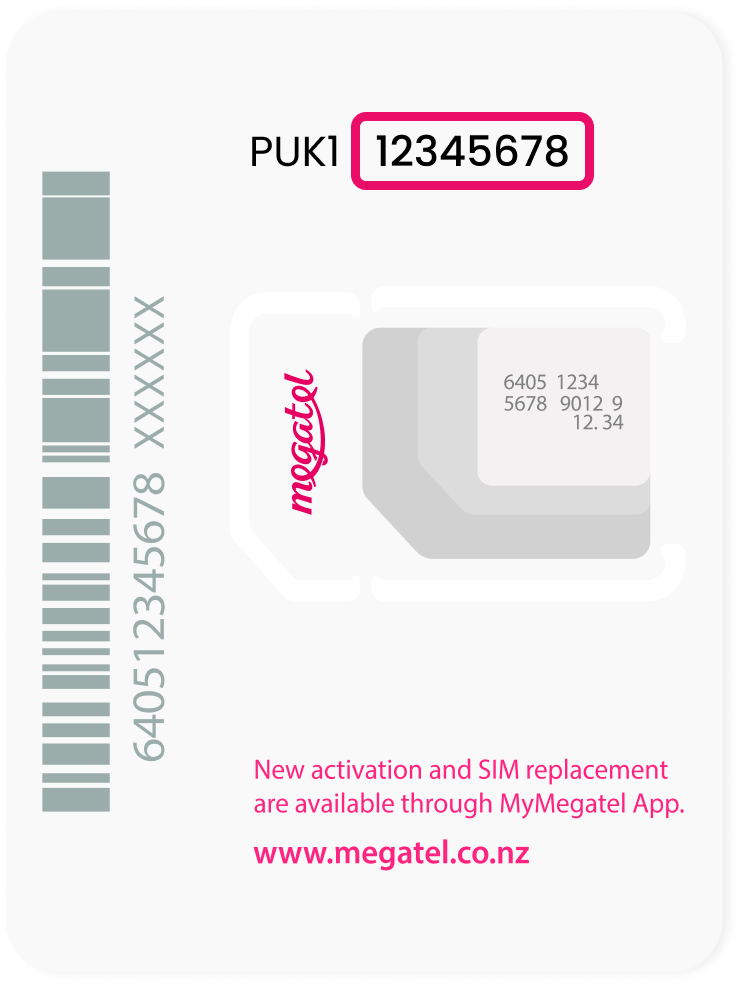
Once you have successfully retrieved your 8-digit PUK code, the process of unblocking the SIM is relatively straightforward, but it requires precision. Entering the PUK incorrectly can have permanent consequences for your hardware.
Entering the Code Correctly
When your phone is in the “SIM Locked” or “Enter PUK” state, the dialer or a dedicated security screen will appear. Carefully type the 8-digit PUK code. Unlike the PIN, which is usually 4 digits, the PUK is longer and more complex. It is vital to double-check the digits before hitting “Enter.”
Creating a New PIN
After the PUK is successfully accepted, the device will not return to its normal state immediately. Instead, it will prompt you to “Enter New PIN.” This is your opportunity to set a new 4-to-8-digit code that you will remember. You will be asked to enter this new PIN a second time to confirm. Once confirmed, the SIM card is unlocked, and your cellular service will be restored.
Troubleshooting Common Input Errors
Sometimes, users may find that their PUK code is rejected. This often happens if the SIM card has been replaced recently and the user is looking at the PUK for an old SIM card. Every PUK is unique to the specific ICCID of the chip. If the code is rejected, do not guess. Stop and verify that the SIM serial number matches the records provided by your carrier.
4. The Risks of PUK Mismanagement and “Bricking”
The PUK code is the final fail-safe, which means there is no “backup for the backup.” This is where the security of the hardware becomes absolute, and the risks of mismanagement become high.
What Happens After 10 Failed Attempts?
While you get three attempts for a PIN, most SIM cards allow for ten attempts to enter the PUK code. If the PUK is entered incorrectly ten times, the SIM card undergoes a process known in the tech world as “bricking.” This is a security feature where the internal circuitry of the SIM card is intentionally and permanently disabled. Once a SIM is “PUK blocked” (or “Perma-blocked”), it can never be used again. No carrier can reset it, and no software can bypass it.
The Impact on Your Digital Identity
If a SIM is bricked, you lose any data stored directly on the chip (though modern smartphones store most data in the cloud or internal storage, some older contacts or SMS messages may still reside on the SIM). More importantly, you lose immediate access to your phone number. You will have to visit a carrier store to purchase a replacement SIM card and have your number “ported” or assigned to the new chip. In a world where we rely on our phone numbers for 2FA and identity verification, being without a functional SIM for even a few hours can disrupt your ability to access work emails or financial accounts.
5. Modern Alternatives and the Future of SIM Security
As we move further into the decade, the traditional physical SIM card—and by extension, the traditional PUK code—is evolving. The technology sector is shifting toward more integrated and software-defined solutions.
The Shift Toward eSIM Technology
The rise of eSIM (Embedded SIM) technology is changing how we handle PUK codes. An eSIM is a programmable chip embedded directly into the device’s motherboard. While eSIMs still utilize PINs and PUK-like security protocols, the recovery process is much more streamlined. Instead of looking for a plastic card, users can often re-download their “SIM profile” via a QR code or carrier app, which utilizes the device’s own secure enclave for authentication.
Biometric Security vs. Traditional PINs
We are also seeing a trend where device-level security is eclipsing SIM-level security. With the advent of sophisticated Face ID, fingerprint scanners, and Titan M2 security chips, the need for a SIM PIN is decreasing for the average user. However, for those in high-security professions or those traveling internationally, the hardware-level protection of a SIM PIN and PUK remains the gold standard for preventing “SIM swapping” attacks.

Conclusion: Digital Hygiene and Hardware Awareness
The PUK code is a reminder that despite the “invisible” nature of the cloud and wireless signals, our digital security is still rooted in physical hardware. Maintaining “digital hygiene”—which includes knowing where your PUK code is and understanding the lockout thresholds—is just as important as updating your software or using a strong password. By treating the PUK code with the same importance as a master recovery key for an encrypted drive, you ensure that your gateway to the digital world remains secure and accessible, even in the event of an accidental lockout.
aViewFromTheCave is a participant in the Amazon Services LLC Associates Program, an affiliate advertising program designed to provide a means for sites to earn advertising fees by advertising and linking to Amazon.com. Amazon, the Amazon logo, AmazonSupply, and the AmazonSupply logo are trademarks of Amazon.com, Inc. or its affiliates. As an Amazon Associate we earn affiliate commissions from qualifying purchases.