
In the modern digital landscape, the demand for high-quality visual content has transcended the boundaries of professional design studios. As smartphones become our primary tools for capturing life’s moments and professional milestones alike, the need for sophisticated yet accessible editing software has surged. Enter Adobe Photoshop Express. While its name carries the weight of the world’s most famous image-editing software, Photoshop Express is a distinct entity tailored for the mobile-first era. It is a powerful, versatile, and AI-driven application designed to bridge the gap between amateur snapshots and professional-grade photography.

In this deep dive, we explore the technical architecture, feature set, and strategic position of Photoshop Express within the broader technology ecosystem.
Understanding Photoshop Express: The Gateway to Adobe’s Creative Ecosystem
Photoshop Express is often misunderstood as merely a “light” version of the desktop behemoth. However, from a technical and functional standpoint, it is a purpose-built application designed for speed, efficiency, and high-performance mobile processing. Available on iOS, Android, and Windows, it serves as a sophisticated entry point into Adobe’s Creative Cloud ecosystem.
The Evolution of Mobile Image Processing
For decades, photo editing required significant computational power, often tethered to high-end workstations. The shift toward mobile technology necessitated a reimagining of how pixels are manipulated on touchscreens. Photoshop Express represents Adobe’s response to this shift. By leveraging mobile GPUs and hardware acceleration, the app provides real-time feedback for complex adjustments like noise reduction and perspective correction—tasks that would have lagged on mobile devices just a few years ago.
How Photoshop Express Differs from the Desktop Powerhouse
To understand what Photoshop Express is, one must understand what it is not. The standard desktop Photoshop is a layer-based, raster graphics editor used for complex manipulation, 3D rendering, and detailed digital painting. Photoshop Express, conversely, focuses on “non-destructive” global and local adjustments. It prioritizes the “workflow of the moment,” allowing users to import, edit, and export within minutes. While it lacks the intricate masking and plugin support of the desktop version, it compensates with automation and AI-driven tools that simplify professional workflows.
Core Features and Technical Capabilities
The true value of Photoshop Express lies in its feature density. It packs a surprising amount of “Photoshop magic” into a streamlined interface, making it a favorite for tech enthusiasts who value both power and portability.
One-Touch Fixes and Intelligent Filters
At the heart of Photoshop Express is a library of “Looks”—sophisticated filters that go beyond basic color overlays. These are algorithmic presets that analyze the histogram of an image to apply corrections to light, skin tone, and texture. Unlike social media filters, which often degrade image quality, these filters are designed to maintain high bit-depth integrity.
Advanced Retouching and Precise Control
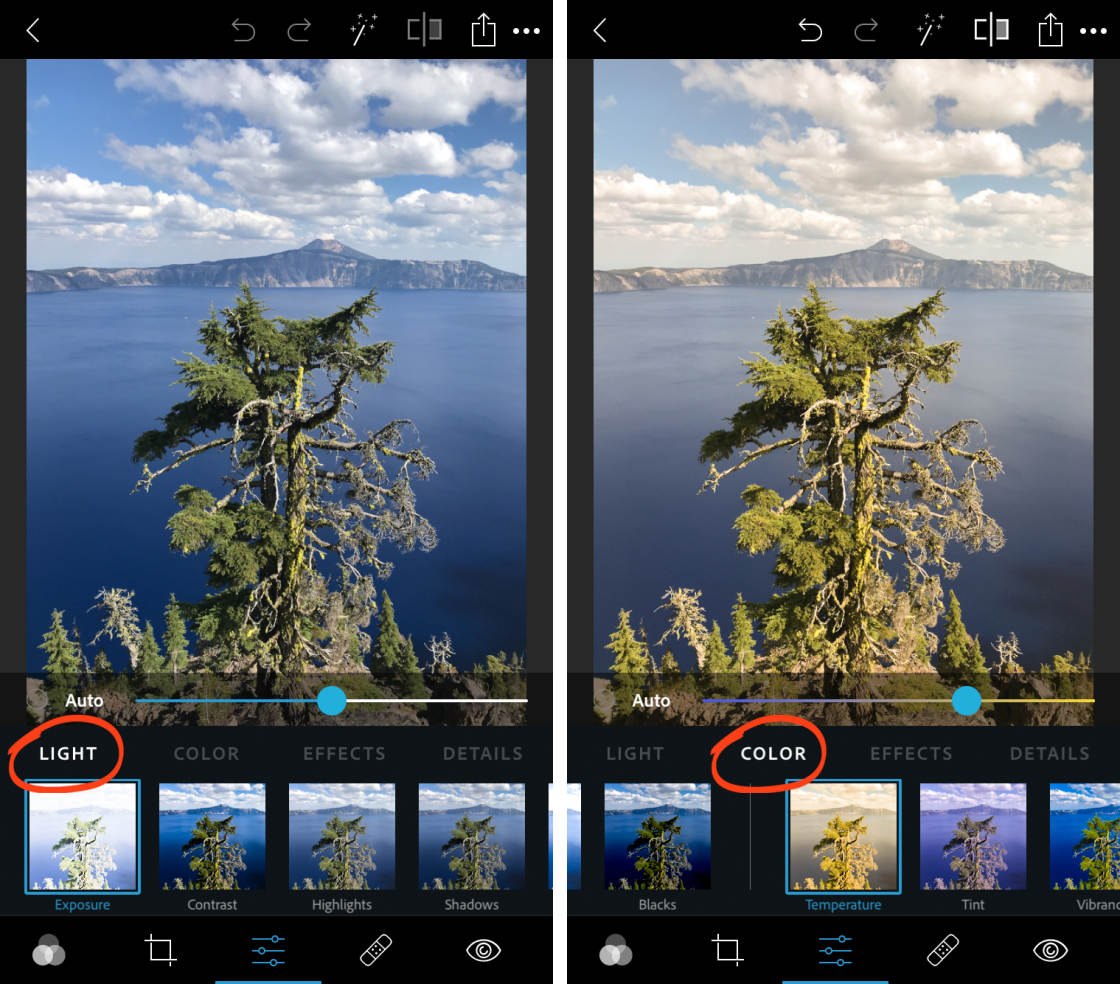
Beyond presets, the app offers granular control over technical parameters. Users can adjust exposure, contrast, highlights, shadows, and color temperature with high precision. One of the standout technical features is the Spot Healing tool. Powered by content-aware algorithms, this feature allows users to remove unwanted objects or blemishes from a photo. The app analyzes the surrounding pixels and intelligently fills the space, a feat of engineering that mirrors the “Content-Aware Fill” found in its desktop sibling.
The Rise of AI: Generative Fill and Smart Selections
The most significant recent update to the Photoshop Express architecture is the integration of Adobe Firefly, Adobe’s family of generative AI models. This elevates the app from a simple editor to an AI-assisted creative suite.
- Generative Fill: Users can type a prompt to add or replace elements in an image seamlessly.
- Generative Expand: This allows users to extend the boundaries of a photo, with the AI “dreaming up” the missing background to match the existing lighting and perspective.
- Smart Selections: The app uses machine learning to automatically detect subjects, backgrounds, and skies, allowing for “one-tap” cutouts or isolated adjustments.
The User Experience: Accessibility and Cross-Platform Integration
For a piece of software to be successful in the tech space, its User Interface (UI) must be as impressive as its backend. Photoshop Express succeeds by offering an intuitive UX that masks its underlying complexity.
Navigating the User Interface (UI)
The UI is organized into logical modules: Edit, Mix, Collage, and Retouch. This modular approach prevents the screen from becoming cluttered—a common pitfall for mobile creative tools. The “Mix” feature is particularly notable, as it introduces basic layering capabilities, allowing users to combine multiple images, adjust blend modes, and create composite graphics on the go.
Seamless Connectivity via Creative Cloud
Photoshop Express is not an island. It is deeply integrated with Adobe Creative Cloud. For users who start a project on their phone during a commute, the integration allows for seamless handoffs. Images edited in Express can be synced to the cloud and opened in Photoshop or Lightroom on a desktop for further refinement. This interoperability is a hallmark of Adobe’s “Liquid Workspace” philosophy, where the device matters less than the creative data itself.
Performance Analysis and System Requirements
From a technical perspective, Photoshop Express is optimized to handle high-resolution files, including RAW formats from professional cameras. This is a critical distinction, as many mobile editors compress images upon import, leading to a loss of data.
Compatibility Across iOS, Android, and Windows
The app is engineered to scale its performance based on the hardware it inhabits. On high-end iPads with M-series chips, Photoshop Express performs with desktop-like fluidity, handling 50-megapixel files without stuttering. On entry-level Android devices, it utilizes lightweight processing to ensure accessibility. This cross-platform stability is achieved through a unified codebase that still respects the specific design languages of each operating system (Human Interface Guidelines for iOS and Material Design for Android).
Free vs. Premium: The Value Proposition
Adobe operates on a “freemium” model for Photoshop Express. The base app is free to download and offers a robust suite of tools. However, the Premium subscription unlocks the true potential of the software. This includes:
- Advanced healing tools.
- The full library of AI-powered features.
- Selective editing (adjusting only the sky or the subject).
- Raw image processing.
- Increased cloud storage.
For tech-savvy users, the subscription often represents a cost-effective way to access professional-grade AI tools without the higher cost of the full Creative Cloud suite.
The Future of Mobile Editing: AI and Automation
As we look toward the future of software, Photoshop Express is positioned at the forefront of the AI revolution. The trajectory of the app suggests a move toward “Intent-Based Editing.” Instead of manually sliding bars for brightness or saturation, users will increasingly interact with AI agents to achieve a specific look.
Automation and Batch Processing
We are already seeing the beginnings of this with “Smart Looks” and auto-corrections. In future iterations, we can expect more robust batch processing features, allowing users to apply complex AI edits to hundreds of photos simultaneously—a feature currently reserved for high-end desktop applications like Lightroom Classic.
The Impact of Neural Processing Units (NPUs)
As mobile hardware manufacturers (like Apple, Qualcomm, and Samsung) continue to emphasize Neural Processing Units (NPUs) in their chipsets, Photoshop Express will likely offload more AI tasks to “on-device” processing. This will result in faster generative edits, better privacy (as data won’t need to be sent to the cloud), and lower battery consumption.

Conclusion
Photoshop Express is far more than a “lite” version of a famous program. It is a sophisticated, AI-enhanced tool designed for the modern era of photography and digital creation. It balances the high-level technical requirements of professional editors with the speed and accessibility required by the general public.
Whether you are a tech enthusiast looking to push the limits of your smartphone’s camera, or a professional needing a reliable mobile companion for the Adobe ecosystem, Photoshop Express stands as a testament to how far mobile software has come. It encapsulates the current state of technology: it is smart, connected, and incredibly powerful, all while fitting in the palm of your hand. Through its continuous integration of Adobe Firefly and its commitment to high-resolution performance, Photoshop Express remains the gold standard for mobile image manipulation.
aViewFromTheCave is a participant in the Amazon Services LLC Associates Program, an affiliate advertising program designed to provide a means for sites to earn advertising fees by advertising and linking to Amazon.com. Amazon, the Amazon logo, AmazonSupply, and the AmazonSupply logo are trademarks of Amazon.com, Inc. or its affiliates. As an Amazon Associate we earn affiliate commissions from qualifying purchases.