
In the rapidly evolving landscape of digital technology, the longevity of information is a recurring challenge. We have all experienced the frustration of trying to open a file from a decade ago, only to find that the software is obsolete, the fonts are missing, or the formatting has completely disintegrated. As businesses and governments transition to entirely paperless environments, the need for a stable, “future-proof” document format has become a technical necessity. This is where PDF/A comes into play.
PDF/A is an ISO-standardized version of the Portable Document Format (PDF) specifically designed for the long-term archiving of electronic documents. Unlike a standard PDF, which is optimized for sharing and interactive features, PDF/A ensures that a document will look and behave exactly the same way twenty, fifty, or even a hundred years from now, regardless of the software or hardware used to open it.
1. What Exactly is a PDF/A File?
To understand PDF/A, one must first understand the limitations of a standard PDF. A regular PDF is a dynamic container. It might link to external fonts installed on your computer, pull data from an external website, or utilize proprietary encryption that may not be supported by future software. While this makes the file lightweight and versatile, it makes it a poor candidate for permanent storage.
The Core Principle: Self-Containment
The fundamental philosophy behind PDF/A is that the file must be completely self-contained. This means that every element required to render the document—including text, images, vector graphics, fonts, and color information—is embedded directly within the file itself. A PDF/A file is prohibited from calling upon external resources. If a specific font is used in the document, that font must be embedded so that a computer in the year 2075 can display the characters correctly, even if that font has long since vanished from commercial availability.
Device and Software Independence
Technical specifications for PDF/A (ISO 19005) mandate that the visual appearance of the document must be independent of the operating system or the application used. In the tech world, this is often referred to as “visual integrity.” Whether you are using a Windows-based PC, a Linux server, or a future operating system that hasn’t been invented yet, the PDF/A standard guarantees that the layout, colors, and structure remain static.
What is Forbidden in PDF/A?
To ensure long-term stability, certain features common in standard PDFs are strictly forbidden in PDF/A. These include:
- JavaScript and Executable Scripts: These pose security risks and rely on specific software engines that may become obsolete.
- Encryption: Password protection and encryption are prohibited because the “keys” to unlock them may be lost over time, rendering the archive useless.
- Audio and Video Content: Multimedia formats change too quickly to be considered archival-grade.
- External Hyperlinks: While internal links are allowed, links to external websites are discouraged or restricted because web addresses are notoriously impermanent.
2. The Evolution of PDF/A Standards (ISO 19005)
The PDF/A standard is not a single, static entity. It has evolved alongside software capabilities to accommodate more complex document types while maintaining its archival integrity. Each version is designed to be backwards compatible, meaning a viewer capable of reading PDF/A-4 can easily read PDF/A-1.
PDF/A-1: The Foundation (2005)
Based on PDF version 1.4, PDF/A-1 was the first iteration of the standard. It focused on the basics: embedding fonts and color management. It introduced two levels of conformance:
- Level B (Basic): Ensures that the visual appearance is preserved.
- Level A (Accessible): Ensures visual preservation plus a logical structure (tags) to make the document readable by assistive technologies like screen readers.
PDF/A-2: Modern Flexibility (2011)
As digital documents became more complex, the tech community required more features. PDF/A-2, based on PDF 1.7, introduced support for JPEG 2000 compression (useful for high-resolution images), transparency effects (common in modern design software), and layers. Importantly, it also allowed for “PDF/A-in-PDF/A,” enabling users to embed one archival-grade file inside another.
PDF/A-3: Handling Embedded Files (2012)
PDF/A-3 was a significant, and somewhat controversial, leap. It allows for the embedding of any file format—such as Excel spreadsheets, CAD drawings, or XML data—inside the PDF/A container. While the PDF/A file itself remains archival, the embedded “source” file may not be. This version is widely used in electronic invoicing (like the ZUGFeRD standard in Europe), where a human-readable PDF contains a machine-readable XML file.
PDF/A-4: The Next Generation (2020)
The latest version, PDF/A-4, aligns with the PDF 2.0 specification. It simplifies the conformance levels and adds better support for “tagged” PDF content, which is essential for modern data extraction and accessibility. It also introduces a specific subtype (PDF/A-4f) that allows for non-PDF/A file attachments, similar to PDF/A-3 but modernized for current tech stacks.
3. Why Technology-Driven Organizations Need PDF/A
For any organization involved in legal, governmental, engineering, or medical sectors, the adoption of PDF/A is not just a preference—it is a critical technical requirement.
Future-Proofing Documentation
In the tech industry, “bit rot” or digital decay is a real threat. Storage media degrades, and file formats go extinct. PDF/A mitigates this by providing a standardized target for migration. By converting legacy documents to PDF/A, IT departments ensure that the organization’s “corporate memory” is preserved in a format that does not require specialized, legacy software to view.
Searchability and Metadata
PDF/A is not just a “picture” of a document; it is a text-based format. This makes it highly superior to image-based formats like TIFF. PDF/A files require extensive metadata (using XMP – Extensible Metadata Platform). This metadata allows for sophisticated indexing and searching across massive digital repositories, making it easy for AI tools or database queries to locate specific records based on author, date, or keywords.
Legal and Regulatory Compliance
Many international regulatory bodies now mandate PDF/A for electronic submissions. From the U.S. federal courts to European patent offices, PDF/A is the required format because it ensures that the “document of record” cannot be altered by missing external dependencies. It provides a “permanent” version of the truth that is essential for audits and legal discovery.
4. Technical Implementation: Creation and Validation
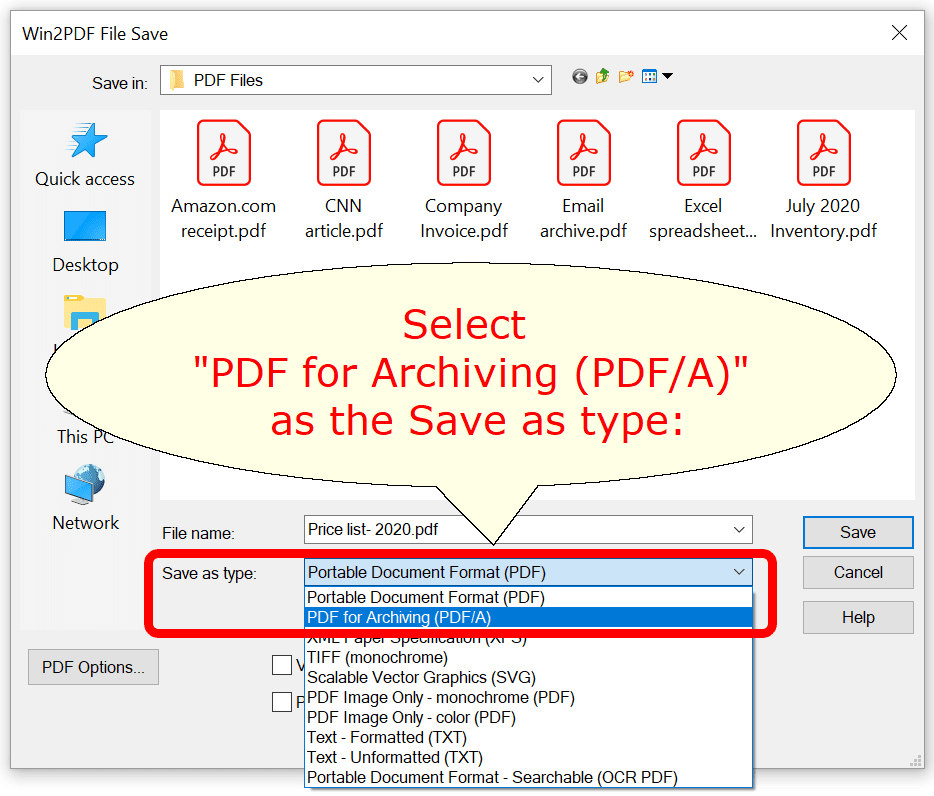
Integrating PDF/A into a technical workflow requires more than just “saving as.” It involves specific conversion and validation steps to ensure the file truly meets the ISO criteria.
Software Tools for Conversion
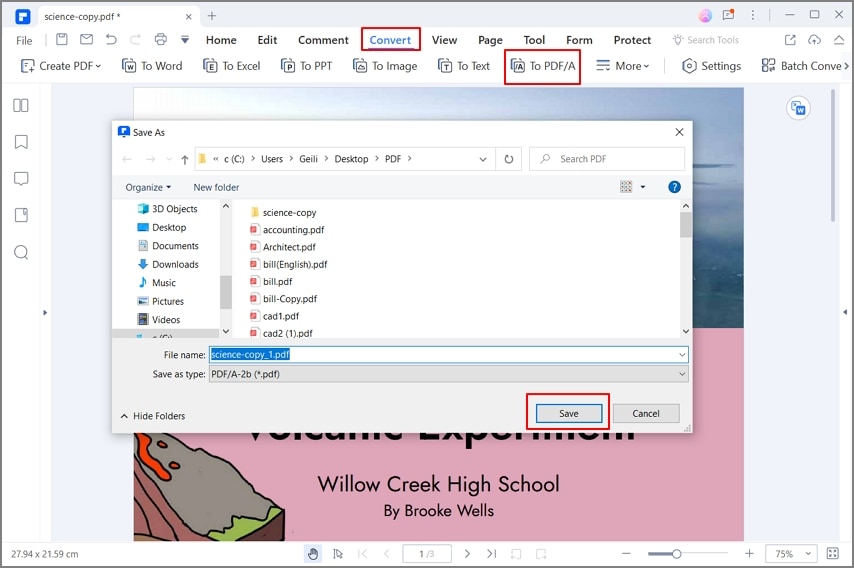
Most modern enterprise software suites, such as Adobe Acrobat Pro, Microsoft Word, and specialized PDF libraries (like iText or PDF Tron), offer PDF/A export options. When a file is converted, the software performs a “pre-flight” check. This process identifies any non-compliant elements—like a transparent image or a non-embedded font—and attempts to fix them or alerts the user that the file cannot reach compliance.
The Critical Role of Validation
Simply having a file with a “.pdf” extension and a PDF/A label isn’t enough. Technical validation is required to prove that the file adheres to every rule of the ISO standard. Validators (such as VeraPDF, an open-source industry standard) scan the file’s internal structure. They check for the presence of the PDF/A flag in the metadata and verify that no forbidden elements (like JavaScript) are present. For high-stakes archiving, an automated validation gate is a standard part of the document ingestion pipeline.
Best Practices for Digital Archiving
To maximize the utility of PDF/A, tech professionals should follow these best practices:
- Use OCR: If scanning paper documents, use Optical Character Recognition (OCR) to ensure the PDF/A contains a text layer for searchability.
- Choose the Right Level: Use PDF/A-2u (Unicode) or PDF/A-2a (Accessible) to ensure that the text is not just visually correct but also digitally retrievable and compliant with accessibility laws.
- Embed Metadata Early: Populate XMP metadata fields at the point of creation to ensure the file remains findable in long-term storage.
5. PDF/A in the Era of AI and Cloud Computing
As we move further into the age of Artificial Intelligence and cloud-native architectures, the role of PDF/A is evolving from a static “storage box” to a high-quality data source.
Machine-Readable Archives
AI and Machine Learning models are only as good as the data they ingest. Traditional PDFs can be difficult for AI to parse if the text encoding is non-standard. Because PDF/A (specifically conformance levels ‘a’ and ‘u’) requires standardized text mapping and logical structures, these files are much easier for AI “crawlers” to read. This allows organizations to train LLMs (Large Language Models) on their historical archives with much higher accuracy.
PDF/A and Cloud Scalability
Cloud storage providers and Document Management Systems (DMS) increasingly use PDF/A as the “normalized” format for all incoming documents. When a document is uploaded to the cloud, it is automatically converted to PDF/A. This ensures that the cloud platform remains format-agnostic. Regardless of whether the original file was a Word doc, a Google Doc, or a specialized CAD export, the archived version is uniform, secure, and ready for long-term cloud residency.
In conclusion, PDF/A is the backbone of digital preservation in a tech-centric world. By stripping away the volatile and ephemeral features of the standard PDF and mandating total self-containment, the PDF/A standard ensures that our digital footprints remain legible for generations to come. For any tech professional or organization looking to secure their data’s future, understanding and implementing PDF/A is an essential step in modern digital strategy.
aViewFromTheCave is a participant in the Amazon Services LLC Associates Program, an affiliate advertising program designed to provide a means for sites to earn advertising fees by advertising and linking to Amazon.com. Amazon, the Amazon logo, AmazonSupply, and the AmazonSupply logo are trademarks of Amazon.com, Inc. or its affiliates. As an Amazon Associate we earn affiliate commissions from qualifying purchases.