
Facebook Stories have become a ubiquitous feature, offering a fleeting glimpse into the lives of our friends, family, and even brands. They are designed for casual sharing, impromptu moments, and a sense of immediate connection. However, for many users, a recurring question arises when navigating their Story feed: “What does ‘Others’ mean on FB Story?” This seemingly simple query unlocks a deeper conversation about privacy settings, audience segmentation, and the nuanced ways we choose to share ourselves online. Understanding “Others” on FB Story is not just about deciphering a label; it’s about grasping the underlying mechanisms that control who sees what, and how we can leverage these settings to manage our digital presence effectively.
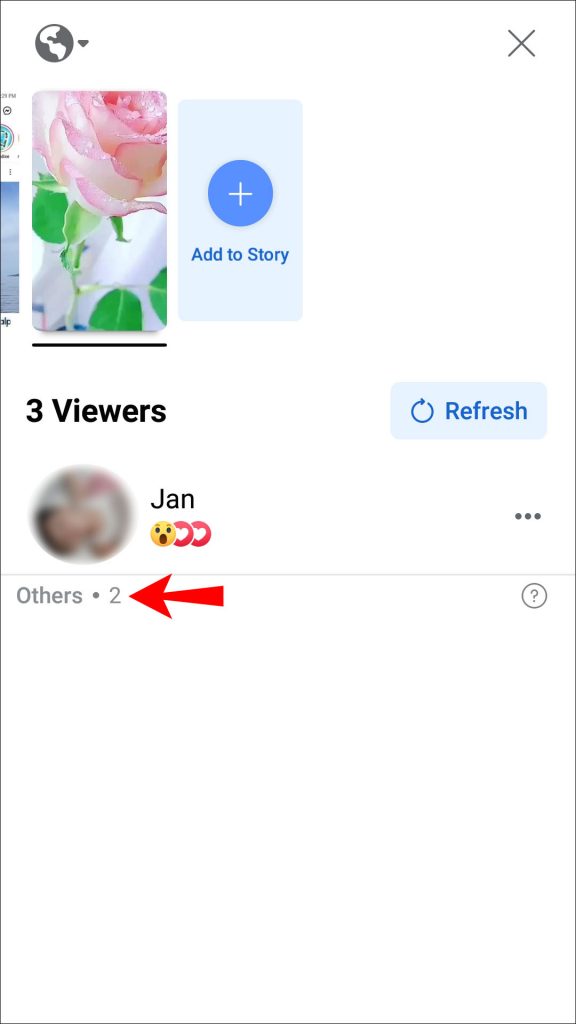
The digital landscape, particularly the realm of social media, is a delicate balance between connection and privacy. Facebook, as one of the largest social platforms, has long grappled with this equilibrium. Stories, with their ephemeral nature, were initially pitched as a less curated, more authentic way to share. Yet, the inherent desire for control over one’s narrative quickly led to the development of sophisticated privacy options. The “Others” category in FB Stories is a direct manifestation of these efforts, aiming to provide users with granular control over their audience.
Decoding the “Others” Label: More Than Just a Default Setting
At its core, the “Others” designation on Facebook Stories isn’t a single, static group of people. Instead, it represents a dynamic audience that is defined by your default privacy settings and the specific choices you make for each individual Story. This is where the nuances begin to unfold. When you post a Story, Facebook, by default, attempts to share it with the broadest audience you’ve permitted. However, the “Others” label emerges when your usual sharing preferences are overridden or when you haven’t explicitly included a specific individual or group in your “Friends” or custom lists.
To truly understand “Others,” we need to break down how Facebook Stories privacy works:
Understanding Your Default Audience Settings
Before diving into the specifics of “Others,” it’s crucial to understand your primary Story privacy settings. Facebook offers a few core options:
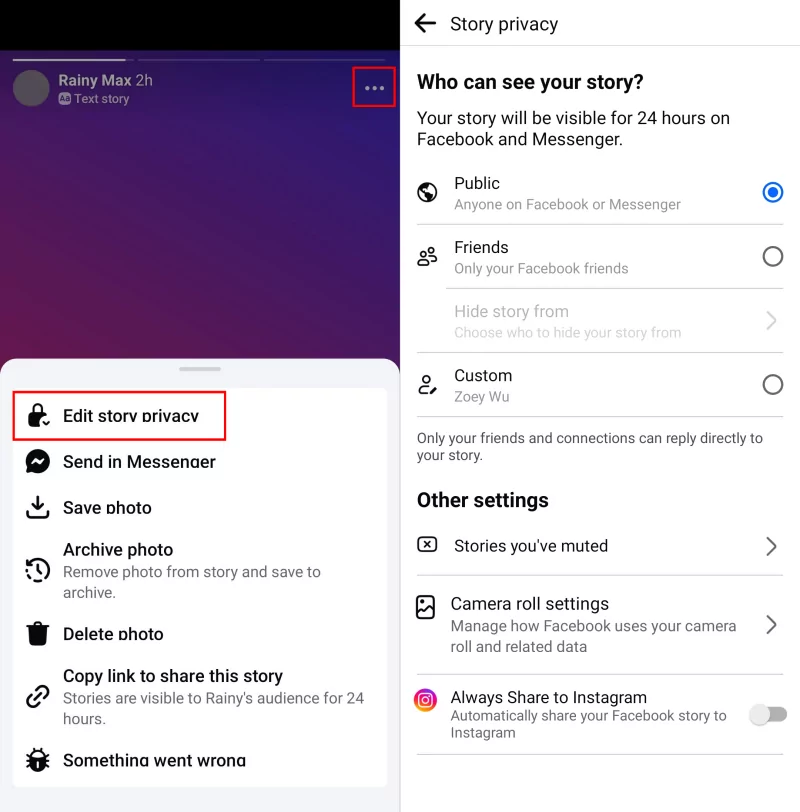
- Public: Anyone on or off Facebook can see your Story. This is the widest reach and generally not recommended for personal Stories unless you are a public figure or aiming for broad brand visibility.
- Friends: Only your Facebook friends can see your Story. This is the most common setting for personal accounts.
- Friends except…: This allows you to select specific friends who will not see your Story, even though they are part of your general “Friends” list.
- Specific friends: This is a more restrictive setting where you can choose a very limited number of friends who will see your Story.
The “Others” designation typically comes into play when you are using the “Friends” setting, or even “Friends except…” or “Specific friends.” Let’s illustrate with an example:
Imagine you have 500 Facebook friends. If your default setting is “Friends,” and you post a Story, all 500 friends should see it. However, if you’ve previously blocked someone, or if they have unfriended you, or if their account is set to a level of privacy that prevents them from seeing your content, they would fall into the “Others” category from your perspective, in the sense that they are not part of the intended audience.
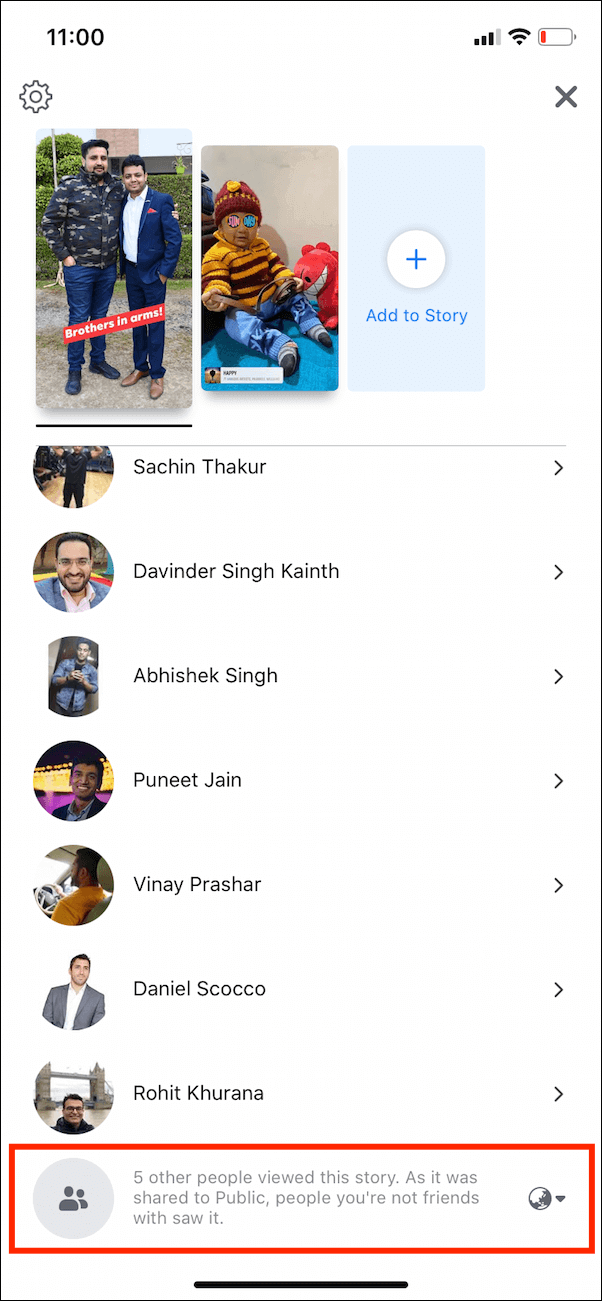
Conversely, and perhaps more commonly, “Others” can refer to individuals who are not your direct friends but might still see your Story under certain circumstances. This happens when:
- You have a Public Story setting enabled for certain posts: Even if your default is “Friends,” you can sometimes override this for a specific Story, making it public. In this scenario, anyone, including people you don’t know, could see it. They would be part of the “Others” who can view.
- Your friends share your Story: If a friend shares your Story (with permission settings allowing this), people who are friends with that friend, but not necessarily you, might see your Story. These individuals would also be categorized as “Others” from your direct connection perspective.
- Mutual Friends: If you have a mutual friend with someone, and your privacy settings are relaxed enough, they might see your Story through a shared connection.
The key takeaway is that “Others” isn’t a predefined list of users. It’s a fluid category determined by the intersection of your privacy settings and the privacy settings of the people viewing your content. It represents everyone outside your explicitly defined audience for that particular Story.
Privacy Settings and Audience Control: Mastering Your Narrative
The power to define “Others” lies squarely in your hands through meticulous management of your Facebook privacy settings. This is where the Brand and Tech aspects of our website intersect. Effectively managing your digital identity, especially on a platform like Facebook, requires a strategic approach akin to personal branding.
Personal Branding in the Digital Age: The Power of Granular Control
Your Facebook profile and its associated features, including Stories, are extensions of your personal brand. In an era where digital footprints are increasingly scrutinized, being mindful of who sees what is paramount. The “Others” category highlights the need for proactive privacy management.
- Regularly Review Your Friends List: Unfriend individuals you no longer wish to share your life with. This directly impacts who can see your “Friends”-only Stories and, by extension, who is excluded from your intended audience.
- Utilize “Friends Except…” and “Specific Friends” Lists: These are your most powerful tools for segmenting your audience. Create lists for close family, colleagues, casual acquaintances, or even groups you’d prefer not to share certain content with. When posting a Story, you can then select these lists to precisely control who sees it. This turns the amorphous “Others” into a precisely defined exclusion.
- Understand Your Story Archive: Facebook Stories can be saved to your archive. While this is private by default, understanding who can access your archive (which is generally only you) is part of the overall privacy picture.
- Be Mindful of Tagging: If you are tagged in someone else’s Story, it might appear on your profile or in your friends’ feeds, depending on your settings. This can inadvertently expose your connections to content from people you may not have directly intended to share with.
Leveraging Technology for Enhanced Privacy
The technology behind Facebook Stories offers sophisticated tools that, when understood and utilized, empower users to curate their online presence. This is where the Tech aspect of our website becomes particularly relevant.
- Explore Facebook’s Privacy Checkup: Facebook regularly prompts users to conduct a Privacy Checkup. This guided tour helps you review who can see your posts, tag you, and access your information. It’s an essential step in understanding and managing your “Others” audience.
- Understand the “View As” Feature: While not directly for Stories, the “View As” feature allows you to see your profile as if you were a specific person (e.g., a friend, or a stranger). This can give you insights into how your broader profile content might be perceived, which indirectly influences how people might expect to interact with your Stories.
- Third-Party Apps and Permissions: Be cautious of third-party apps that request access to your Facebook account. Overly permissive apps can inadvertently share your data or influence who sees your content. Always review app permissions thoroughly.
By actively engaging with these privacy controls and understanding the technological framework, you can transform the vague “Others” into a precisely managed audience, ensuring your Stories reflect the image you wish to project.
When “Others” on FB Story Impacts Your Online Presence
The implications of the “Others” category on FB Story extend beyond simple curiosity. For individuals and businesses alike, it can significantly impact reputation, perceived authenticity, and the effectiveness of marketing efforts.
The Shadow Side of “Others”: Unintended Audience Exposure
While the intention of “Others” is to provide privacy, it can also lead to unintended consequences if not managed properly.
- Reputational Risks: If your default Story settings are too broad (e.g., Public) and you post something that is only intended for a select group, individuals in the “Others” category (strangers, acquaintances you’ve forgotten) could see it. This can lead to misinterpretations, professional repercussions, or damage to your personal reputation. For instance, an off-the-cuff remark shared publicly that was meant as a joke among close friends could be taken out of context by someone who doesn’t know you.
- Misinformation and Trolling: Publicly accessible Stories can attract unwanted attention. Individuals from the “Others” category might engage with your Story in ways you don’t appreciate, such as leaving inappropriate comments or even using your content for malicious purposes.
- Erosion of Trust: If followers or friends perceive that you are sharing content with a wider, unintended audience, it can erode trust. They might question your judgment or your understanding of social media etiquette.
Leveraging “Others” for Strategic Outreach and Engagement
Conversely, understanding and strategically utilizing the “Others” designation can be a powerful tool for growth and connection.
- Brand Building and Awareness: For businesses and influencers, intentionally making certain Stories public or accessible to a broader audience can be a deliberate strategy to increase brand awareness. This is where the Brand and Money aspects of our website converge. A well-crafted public Story can attract new followers, generate leads, and showcase your products or services to a wider market.
- Marketing Campaigns: Use public Stories to announce new products, run contests, or share user-generated content that highlights your brand’s reach and customer satisfaction.
- Thought Leadership: Share industry insights or behind-the-scenes glimpses to position yourself as an expert, attracting new connections and potential clients.
- Community Building: By allowing certain Stories to be viewed by “Friends of Friends” or a wider network, you can foster a sense of community. This is especially effective for niche interests or hobbyist groups where shared passion can transcend direct friendships.
- Testing and Feedback: You might choose to make a Story public to gauge general reaction to a new idea or a piece of content before committing to a broader rollout. The feedback from a wider “Others” audience can be invaluable.
The effective management of the “Others” category in FB Stories, therefore, is not just a technical setting to be ignored. It is a critical component of your digital strategy, influencing how you are perceived, who engages with you, and ultimately, how you leverage the platform for your personal or professional goals. By understanding who constitutes “Others” and how to influence that group, you gain greater control over your digital narrative.
Conclusion: Mastering Your FB Story Audience
The question “What is others on FB story?” might seem minor, but it opens the door to a fundamental aspect of digital communication: audience control. Facebook Stories, with their inherent ephemerality, offer a unique avenue for sharing, but they also necessitate a thoughtful approach to privacy.
Understanding “Others” means recognizing that it’s not a fixed entity but a fluid category defined by your privacy settings and the choices of those around you. It’s the group outside your explicitly defined audience for any given Story. This realization empowers you to move beyond passive consumption of the platform and to become an active curator of your digital presence.
The intersection of Tech, Brand, and Money becomes profoundly evident here. Technologically, Facebook provides the tools for granular control. Strategically, understanding and managing your audience is core to personal and corporate branding. Financially, a well-managed online presence can lead to increased opportunities and income streams.
By diligently reviewing your privacy settings, utilizing custom lists, and being mindful of the broader implications of your sharing habits, you can ensure that your Stories resonate with the intended audience. Whether you aim for intimate connections with close friends or broad outreach for your brand, mastering the concept of “Others” on FB Story is key to navigating the complexities of online communication and building a robust, intentional digital identity.
aViewFromTheCave is a participant in the Amazon Services LLC Associates Program, an affiliate advertising program designed to provide a means for sites to earn advertising fees by advertising and linking to Amazon.com. Amazon, the Amazon logo, AmazonSupply, and the AmazonSupply logo are trademarks of Amazon.com, Inc. or its affiliates. As an Amazon Associate we earn affiliate commissions from qualifying purchases.