
In the intricate tapestry of modern computer networks, where data flows seamlessly across oceans and continents, there exists a fundamental component that acts as the gateway for every device seeking to communicate. This unsung hero is the Network Interface Card, or NIC. Often overlooked but universally present, the NIC is the indispensable bridge connecting a computer to a network, translating digital signals into physical transmissions and vice-versa. Without it, your laptop would be an isolated island, unable to browse the web, send an email, or connect to your local printer. Understanding the NIC is paramount to grasping the foundational mechanics of how computers interact within a networked world, from a simple home setup to the most complex data centers.
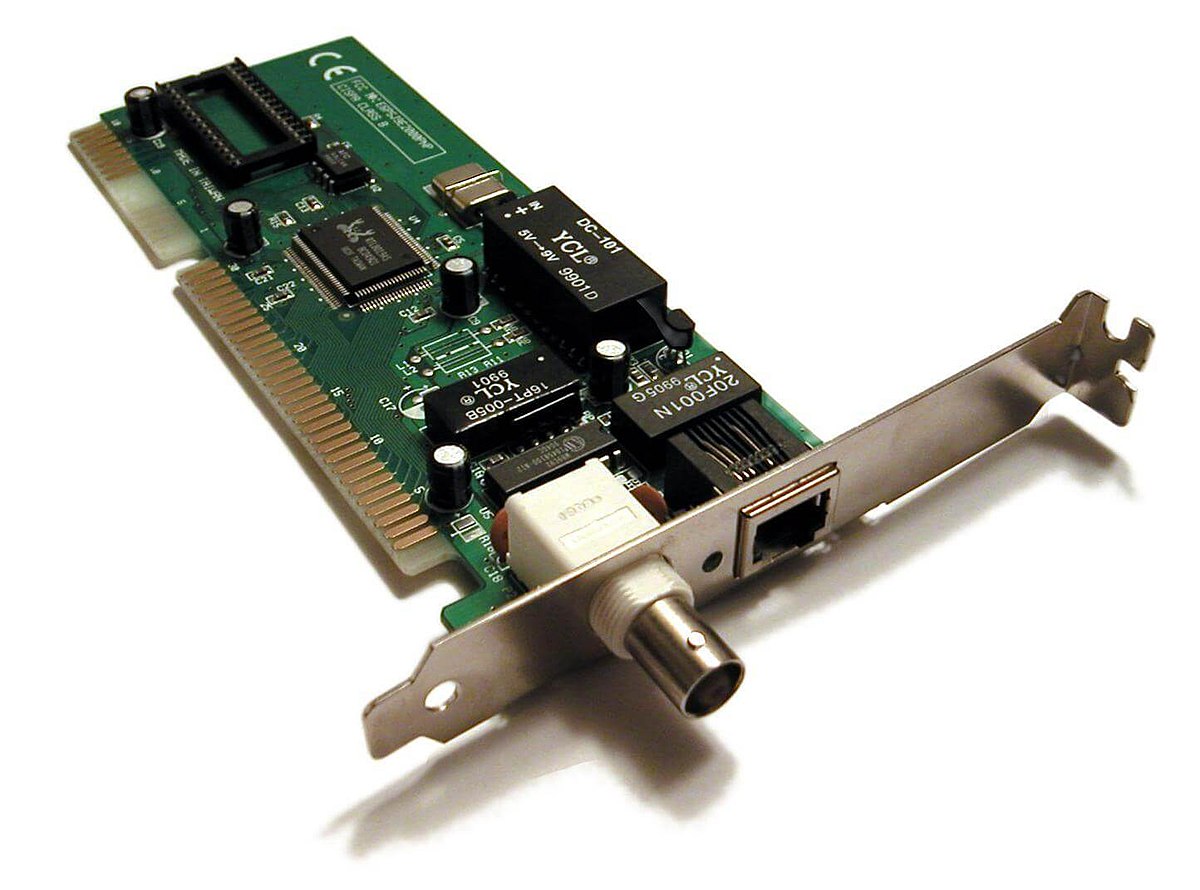
The Core Functionality of a Network Interface Card (NIC)
At its heart, a NIC is a circuit board or chip that enables a network-ready device to connect to a network. It acts as an intermediary, managing the low-level data transmission processes that are invisible to the end-user but crucial for connectivity. Its operations span both the physical and data link layers of the OSI model, orchestrating the journey of data packets between your device and the network infrastructure.
Bridging the Digital and Physical Worlds
Every piece of data your computer handles is in a digital format – a series of ones and zeros. Networks, however, often transmit data using physical signals like electrical pulses over copper cables, light pulses through fiber optics, or radio waves for wireless connections. The NIC’s primary role is to perform this critical conversion. It takes the digital data from your computer’s operating system, converts it into the appropriate physical signals (electrical, optical, or radio), and sends it out onto the network medium. Conversely, when signals arrive from the network, the NIC receives them, converts them back into digital data, and passes them up to the computer’s operating system and applications. This bidirectional translation is what allows for meaningful communication.
Data Packetization and Transmission
Before data can be transmitted, it must be organized into smaller, manageable units called packets or frames. The NIC handles this packetization process, adding header and trailer information that includes source and destination addresses, error-checking codes, and other control data. This ensures that data can be routed efficiently and reliably across the network. Once the data is encapsulated into frames, the NIC manages the transmission onto the network medium, adhering to specific protocols like Ethernet, Wi-Fi, or Token Ring. It controls the timing and flow, ensuring that data is sent at the correct speed and in an orderly fashion, avoiding collisions on shared media and facilitating efficient bandwidth usage.
Unique Identification: MAC Addresses
One of the most critical functions of a NIC is its unique identifier, known as the Media Access Control (MAC) address. This is a globally unique hardware address embedded into the NIC by the manufacturer, typically a 48-bit (6-byte) hexadecimal number. Think of it as the physical address of your device on a local network segment. When data is sent across a local network, it’s addressed to the MAC address of the destination device. The NIC constantly listens for frames addressed to its own MAC address. Upon receiving such a frame, it processes it; otherwise, it discards it. This MAC address is distinct from an IP address, which is a logical address assigned by the network. While an IP address can change, the MAC address of a NIC remains constant, acting as a permanent identifier for that specific network adapter.
Flow Control and Error Checking
Networking environments are dynamic, with varying levels of traffic and potential for errors. NICs incorporate mechanisms for flow control, which regulate the rate of data transmission to prevent a fast sender from overwhelming a slower receiver. This ensures that data is processed efficiently and that buffers don’t overflow, leading to lost packets. Furthermore, NICs perform error checking, typically using Cyclic Redundancy Check (CRC). As data frames are transmitted, the NIC calculates a CRC checksum and appends it to the frame. The receiving NIC performs the same calculation; if the calculated checksum doesn’t match the one in the frame, it indicates a transmission error, and the frame is typically discarded and often requested for retransmission by higher-level protocols. This robust error detection ensures the integrity of the data being transferred.
Anatomy and Types of NICs
While the fundamental purpose of all NICs is similar, their form factor, connectivity options, and capabilities vary widely depending on the device and the network environment they are designed for. From the integrated chip on your smartphone to the high-performance cards in data center servers, NICs have evolved to meet diverse demands.
Internal vs. External NICs
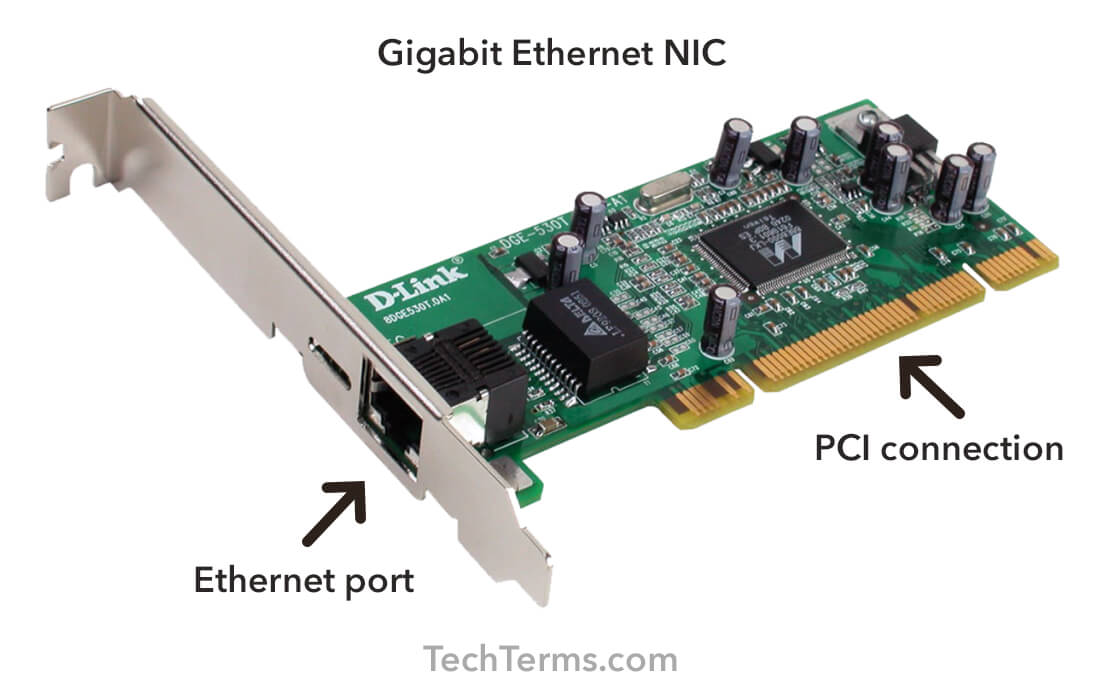
Historically, and still commonly today, NICs are internal components. Desktop computers often use PCIe (Peripheral Component Interconnect Express) cards that plug into expansion slots on the motherboard. Laptops and smaller devices might use more compact form factors like M.2 or Mini PCIe. These internal NICs offer high bandwidth and integration with the system.
External NICs are used when a device doesn’t have an integrated NIC, needs an upgrade, or requires a different type of network connectivity. The most common external NICs connect via USB, providing Ethernet or Wi-Fi capabilities to devices like older laptops or tablets without built-in network ports. Thunderbolt-based external NICs also exist, offering higher speeds for professional applications.
Wired vs. Wireless NICs
The distinction between wired and wireless NICs lies in the physical medium they utilize for communication.
-
Wired NICs (Ethernet Adapters): These are designed for physical cable connections, primarily using Ethernet standards. They feature an RJ-45 port (or sometimes fiber optic ports for higher-speed server NICs) that connects to an Ethernet cable. Wired NICs offer stable, high-speed, and secure connections, making them preferred for desktops, servers, and critical infrastructure. Speeds range from 10 Mbps (Fast Ethernet, now largely obsolete) to 100 Mbps (Gigabit Ethernet), 10 Gbps, 25 Gbps, 40 Gbps, 100 Gbps, and even 400 Gbps in enterprise and data center environments.
-
Wireless NICs (Wi-Fi Adapters): These communicate over radio waves, eliminating the need for physical cables. They adhere to the IEEE 802.11 standards (Wi-Fi) and typically incorporate antennas to send and receive signals. Wireless NICs offer mobility and convenience, making them ubiquitous in laptops, smartphones, and IoT devices. Their performance is influenced by factors like signal strength, interference, and network congestion. Modern Wi-Fi NICs support standards like Wi-Fi 5 (802.11ac), Wi-Fi 6 (802.11ax), and the newer Wi-Fi 6E/7, offering multi-gigabit speeds.
Specialized NICs
Beyond general-purpose Ethernet and Wi-Fi adapters, there are NICs designed for specific, high-demand applications:
-
Server NICs: These are optimized for high performance, reliability, and advanced features needed in data centers. They often include multiple ports (teaming/bonding for redundancy and load balancing), support for Jumbo Frames, hardware offloading engines (for tasks like TCP/IP checksums, making the CPU available for other work), and virtualization features.
-
Fibre Channel Host Bus Adapters (HBAs): While not strictly NICs in the traditional Ethernet sense, HBAs perform a similar function for connecting servers to Fibre Channel Storage Area Networks (SANs). They use fiber optics for high-speed, low-latency block storage access.
-
Virtual NICs (vNICs): In virtualization environments, virtual machines don’t have direct access to physical hardware. Hypervisors create vNICs, which are software constructs that emulate physical NICs. These vNICs connect to virtual switches, which then map traffic to one or more physical NICs of the host server. This allows multiple virtual machines to share a single physical network adapter.
Integrated NICs (Onboard Motherboard)
The vast majority of modern computers, including laptops, desktops, and motherboards, come with integrated NICs directly embedded into the motherboard chipset. This saves space, reduces manufacturing costs, and provides immediate network connectivity out of the box. While often sufficient for general use, dedicated PCIe NICs can offer superior performance, more advanced features, and additional ports for demanding users or server applications.
The Indispensable Role of NICs in Modern Networks
The presence and proper functioning of NICs are absolutely critical for virtually every form of digital communication and networked operation today. Their importance scales from enabling casual internet browsing to powering the backbone of global commerce and communication.
Enabling Connectivity in Everyday Devices
From the smartphone in your pocket to the smart TV in your living room, every internet-connected device relies on a NIC. It’s what allows your laptop to join your home Wi-Fi network, your desktop to connect to your router via an Ethernet cable, and your gaming console to access online multiplayer servers. Without a NIC, these devices would be cut off from the vast resources and services available on the internet and local networks. Even seemingly simple tasks like printing to a network printer or sharing files with another computer on your home network depend on the NIC’s ability to facilitate communication.
Criticality in Data Centers and Enterprise Environments
In data centers and large enterprise networks, NICs are foundational. Servers, switches, routers, and storage devices all utilize NICs, often specialized ones, to handle enormous volumes of data at very high speeds. High-performance server NICs are engineered for maximum throughput, low latency, and resilience, supporting features like network teaming (link aggregation) for increased bandwidth and redundancy. The reliability of these NICs directly impacts the uptime and performance of critical business applications, cloud services, and vast databases. Any failure or bottleneck at the NIC level can cascade into significant service disruptions.
Impact on Network Performance and Reliability
The quality and capabilities of a NIC directly influence the overall performance and reliability of a network connection. A higher-speed NIC (e.g., 10 Gigabit Ethernet instead of 1 Gigabit Ethernet) can significantly reduce bottlenecks, especially when transferring large files or accessing high-bandwidth applications. Features like hardware offloading reduce the burden on the CPU, allowing the system to dedicate more processing power to applications, leading to better overall performance. Furthermore, advanced NICs in server environments often incorporate features for fault tolerance, such as multiple ports configured for failover, ensuring continuous operation even if one connection fails. This resilience is paramount for mission-critical systems where downtime is costly.
Evolution and Future of Network Interface Cards
The journey of the NIC has been one of continuous innovation, driven by ever-increasing demands for speed, efficiency, and intelligence in networking. From humble beginnings as simple connectivity devices, NICs are transforming into sophisticated network processing units.
From Basic Connectivity to Intelligent Adapters
Early NICs were relatively simple, primarily responsible for MAC layer functions and physical signal conversion. As networks grew in complexity and speed, NICs began to incorporate more intelligence. Features like hardware checksum offloading, large send offload (LSO), and receive side scaling (RSS) were introduced to offload CPU-intensive tasks from the main processor to the NIC. This shift marked the beginning of NICs becoming more active participants in network processing rather than just passive interfaces. The increasing sophistication also led to specialized drivers and firmware that could be updated to improve performance and add new features.
Increasing Speeds and Bandwidth Demands
The demand for bandwidth continues unabated. The transition from 10 Mbps Ethernet to 1 Gbps was a significant leap, and now 10 Gbps and 25 Gbps are common in enterprise and data center servers, with 40 Gbps, 100 Gbps, and even 400 Gbps becoming increasingly prevalent in high-performance computing and hyperscale data centers. This exponential growth in speed requires not only faster physical interfaces but also more powerful internal processing capabilities within the NIC to handle the higher data rates without introducing latency or errors. The ongoing development of new Ethernet standards (like IEEE 802.3ck for 100/200/400 Gbps) and Wi-Fi generations (Wi-Fi 7) continually pushes the boundaries of what NICs must support.
Software-Defined Networking (SDN) and NIC Offloading
The advent of Software-Defined Networking (SDN) and Network Functions Virtualization (NFV) has introduced new paradigms for network management and architecture. In SDN environments, network control is decoupled from forwarding planes, allowing for greater flexibility and programmability. NICs play a crucial role here by supporting advanced offloading capabilities that enable more efficient virtual networking. This includes functions like Open vSwitch (OVS) offloading, which can accelerate virtual switch operations by moving them from the server CPU to the NIC, significantly improving the performance of virtualized workloads. This trend towards offloading network processing tasks to the NIC is vital for efficient cloud infrastructure.
The Rise of SmartNICs and DPU Integration
The most significant recent evolution in NIC technology is the emergence of SmartNICs and Data Processing Units (DPUs). These are highly sophisticated NICs that integrate powerful programmable processors (like FPGAs or ARM cores) directly onto the network adapter. Unlike traditional NICs, which primarily offload stateless tasks, SmartNICs can offload stateful network and security functions, run entire network applications, and even act as security accelerators. They can handle complex tasks such as firewalls, load balancing, intrusion detection, encryption/decryption, and storage processing directly at the network edge, thereby freeing up the host CPU for application-specific workloads.
DPUs take this concept even further, essentially becoming “computers on a chip” designed to process data at the network and storage layers. They combine high-speed network interfaces with powerful, multi-core CPUs, dedicated security engines, and advanced accelerators. DPUs are poised to become a third major pillar of data center architecture, alongside the CPU and GPU, playing a pivotal role in accelerating infrastructure workloads in cloud, edge, and AI environments, reducing latency, and enhancing security.

Conclusion
The Network Interface Card, or NIC, is far more than just a simple connector; it is the intelligent conduit through which all digital communication flows. From translating digital data into physical signals and uniquely identifying devices with MAC addresses to managing data flow and performing crucial error checks, the NIC is an intricate and indispensable component of any computer network. Its evolution, driven by the relentless march of technological progress and the ever-growing demands for speed and efficiency, has transformed it from a basic connectivity device into a sophisticated network processor. As we look to the future, with the rise of SmartNICs and DPUs, the NIC is set to play an even more central and intelligent role, accelerating infrastructure, enhancing security, and continuing to enable the seamless, high-performance connectivity that defines our digital world. Understanding the NIC is not merely an academic exercise; it is fundamental to comprehending the very fabric of modern computing and communication.
aViewFromTheCave is a participant in the Amazon Services LLC Associates Program, an affiliate advertising program designed to provide a means for sites to earn advertising fees by advertising and linking to Amazon.com. Amazon, the Amazon logo, AmazonSupply, and the AmazonSupply logo are trademarks of Amazon.com, Inc. or its affiliates. As an Amazon Associate we earn affiliate commissions from qualifying purchases.