
In the evolving landscape of digital entertainment, the term “Standard” often implies a baseline. However, within the technical architecture of Netflix’s ecosystem, the “Standard” plan represents a specific tier of engineering designed to balance visual fidelity with bandwidth efficiency. For the average user, it is the middle ground between the budget-friendly “Standard with Ads” (or the defunct Basic plan) and the top-tier Premium 4K offering. From a technical perspective, understanding the Netflix Standard plan requires looking beyond the price tag and into the specifics of resolution, bitrate, codec support, and device compatibility.
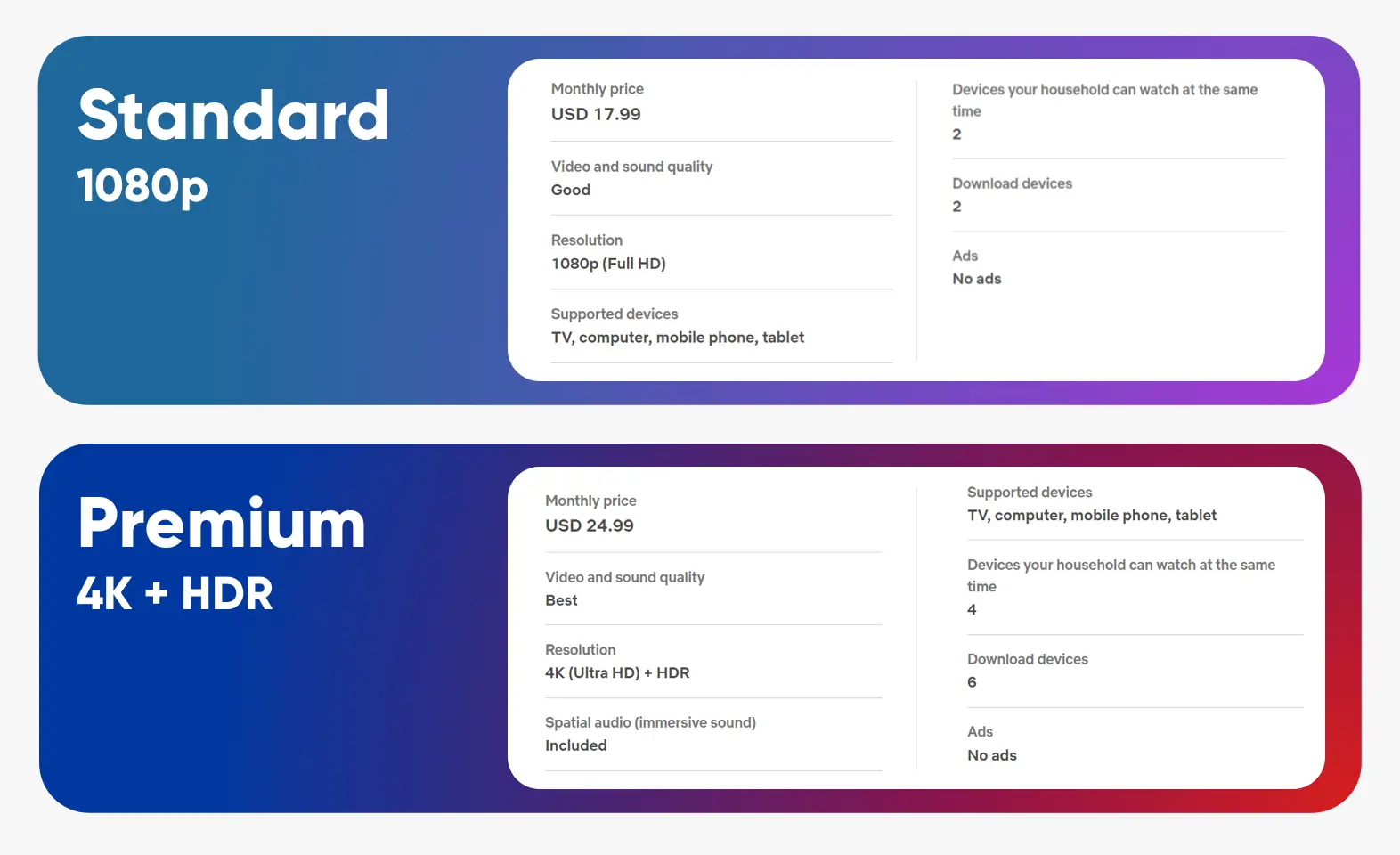
The Standard plan is defined primarily by its delivery of Full High Definition (1080p) content. While 4K Ultra HD grabs the headlines, 1080p remains the industry benchmark for high-quality streaming on a vast majority of consumer hardware, from smartphones and tablets to laptops and mid-sized television sets.
The Technical Anatomy of the Standard Plan
At its core, the Netflix Standard plan is a service tier that allows for simultaneous streaming on two supported devices. While the “two-stream” limit is a functional constraint, the technical delivery of those streams is where the complexity lies.
Resolution and Pixel Density
The defining feature of the Standard plan is 1080p resolution, also known as Full HD. This translates to a pixel grid of 1,920 by 1,080 pixels. Compared to the 720p (HD) resolution found in lower tiers, 1080p offers more than double the total pixel count. This increase in pixel density is crucial for maintaining image sharpness on screens larger than 32 inches. In the 1080p ecosystem, the “Standard” plan ensures that fine details—such as textures in clothing or facial expressions in wide shots—remain crisp without the “softness” associated with lower resolutions.
Bitrate and Data Consumption
Resolution is only one part of the equation; bitrate is arguably more important for visual quality. Bitrate refers to the amount of data transferred per second to maintain the video stream. For a 1080p stream on the Standard plan, Netflix typically targets a bitrate between 3 Mbps and 7 Mbps, depending on the complexity of the scene.
Netflix utilizes a sophisticated “Per-Shot Encoding” system. Rather than applying a uniform bitrate to an entire movie, their algorithms analyze individual scenes. An action sequence with rapid movement and high detail will receive a higher bitrate allocation, while a static dialogue scene against a simple background will be compressed more aggressively to save bandwidth without sacrificing perceived quality.
Multi-Device Sync and Concurrent Streams
The Standard plan’s ability to handle two concurrent streams places specific demands on a household’s local area network (LAN). To support two simultaneous 1080p streams comfortably, a user needs a consistent downstream speed of at least 10 Mbps. Because Netflix uses adaptive bitrate streaming, the player will dynamically adjust the quality if it detects network congestion, dropping from 1080p to 720p or lower to prevent buffering.
Under the Hood: Codecs and Compression Technology
Netflix is a pioneer in video compression technology, and the Standard plan benefits significantly from their internal research and development. To deliver 1080p video efficiently, Netflix employs several advanced video codecs.
The Role of HEVC and AV1
Historically, the H.264 (AVC) codec was the backbone of Netflix’s delivery system. However, as the platform scaled, they integrated more efficient codecs like H.265 (HEVC) and, more recently, AV1.
AV1 is an open-source, royalty-free video coding format that offers 30% to 40% better compression efficiency than H.264. For a user on the Standard plan, this means that a 1080p stream can look just as good at a lower bitrate, reducing the likelihood of buffering on slower connections. On mobile devices, the use of AV1 is particularly beneficial as it reduces data consumption while maintaining the high-definition “Standard” experience.
VMAF: Measuring Visual Quality
Netflix doesn’t just guess if a stream looks good; they use a proprietary metric called VMAF (Video Multi-Method Assessment Fusion). This tool uses machine learning to predict how a human viewer would perceive the quality of a video. For the Standard plan, the goal is to maintain a high VMAF score across all supported devices. This ensures that the “Standard” experience is consistent whether you are watching on a high-end OLED monitor or a budget Android tablet.
Dynamic Optimizer
The Dynamic Optimizer is another technical pillar of the Standard tier. It allows Netflix to encode video at various resolutions and bitrates that are tailored specifically to the content. For example, an animated show might reach “Standard” 1080p quality at a much lower bitrate than a grainy film-noir classic. By optimizing the encode for the specific visual characteristics of the content, the Standard plan maximizes the efficiency of the 1080p delivery.
Device Compatibility and Hardware Requirements
Not all hardware is created equal, and the Netflix Standard plan interacts differently with various devices based on their Digital Rights Management (DRM) capabilities and hardware decoders.
Smart TVs and External Streamers
Most modern Smart TVs and streaming sticks (like Roku, Amazon Fire Stick, or Apple TV) are built to handle the Standard plan’s 1080p requirements natively. These devices usually include hardware-based decoders for HEVC, ensuring smooth playback. However, for the Standard plan to actually display in 1080p, the device must support HDCP (High-bandwidth Digital Content Protection) 1.4 or higher. If a user connects a 1080p-capable laptop to an older monitor that lacks HDCP, the stream may be downgraded to SD (480p) to prevent unauthorized recording.
Mobile Optimization and HDR
While the Standard plan is primarily advertised as a 1080p tier, it is important to note that it does not typically include HDR (High Dynamic Range). HDR is reserved for the Premium tier. Therefore, even if a user has a high-end smartphone with an OLED screen capable of 1200 nits of brightness, the Standard plan will deliver a Standard Dynamic Range (SDR) signal. This limits the color gamut and contrast ratio to the Rec. 709 color space, which is the traditional standard for HD television.
Browser Limitations and DRM
A common technical hurdle for Standard plan users occurs on desktop computers. Due to DRM restrictions, not all browsers support 1080p playback. For instance, on Windows, Google Chrome and Mozilla Firefox are often limited to 720p because they utilize software-based DRM (Widevine Level 3). To achieve the full 1080p resolution offered by the Standard plan, users must use Microsoft Edge or the native Netflix app from the Microsoft Store, both of which utilize hardware-level DRM (PlayReady). On macOS, Safari is required to reach the plan’s maximum potential resolution.
Performance Optimization for Standard Users
To get the most out of the Netflix Standard plan, technical optimization on the user’s end can significantly impact the viewing experience.
Network Throttling and ISP Peering
ISPs sometimes throttle high-bandwidth traffic during peak hours. Netflix addresses this through Open Connect, their global Content Delivery Network (CDN). Netflix places localized storage appliances directly within ISP data centers. For a Standard plan user, this means the 1080p data packets don’t have to travel across the entire internet; they are often served from a server just a few miles away. Users can test their connection to these specific servers using Fast.com, a tool created by Netflix to help troubleshoot throughput issues specifically for their streams.
Managing Download Quality for Offline Viewing
The Standard plan allows for content downloads on two devices. Within the app settings, users can choose between “Standard” and “High” download quality. In this context, “High” quality corresponds to the 1080p resolution of the plan. However, “High” quality files are significantly larger. For a technical user with limited storage on a tablet or phone, selecting the “Standard” download setting (which is usually 720p or 480p depending on the device) may be a more efficient use of hardware resources, even if the subscription allows for higher.
The Future of the “Standard” Definition
As 4K becomes the default for television manufacturing and 8K begins to peek over the horizon, the definition of what constitutes a “Standard” streaming experience is subject to change. Currently, the Netflix Standard plan occupies a critical niche. It provides the highest resolution that most human eyes can distinguish from a typical viewing distance on screens under 50 inches.
From a software engineering perspective, the Standard plan is a masterclass in balance. It leverages advanced codecs like AV1 and HEVC, utilizes AI-driven VMAF quality assessment, and navigates complex DRM environments to deliver a consistent experience. While it lacks the HDR and spatial audio (Dolby Atmos) features of the Premium tier, its technical foundation in 1080p Full HD ensures that it remains the most versatile and compatible tier for the diverse array of hardware in use today. For those who prioritize a clean, high-definition image without the bandwidth demands of 4K, “Standard” is less of a compromise and more of a technical sweet spot.
aViewFromTheCave is a participant in the Amazon Services LLC Associates Program, an affiliate advertising program designed to provide a means for sites to earn advertising fees by advertising and linking to Amazon.com. Amazon, the Amazon logo, AmazonSupply, and the AmazonSupply logo are trademarks of Amazon.com, Inc. or its affiliates. As an Amazon Associate we earn affiliate commissions from qualifying purchases.