
In the modern digital landscape, losing access to an online account is more than a minor inconvenience; it is a disruption of one’s digital identity. For many, the question “What is my YouTube password?” arises at a moment of frustration, often when switching devices or clearing browser caches. However, to answer this question, one must first understand the underlying technical infrastructure that powers YouTube.
YouTube does not exist as a standalone entity with its own independent login system. Since its acquisition by Google in 2006, the platform has been fully integrated into the Google ecosystem. Consequently, your YouTube password is, in fact, your Google Account password. This integration is part of a broader shift toward Single Sign-On (SSO) technology, designed to streamline user experience across multiple applications like Gmail, Google Drive, and Google Photos.
Understanding the Link Between YouTube and Google Accounts
The architecture of Google’s user authentication is built on the principle of a unified identity. When you ask for your YouTube password, you are searching for the master key to your entire Google presence. This centralized system offers significant benefits in terms of synchronization, but it also means that your security posture on YouTube is directly tied to the health of your Google Account.
One Password for the Entire Ecosystem
The technical term for this arrangement is Single Sign-On (SSO). By using a single set of credentials, Google reduces “password fatigue”—the psychological exhaustion users feel when forced to remember dozens of different passwords. When you log into YouTube, you are communicating with Google’s centralized authentication servers. These servers verify your identity and issue a “token” to the YouTube application, granting you access without requiring a separate database of YouTube-specific passwords.
Why You Can’t Find a “YouTube-Specific” Password
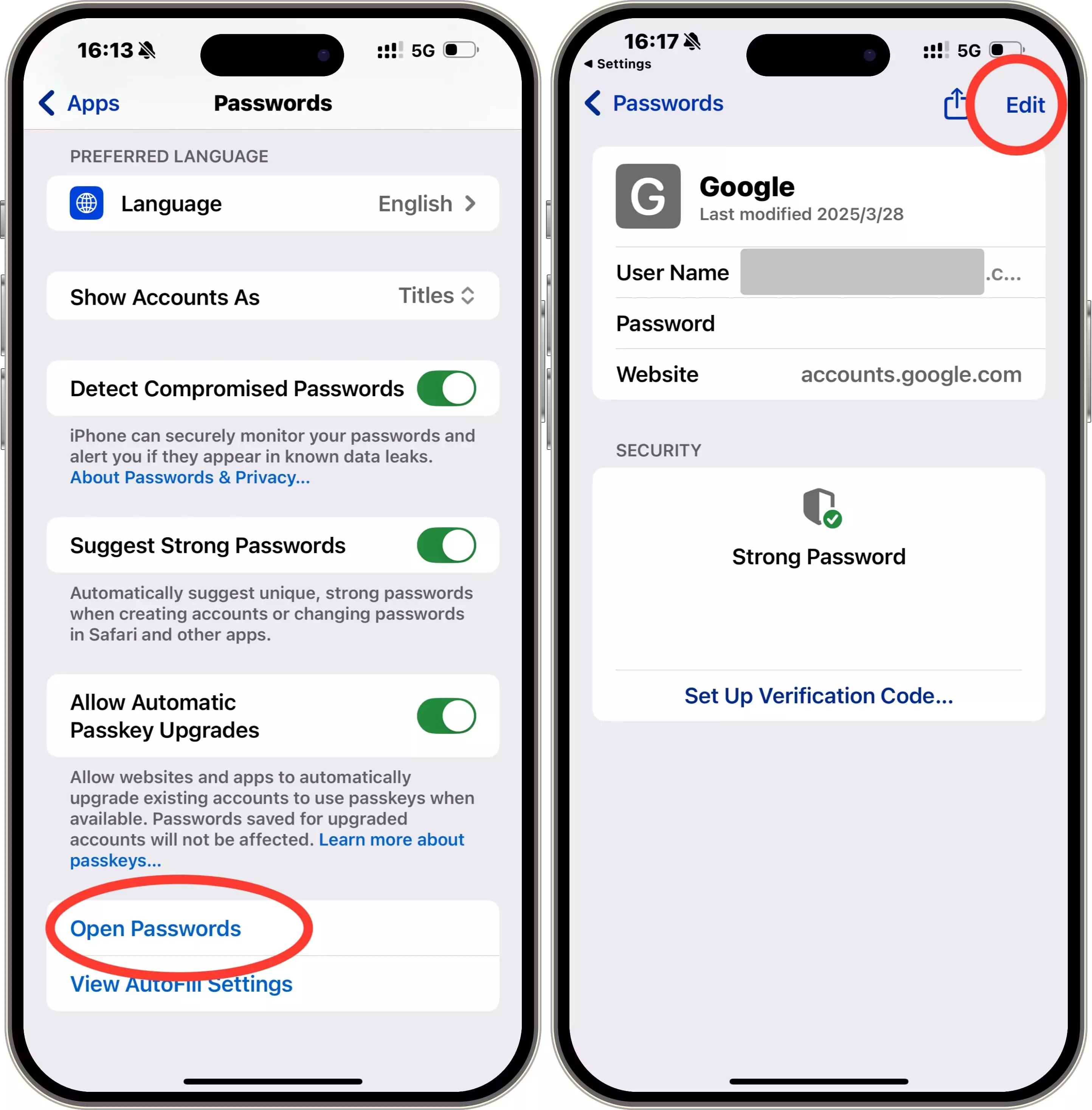
If you were to search through your browser’s saved passwords looking specifically for “YouTube.com,” you might come up empty-handed. This is because most modern browsers and password managers categorize these credentials under “google.com” or “accounts.google.com.” Understanding this distinction is the first step in troubleshooting login issues. If you change your password on Gmail, it automatically changes for YouTube, and vice versa.
How to Recover a Forgotten YouTube Password
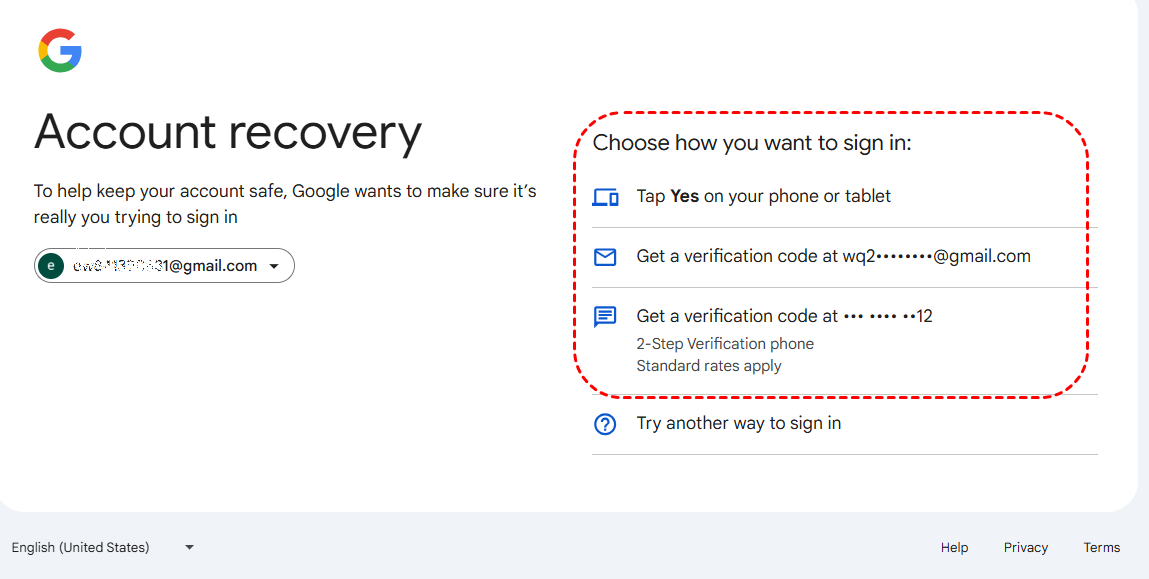
If you have realized that you don’t know your password and it isn’t saved in your browser, you must engage in the account recovery process. This is a sophisticated technical workflow designed by Google to verify ownership while preventing unauthorized “social engineering” attacks.
Using the Google Account Recovery Tool
The primary method for regaining access is the Google Account Recovery page. This tool uses a series of heuristic checks to determine if the person requesting access is truly the owner. You will be asked to provide the last password you remember. If that fails, the system moves through a hierarchy of verification methods, ranging from automated prompts on your smartphone to identity challenges.
Utilizing Recovery Emails and Phone Numbers
A critical component of digital security is the “recovery channel.” During the initial setup of a Google Account, users are prompted to provide a secondary email address or a phone number. If you forget your YouTube password, Google can send a verification code to these secondary channels. This serves as an “out-of-band” authentication method, ensuring that even if your primary password is lost, your identity can be verified through a separate communication stream.
The Role of Trusted Devices in Verification
Google’s security algorithms also analyze “known” devices and IP addresses. If you attempt to recover your password from a laptop you have used for years, Google is more likely to grant access than if you try from a public computer in a different country. This is part of a behavioral biometric approach to security, where the system recognizes your patterns and hardware signatures to lower the friction of recovery.
How to Find Your Saved YouTube Password on Different Devices
In many cases, your password is not truly “lost” but is simply hidden within the encrypted storage of your hardware or software. Modern operating systems and browsers act as digital vaults, storing credentials so you don’t have to manually enter them.
Accessing Passwords on Google Chrome
If you use Google Chrome, your YouTube credentials are likely stored in the Chrome Password Manager. By navigating to the “Autofill and Passwords” section in your browser settings, you can view a list of all saved credentials. To see the actual password, the browser will require you to enter your computer’s administrative password or use biometric authentication (such as TouchID or FaceID). This adds a layer of local security to ensure that someone sitting at your computer cannot easily steal your accounts.
Managing Passwords on iOS and Android Systems
Mobile devices have their own integrated password management systems. On iOS, this is known as iCloud Keychain, found within the “Passwords” menu in Settings. On Android, it is managed through the Google Password Manager integrated into the OS. Both systems use end-to-end encryption, meaning that while the device “knows” your password to log you in, the raw data is protected behind your phone’s primary lock screen.
Using Third-Party Password Managers
For users who prioritize high-level digital security, third-party password managers like Bitwarden, 1Password, or LastPass are the gold standard. These tools allow you to generate complex, high-entropy passwords that are impossible to memorize but easy to manage. If you are using one of these services, your YouTube password will be stored in an encrypted vault, accessible via a single “Master Password.” This approach is the most effective way to prevent the “What is my password?” dilemma from occurring in the future.
Strengthening Your Digital Security Strategy
Finding or resetting your password is only the first step. In an era of increasing cyber threats, relying solely on a password—no matter how complex—is often insufficient. You must build a multi-layered defense to protect your YouTube channel and personal data.
Implementing Two-Factor Authentication (2FA)
Two-Factor Authentication (2FA), or Two-Step Verification (2SV), is the most effective deterrent against account hijacking. By requiring a second form of identification—such as a code from an authenticator app (Google Authenticator or Authy) or a physical security key (like a YubiKey)—you ensure that even if a hacker discovers your password, they cannot access your account. For YouTube creators, this is not just a recommendation; it is often a requirement for accessing certain Creator Studio features.
The Importance of Passkeys in a Passwordless Future
The tech industry is currently transitioning toward a “passwordless” future through the use of Passkeys. Developed by the FIDO Alliance and supported by Google, Passkeys allow you to sign in using your device’s local authentication (fingerprint or face scan) instead of a traditional password. Passkeys are resistant to phishing because they are cryptographically tied to the specific website they were created for, making them significantly more secure than standard text-based passwords.
Recognizing and Avoiding Phishing Attempts
Many users “lose” their YouTube passwords because they are tricked into giving them away through phishing. This usually involves a fraudulent email claiming your account has been compromised or that you have a copyright strike, directing you to a fake login page. Always check the URL before entering your credentials. If the domain is not exactly “google.com” or “youtube.com,” it is a trap.
Troubleshooting Common Login Issues
Sometimes, even with the correct password, you may find yourself unable to log in. This can be due to various technical glitches or security protocols triggered by the platform.
Resolving Account Lockouts
If you enter the wrong password too many times, Google may temporarily lock your account to prevent a “brute-force” attack. In this scenario, the best course of action is to wait several hours before attempting again. If the lockout persists, you may need to clear your browser cookies and cache, as outdated session data can sometimes interfere with the authentication handshake.
What to Do If Your Account Is Compromised
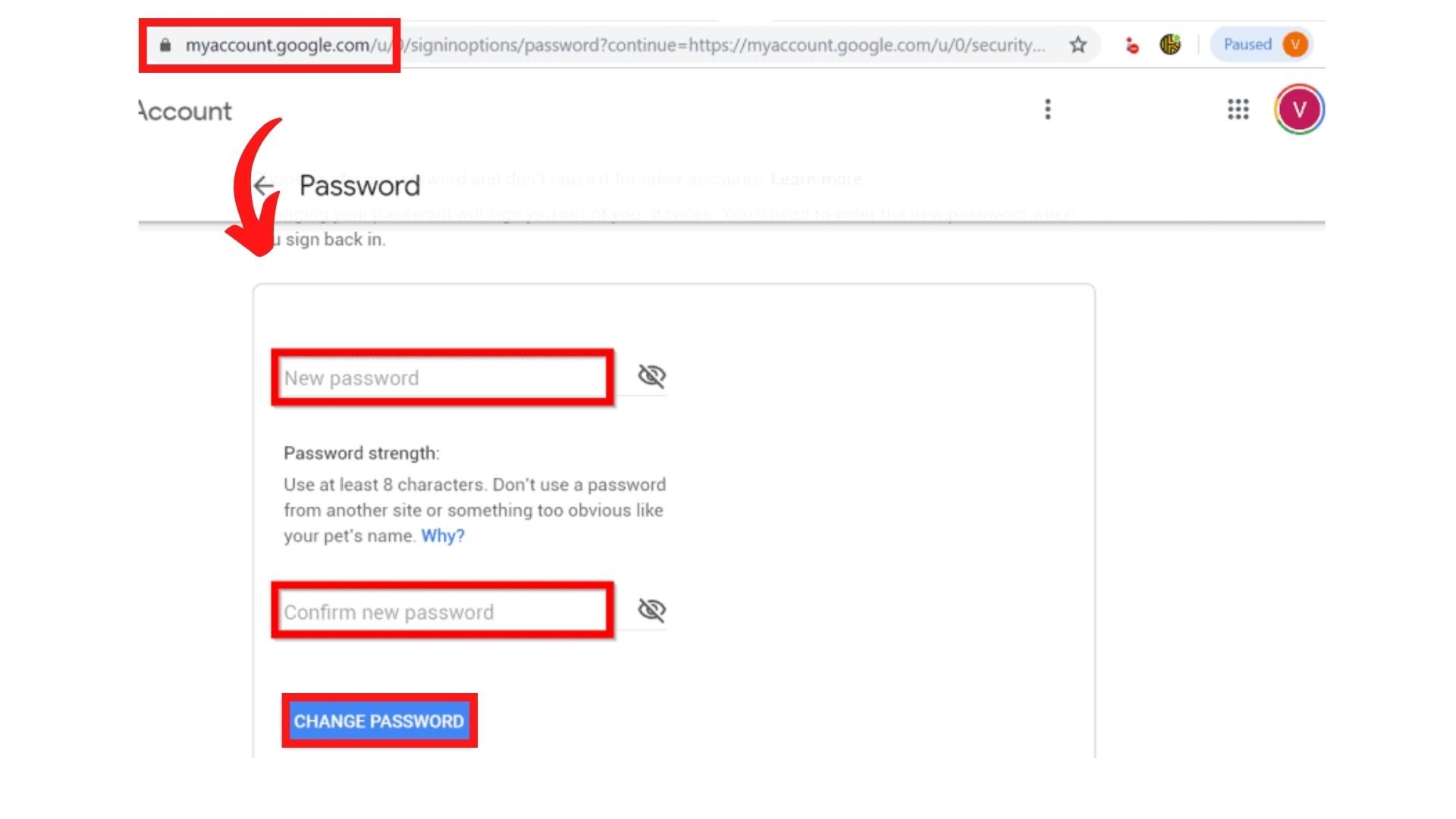
If you discover that your YouTube password has been changed without your permission, you must act immediately. Use the “Account Recovery” flow specifically designed for hacked accounts. Google will ask questions to verify your identity based on historical data. Once you regain access, it is imperative to check your “Security Checkup” page to see if the attacker added any unauthorized recovery emails or connected malicious third-party apps to your account.
In conclusion, while the question “What is my YouTube password?” seems simple, it opens the door to the complex world of digital identity management. By understanding that your YouTube access is governed by your Google Account, utilizing the recovery tools available, and implementing advanced security measures like 2FA and Passkeys, you can ensure that your digital life remains both accessible to you and secure from everyone else.
aViewFromTheCave is a participant in the Amazon Services LLC Associates Program, an affiliate advertising program designed to provide a means for sites to earn advertising fees by advertising and linking to Amazon.com. Amazon, the Amazon logo, AmazonSupply, and the AmazonSupply logo are trademarks of Amazon.com, Inc. or its affiliates. As an Amazon Associate we earn affiliate commissions from qualifying purchases.