
In the modern digital landscape, our mobile phone number has evolved from a simple routing address for voice calls into a foundational pillar of our digital identity. It serves as a primary key for two-factor authentication (2FA), a recovery tool for encrypted accounts, and a unique identifier across a myriad of software ecosystems. Despite its importance, the transition to new devices, the adoption of eSIM technology, and the management of multiple lines for professional and personal use can occasionally lead to a surprisingly common question: “What is my cell number?”
Retrieving this information involves more than just looking at a sticker on a box. It requires navigating various layers of mobile operating systems, understanding carrier protocols, and recognizing the underlying hardware that stores this data. This guide explores the technical methodologies for identifying your mobile number across different platforms and examines the broader implications of mobile identity management in a tech-centric world.
Platform-Specific Retrieval Methods
Every smartphone operating system handles subscriber information differently. Whether you are using a closed ecosystem like Apple’s iOS or a more fragmented environment like Google’s Android, the device itself holds the record of the assigned Mobile Station International Subscriber Directory Number (MSISDN).
Retrieving Numbers on iOS
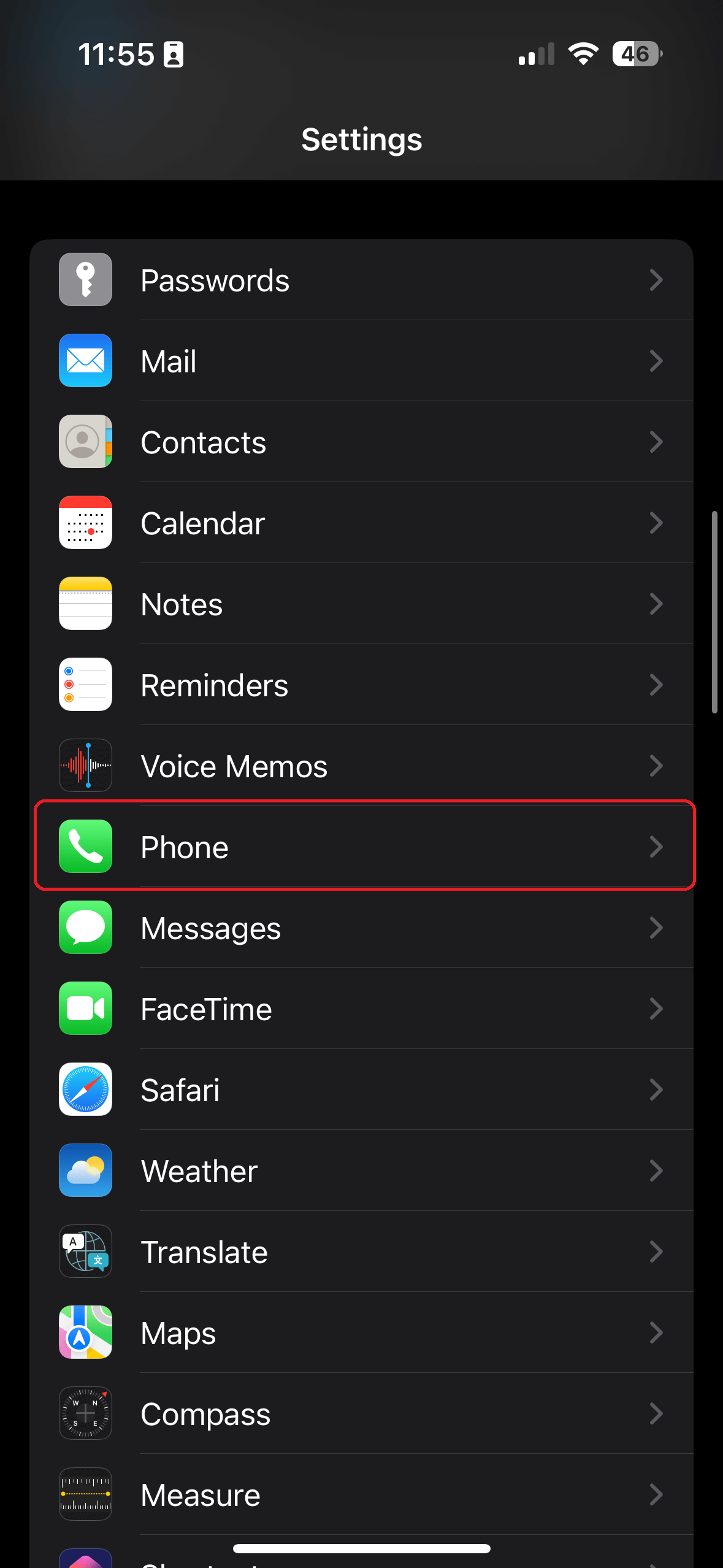
Apple’s iOS integrates the user’s phone number deeply into the iCloud and iMessage frameworks. To find your number on an iPhone, the most direct path is through the system settings. Navigating to Settings > Phone will typically display “My Number” at the top of the menu. This information is pulled directly from the SIM card or the eSIM profile provisioned by the carrier.
Alternatively, the Contacts application provides a dedicated “My Card” entry at the very top of the list. This card aggregates data from your Apple ID and the hardware’s active line. If the number appears as “Unknown,” it often indicates a provisioning delay or a handshake issue between the device’s firmware and the carrier’s Home Location Register (HLR).
Retrieving Numbers on Android
Android devices, due to the diversity of manufacturers (OEMs) and software “skins” like Samsung’s One UI or Google’s Pixel UI, may have slightly different menu structures. However, the core path remains consistent. Users can generally find their number by navigating to Settings > About Phone or Settings > About Device.
In more granular versions of the OS, the information is located under Settings > Network & Internet > SIMs. Here, the device queries the Subscriber Identity Module (SIM) for its metadata. Unlike iOS, Android allows for more detailed diagnostic views; by entering the “Status” or “SIM Status” submenu, users can see not only their phone number but also their signal strength, network type (LTE/5G), and roaming status.
Troubleshooting the “Unknown” Number Error
Technically, the phone number is not always stored on the SIM card itself. Instead, the SIM contains an International Mobile Subscriber Identity (IMSI) and an authentication key. When the phone connects to a tower, the network maps that IMSI to your actual phone number (MSISDN). If your phone displays “Unknown,” it usually means the “Line 1” field on the SIM card has not been programmed with the MSISDN. While this doesn’t affect the ability to make calls or use data, it can be corrected on some Android devices through specialized “SIM Editor” apps or by a carrier-side re-provisioning signal.
Carrier Protocols and Network-Level Identification
When hardware settings fail to provide an answer, the next layer of retrieval exists at the network level. Mobile carriers utilize specific protocols that allow devices to query the network for subscriber details without requiring a data plan or an active internet connection.
USSD Codes: The “Secret” Menu
Unstructured Supplementary Service Data (USSD) is a protocol used by GSM cellular telephones to communicate with the service provider’s computers. Unlike SMS, USSD creates a real-time session between the handset and the network. Most carriers have a specific USSD code that, when “dialed” like a phone number, returns the active MSISDN to the screen.
Common USSD codes for number retrieval include:
- T-Mobile: #NUM# (#686#)
- Verizon: #99
- AT&T: *#62# (often used to check call forwarding, which displays the number)
- Global Variations: *132#, *1#, or *100# depending on the regional carrier.
The Role of the HLR and VLR
Behind the scenes, when you request your number via a USSD code, the request hits the Visitor Location Register (VLR) of the tower you are connected to. The VLR communicates with your home carrier’s Home Location Register (HLR), which is the central database containing details of every subscriber authorized to use the core network. This technical handshake ensures that even if you are roaming internationally, the network can identify your identity based on the hardware ID of your SIM card.

Digital Account Portals
In an era of ubiquitous connectivity, your number is also a cloud-stored asset. By logging into a carrier’s web portal or mobile app (such as My Verizon or MyAT&T) from a secondary device, you can view all active lines associated with your account. This is particularly useful for managing IoT devices, tablets, or mobile hotspots that possess a cellular number but lack a traditional dialer interface for USSD codes.
The Shift to eSIM and Multi-SIM Architecture
The physical SIM card, a staple of mobile technology since the early 1990s, is being rapidly replaced by the Embedded SIM (eSIM). This shift has fundamentally changed how we manage and identify our mobile numbers.
Understanding eSIM Provisioning
An eSIM is a small chip soldered directly onto the device’s motherboard. Instead of swapping physical cards, users download an “eSIM profile.” This profile contains the same credentials as a physical SIM but allows for much greater flexibility. For users asking “What is my cell number?”, the answer may now involve multiple numbers on a single device. Modern smartphones can store eight or more eSIM profiles, with two active simultaneously.
From a technical standpoint, managing these requires navigating the device’s “SIM Manager” or “Cellular Data” settings. Users must toggle between “Primary,” “Secondary,” “Travel,” or “Business” labels, which are local aliases for the various MSISDNs stored on the chip.
Dual-SIM Dual-Standby (DSDS)
Most current-generation flagship phones utilize DSDS technology. This allows the device to listen to two different mobile numbers at once. If you are trying to identify which number is which, the OS interface typically color-codes or labels incoming signals. In the settings menu, each SIM slot (physical and electronic) will have its own IMEI (International Mobile Equipment Identity) and associated phone number, requiring users to be precise about which “slot” they are querying.
Digital Security and Mobile Identity Management
The question of “what is my cell number” is not merely a matter of convenience; it is a matter of digital security. Because mobile numbers are so integrated into our software lives, they have become a high-value target for cybercriminals.
The Number as a Security Token
Most major tech platforms—Google, Meta, Amazon, and financial institutions—use the mobile number as a primary method for account recovery and 2FA. This is known as “out-of-band” authentication. When you provide your number to a service, it becomes a “trusted” identifier. Consequently, knowing and protecting your number is the first step in maintaining a secure digital perimeter.
Risks of SIM Swapping
One of the most prevalent threats in the tech world today is SIM swapping. In this attack, a malicious actor social-engineers a carrier into porting your phone number to a SIM card in their possession. Once they “own” your number, they can intercept 2FA codes and reset passwords for your most sensitive accounts.
To mitigate this, users should not only know their number but also be aware of their SIM’s ICCID (Integrated Circuit Card Identifier). This 20-digit number is the unique serial number of the SIM itself. By setting a “SIM PIN” in the device settings, you add an extra layer of hardware-level encryption that prevents the SIM from being used in another device without a code, regardless of the phone number associated with it.
Privacy Tools and Virtual Numbers
For users concerned about privacy, the “real” cell number (the one tied to the hardware) is often hidden behind virtual numbers. Services like Google Voice or Burner provide a Voice over IP (VoIP) layer. While these appear as standard 10-digit numbers to the outside world, they are software-defined and can be managed through an app. Identifying these numbers requires checking the specific app settings rather than the device’s system settings, as the phone’s hardware remains agnostic to the VoIP traffic.

Conclusion: The Number in the Ecosystem
Identifying your cell number is a gateway to understanding the complex relationship between hardware, carrier networks, and digital identity. Whether you are retrieving a forgotten number from a deep-nested Android menu, using a USSD protocol to query a carrier’s HLR, or managing a suite of eSIM profiles on a modern iPhone, the process highlights the sophistication of current mobile standards.
As we move toward a future where the “cell number” might be replaced by decentralized identifiers or biometric-linked addresses, the MSISDN remains the most critical string of digits in our professional and personal lives. Keeping this number secure, knowing how to find it across different technical environments, and understanding the infrastructure that supports it are essential skills for any user in the modern tech ecosystem.
aViewFromTheCave is a participant in the Amazon Services LLC Associates Program, an affiliate advertising program designed to provide a means for sites to earn advertising fees by advertising and linking to Amazon.com. Amazon, the Amazon logo, AmazonSupply, and the AmazonSupply logo are trademarks of Amazon.com, Inc. or its affiliates. As an Amazon Associate we earn affiliate commissions from qualifying purchases.