
In the vast ecosystem of the Microsoft 365 suite, certain applications like Word, Excel, and PowerPoint have become household names, synonymous with modern office productivity. However, nestled within this suite is a specialized tool that often flies under the radar for casual users but remains a powerhouse for creators: Microsoft Publisher.
Microsoft Publisher is an entry-level desktop publishing (DTP) application. Unlike Microsoft Word, which focuses heavily on text composition and proofing, Publisher is built around the “page layout” philosophy. It is designed to give users precise control over the visual placement of elements, making it the go-to software for creating professional-grade marketing materials, newsletters, and complex document designs without the steep learning curve associated with high-end industry tools like Adobe InDesign.

Understanding Microsoft Publisher: More Than Just a Word Processor
To truly understand what Microsoft Publisher is, one must first distinguish it from standard word processing software. While you can type a letter in Publisher, that isn’t its primary function.
The Core Concept of Desktop Publishing (DTP)
Desktop publishing refers to the use of specialized software to create visual displays of information on a computer for either digital or print distribution. In a DTP environment, the “canvas” is the priority. Every element—be it a block of text, an image, or a geometric shape—is treated as a discrete object that can be moved, layered, and manipulated with pixel-perfect precision. Microsoft Publisher serves as the bridge between the rudimentary layout capabilities of Word and the high-end complexity of professional graphic design suites.
Microsoft Publisher vs. Microsoft Word: Key Distinctions
The most common question users ask is: “Why use Publisher if I already have Word?” The answer lies in the technical architecture of the programs. Microsoft Word is “flow-based.” When you type a sentence, the text flows from one line to the next; if you insert an image, it often displaces the text in a way that can be difficult to manage in complex layouts.
Publisher, conversely, is “frame-based.” Nothing exists on the page unless it is inside a frame. This allows for absolute positioning. You can place a text box at the exact coordinates of 2.5 inches from the top and 3.0 inches from the left, and it will remain there regardless of what other content you add. This stability is essential for documents where the visual arrangement is as important as the content itself.
Why Layout Matters in Professional Software
In a professional tech environment, the presentation of data and branding is paramount. When technical manuals, corporate brochures, or annual reports are generated, the layout must be consistent across hundreds of pages. Publisher provides tools like “Master Pages,” which allow designers to set a background, header, and footer once and apply them across the entire document. This technical efficiency ensures that branding remains uniform and the production time is significantly reduced.
Key Features and Capabilities of the Software
Microsoft Publisher is packed with features designed to democratize design. It focuses on providing “what you see is what you get” (WYSIWYG) functionality, ensuring that the digital design translates perfectly to physical paper.
Extensive Template Library
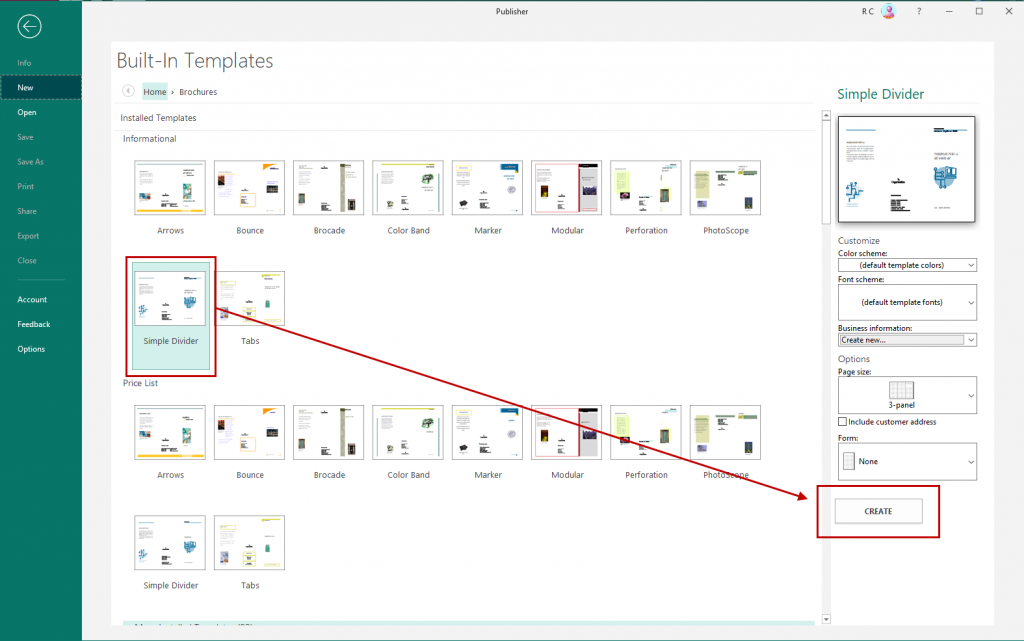
One of the software’s greatest technical strengths is its library of pre-formatted templates. These are not merely aesthetic choices; they are structurally sound blueprints for specific document types. Whether you are designing a tri-fold brochure, a business card, or a catalog, Publisher provides the correct dimensions, bleed areas, and margins automatically. For small business owners and tech enthusiasts, this eliminates the guesswork involved in technical print specifications.
Precise Object Manipulation and Layering
Publisher utilizes a sophisticated layering system. In a complex design, you might have a background gradient, a semi-transparent image over it, a text box on top, and a logo in the foreground. Publisher allows users to “Bring Forward” or “Send Backward” these elements with ease. Furthermore, it offers “Snapping” features, where objects automatically align with margins or other objects, ensuring a balanced and symmetrical composition that looks professionally engineered.
Typography and Graphics Integration
While Word offers basic font selection, Publisher dives deeper into typography. It supports advanced OpenType features, allowing for ligatures, stylistic alternates, and precise kerning (the space between individual characters). On the graphics side, it handles high-resolution images and vector graphics with ease. It also includes basic photo editing tools—such as cropping, brightness adjustment, and color recoloring—directly within the app, reducing the need to switch to external photo editors for minor tweaks.
High-Quality Output for Print and Digital
The technical backend of Publisher is optimized for high-quality output. It supports various color models, including RGB for digital screens and CMYK for professional printing presses. When a project is finished, Publisher offers a “Pack and Go” feature, which bundles the document along with all its linked images and fonts into a single file. This ensures that when the file is opened on another machine or at a print shop, no data is lost and the design remains intact.
Practical Applications: When to Choose Publisher
In the tech and business world, efficiency is measured by choosing the right tool for the specific task. Microsoft Publisher excels in scenarios where visual hierarchy is the priority.
Creating Marketing Collateral
For tech startups or independent contractors, marketing is the lifeblood of growth. Publisher is the ideal tool for creating flyers, menus, and brochures. Its ability to handle “Bleed”—the area that is trimmed off after printing—ensures that colors go all the way to the edge of the paper, a hallmark of professional printing that is difficult to achieve in Word.
Designing Internal Corporate Documentation
Large organizations often use Publisher for internal newsletters and technical documentation. When a company needs to distribute a monthly update that includes charts, employee spotlights, and complex multi-column layouts, Publisher’s ability to “link” text boxes is invaluable. This feature allows text to flow from a box on page one to a box on page four, enabling sophisticated magazine-style layouts.
Developing Personalized Personal Projects
Beyond the corporate world, Publisher is a favorite for personalized projects such as greeting cards, calendars, and yearbooks. Its drag-and-drop interface makes it accessible for users who may not have a background in graphic design but want to produce something that looks more polished than a standard document.
The Technical Infrastructure and Accessibility
Microsoft Publisher is built on the same core engine as the rest of the Office suite, which provides it with unique advantages regarding integration and system requirements.
Integration with the Microsoft 365 Ecosystem
Because Publisher is part of the Microsoft family, it integrates seamlessly with other apps. You can pull data from an Excel spreadsheet to perform a “Mail Merge,” allowing you to print hundreds of personalized envelopes or catalogs in minutes. It also saves directly to OneDrive, enabling cloud backups and version history, which is a critical safety net for any digital project.
Hardware Requirements and Compatibility
Publisher is a lightweight application compared to the heavy resource demands of the Adobe Creative Cloud. It runs efficiently on most modern Windows-based PCs without requiring specialized graphics cards or massive amounts of RAM. However, it is important to note a significant technical limitation: Microsoft Publisher is a Windows-only application. There is no native version for macOS, which has led many Mac users to seek web-based or cross-platform alternatives.
Managing File Formats and Exports
The native file format for Publisher is .pub. While this format is great for editing, it is not widely readable by other software. To solve this, Publisher includes robust export options. Users can save their work as high-quality PDFs, JPEGs, or PNGs. For those working with professional printers, the ability to export to PDF/X—a standard specifically designed for print archival—is a vital technical feature.
The Future of Microsoft Publisher and Emerging Alternatives
As the software landscape shifts toward cloud-based and AI-driven tools, the role of legacy desktop applications is changing.
Microsoft’s Sunset Plan for 2026
In a significant move for the tech community, Microsoft officially announced that Microsoft Publisher will be retired in October 2026. This decision is part of a broader strategy to streamline the Microsoft 365 offering and migrate layout capabilities into more modern, integrated platforms. For long-time users, this means the clock is ticking to transition to new workflows.
Transitioning to Microsoft Designer and Canva
Microsoft is positioning “Microsoft Designer” as a spiritual successor for casual users. Designer utilizes DALL-E and generative AI to help users create layouts via text prompts. Meanwhile, web-based tools like Canva have captured a large portion of the market by offering similar “frame-based” design capabilities with the added benefit of being platform-independent and collaborative in real-time.
Professional Alternatives: Adobe InDesign and Affinity Publisher
For users who require the advanced technical features of Publisher for professional printing, the move will likely be toward Adobe InDesign or Affinity Publisher. InDesign remains the industry standard, offering unparalleled control over prepress settings, while Affinity Publisher has gained a massive following as a one-time-purchase alternative that mimics many of Microsoft Publisher’s best features while adding modern enhancements.
In conclusion, Microsoft Publisher has served as a vital tool in the technology stack of millions of users for over three decades. By providing an accessible gateway into the world of desktop publishing, it empowered individuals to create professional-quality designs without needing a degree in graphic arts. As we head toward its retirement in 2026, understanding its legacy and the technical principles it championed—precision, object-based layout, and print-ready output—remains essential for anyone looking to master the art of digital document creation.
aViewFromTheCave is a participant in the Amazon Services LLC Associates Program, an affiliate advertising program designed to provide a means for sites to earn advertising fees by advertising and linking to Amazon.com. Amazon, the Amazon logo, AmazonSupply, and the AmazonSupply logo are trademarks of Amazon.com, Inc. or its affiliates. As an Amazon Associate we earn affiliate commissions from qualifying purchases.