
Instagram, a dominant force in social media, continuously evolves its platform to integrate with the latest technological advancements, ensuring users remain engaged and informed. One such integration, particularly significant for iOS users, is its adoption of Apple’s “Live Activities.” Far from being an Instagram-exclusive feature, Live Activities represent a powerful system-level capability introduced by Apple that allows apps to display dynamic, real-time updates directly on the iPhone’s Lock Screen and in the Dynamic Island. Understanding this integration is crucial for users seeking a more streamlined and immediate interaction with their favorite apps, including Instagram. It shifts the paradigm from static notifications to persistent, glanceable information, revolutionizing how we monitor ongoing events or processes without fully unlocking our devices. This deep dive will explore what Live Activities are, how Instagram leverages them, and the impact they have on the user experience for content consumption and creation alike.
Decoding Apple’s Live Activities: The Foundation
To fully grasp the “Live Activities on Instagram,” it’s essential to first understand the underlying Apple technology that powers it. Live Activities are a feature of iOS (introduced with iOS 16.1) designed to provide users with real-time updates for ongoing events or tasks directly on their device’s Lock Screen and, for iPhone 14 Pro models and later, within the Dynamic Island. Unlike traditional notifications that appear and then fade or require interaction to view details, a Live Activity remains active and visible, constantly updating with new information as the event progresses.
Real-time Information, Right on Your Lock Screen
Imagine tracking a food delivery, monitoring the score of a live sports game, or keeping tabs on a ride-share service – all without unlocking your phone or opening an app. This is the core utility of Live Activities. They provide a persistent banner or widget-like display that updates information in real time. For instance, a sports app could display the current score and game clock, a delivery app could show the driver’s progress on a map, or a timer app could count down the remaining time. The information is presented in a concise, actionable format, allowing users to stay informed at a glance. On devices with the Dynamic Island, these activities elegantly integrate into the notch area, expanding to a larger view with a tap, offering even more interactive possibilities without obstructing other content. This always-on, always-updating paradigm significantly reduces the friction of context switching, as users no longer need to navigate through app interfaces to get critical updates.
Key Benefits for Users
The advantages of Live Activities are multifaceted. Firstly, they offer unparalleled convenience. Users receive critical updates immediately and persistently, eliminating the need to unlock their phone, find the app, and navigate to the relevant section. This reduces cognitive load and saves time. Secondly, they enhance engagement by keeping users connected to ongoing events in a less intrusive way than constant push notifications. Instead of receiving multiple alerts for every minor update, a single Live Activity coalesces all relevant information into one dynamic display. Thirdly, for developers and platforms like Instagram, Live Activities provide a powerful new canvas for delivering timely and relevant information, keeping their applications top-of-mind and deeply integrated into the user’s daily digital workflow. The design principles emphasize clarity and directness, ensuring that the information conveyed is immediately understandable and actionable, reinforcing the utility of the application without demanding full user attention.
Instagram’s Integration with Live Activities
Instagram’s adoption of Live Activities primarily focuses on enhancing the user experience around content creation and consumption, particularly for tasks that involve a waiting period or real-time status updates. While not as outwardly interactive as some other Live Activities (like controlling music playback), Instagram’s integration serves a crucial purpose in transparency and efficiency for its users.
Streamlining Content Uploads
One of the most prominent ways Instagram utilizes Live Activities is by displaying the progress of content uploads. When a user uploads a photo, video, or a Reel, the process, especially for larger files or slower connections, can take a noticeable amount of time. Previously, users might have to keep the Instagram app open, or periodically check back, to see if their content had finished uploading. With Live Activities, Instagram can now display a progress bar or status indicator directly on the Lock Screen or in the Dynamic Island. This allows users to initiate an upload and then freely switch to other apps or even lock their phone, knowing they can monitor the upload status without interruption. This functionality not only reduces anxiety about whether an upload is succeeding but also frees up the user to perform other tasks, streamlining their content creation workflow significantly. It’s a subtle yet powerful improvement for creators and casual users alike, ensuring a smoother, less fragmented experience when sharing moments with their audience. The Live Activity provides a direct visual confirmation of the content’s journey from their device to Instagram’s servers, enhancing perceived reliability and responsiveness.
Real-time Engagement Updates
Beyond uploads, Instagram can extend Live Activities to other real-time engagement scenarios. For instance, if a user is waiting for a live stream to start from an account they follow, a Live Activity could potentially display a countdown or an “LIVE NOW” indicator once the stream begins. This provides a more persistent and prominent notification than a fleeting push alert, ensuring users don’t miss out on timely content. Similarly, ongoing direct message conversations, especially those that are highly active, could theoretically be summarized in a Live Activity, showing new message counts or the last sender without needing to delve into the app. While some of these applications might be more speculative or dependent on future Instagram updates, the underlying technical capability is present. The goal remains consistent: to provide users with critical, immediate updates about their activity on the platform in a non-disruptive, highly visible manner.
How it Differs from Standard Notifications
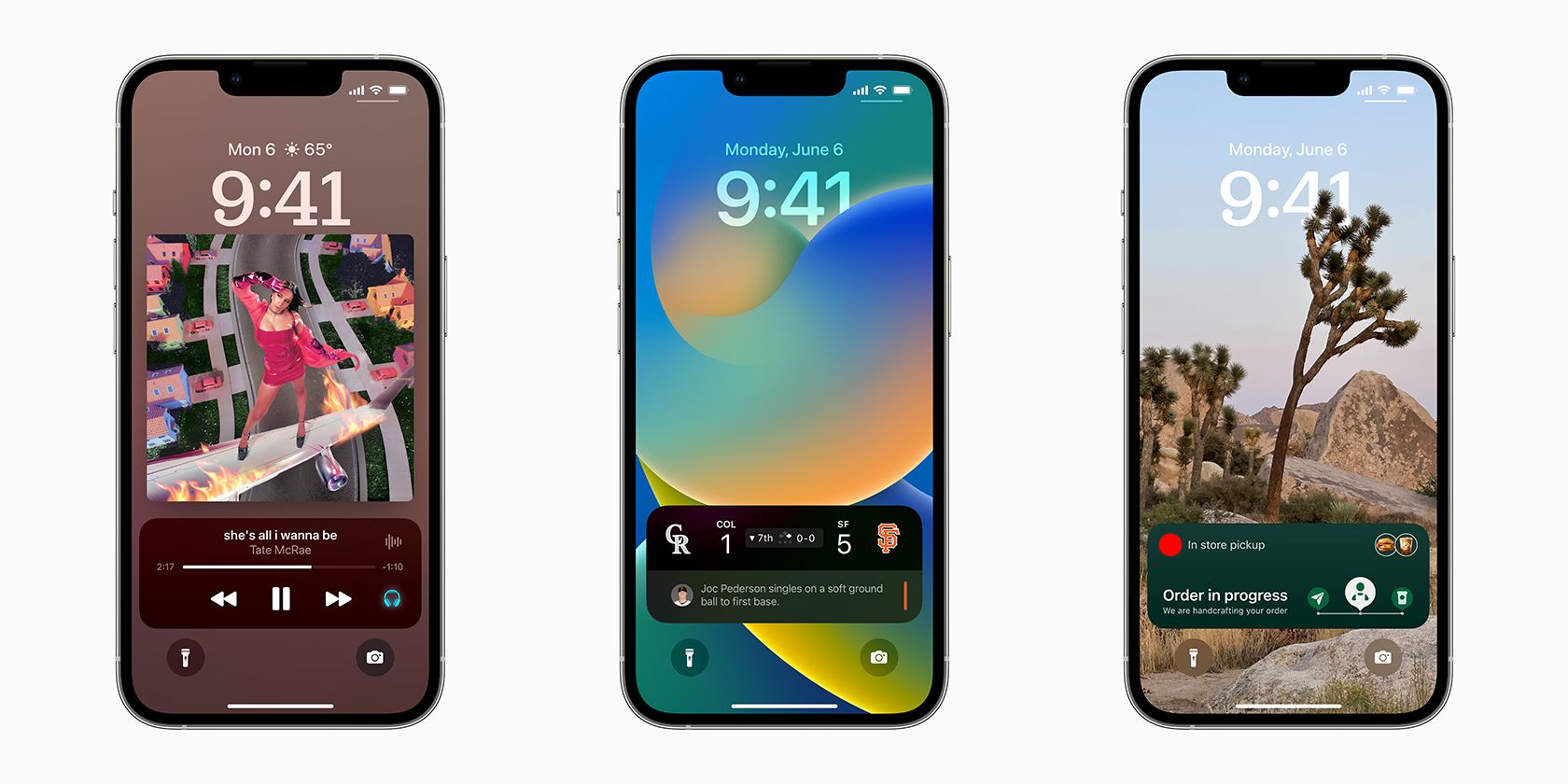
The distinction between Live Activities and standard push notifications is fundamental. Push notifications are discrete, transient alerts designed to grab immediate attention for a specific event – a new like, a direct message, a comment. They typically disappear after being acknowledged or after a short period, and accessing the information often requires tapping the notification to open the app. Live Activities, conversely, are continuous and persistent. They are for ongoing processes or events. They don’t disappear until the activity concludes (e.g., the upload finishes, the game ends). This persistence means users can glance at their screen multiple times to see evolving information without triggering a new alert each time. This provides a calmer, more integrated way to stay updated, moving beyond the alert-fatigue often associated with an overload of push notifications and offering a more sophisticated layer of interaction with dynamic app data.
Enabling and Managing Instagram Live Activities
For Live Activities to function correctly with Instagram, users must ensure their device settings and app permissions are configured appropriately. This gives users full control over which apps can leverage this real-time display feature, balancing convenience with privacy and personal preference.
iOS System Settings and App Permissions
Enabling Live Activities for Instagram, or any app, primarily involves managing system-level settings on your iOS device. Typically, you can find the controls within the Settings app. Navigate to Face ID & Passcode (or Touch ID & Passcode) and scroll down to ensure Live Activities is toggled on under the Allow Access When Locked section. This is a global setting that permits any app to display Live Activities on the Lock Screen.
Beyond the global setting, individual apps also require permission. For Instagram specifically, you would usually go to Settings > Instagram > Live Activities. Within this section, you’ll likely find a toggle that allows you to enable or disable Live Activities specifically for the Instagram app. If this toggle is off, even if the global setting is on, Instagram will not display Live Activities. This granular control is crucial because users might want Live Activities for some apps (like sports scores) but not others (like social media updates, if they prefer less constant visibility). Ensuring both the system-wide and app-specific toggles are activated is key to experiencing this feature with Instagram.
User Control and Privacy Considerations
Apple’s design philosophy for Live Activities emphasizes user control and privacy. The ability to enable or disable Live Activities at both the system and app level provides significant autonomy. Users can decide which ongoing tasks warrant this persistent display and which do not. This is particularly important for privacy, as Live Activities display dynamic information on the Lock Screen, which is visible to anyone near the device. While Instagram’s current integration primarily focuses on benign information like upload progress, other apps might display more sensitive data. Therefore, understanding and utilizing these settings is vital for maintaining personal privacy. Furthermore, Live Activities automatically end and disappear after a certain period of inactivity or once the underlying event concludes, preventing stale information from lingering on the Lock Screen indefinitely. This automatic termination, coupled with manual control, ensures that the feature enhances user experience without becoming an intrusive element or a privacy concern.
The Strategic Implications for Instagram Users and Creators
The integration of Live Activities into Instagram is not merely a technical novelty; it carries strategic implications for how users interact with the platform and how creators manage their content and audience engagement. It subtly yet significantly reshapes the user experience, making Instagram feel more immediate and integrated into the broader mobile ecosystem.
Enhancing User Experience and Workflow
For the average Instagram user, Live Activities contribute to a smoother, less fragmented mobile experience. The primary benefit lies in the ability to track content uploads without being tethered to the app. This means if you’re uploading a Reel while simultaneously responding to a message or checking an email, you can keep an eye on the upload status from your Lock Screen. This multitasking capability improves overall efficiency and reduces the frustration of waiting. It transforms passive waiting into active monitoring, giving users a sense of control and progress. For those who frequently post or manage multiple accounts, this streamlined workflow can be a considerable time-saver, allowing them to remain productive even during background processes. The seamless nature of the integration means Instagram is “working” for you in the background, providing transparent updates without demanding your full attention, thereby reducing app fatigue and encouraging more consistent engagement.
A New Avenue for Creator Engagement
For Instagram creators, Live Activities open up a new, albeit subtle, avenue for engagement. While not directly interactive in the way comments or DMs are, Live Activities can enhance the viewer’s experience by providing real-time updates on content they might be anticipating. For instance, if Instagram expands Live Activities to notify followers when a favorite creator starts a live stream with a persistent Lock Screen banner, it significantly increases the chances of viewers tuning in. This could translate to higher viewership for live content, more timely interaction with Q&A sessions, and a stronger sense of connection between creators and their audience. The ability for a creator to know their audience is being proactively nudged about their content, without the intrusive nature of repeated notifications, provides a sophisticated tool for managing and amplifying their reach during critical moments. It’s about being present and visible at the right time, rather than relying solely on the user actively opening the app.

Potential Future Integrations and Evolution
The current implementation of Live Activities on Instagram, primarily for content uploads, is likely just the beginning. The underlying technology offers a vast potential for future integrations. Imagine Live Activities providing a countdown to a highly anticipated product drop from a brand you follow, a persistent notification for a limited-time poll or Q&A session, or even a summary of unread DMs from close friends. As Apple continues to refine Live Activities and Instagram seeks to deepen its integration with iOS features, we can expect more dynamic and interactive uses. This could include richer displays of real-time metrics for creators during a live broadcast, or more nuanced summaries of trending topics relevant to a user’s interests. The evolution of Live Activities on Instagram promises a more immediate, context-aware, and ultimately more efficient way for users to stay connected with the content and communities they care about most, solidifying Instagram’s place as an integral part of the mobile experience.
aViewFromTheCave is a participant in the Amazon Services LLC Associates Program, an affiliate advertising program designed to provide a means for sites to earn advertising fees by advertising and linking to Amazon.com. Amazon, the Amazon logo, AmazonSupply, and the AmazonSupply logo are trademarks of Amazon.com, Inc. or its affiliates. As an Amazon Associate we earn affiliate commissions from qualifying purchases.