
In the landscape of modern technology, we are constantly surrounded by metrics that define our digital experiences. We measure processor power in gigahertz, storage in terabytes, and display clarity in pixels. However, one of the most fundamental measurements—the one that dictates how quickly information moves from a remote server to your device—is the bit rate. Specifically, the term “kbps” (kilobits per second) serves as a foundational unit of measurement in telecommunications and computing.
While the average user today is more accustomed to seeing “Mbps” (megabits per second) or even “Gbps” (gigabits per second) on their internet bills, kbps remains a vital metric for understanding audio quality, low-power IoT devices, and the underlying mechanics of data transmission. To truly master the nuances of digital technology, one must first understand what kbps is, how it differs from other units, and why it still matters in an era of high-speed fiber optics.
Decoding the Basics: What Does kbps Actually Mean?
At its simplest level, kbps stands for kilobits per second. It is a unit used to measure data transfer rates—the speed at which a digital signal is transmitted over a network or processed by a piece of hardware. To understand kbps, we must break it down into its constituent parts: the bit and the “kilo” prefix.
The Difference Between a Bit and a Byte
The most common point of confusion in the tech world is the distinction between a “bit” (represented by a lowercase ‘b’) and a “byte” (represented by an uppercase ‘B’).
- A bit is the smallest unit of digital information, representing a binary state of either 0 or 1.
- A byte consists of 8 bits. Bytes are typically used to measure data storage (e.g., a 500GB hard drive), while bits are used to measure data transfer speeds (e.g., a 100Mbps connection).
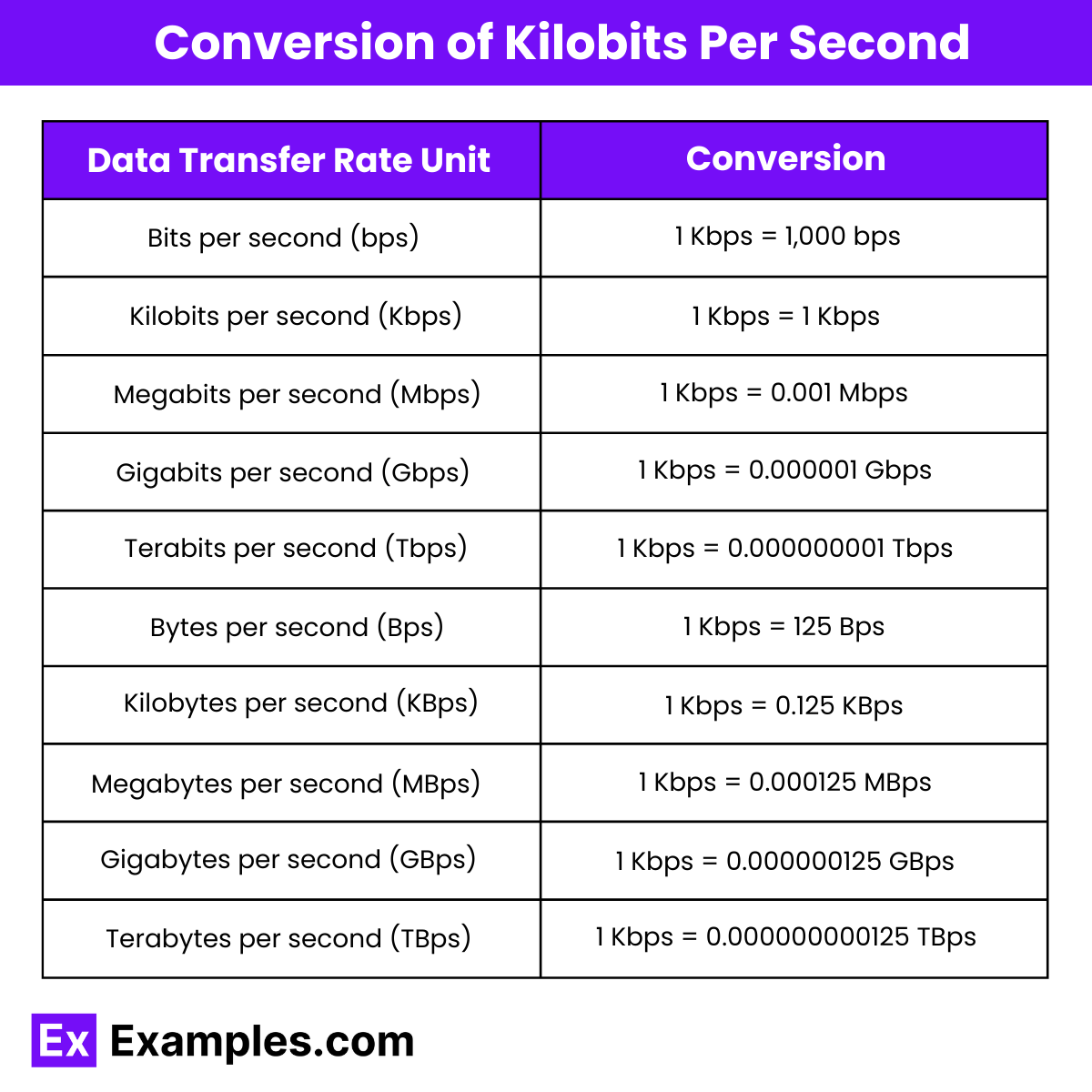
Therefore, 1 kbps (kilobit per second) is not the same as 1 KB/s (kilobyte per second). If you are downloading a file at 800 kbps, you are actually transferring 100 kilobytes of data every second. Understanding this 8-to-1 ratio is essential for accurately calculating how long it will take to move data across a network.
Units of Measurement: From Bits to Gigabits
The metric system prefixes help us scale these measurements as technology advances. In the context of data rates:
- 1 bps: 1 bit per second.
- 1 kbps: 1,000 bits per second.
- 1 Mbps: 1,000,000 bits per second (or 1,000 kbps).
- 1 Gbps: 1,000,000,000 bits per second (or 1,000 Mbps).
While modern broadband often operates in the hundreds of Mbps, kbps is still the standard unit for smaller-scale data transfers, such as voice-over-IP (VoIP) calls or telemetry data from remote sensors.
The Mathematical Breakdown
When a tech professional refers to a “bitrate,” they are talking about the frequency of bits processed over a specific interval. For example, if an audio file has a bitrate of 320 kbps, it means that for every second of playback, the computer processes 320,000 bits of data. High bitrates generally correlate with higher quality because more data is available to represent the original source material, whether that be sound, video, or a complex software update.
kbps in Multimedia: Audio and Video Compression
In the realm of digital media, kbps is the primary metric used to describe the quality of compressed files. This is particularly evident in audio formats like MP3 and AAC, as well as the streaming protocols used by platforms like Spotify or YouTube.
Audio Bitrates: Why kbps Matters for Music
When you listen to music online, the service must balance sound quality with data consumption. This balance is managed through the bitrate, measured in kbps.
- 96 kbps: Generally considered low quality; suitable for voice recordings or podcasts where high fidelity isn’t required.
- 128–160 kbps: Standard quality. Most listeners find this acceptable for casual listening, though some detail is lost in the high and low frequencies.
- 320 kbps: The “gold standard” for compressed audio. At this bitrate, most human ears cannot distinguish between an MP3 and a CD-quality recording.
The lower the kbps, the more data is discarded during the compression process to make the file smaller. This is known as “lossy” compression.
Video Streaming and Resolution Requirements
While video is often measured in Mbps, it is helpful to look at it through the lens of kbps to understand the bandwidth requirements for different resolutions. For instance:
- A standard-definition (480p) video usually requires around 1,500 kbps (1.5 Mbps).
- High-definition (720p) video jumps to roughly 3,500 kbps (3.5 Mbps).
- 4K Ultra HD streaming can require upwards of 25,000 kbps (25 Mbps).
Technicians use these metrics to optimize “Adaptive Bitrate Streaming,” a technology that detects your internet speed in real-time and adjusts the video quality (measured in kbps) to prevent buffering.
Lossy vs. Lossless Compression
The relationship between kbps and quality is deeply tied to the compression algorithm used. Lossless formats (like FLAC or ALAC) have very high kbps because they preserve every bit of the original recording. Lossy formats (like MP3) use psychoacoustic modeling to remove sounds the human ear is unlikely to hear, allowing for much lower bitrates while maintaining perceived quality.

The Role of kbps in Internet Connectivity and Bandwidth
Beyond media, kbps is a critical metric for evaluating network performance. Even in a world of high-speed fiber, many underlying protocols and “last-mile” technologies still function within the kbps range.
Upload vs. Download Speeds
Internet Service Providers (ISPs) typically market their plans based on download speeds, but the upload speed is equally important. While your download might be 500 Mbps, your upload might be throttled or limited to a much lower rate. In environments with poor connectivity, such as rural areas or satellite connections, users may find their speeds dropping back into the kbps range. Understanding kbps helps users diagnose why a video call (which requires a consistent upload/download bitrate) is lagging or dropping.
How kbps Affects Web Browsing
A standard webpage today is several megabytes in size, including images, scripts, and trackers. If your connection speed is only 56 kbps (the speed of a legacy dial-up modem), it could take several minutes to load a modern site. To ensure a smooth experience, modern web optimization focuses on “minifying” files to reduce the number of kilobits that need to be transferred, ensuring that even users on slower mobile connections can access information efficiently.
Latency and Throughput
It is important to distinguish between “speed” (bandwidth/kbps) and “latency” (ping). Bandwidth is the width of the pipe—how much data (kbps) can pass through at once. Latency is the speed of the water—how long it takes for a single bit to travel from point A to point B. Even a high kbps connection can feel slow if the latency is high, which is why tech enthusiasts monitor both metrics when optimizing networks for gaming or real-time communication.
Evolution of Speed: From Dial-Up to the Internet of Things (IoT)
The history of kbps is essentially the history of the modern internet. Looking at how these speeds have evolved provides a perspective on how far technology has progressed and where it is headed.
The Era of 56k Modems
In the 1990s, the pinnacle of home internet technology was the 56 kbps modem. For many, this was the first introduction to the world wide web. At 56 kbps, downloading a single song could take 15 to 20 minutes. This era necessitated extreme efficiency in web design, where every kilobit was precious.
The Jump to Broadband and Mbps
As DSL and Cable internet emerged, the conversation shifted from kbps to Mbps. However, kbps never went away. It transitioned into the background, serving as the unit for the “metadata” and “overhead” that keeps the internet running. Even today, when your 5G signal drops to “E” (Edge) or “2G,” you are essentially being throttled back to speeds measured in the low hundreds of kbps.
Why kbps Still Matters in the IoT Era
While high-end tech focuses on speed, the growing field of the Internet of Things (IoT) often prioritizes efficiency and battery life over raw throughput. Smart meters, environmental sensors, and industrial monitors don’t need Mbps-level speeds. Many of these devices operate on Narrowband-IoT (NB-IoT) or LoRaWAN protocols, which transmit data at rates as low as 0.3 kbps to 50 kbps. By using lower bitrates, these devices can operate for years on a single battery while still providing the necessary data to the cloud.
How to Test and Optimize Your Data Rates
For developers, IT professionals, and hardware enthusiasts, understanding and measuring kbps is a daily requirement. Monitoring these rates allows for the troubleshooting of network bottlenecks and the optimization of software performance.
Using Speed Test Tools
Tools like Ookla’s Speedtest or Fast.com allow users to see their real-time bandwidth. When running these tests, it is important to check if the results are displayed in Mbps or kbps. If your speed shows as “500 kbps,” it indicates a significant problem with your connection, as modern broadband should be at least 25,000 kbps (25 Mbps) by current regulatory standards in many regions.
Factors That Throttle Your Connection
Several technical factors can reduce your kbps:
- Hardware Limitations: Old routers or aging Cat5 cables may not support modern speeds.
- Network Congestion: Too many devices sharing a single “pipe” reduces the available kbps for each device.
- Signal Interference: In wireless tech, physical barriers or electromagnetic interference can cause packet loss, forcing the system to re-send data and effectively lowering the bitrate.
Tips for Improving Bandwidth Efficiency
For those managing tech environments, several strategies can help maximize the utility of available kbps:
- Enable Compression: Using Gzip or Brotli compression on servers reduces the size of data packets.
- Content Delivery Networks (CDNs): By moving data closer to the user, you reduce the distance bits must travel, optimizing the effective transfer rate.
- Quality of Service (QoS) Settings: On a router, you can prioritize certain types of traffic (like VoIP) to ensure they always have the necessary kbps to function without interruption.
Conclusion
Though the term “kbps” may feel like a relic of the dial-up era to some, it remains an indispensable metric in the technological toolkit. Whether it is defining the clarity of your favorite song, ensuring the functionality of a remote sensor in a smart city, or acting as the baseline for network troubleshooting, the kilobit per second is a fundamental building block of digital communication. By understanding the relationship between bits, bytes, and bitrates, tech professionals can better navigate the complexities of modern connectivity and appreciate the massive leaps in speed that have shaped our digital world.
aViewFromTheCave is a participant in the Amazon Services LLC Associates Program, an affiliate advertising program designed to provide a means for sites to earn advertising fees by advertising and linking to Amazon.com. Amazon, the Amazon logo, AmazonSupply, and the AmazonSupply logo are trademarks of Amazon.com, Inc. or its affiliates. As an Amazon Associate we earn affiliate commissions from qualifying purchases.