
In the contemporary digital landscape, the hardware on our desks is only as good as the software that manages it. For owners of HP printers, the bridge between a digital document and a physical page is almost exclusively handled by a single application: HP Smart. Formerly known as HP All-in-One Remote, this software has evolved from a simple mobile utility into a comprehensive, cloud-based ecosystem designed to manage every facet of the printing experience.
However, as software suites become more integrated and mandatory, many users find themselves asking whether this application is a genuine productivity booster or simply another layer of digital “bloatware.” To determine if you need HP Smart, one must look under the hood at its architecture, its features, and the shift in how modern printing technology functions.
1. Defining the HP Smart Ecosystem: More Than Just a Driver
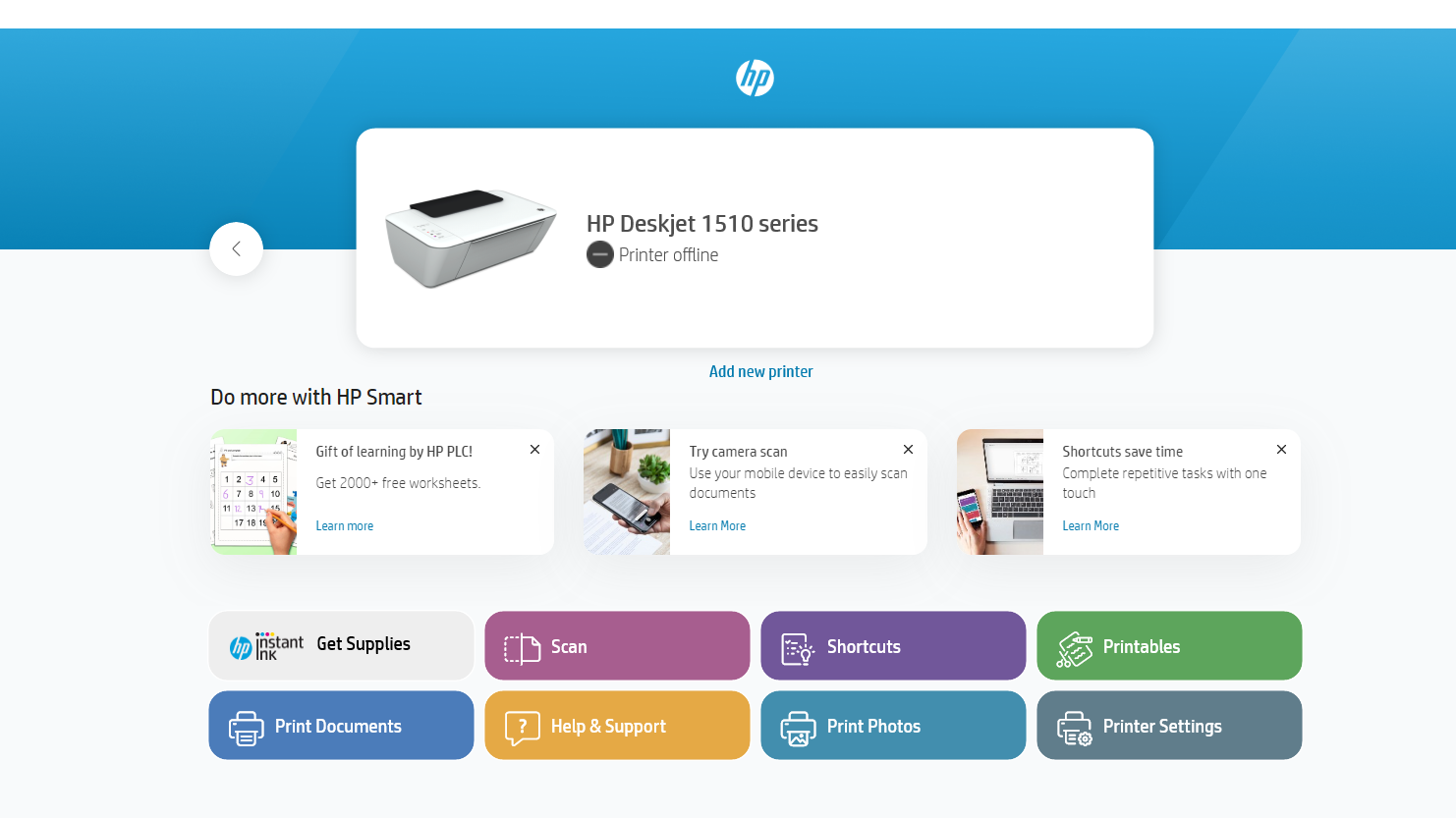
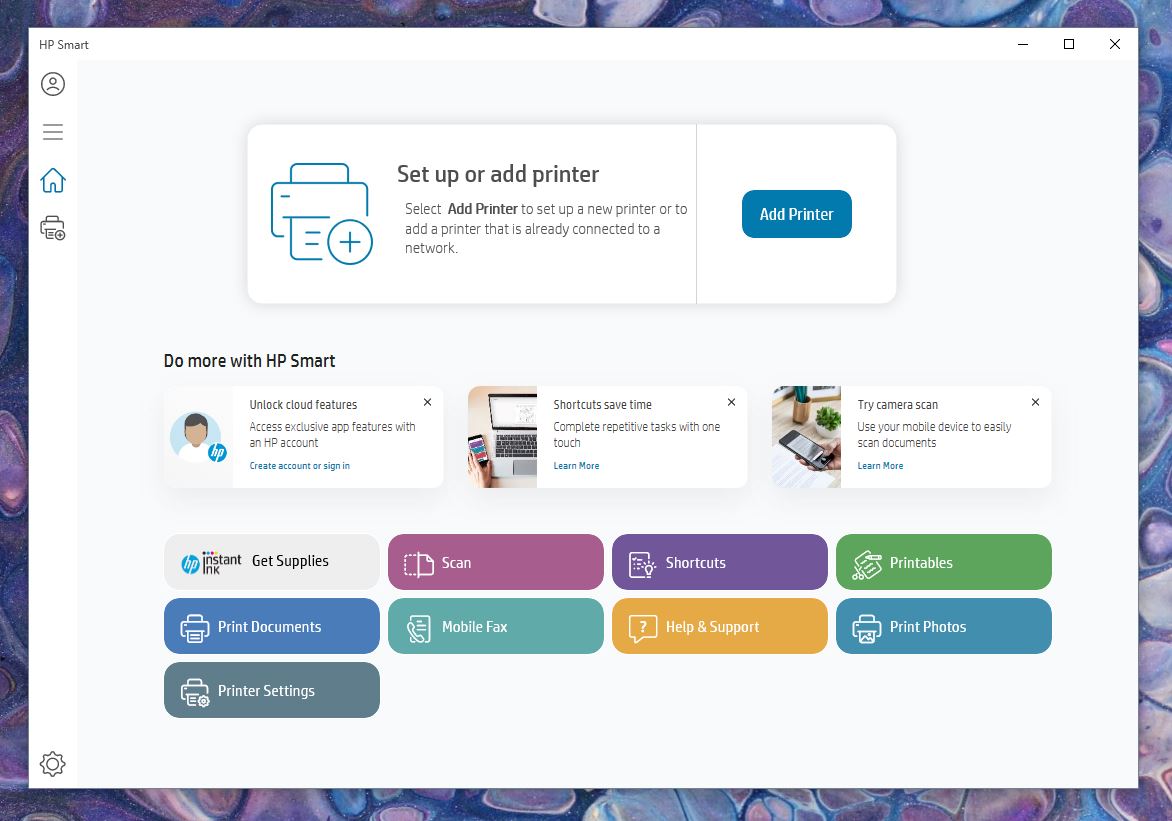
At its core, HP Smart is a cross-platform application available for Windows 10 and 11, macOS, Android, and iOS. It serves as the primary interface for setting up and managing HP printers, particularly those in the OfficeJet, LaserJet, and Envy lines.
The Shift from Drivers to Apps
In the early days of personal computing, connecting a printer required “drivers”—specific bits of code that told your operating system how to communicate with the hardware. While basic drivers still exist, the tech industry has pivoted toward “App-based” management. HP Smart represents this shift. It is a centralized hub that handles not just the communication of data, but also device maintenance, supply ordering, and cloud integration.
Cloud-First Architecture
Unlike traditional printer software that lived locally on your hard drive, HP Smart is built on a cloud-first architecture. This means many of its features—such as scanning to email or checking ink levels from a different network—rely on HP’s servers. This allows for a “Print Anywhere” capability, enabling a user to send a document to their home printer while sitting in a coffee shop miles away.
2. Key Features and Technical Capabilities
To understand if HP Smart is necessary for your workflow, you must evaluate the specific tools it brings to the table. For many, the software provides a level of utility that a standard Windows or Mac print dialog box simply cannot match.
Advanced Mobile Scanning and OCR
One of the most impressive technical aspects of the HP Smart app is its scanning engine. Using the camera on your smartphone, the app employs sophisticated image processing to detect the edges of a document, flatten the perspective, and enhance the text for readability.
- Optical Character Recognition (OCR): Through the app, users can convert scanned images into searchable PDFs or editable Word documents. This is a high-level software feature that usually requires expensive third-party tools, but HP integrates it directly into the Smart suite.
Smart Tasks and Automation
For power users, the “Smart Tasks” feature (sometimes referred to as Shortcuts) is a significant draw. This allows users to create one-touch workflows. For example, you can program a shortcut that simultaneously saves a scan to Google Drive, emails a copy to your accountant, and prints a physical backup. By automating these repetitive sequences, the software transforms the printer from a passive output device into an active participant in a digital workflow.
HP Instant Ink Integration
From a maintenance perspective, HP Smart is the gateway to the HP Instant Ink service. The app monitors your page count and ink levels in real-time. When the hardware detects that supplies are low, it automatically triggers a shipment of new cartridges. For users who prefer a subscription model over manual shopping, the app is an essential dashboard for monitoring usage and managing billing.
3. The Technical Trade-offs: Is it Mandatory?
While HP Smart offers a robust feature set, its necessity is a subject of debate within the tech community. The answer to “Do I need it?” depends largely on your hardware model and your tolerance for account-based software.
The HP+ Requirement
If you have purchased a printer with an “e” suffix (such as the HP OfficeJet Pro 9015e), you have likely opted into the HP+ service. This is a cloud-connected system that offers an extended warranty and ink benefits. However, for these specific models, HP Smart is not optional. The printer requires a continuous internet connection and the HP Smart app to function. In this technological “walled garden,” the app is the key that unlocks the hardware.
Account Mandates and Privacy
A common critique of HP Smart is the requirement to create an HP account to use basic features like scanning. From a technical standpoint, this is because the scanning processing often happens in the cloud to utilize the aforementioned OCR features. However, for users who prioritize digital privacy and offline functionality, this can be a deterrent. If you only wish to print via a USB cable and do not care for mobile features, you can often bypass HP Smart by installing the “HP Easy Start” driver and opting for the “Basic Driver” package, though HP has made this option increasingly difficult to find.
System Resources and Performance
On desktop environments, HP Smart is a Universal Windows Platform (UWP) app. It is generally lightweight in terms of disk space, but because it runs several background processes to monitor printer status, it can consume a small amount of RAM continuously. For high-performance workstations, this is negligible, but on older machines, some users may prefer the “leaner” experience of a standard print driver.
4. Troubleshooting and Optimizing the HP Smart Experience
If you decide that the features of HP Smart are worth the installation, there are several ways to optimize the tech to ensure it doesn’t become a source of frustration.
Connectivity and Network Protocols
HP Smart relies heavily on network discovery protocols like mDNS (Multicast DNS) and WSD (Web Services for Devices). If the app frequently “loses” your printer, it is often a router issue rather than a software bug. Ensuring that your printer has a “Static IP address” assigned within your router’s settings can significantly improve the reliability of the HP Smart interface.
Keeping Firmware Up to Date
One of the most vital functions of HP Smart is its ability to push firmware updates to the printer. In the realm of digital security, printers are often overlooked vulnerabilities. Outdated firmware can leave a network open to exploits. HP Smart simplifies this by checking for security patches and installing them automatically, ensuring that your peripheral doesn’t become a backdoor for malware.
5. The Final Verdict: Who Actually Needs It?
In the final analysis, HP Smart is a tool designed for the modern, mobile-centric professional. It is not merely a utility, but a bridge between physical paper and the digital cloud.
You NEED HP Smart if:
- You print from your phone or tablet: It is the most stable way to manage mobile printing without dealing with the inconsistencies of generic print protocols.
- You scan frequently: The OCR and document-straightening features are top-tier and save significant time in document management.
- You use HP Instant Ink: The app is the only way to effectively track your subscription and page limits.
- You own an HP+ printer: The hardware is designed to require the app for its cloud-based authentication.

You DON’T need HP Smart if:
- You use a USB connection only: If your printer is physically tethered to your PC and you have no need for mobile features, a basic driver will suffice.
- You are an “Offline” purist: If you prefer not to have an HP account and do not want your printer communicating with the cloud, you should avoid the app and look for the “Offline/Basic” driver sets.
- You use Linux: HP Smart is not available for Linux; users in this ecosystem should rely on HPLIP (HP Linux Imaging and Printing) for their driver needs.
HP Smart represents the direction in which all consumer technology is moving: away from isolated hardware and toward integrated, service-oriented software. While the “mandatory” nature of the app can be polarizing, its ability to streamline complex workflows—like multi-destination scanning and remote printing—makes it a powerful asset for anyone looking to maximize the utility of their HP hardware. In the modern tech stack, it is less of a “driver” and more of a “printing OS,” providing a level of control that was once reserved for high-end corporate Xerox machines, now shrunk down into an app on your smartphone.
aViewFromTheCave is a participant in the Amazon Services LLC Associates Program, an affiliate advertising program designed to provide a means for sites to earn advertising fees by advertising and linking to Amazon.com. Amazon, the Amazon logo, AmazonSupply, and the AmazonSupply logo are trademarks of Amazon.com, Inc. or its affiliates. As an Amazon Associate we earn affiliate commissions from qualifying purchases.