
In the modern digital landscape, data is the lifeblood of any organization. As businesses migrate their operations to cloud-based ecosystems like Google Workspace, the volume of emails, documents, and chat logs grows exponentially. While this facilitates collaboration, it also creates a significant challenge: how do you manage, preserve, and retrieve this information for legal or regulatory purposes? This is where Google Vault comes into play.
Google Vault is an information governance and electronic discovery (e-discovery) tool designed specifically for Google Workspace. It serves as a centralized platform that allows IT administrators and legal teams to manage their organization’s data retention and meet compliance requirements. Unlike a standard backup solution, Vault is built for the specific purpose of litigation support and internal auditing. In this comprehensive guide, we will explore the technical nuances of Google Vault, its core functionalities, and why it is a critical component of a secure digital infrastructure.

Understanding the Core Purpose of Google Vault
At its heart, Google Vault is about control and visibility. Many users mistake it for a simple “cloud backup,” but its function is far more sophisticated. While a backup is used to restore data after a system failure, Vault is used to archive data so that it can be searched and produced as evidence if necessary.
Defining Information Governance in the Cloud
Information governance refers to the strategic framework an organization uses to manage its information. In the context of Google Workspace, this involves deciding how long data should be kept and when it should be permanently deleted to reduce liability. Google Vault provides the technical mechanisms to enforce these policies across an entire domain. By setting up automated rules, organizations ensure that they aren’t keeping “stale” data that could be a liability, nor are they accidentally deleting data that is legally required to be preserved.
The Role of e-Discovery in Modern Business
e-Discovery is the process by which electronic information is sought, located, secured, and searched with the intent of using it as evidence in a civil or criminal legal case. Before the rise of cloud computing, this involved physically searching hard drives and servers. With Google Vault, the process is digitized and centralized. If a company is sued or undergoes a regulatory audit, administrators can use Vault to find every mention of a specific keyword across thousands of employee accounts in seconds. This speed and accuracy are essential for maintaining legal integrity in a fast-paced tech environment.
Key Features and Technical Functionalities
Google Vault operates through a set of core features that allow for the granular management of data. These features work behind the scenes, capturing data in real-time without interfering with the user’s daily workflow.
Data Retention Policies
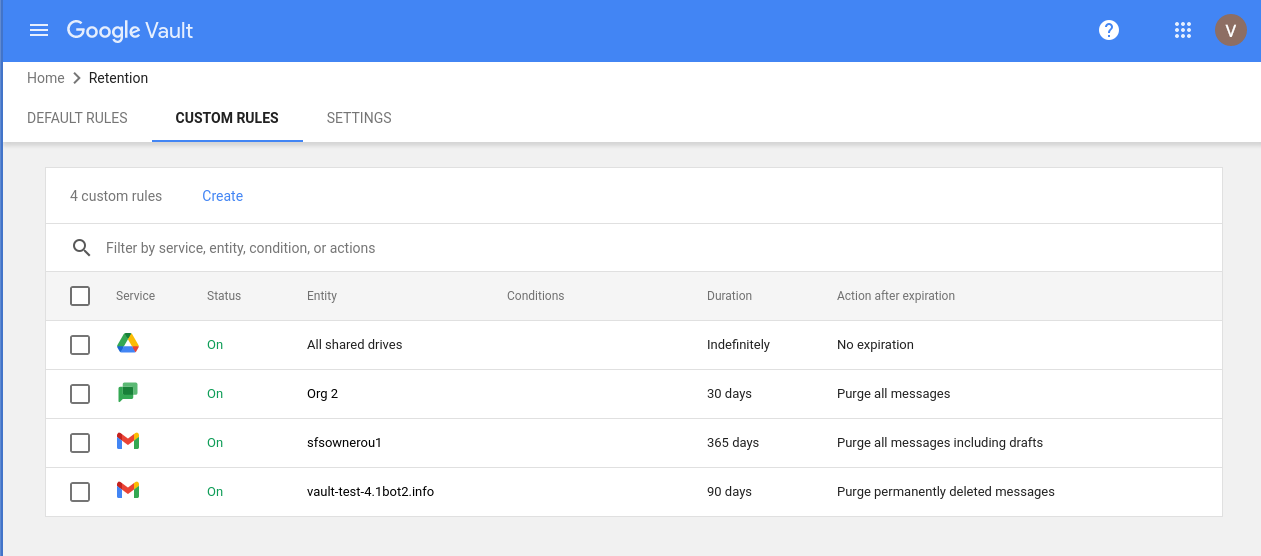
The foundation of Google Vault is its retention system. Administrators can set “Retention Rules” that dictate how long data is stored before it is purged.
- Default Retention Rules: These apply to all users in a domain for a specific service (like Gmail). For example, a company might set a default rule to keep all emails for seven years.
- Custom Retention Rules: These allow for more specificity. You can set rules based on specific organizational units (OUs), date ranges, or even specific terms.
When data reaches the end of its retention period, Google Vault automatically removes it from user views and eventually from Google’s servers, ensuring the company adheres to its own data destruction policies.
Legal Holds and Preservation
One of the most critical technical aspects of Vault is the “Legal Hold.” When litigation is anticipated, an organization has a legal “duty to preserve” relevant evidence. A hold placed in Google Vault overrides all retention rules. Even if a user deletes an email and empties their trash, or if a retention rule is set to delete data after 30 days, a Legal Hold ensures the data remains in the Vault until the hold is manually removed by an authorized administrator. This prevents the “spoliation of evidence,” which can lead to severe legal penalties.
Advanced Search and Export Capabilities
Vault’s search engine is incredibly robust, utilizing Google’s legendary search algorithms to index data across the Workspace suite. Administrators can search by:
- Account holder or Organizational Unit.
- Sent or received date.
- Specific keywords or Boolean operators.
- File type or attachment status.
Once the relevant data is found, it can be “exported” for further review. Exports are typically packaged in industry-standard formats, such as PST (for email), MBOX, or CSV, making them compatible with third-party legal review software.
Supported Services and Data Architecture
Google Vault does not just monitor email; it covers a wide array of applications within the Google Workspace ecosystem. Understanding which services are supported is vital for comprehensive digital security.
Gmail and Google Groups
Gmail is the primary focus for most e-discovery requests. Vault archives every message sent or received, including drafts and messages in the trash. It also covers Google Groups, which is often used for internal forums or mailing lists. Because Vault captures data at the server level, a user cannot bypass it by deleting messages from their local device or web browser.
Google Drive and Shared Drives
In terms of document management, Vault tracks files stored in “My Drive” and “Shared Drives.” This includes native Google formats (Docs, Sheets, Slides) as well as uploaded files like PDFs, Word documents, and images. Vault doesn’t just keep the current version of a file; it allows for the retrieval of specific versions if the file was modified, providing a historical trail of document evolution.
Google Chat and Google Meet
In the era of remote work, instant messaging has replaced many informal office conversations. Google Vault captures Google Chat history (for threaded and non-threaded rooms) and records of Google Meet sessions. This includes the chat transcripts generated during a video call and the recorded video files themselves. As workplace harassment or compliance issues often arise in “informal” chat settings, having this data archived is a critical security measure.
Implementation and Security Best Practices
Deploying Google Vault is not a “set it and forget it” task. It requires a technical strategy to ensure that the data being captured is accurate and that access to the Vault itself is restricted.
Granular Administrative Access
Because Google Vault grants the ability to read any employee’s email or chat logs, access must be strictly controlled. Google Workspace allows for “Privileged Access Management.” You should never have a single admin with “Super Admin” rights performing Vault searches. Instead, use specific “Vault Roles” to delegate tasks. For example, a legal officer might have the right to search and view data, while an IT technician might only have the right to manage retention rules.
Setting Up Audit Reports
Transparency is key to digital security. Google Vault includes an “Audit” feature that records every action taken within the tool. If an administrator performs a search, the audit log records who performed the search, what terms they used, and which accounts were viewed. This prevents the misuse of the tool for unauthorized surveillance and provides a “chain of custody” for legal evidence, proving that the data was handled correctly from the moment it was searched to the moment it was exported.
Managing the Lifecycle of Former Employees
A common technical challenge is what to do with the data of employees who leave the company. If you delete a user’s Google Workspace account, their data is also deleted from Vault. To prevent this, organizations often use “Archived User” (AU) licenses. This allows the company to maintain the user’s data in Vault for retention and e-discovery purposes without paying for a full active Workspace license.
The Strategic Value of Google Vault in Tech Governance
In the context of technology trends, the shift toward “Privacy by Design” and strict data sovereignty laws (like GDPR and CCPA) makes tools like Google Vault indispensable. It is no longer enough to simply store data; companies must be able to prove they are managing it responsibly.
Google Vault provides a centralized, scalable, and secure way to handle the complexities of data management in the cloud. By automating retention, enabling rapid e-discovery, and providing a clear audit trail, it protects organizations from the technical and legal risks associated with data loss and non-compliance. For any business operating within the Google ecosystem, Vault is not just an add-on—it is the backbone of their digital governance strategy, ensuring that while the company moves forward into new digital frontiers, its history is preserved, protected, and accessible.
aViewFromTheCave is a participant in the Amazon Services LLC Associates Program, an affiliate advertising program designed to provide a means for sites to earn advertising fees by advertising and linking to Amazon.com. Amazon, the Amazon logo, AmazonSupply, and the AmazonSupply logo are trademarks of Amazon.com, Inc. or its affiliates. As an Amazon Associate we earn affiliate commissions from qualifying purchases.